
Ownership of AI-generated content generally follows the human creative contribution, not who typed the prompt or paid the subscription, and the answer changes by country and contract. A paid plan can give you permission to publish an asset without giving you exclusive copyright in everything it contains.
If you can sell an AI-generated video but can't stop someone else from copying its generated visuals, what exactly do you own?
The confusion comes from using ownership to describe different things. Copyright concerns legally protected expression. A contract sets permissions between you and a service provider. Third-party clearance concerns the music, faces, voices, and other material you're allowed to include. Keeping those questions separate makes a complicated subject much easier to manage.
Table of Contents
- Who Owns AI-Generated Content in the US, UK and EU
- Why Prompts Alone Rarely Create Ownership
- Which Parts of a Finished AI Video Are Protected
- How to Build an Ownership Record You Can Defend
- Training Data, Likeness and Music Risks Ownership Misses
- Commercial Rights Versus Ownership and Your Pre-Publish Checklist
<a id="who-owns-ai-generated-content-in-the-us-uk-and-eu"></a>
Who Owns AI-Generated Content in the US, UK and EU
Who owns AI-generated content usually turns on who made the creative choices, but national law determines which choices count. Authorship identifies the creator recognized by law; ownership concerns who holds the resulting rights, which may also involve employment arrangements or contractual transfers.
Use this comparison as a starting point, not a universal clearance certificate.
Ownership rules for AI-generated content by jurisdiction
| Jurisdiction | Rule for AI output | Who is treated as owner |
|---|---|---|
| United States | Protects human-authored expression; purely AI-generated material is not protected | The human author for their own contributions, subject to applicable ownership arrangements |
| United Kingdom | A statutory computer-generated-work rule can recognize the person making the necessary arrangements | The person who undertook those arrangements, potentially the user, assessed case by case |
| European Union | Copyright requires an original work reflecting a human author's own intellectual creation | The human author of the creative contribution, subject to applicable transfers |
| Other countries | National law sets the authorship and protection requirements | The person or entity qualifying under local law and relevant contracts |
The UK offers a notable contrast: the Copyright, Designs and Patents Act 1988 provides in section 9(3) that the author of a qualifying computer-generated work is the person who undertook the necessary arrangements, while section 12(7) provides protection for 50 years from the end of the calendar year in which it was made.
That doesn't automatically make every AI subscriber the author. Identifying the necessary arrangements remains a factual question, and a finished video may also contain scripts, performances, or edits governed by other rules. Don't assume a contract's choice-of-law clause settles every copyright issue wherever a campaign appears.
<a id="check-the-territory-before-promising-exclusivity"></a>
Check the territory before promising exclusivity
For a globally distributed product ad, identify the intended markets rather than treating the upload location as the complete answer. If model development also matters to your assessment, you can explore copyright guidance for AI training through SourceX, keeping training questions separate from output ownership.
Before commissioning or publishing, ask:
- Where will this appear? Name the markets and distribution channels.
- What did a human shape? Identify actual expressive decisions.
- What does the contract grant? Separate usage permission from an assignment of existing rights.
For an exclusive international campaign, have counsel assess the relevant jurisdictions before you promise a client worldwide ownership.
<a id="why-prompts-alone-rarely-create-ownership"></a>
Why Prompts Alone Rarely Create Ownership
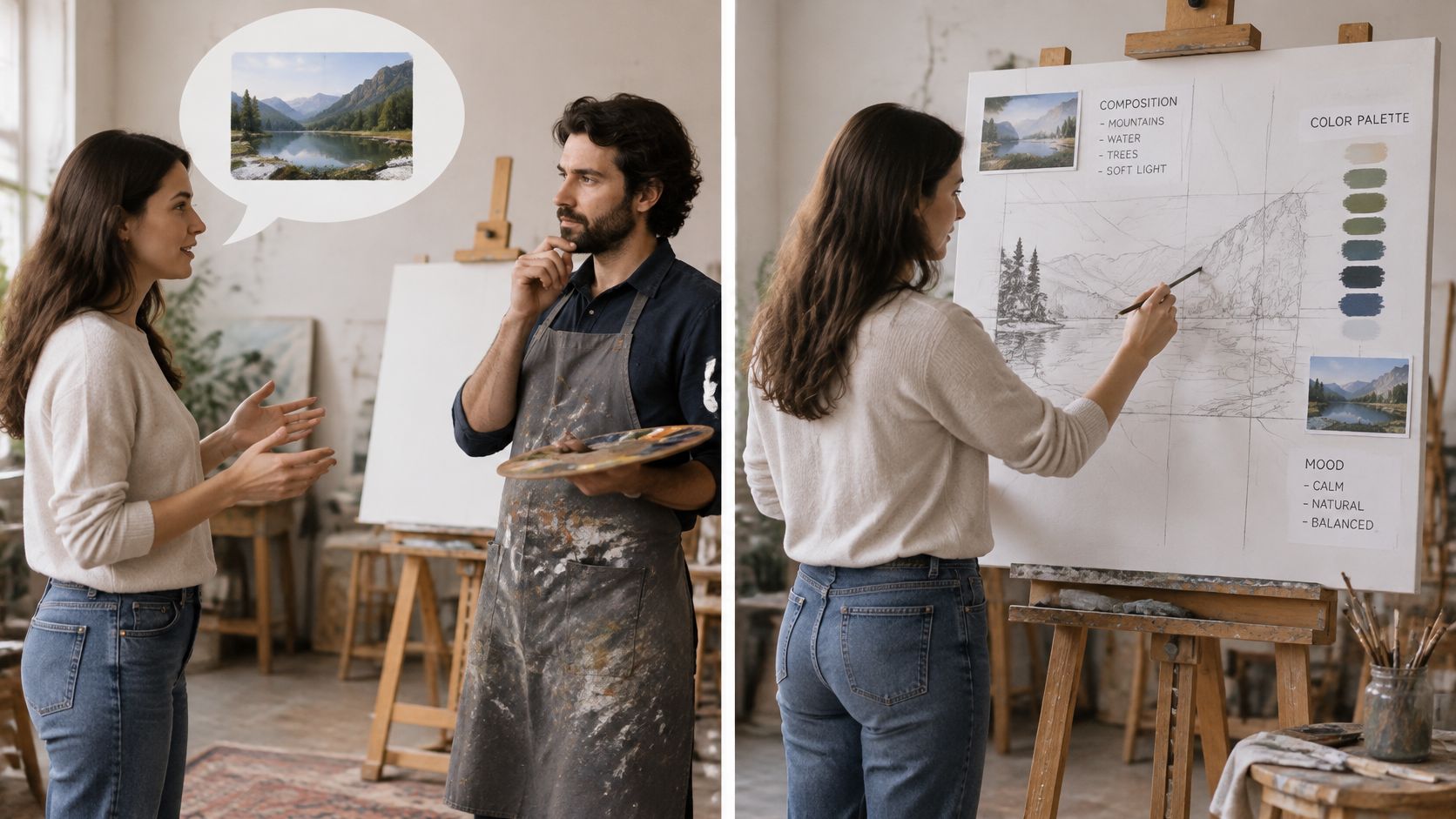
Describing a scene to a painter isn't the same as painting it. You might request a mountain, a lake, and warm evening light, while the painter chooses the composition, brushwork, and precise relationships between colors.
A prompt often works more like that creative brief than the finished expression. Its length or detail doesn't, by itself, establish who controlled the result.
The distinction is easier to understand when you separate discussing a creative project from executing its expressive details.
<a id="instructions-arent-necessarily-authorship"></a>
Instructions aren't necessarily authorship
The U.S. Copyright Office's annual report records its January 29, 2025 copyrightability report and its conclusion that prompts alone generally don't provide sufficient human control over an output's expressive elements.
The legal distinction is between an idea or instruction and the expression that results. Asking for a reassuring explanation of a product supplies direction; choosing the actual words, visual arrangement, and timing supplies expression. When the system makes those latter decisions, the user's request doesn't automatically become authorship of the response.
The Office recognizes several possible human contributions:
- Existing human work: Your original writing or artwork remains perceptible in the output.
- Creative selection and arrangement: You assemble generated elements into an original composition.
- Original modifications: You make expressive changes rather than accepting what the system produced.
These aren't boxes to tick mechanically. A project file containing edits helps explain what happened, but the creative substance of those edits matters more than the number of actions recorded.
<a id="compare-requesting-a-clip-with-shaping-it"></a>
Compare requesting a clip with shaping it
Say a bakery generates an explainer from a prompt and publishes the default result. The owner supplied the subject and purpose, but the system selected the wording, shots, and presentation.
Now suppose the owner replaces the narration with an original story about the bakery, chooses a deliberate shot sequence, and writes captions that add a separate comic rhythm. Those decisions provide a stronger basis for identifying human-authored expression.
Protection for your creative contribution doesn't automatically turn every generated ingredient into your exclusive property.
A useful text-to-video prompt can help communicate creative intent. It shouldn't be treated as a substitute for scripting, composition, or editing when protectable authorship matters.
Review an existing asset and make separate lists headed shaped and requested. Put original lines, deliberate arrangements, and expressive revisions under the first heading. Put instructions such as make it cinematic under the second. That distinction gives you a more realistic starting point than the amount of time you spent prompting.
<a id="which-parts-of-a-finished-ai-video-are-protected"></a>
Which Parts of a Finished AI Video Are Protected
A finished AI video resembles transparent sheets laid over one another. The script, generated footage, editing, sound, and branding can each have a different legal status.
The U.S. Copyright Office's copyrightability announcement explains that human-authored expression can remain protected within AI-assisted work, including creative selection, coordination, arrangement, and modification. For a video producer, that means assessing the components rather than assigning a single ownership label to the export.
This visual separates the main creative layers before you examine individual permissions.
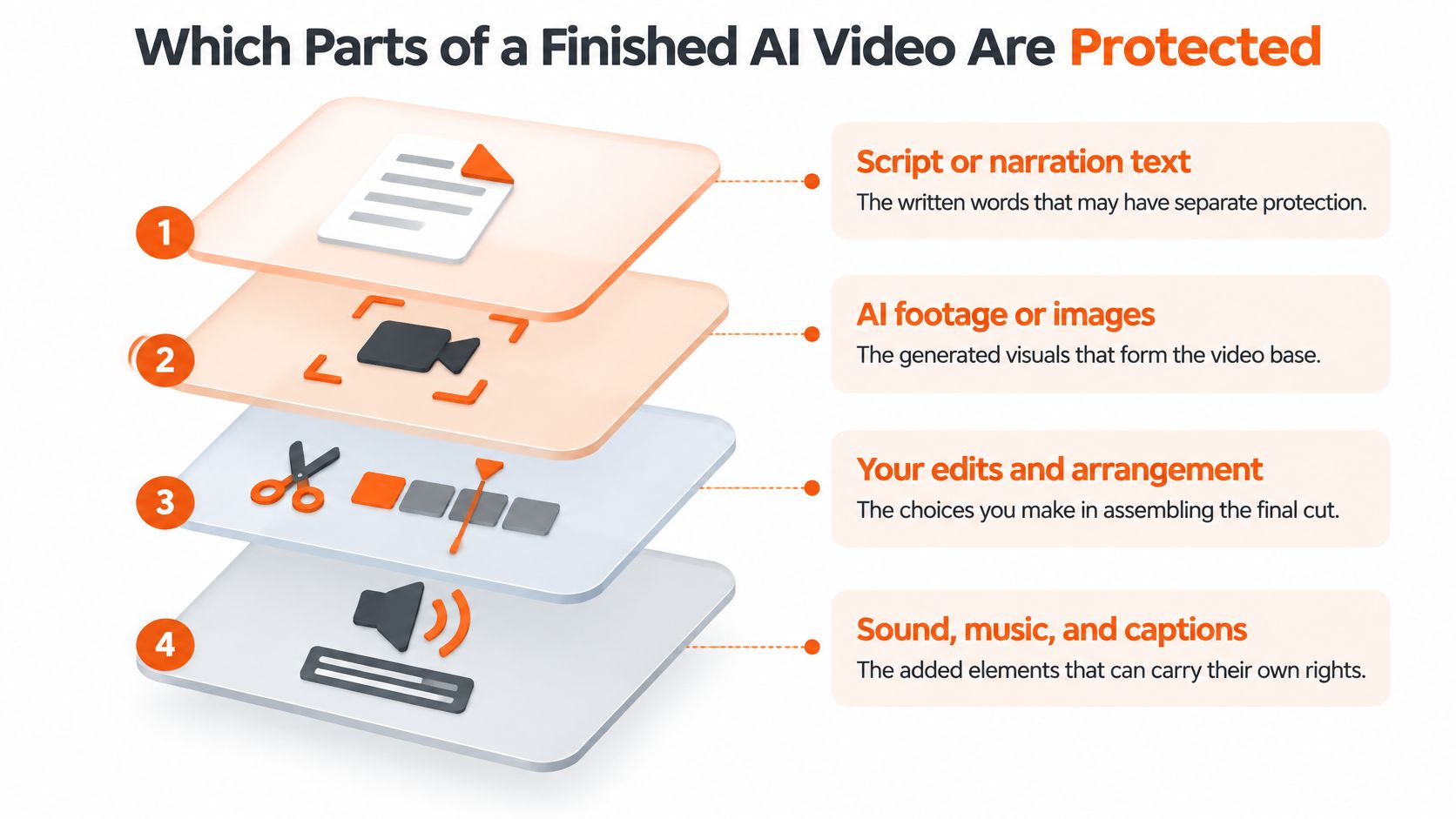
Rights held in each layer of a finished AI video
| Layer | Who usually holds rights | What to keep on file |
|---|---|---|
| Script or narration text | The human author of sufficiently original writing or revisions, subject to ownership agreements | Source brief, drafts, and revision notes |
| Unmodified AI footage or images | No U.S. copyright in purely AI-generated material; the UK statutory rule may apply | Generation settings and model used |
| Your edits, sequencing, and captions | The author or rights holder of original human expression and arrangement | Project file and edit history |
| Licensed music track | The relevant music rights holders; the licence grants specified uses | Licence receipt and permitted uses |
| Narrator or cloned voice | Recording rights and personal consent may involve different parties | Written consent, recording agreement, or voice licence |
| Real person's likeness | The person may hold relevant publicity or privacy rights | Signed release covering the intended use |
| Logos and trademarks | The trademark owner holds relevant brand rights | Permission or clearance assessment |
<a id="apply-the-layer-test-to-an-advertisement"></a>
Apply the layer test to an advertisement
Suppose a product ad combines AI footage, a human-written script, licensed music, and a narrator. Your team may hold the script rights while using the music under permission from someone else. A narrator's agreement should address the recording and any authorized synthetic use rather than assuming that payment settles both.
Unprotected generated footage can also sit inside a protected human arrangement. Copying a raw visual and copying an original edited sequence aren't necessarily the same legal question.
For a video-making reference alongside your rights review, consider this accompanying video.
<iframe width="100%" style="aspect-ratio: 16 / 9;" src="https://www.youtube.com/embed/mCMyS4oPLfU" frameborder="0" allow="autoplay; encrypted-media" allowfullscreen></iframe>Whether you're using an AI movie maker or assembling footage manually, keep each component identifiable. For brand identifiers, LA Law Group, APLC explains how to protect your brand with trademarks, a separate issue from copyright in the video.
For every layer, ask: Can I name its source, identify the relevant rights holder, and produce the supporting document?
<a id="how-to-build-an-ownership-record-you-can-defend"></a>
How to Build an Ownership Record You Can Defend
An ownership record should show both what a human created and why your team may use the remaining material. A folder containing only the final export can't explain either question well.
The U.S. Copyright Office's copyrightability report recognizes original human arrangements and modifications through a case-by-case analysis. Documentation helps you describe those contributions accurately; it doesn't manufacture protection for a contribution that wasn't creative.
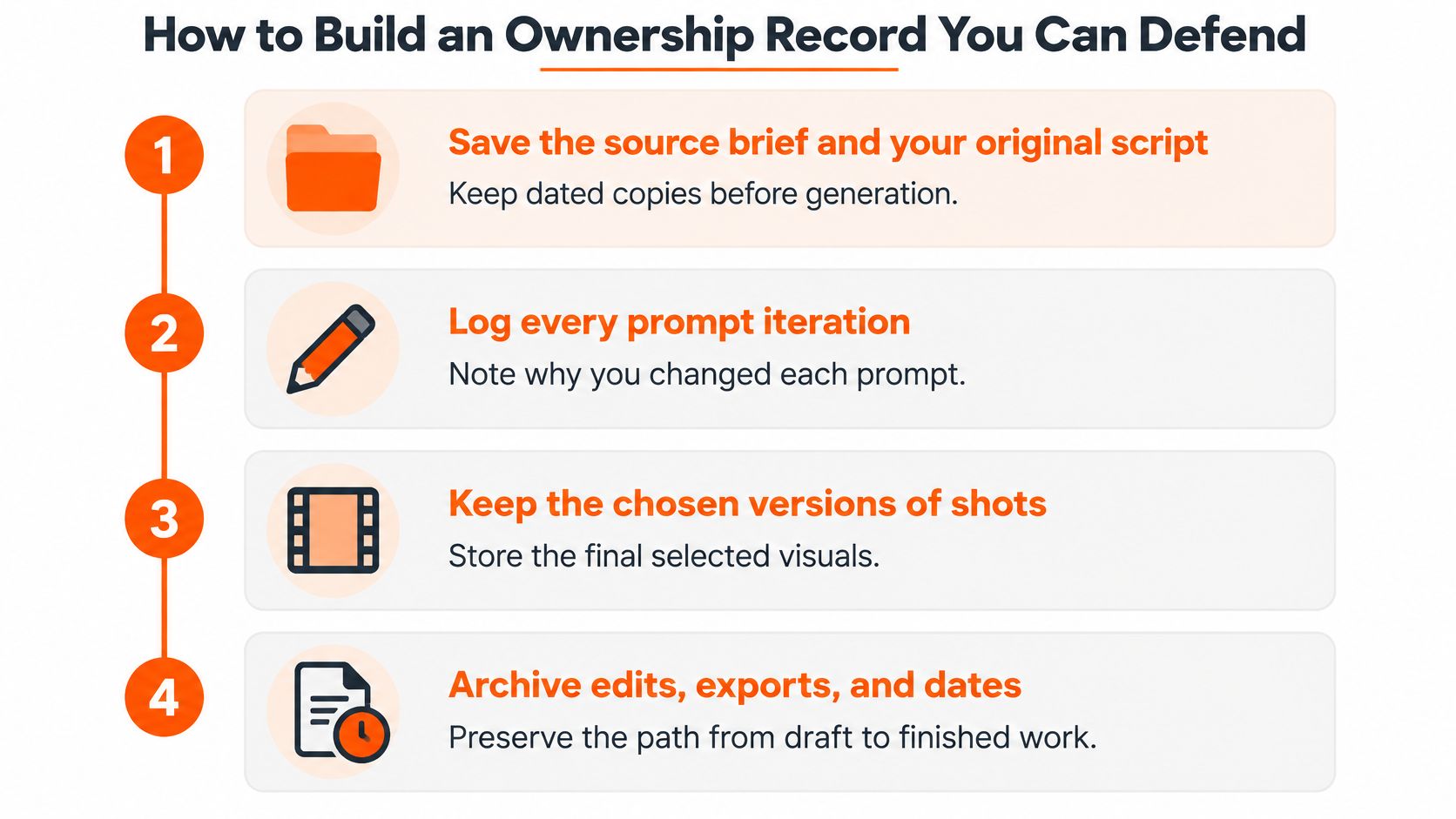
Use the following visual as a filing reminder, then build a more detailed record around the actual project.
<a id="preserve-decisions-as-you-make-them"></a>
Preserve decisions as you make them
-
Save the brief and original script before generation. Keep dated drafts and identify their authors. This separates material your team supplied from material the system introduced and makes later comparisons possible.
-
Log prompt iterations and their purpose. Record why you changed the direction, such as replacing a generic demonstration with a specific narrative. Treat this as workflow evidence, not proof that prompting alone establishes authorship.
-
Retain selected shots, voice takes, and captions. Give files clear names and record where they appear in the timeline. Preserve relevant alternatives when they help explain a deliberate choice, rather than saving an unsearchable pile of outputs.
-
Record expressive edits. Note rewritten lines, reordering, overlays, pacing, color decisions, and motion changes in the project history. Describe the creative purpose, for example, moving a reaction shot before the reveal to create anticipation.
<a id="connect-creative-evidence-to-permission"></a>
Connect creative evidence to permission
-
Maintain an asset-rights ledger. Use a spreadsheet listing each asset, model, input source, licence, music source, talent or voice consent, editor, export date, and revision history. Add a location for the supporting document and flag restrictions that affect client delivery.
-
Watch and fact-check the complete video. AI can still get a date, name, or detail wrong, so verify the script and inspect what appears on screen before posting. For product visuals, Photo Speak's guide to accurate product imagery offers a useful companion to checking whether the depicted item matches what you sell.
-
Archive the project and ledger together. Store editable files, approvals, releases, licence records, and final exports in a project folder with stable filenames. Make sure someone other than the editor can locate the evidence when a client requests it.
Documentation rule: Preserve the decision and its supporting file, not merely a note saying the asset was approved.
This package supports a chain-of-title review, an examination of how rights moved from creators and licensors to the party delivering the work. It also helps distinguish a complaint about your original edit from a complaint about an included track or likeness.
Make the asset-rights ledger the first document you hand to a client or platform reviewer. It should function as an index to the evidence, not an unsupported declaration that your team owns everything.
<a id="training-data-likeness-and-music-risks-ownership-misses"></a>
Training Data, Likeness and Music Risks Ownership Misses
A creator can have rights in an edit and still lack permission for something inside it. Clearance means establishing that the intended use of a particular element is authorized or otherwise legally supportable.
Consider a talking-host advertisement using a cloned voice of a real person who never agreed to participate. Original captions and careful editing don't resolve the missing consent.
<a id="separate-the-unresolved-risks"></a>
Separate the unresolved risks
-
Training data and output resemblance: Review available information about model provenance and contractual protection for claims. Also inspect the output itself for recognizable protected material; a general statement about training practices isn't a clearance certificate for a particular scene.
-
Likeness and voice: Keep a release or voice licence that covers the actual synthetic use. Permission to record someone speaking doesn't necessarily answer whether you may create new advertising dialogue in a replica of their voice.
-
Music: Check the licence against the intended distribution, including paid advertising, client work, and monetized channels. When choosing an application to make video with music, evaluate the available permission records alongside the editing workflow.
-
Trademarks: Inspect generated packaging, storefronts, clothing, and background signs for recognizable branding. Obtain permission where needed, or document a legal clearance assessment rather than assuming every appearance is prohibited or automatically permitted.
<a id="review-what-the-audience-will-actually-encounter"></a>
Review what the audience will actually encounter
A voice agreement can be genuine but too narrow for the proposed campaign. A music licence can cover an organic post while leaving paid distribution unresolved. Read the permitted uses, not just the filename or receipt.
Avoid treating generated as a synonym for cleared. New pixels can depict an existing person or brand, and newly generated audio can imitate an identifiable voice. Those questions require their own assessment even when no one disputes who edited the video.
Owning the frame around an asset doesn't supply permission for the asset inside it.
For every third-party element, write down the clearance, licence, consent, or legal basis supporting its use. Mark missing evidence as unresolved, assign someone to obtain it, and keep the affected version out of publication until the issue is addressed. For high-value campaigns or disputed likenesses, get a legal review before release.
<a id="commercial-rights-versus-ownership-and-your-pre-publish-checklist"></a>
Commercial Rights Versus Ownership and Your Pre-Publish Checklist
Commercial permission can be useful even when exclusive copyright isn't available. A creator producing routine campaign variants may primarily need authorization to publish and monetize, not a legal right to prevent everyone else from producing similar imagery.
The mistake is treating that practical permission as a guarantee of exclusivity. The Congressional Research Service's discussion of generative AI and copyright helps distinguish copyright questions from contractual terms governing inputs and outputs. Read the agreement for the rights it provides rather than relying on an ownership label in a sales summary.
<a id="read-the-contract-as-separate-permissions"></a>
Read the contract as separate permissions
A service agreement can address several relationships at once:
- Permission for the service to process content: The provider may need a licence to handle your script, source images, and outputs while operating the service. Examine its scope, duration, and purposes.
- Permission for you to publish commercially: The agreement may authorize advertising, client delivery, or monetized distribution. Identify restrictions and whether permissions continue after cancellation.
- Allocation of existing intellectual property rights: An assignment transfers rights that exist; a licence permits specified uses. Neither label can create statutory copyright where the applicable law doesn't recognize it.
At ClipNova, videos created on paid plans come with full commercial rights and no watermark, and can be used on any platform, including monetized channels. That permission answers a distribution question, not every question about third-party material or legally enforceable exclusivity.
Suppose separate creators generate similar product ads. One publishes the default output; the other writes an original narrative, changes the sequence, and adds original captions. Both may have contractual permission to publish, but their defensible claims should describe different creative contributions.
The second creator shouldn't promise exclusive ownership of every generated frame. The first shouldn't assume a competitor's similar output violates rights merely because they generated theirs earlier.
<a id="resolve-the-contract-questions-before-client-delivery"></a>
Resolve the contract questions before client delivery
Read whether the agreement assigns rights or licenses use, whether it promises exclusivity, and which clearances remain your responsibility. Check what rights you grant back to the service, especially before uploading confidential scripts or client-owned source material.
For an agency handoff, describe the deliverable precisely. A client can receive your human-authored contributions alongside licensed components without receiving exclusive ownership of those components. Make the delivery agreement match that reality rather than promising more rights than your team can supply.
If exclusivity is central to the brief, budget for original writing, deliberate editing, or original production. Don't leave that requirement until after the default output has been approved.
<a id="run-the-pre-publish-checklist"></a>
Run the pre-publish checklist
-
Identify your contribution. List what people authored, arranged, or modified, separately from what they requested from the system.
-
Confirm the exact commercial use. Check the intended platform, client handoff, advertising placement, and monetized channel against the applicable permissions. Don't substitute a subscription receipt for the relevant terms.
-
Resolve third-party elements. Match music, voices, likenesses, source media, and branding to their clearance records. Escalate gaps instead of treating a polished export as approval.
-
Complete the ownership ledger. Store it with the editable project, agreements, and final export so another team member can reconstruct the rights position.
-
Watch the final version. Verify names, dates, figures, captions, product details, and audio after the last edit, not just in an earlier script.
The useful question isn't whether you own the video. It's whether you can accurately explain what you own, what you're licensed to use, and what remains unresolved before someone asks you to defend it.
ClipNova turns a prompt, script, or image into a finished video with voiceover, captions, and music. Visit ClipNova to build your next video, then preserve your original writing, editing decisions, and asset permissions alongside the final export.
Ready to ship your own?
Start creating viral videos with AI in under twenty minutes, no credit card required.