
You're standing in front of the mirror with a saved photo of long, glossy hair on your phone, trying to decide whether to grow yours out or book a cut. A virtual hairstyle preview seems like the obvious shortcut. It can help you picture a new silhouette, but it can't promise that your hair will fall, curl, or fill out the way it does in the image.
The useful question isn't only “What will I look like with long hair?” It's also what length your hair can realistically reach, how its texture and density will shape the result, and whether you'll enjoy caring for it. Treat the preview as a way to compare possibilities, not a prediction. Use it alongside a realistic growth timeline, a well-prepared photo, and advice from a stylist who can assess your actual hair.
Table of Contents
- What a Long Hair Preview Can and Cannot Do
- How Long Hair Actually Grows and Why That Matters
- The Main Types of Long Hair Preview Tools
- Preparing Your Input Photo for the Best Preview
- Comparing the Best AI Selfie Generators for Long Hair
- Running the Preview and Saving Your Results
- Turning Your Preview Into a Real Hair Plan
<a id="what-a-long-hair-preview-can-and-cannot-do"></a>
What a Long Hair Preview Can and Cannot Do
A virtual preview is best at helping you explore overall shape and face framing. It can give you a rough sense of how a center part, side part, fringe, or longer silhouette might look in a photo. That's useful when you're choosing what to show a stylist or deciding whether you want to experiment with length.
It's much less reliable at predicting how hair will behave. A generated image may smooth out uneven density, place volume where your hair doesn't naturally hold it, or blend a new style into your hairline too neatly. It also can't know how much your curls shrink when dry, how your hair moves, or how much styling you're willing to do each morning.
<a id="read-the-silhouette-not-the-promise"></a>
Read the silhouette, not the promise
Look at the preview for broad cues: Does the length balance the proportions you want? Do layers bring movement, or does a blunt shape look fuller? Does a fringe feel like part of the look you want to wear, not just a detail that makes the image seem polished?
Don't treat exact strand placement, root lift, or the back of the head as reliable evidence. A beautiful render can be flattering without being achievable. The right question is not “Does this image look convincing?” but “Which part of this image could I realistically ask my stylist to create?”
A useful preview narrows your choices. It doesn't make the choice for you.
<a id="compare-more-than-one-version"></a>
Compare more than one version
Generate or try on several plausible looks using the same face and similar lighting. Compare long and blunt, long with layers, loose waves, and a fringe. If your hair is curly or coily, include a version that reflects its natural texture rather than judging the idea only through a straightened image.
The strongest decision combines a preview with practical variables: your current length, texture, density, hairline, maintenance routine, and target length. The rest of this guide shows how to account for those factors, choose the right kind of tool, prepare a useful photo, and turn a digital idea into a real hair plan. If a preview gives you one idealized answer, ask it for alternatives before you trust it.
<a id="how-long-hair-actually-grows-and-why-that-matters"></a>
How Long Hair Actually Grows and Why That Matters
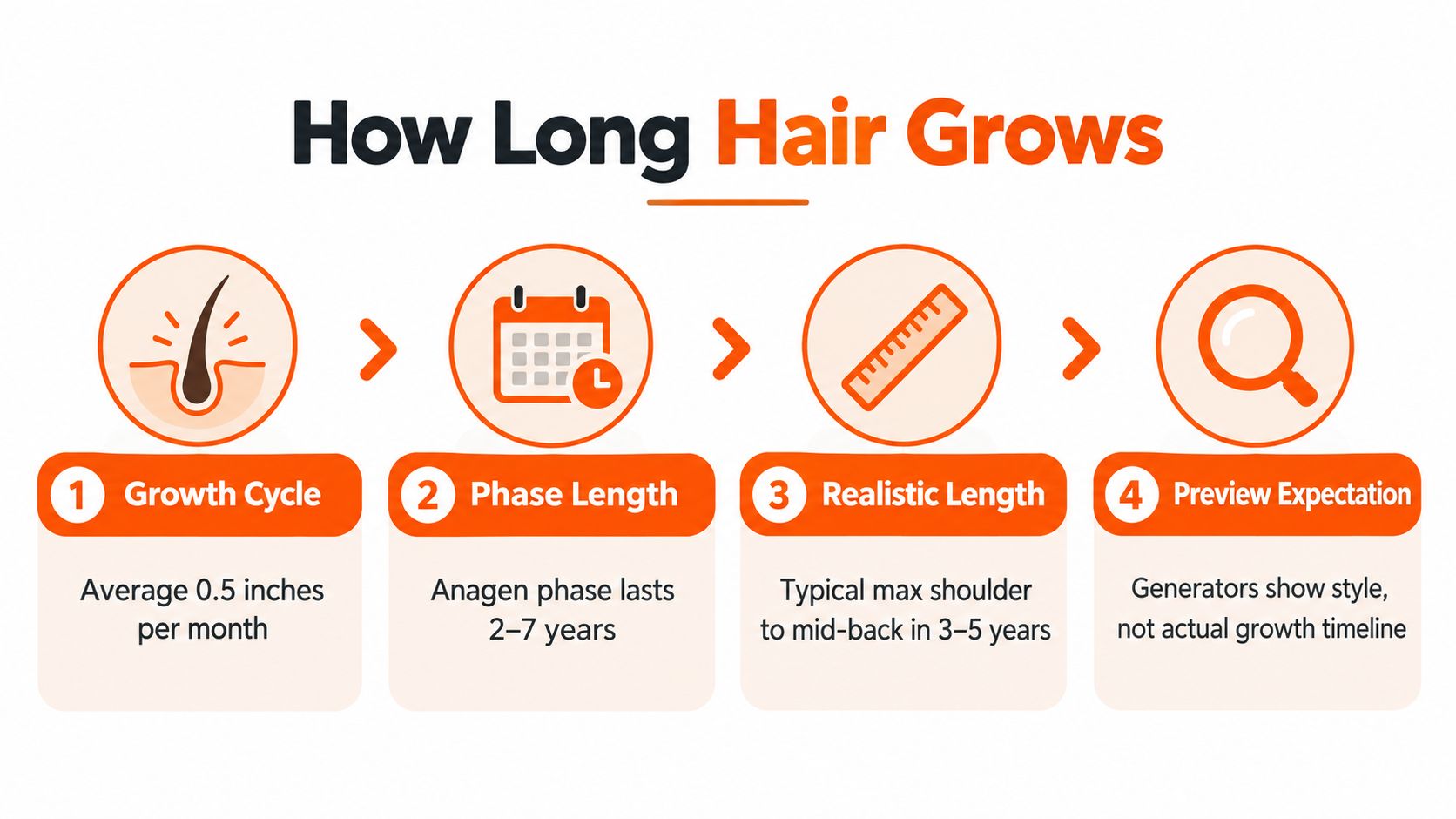
Hair grows gradually, so a generator can show a finished style without telling you how long it may take to reach. Healthy scalp hair grows at an average of about 0.35 millimeters per day, or roughly 0.5 inches per month and 6 inches per year, according to the hair growth information from the Agency for Toxic Substances and Disease Registry. As a rough planning example, gaining about 3 inches may take around 6 months, while gaining 6 inches may take around 12 months. Your visible result can differ because of your starting cut, curl shrinkage, breakage, and trims.
<a id="growth-happens-in-a-cycle"></a>
Growth happens in a cycle
Hair follicles move through anagen, the active growth phase, catagen, a transition phase, and telogen, a resting and shedding phase. Anagen commonly lasts two to seven years, while telogen can last up to four months. About 80%–90% of follicles are generally in anagen at a given time, so strands don't all grow in lockstep. Around 100 scalp hairs shed daily as part of the normal cycle. These figures are described in the Cleveland Clinic's guide to hair follicles.
Those are averages, not a personal forecast. A cited comparison reports different growth rates across life stages, and individual results vary. For a broader explanation of how the growth phases work, the ArtNaturals hair growth cycle guide is a useful companion.
<a id="visible-length-isnt-the-same-as-stretched-length"></a>
Visible length isn't the same as stretched length
Straight hair may show nearly all of its added length. Tightly curled or coiled hair can look substantially shorter because of shrinkage, even as it grows. Density affects the shape too: the same length can appear full and weighty on one head of hair, or wispy and less substantial on another.
Before you preview a style, set a target such as shoulder, collarbone, or mid-back, then compare it with your current length. Keep your natural texture and likely styling routine in mind. A long, straight render may help you study the outline, but it won't tell you whether your air-dried curls will reach the same point or whether you'll want the daily work involved in recreating the image.
<a id="the-main-types-of-long-hair-preview-tools"></a>
The Main Types of Long Hair Preview Tools
Long-hair preview tools fall into a few useful categories. Choose based on the decision you need to make, not on which demo looks most dramatic.
<a id="dedicated-hairstyle-try-on-apps"></a>
Dedicated hairstyle try-on apps
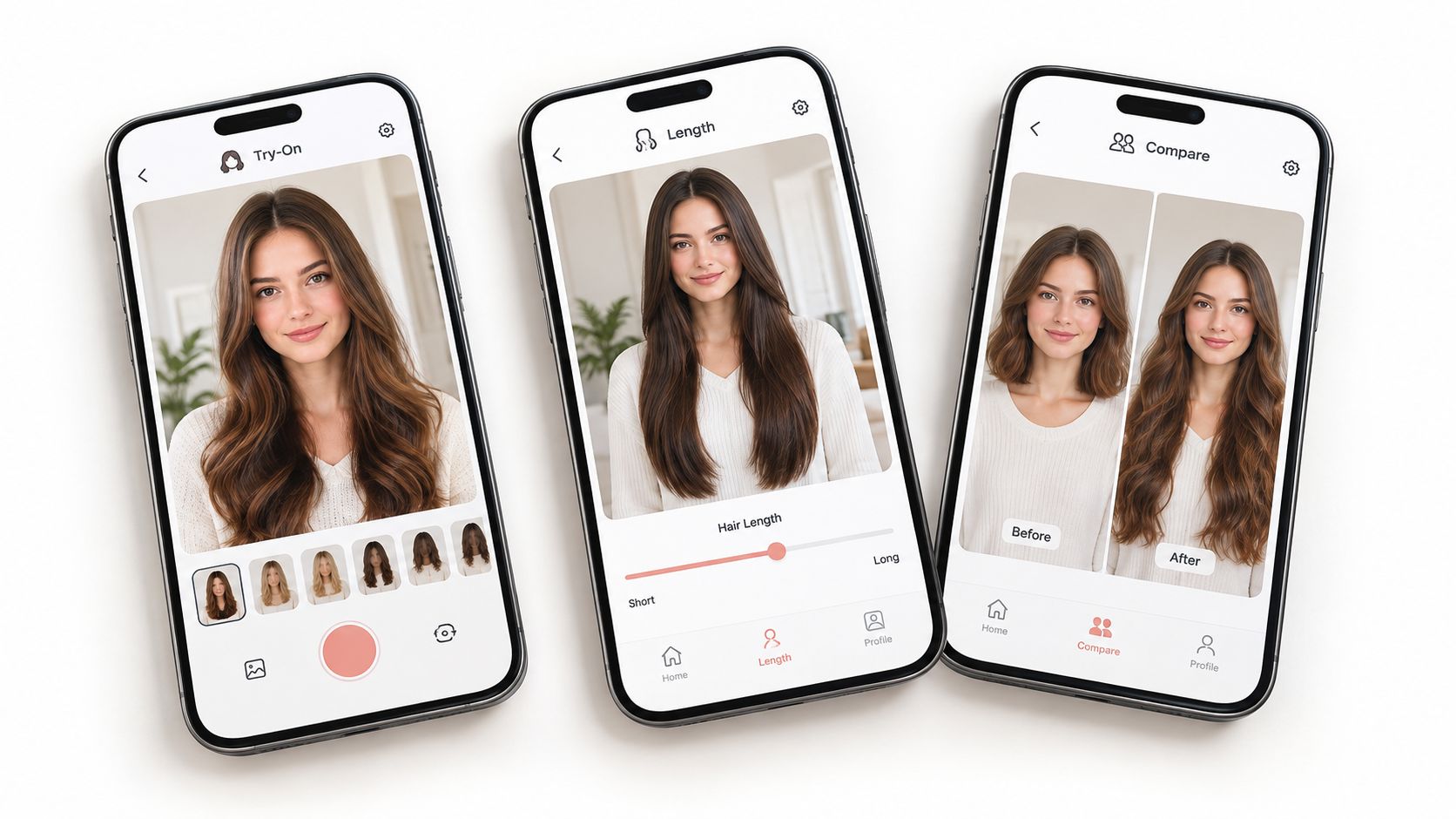
These tools are designed for quick hairstyle comparisons. They usually place or generate hair directly onto a selfie, making them convenient for testing broad options such as a longer shape, part, or general texture. They're a sensible first stop if you want to try ideas privately or get a rough visual before talking to a stylist.
The trade-off is control. Some apps may give you limited ways to specify density, natural curl pattern, or how the style should look from the side and back. A polished front-facing result doesn't establish that the cut is achievable on your hair.
<a id="general-ai-selfie-generators"></a>
General AI selfie generators
A general selfie generator can work when it accepts a clear prompt and keeps your features recognizable. You might describe a length, texture, part, and finish, then create variations to compare. This is handy when you want a personalized concept that a simple hairstyle filter doesn't offer.
The output depends on the image model and your instructions. If it changes your hairline, smooths your skin, or alters your face, the result stops being a useful comparison.
<a id="prompt-driven-image-and-video-studios"></a>
Prompt-driven image and video studios
Broader creative studios can create hairstyle concepts within a larger image or video workflow. They may suit creators who want to turn a hair concept into social content, rather than someone who only needs a quick personal try-on.
For a personal cut decision, prioritize identity preservation, texture control, and multiple angles over extra creative features. For a stylist conversation, a simple, honest preview is more valuable than an elaborate transformation that hides what your real hair can do.
If a tool makes every version look like a salon campaign, it may be selling you a fantasy rather than helping you compare cuts.
<a id="preparing-your-input-photo-for-the-best-preview"></a>
Preparing Your Input Photo for the Best Preview
A preview can't correct a photo that hides your hairline or distorts your face. Start with a clear, natural-looking image, then keep the camera position and expression consistent across the views you compare.
<a id="take-a-useful-baseline-photo"></a>
Take a useful baseline photo
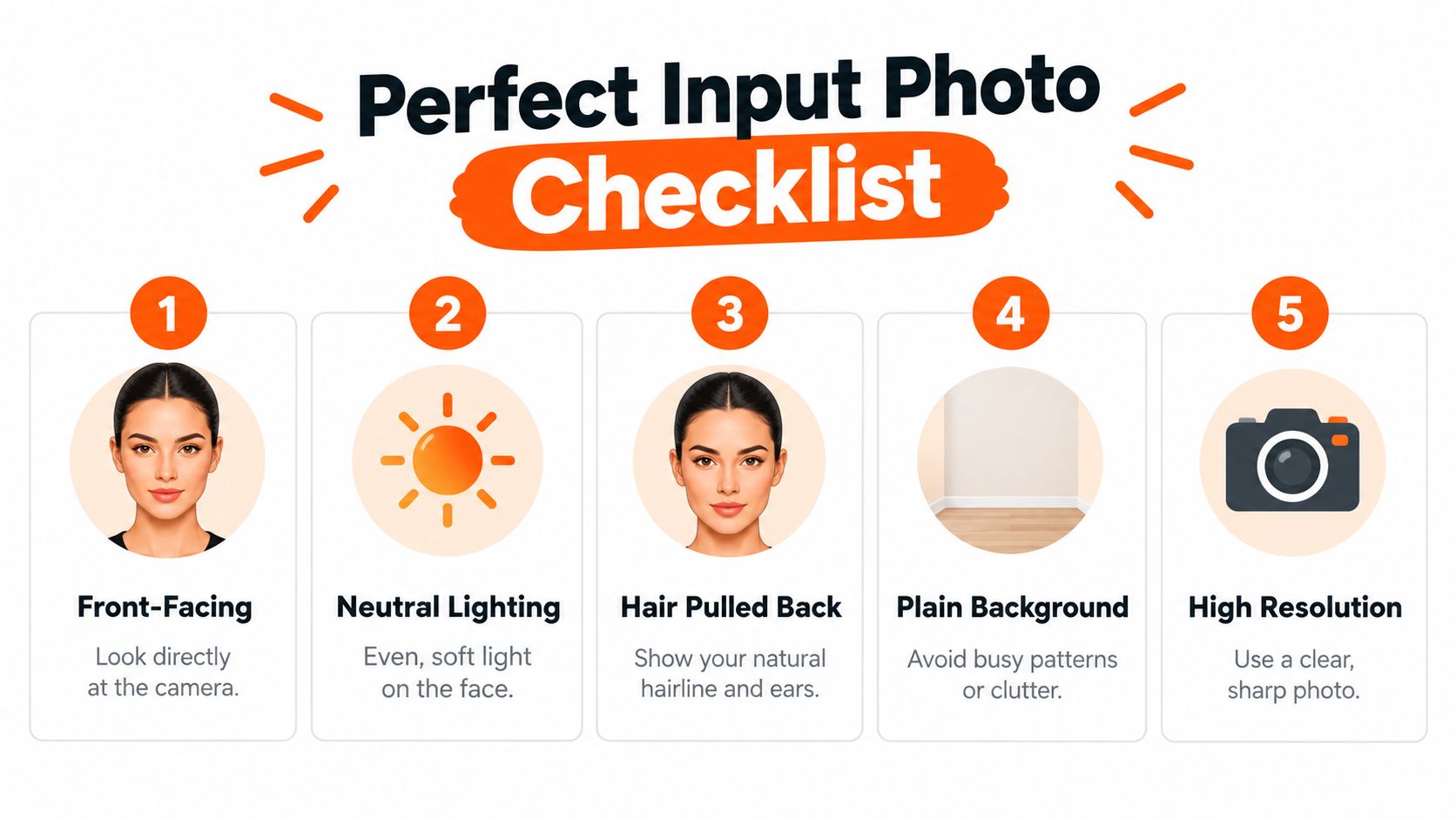
Face the camera in soft, even light. Pull your hair back enough to show your natural hairline and ears, use a plain background, and choose a sharp photo without a beauty filter. Keep your shoulders in frame so the preview has room to show where the hair ends.
Take a front view and, if the tool supports them, three-quarter and profile views. Use the same camera distance, head angle, and expression for comparisons. A tilted head or broad smile can change how your face appears, making it harder to judge whether the haircut itself is doing the work.
<a id="fix-common-input-problems"></a>
Fix common input problems
Dark hair can disappear against a dark background, while a busy backdrop can make the edges of a generated hairstyle look messy. Move to a lighter, plain wall if the hair blends into the surroundings. If glasses catch glare, change the angle or lighting rather than applying a filter that alters your face.
Choose the clearest original image available instead of enlarging a small, blurry screenshot. If you need to improve image clarity before using a preview tool, this guide to AI image upscaling software can help you understand the role of upscaling. It won't restore details the original photo never captured, so don't mistake a sharper-looking file for a more accurate likeness.
Before uploading: check that your face, hairline, and shoulders are visible, and that the light falls evenly across your face.
If you're also considering a gloss or finish treatment for the final look, a salon resource on hair gloss treatments can help you separate shine from cut and length. Keep those choices separate when comparing previews. A glossy effect can make an image seem more finished without showing how the haircut will sit in everyday light.
<a id="comparing-the-best-ai-selfie-generators-for-long-hair"></a>
Comparing the Best AI Selfie Generators for Long Hair
There isn't one best generator for everyone. A quick mobile try-on may be ideal for narrowing down silhouettes, while a prompt-driven tool may give you more flexibility over length and texture. The deciding factors are whether the tool preserves your face, gives you control, and makes its limits visible.
| Tool type | Best use | What to check |
|---|---|---|
| Browser-based hairstyle preview | Comparing familiar cuts quickly | Does it preserve your features and let you adjust length or texture? |
| Mobile try-on app | Testing options on the go | Can you save clean results, and do the styles look plausible from more than one angle? |
| Prompt-driven selfie generator | Exploring a specific combination of length, part, and finish | Does it follow your instructions without changing your identity or inventing volume? |
| Creative image or video studio | Developing a concept for content as well as personal reference | Can you make a useful still image, or is the workflow built mainly around broader creative projects? |
<a id="accuracy-and-flattery-arent-the-same-thing"></a>
Accuracy and flattery aren't the same thing
A generator can make a style look attractive while making it less realistic. Watch for a perfectly even hairline, lifted roots, thick ends, or a texture that doesn't match your own. If the tool changes the shape of your face as it lengthens the hair, don't use that result to judge the cut.
For a stylist consultation, favor the result that looks closest to your actual hair and face, not the one you'd most like to post. For a mood board or social content, a more stylized image may still be useful, as long as you don't mistake it for an achievable outcome.
<a id="choose-features-that-help-you-decide"></a>
Choose features that help you decide
Look for adjustable length, part, texture, and styling options. Side and back views are valuable if the tool offers them, but treat generated angles cautiously. Check whether you can export the image clearly, whether a watermark obscures the hair, and how the service handles uploaded photos. Privacy terms matter whenever you share a personal image, so read the tool's own policy rather than assuming every app works the same way.
Don't rank generators by realism alone. The most useful tool is the one that lets you compare plausible variations without changing the person in the photo.
<a id="running-the-preview-and-saving-your-results"></a>
Running the Preview and Saving Your Results
A slick result can still be wrong. Visual polish is not prediction accuracy. Trust a generated image more for broad face framing and silhouette than for exact root volume, hairline blending, curl behavior, movement, or the shape at the back.
<a id="give-the-tool-a-clear-prompt"></a>
Give the tool a clear prompt
Upload your baseline photo, then describe the style in terms you can compare: target length, part, texture, shape, and color. For example, ask for collarbone-length natural waves with a side part and soft layers. Keep the description focused; changing many style details at once makes it harder to tell which choice improved the result.
If the tool offers sliders, adjust them gradually. Generate a small set of variations rather than choosing the first image. Compare the same intended cut in a natural-texture version and a styled version, then ask whether the difference is something you'd recreate.
<a id="save-images-you-can-use"></a>
Save images you can use
Keep the original photo and the generated results together. Label each image by the style it shows, and save front, profile, and back views separately when available. If you're taking the images to a stylist, bring a concise selection rather than a stack of near-identical versions. Point out what you like in each: the length from one, the fringe from another, or the overall shape from a third.
Check the exported file before relying on it. A watermark over the ends, low clarity, or a crop that removes the shoulders can make the image less useful. Don't assume a generated side or back view reflects your real density or growth pattern. Ask your stylist to assess those details in person.
Before uploading, check how the service handles your photo, including storage and model training. Privacy practices vary between tools. For example, ClipNova says its projects are encrypted at rest and that user inputs aren't used for model training, but you should still read the current terms of any tool you use.
<a id="turning-your-preview-into-a-real-hair-plan"></a>
Turning Your Preview Into a Real Hair Plan
Pick the preview that feels plausible to maintain, not just exciting to look at. Start with the target length and your current length, then use the average growth rate described earlier as a planning baseline. Allow for the fact that trimming, breakage, and shrinkage can change the visible result.
<a id="build-around-retention-and-routine"></a>
Build around retention and routine
Growing length is only part of the job. Gentle washing and detangling, conditioning that suits your hair's density, reduced high-heat styling, and avoiding persistently tight ponytails or braids can help limit breakage and tension. Don't book trims on a rigid schedule just because you've seen the advice repeated online. Trim when split ends or breakage are visibly travelling upward, or when your stylist recommends a shape adjustment that supports your goal.
If the image depends on a finish you rarely wear, ask for a version that matches your normal routine. A layered cut may create movement, but if your hair is fine, too much layering can make the ends look less full. A blunt shape may preserve a fuller-looking outline, even if it's less dramatic in a generated image.
<a id="make-the-preview-useful-at-the-salon"></a>
Make the preview useful at the salon
Bring your preferred reference and explain what it gets right, then show what doesn't look like your hair. Ask the stylist to assess your texture, density, hairline, and how the shape will work as it grows. If you want to test length before committing, extensions or a wig can help you sample the silhouette; resources explaining what 20-inch extensions suit can offer context, but the right choice depends on your own desired look and styling needs.
Reassess with consistent photos as your hair changes. Keep an ideal version and a lower-maintenance option in view, such as long layers, a simpler blunt shape, or a tied-back style for an awkward stage. The point isn't to force your real hair to match an image. It's to use the image to make a choice you'll be happy living with.
ClipNova offers an AI Selfie Generator for exploring image concepts, alongside image and video tools for building creative content from prompts. Try a few long-hair variations, compare them with your natural texture and maintenance routine, and visit ClipNova to create a preview you can take into a more informed style decision.
Ready to ship your own?
Start creating viral videos with AI in under twenty minutes, no credit card required.