
AI video is video that generative AI creates or transforms from a text prompt, image, script or audio track, rather than filming a real scene with a camera. But if a clip looks convincing, does that mean it's ready to publish?
Not necessarily. A generated presenter might speak clearly while mispronouncing a product name, or a beautiful product shot might change the packaging. Understanding what AI video is means understanding both how the pictures are made and how people turn them into dependable, trustworthy content.
Table of Contents
- What AI Video Means and Its Main Types
- How Text-to-Video Models Generate Motion
- Why AI Video Became Possible Now
- Common Uses and Where AI Fits in the Workflow
- Strengths, Limits and How to Test a Clip
- Trust, Disclosure and Provenance for Published AI Video
- Test One AI Video Before You Commit to a Workflow
<a id="what-ai-video-means-and-its-main-types"></a>
What AI Video Means and Its Main Types
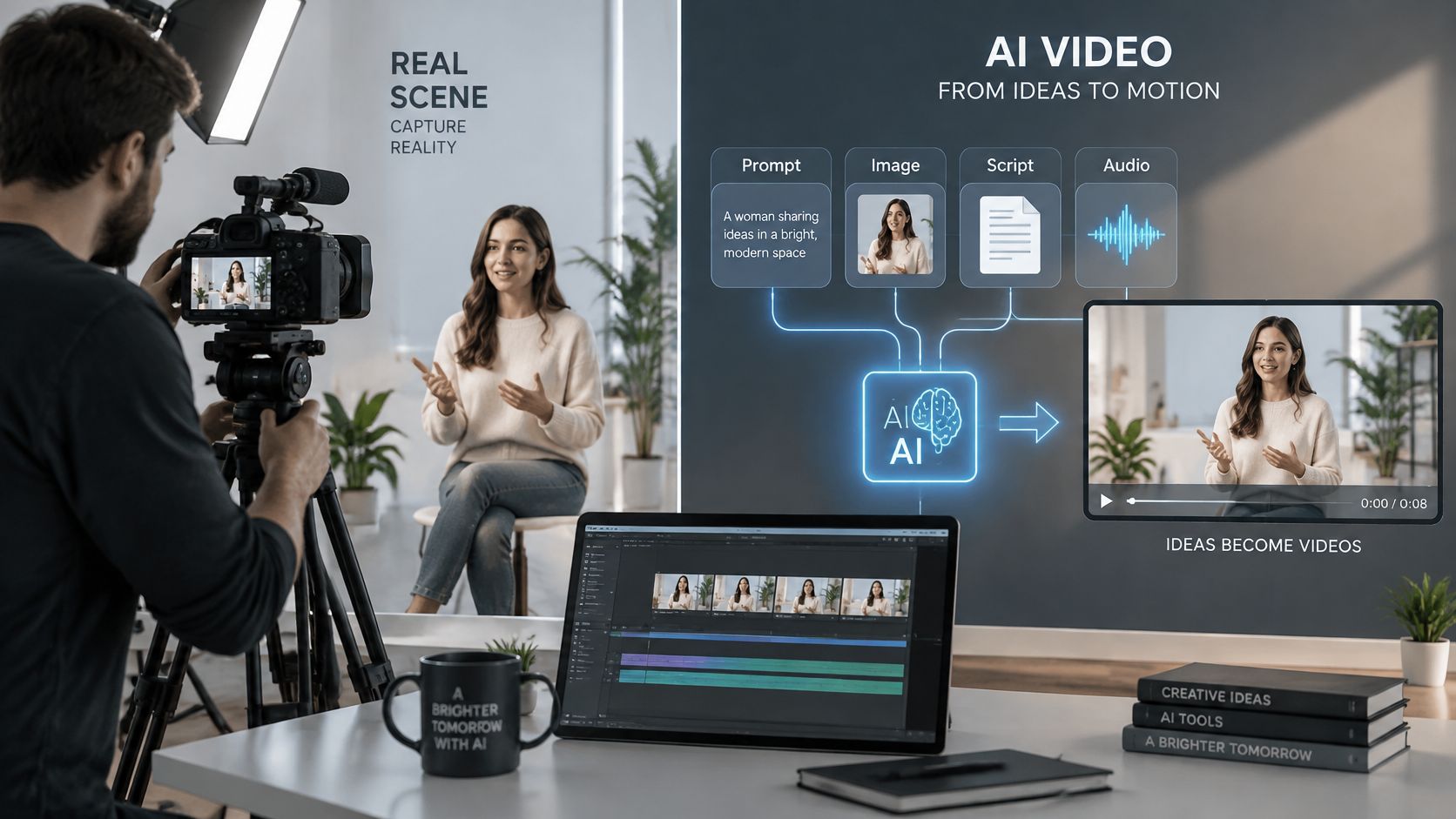
Think of an AI video tool as a film crew working from a written brief. Instead of choosing a location and recording what happens there, you describe what should appear, supply reference material, and guide the result through revisions. The analogy has a limit: a model doesn't understand your intentions as a human crew would.
The main distinction is between generating content and editing recorded footage. Cutting an interview or adjusting its exposure doesn't make the whole production synthetic. Creating a presenter, inventing a scene, or generating movement from a photograph changes where the visual content comes from.
<a id="the-four-main-types-of-ai-video"></a>
The four main types of AI video
| Type | You provide | What comes back | Typical use |
|---|---|---|---|
| Text-to-video | A written prompt | A clip generated from scratch | Concept videos, B-roll and ad drafts |
| Image-to-video | A still image | Motion and camera movement added to the picture | Animating product shots and key visuals |
| Talking avatar | A script and a voice or reference | A presenter speaking with lip sync | Explainers, training and host-led videos |
| Music-to-video | An audio track | Visuals timed to the beats | Music promos and lyric videos |
These categories can overlap. A finished explainer might combine a talking presenter, animated product photographs and generated background footage. Music-to-video may coordinate existing or generated visuals with audio rather than use the same generation method as text-to-video.
If you already have approved photographs, this guide to picture-to-video AI explains that starting point. For lessons and training, VideoLearningAI's comparison of AI video software for course creators provides a more education-specific way to assess tools.
<a id="a-small-glossary"></a>
A small glossary
- Diffusion: A generation method that starts with noise and removes it progressively to form an image or moving scene.
- Latent: A compact internal representation of visual information, rather than the full image pixels.
- Lip sync: The alignment between mouth movements and spoken audio.
A useful classification test is to ask where the main picture came from. If a model created it rather than a camera recording it, you're looking at AI-generated video, even when a person wrote the script and chose every edit. Productions that combine both are better described as hybrid video.
<a id="how-text-to-video-models-generate-motion"></a>
How Text-to-Video Models Generate Motion
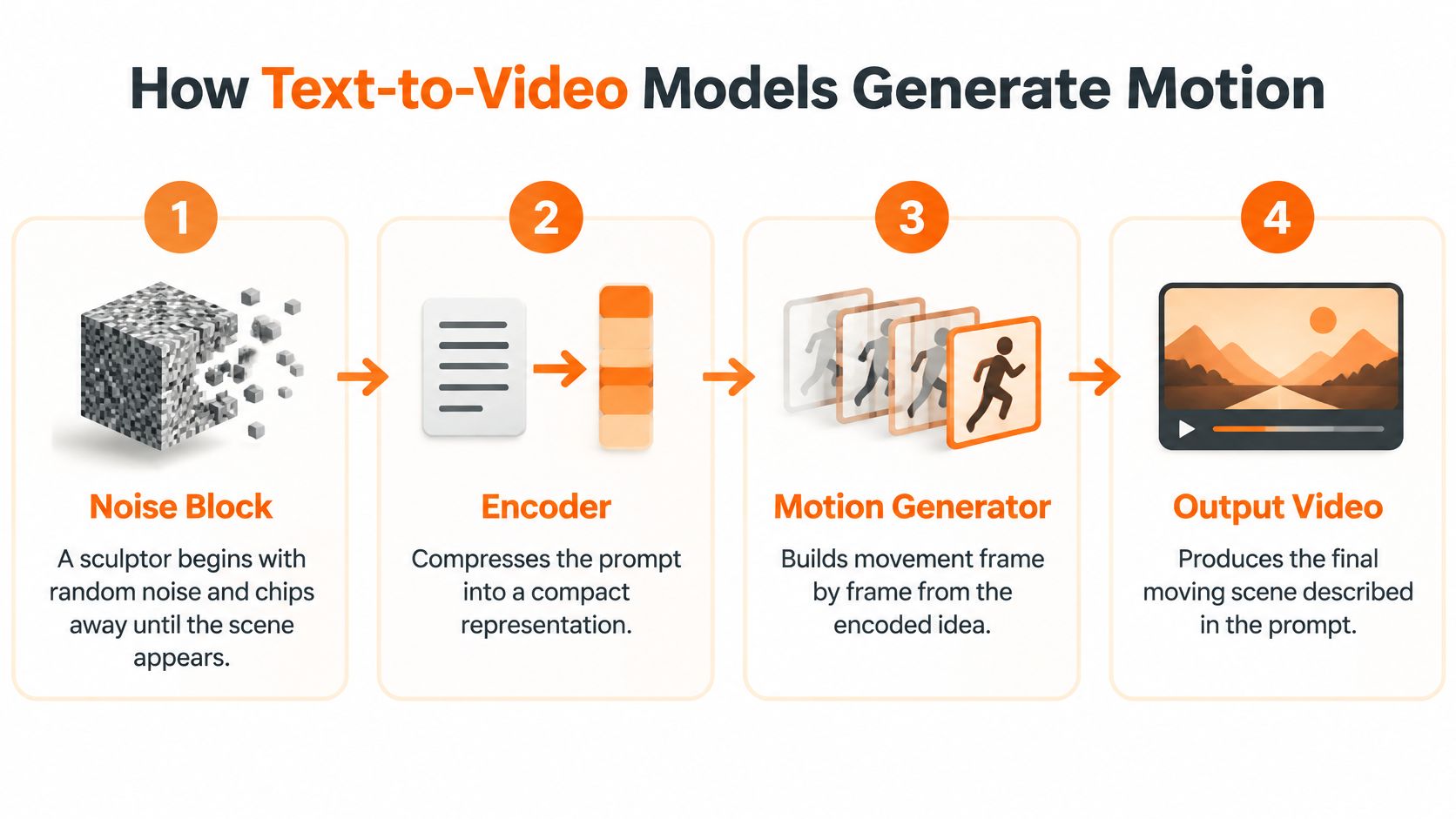
A diffusion model works a little like a sculptor starting with a block of random noise and gradually shaping it into the requested scene. There's no tiny film hidden inside the noise. The model uses patterns learned during training to predict what a suitable result could look like.
The key difference from image generation is time. A video model must coordinate changing visual information, not just produce an attractive still.
<a id="from-compressed-information-to-moving-pixels"></a>
From compressed information to moving pixels
The infographic simplifies the process. More precisely, a visual encoder compresses images or video frames, while the prompt supplies separate guidance about what to generate. Not every system uses an identical architecture, but latent-diffusion systems commonly follow this pattern:
- Represent visual information compactly. During training, an encoder turns frames into smaller latent representations. A kettle's outline, surrounding table and lighting can be represented without carrying every raw pixel through the generation process.
- Begin with noise. At generation time, the system creates a noisy latent representation. At this stage, there isn't a recognizable kettle or kitchen.
- Refine under guidance. A denoising network repeatedly updates that representation, conditioned on the prompt and any reference image. Instructions about a red kettle, dawn light and rising steam influence those updates.
- Coordinate the scene across time. The model builds a temporally ordered latent sequence. It must connect the kettle's movement with the position of its spout, the cup and the changing stream of tea.
- Decode and finish. A decoder turns the latent representation into visible frames. Optional super-resolution stages increase detail after the underlying scene has been generated.
The W.A.L.T. paper demonstrates this approach through a shared image-and-video encoder, a base latent video diffusion model and subsequent super-resolution stages. That separation matters: making the scene coherent and making it sharper are related but different jobs.
<a id="why-a-simple-action-can-go-wrong"></a>
Why a simple action can go wrong
Consider a request for a red kettle pouring tea at dawn. The model needs to preserve the kettle's shape while its angle changes, keep the tea connected to the spout, and maintain believable steam and light. A sharp individual frame can conceal a sequence in which the handle bends or the cup changes position.
Identity drift, deforming objects and flickering illumination are signs that the model hasn't maintained those relationships. They're different from ordinary compression artifacts or a slightly soft image.
Practical rule: Watch movement first, then judge sharpness. A detailed frame can't rescue an object that changes shape during the shot.
Longer clips and higher resolution require more computation. That helps explain duration limits and staged rendering: a practical workflow can establish composition and movement before spending more resources on final detail.
<a id="why-ai-video-became-possible-now"></a>
Why AI Video Became Possible Now
Say you want a scene of a cyclist rounding a corner. Producing a believable bicycle in a still image is only part of the task. The system also needs to coordinate turning wheels, changing perspective and a rider whose body remains attached to the bicycle.
Earlier approaches made those relationships difficult to sustain. A rough analogy is painting separate pictures versus refining a connected moving scene, though modern systems still don't simulate every physical cause behind what they depict.
<a id="the-shift-toward-connected-scenes"></a>
The shift toward connected scenes
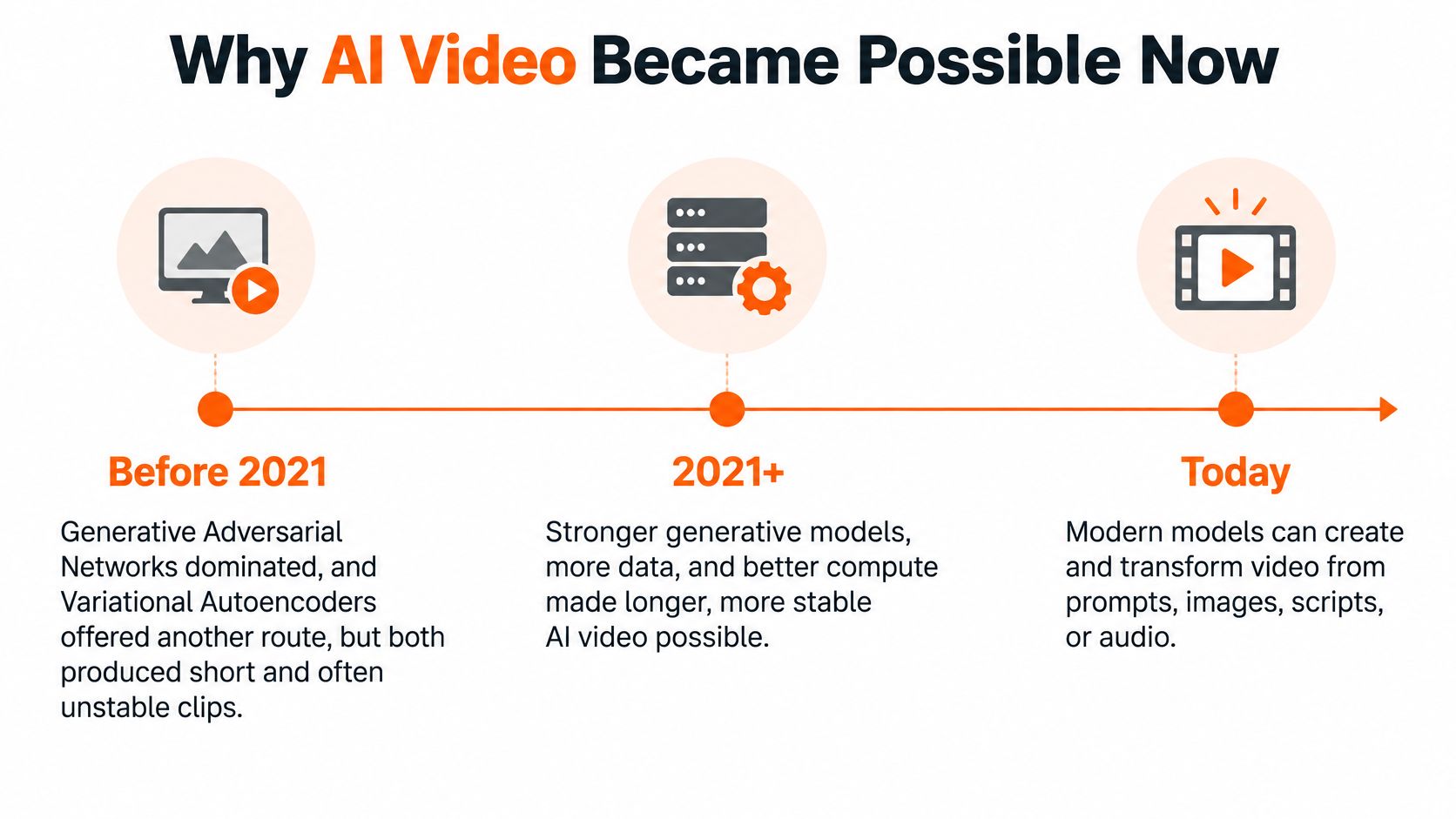
The Springer review of video-generation methods identifies GANs as the dominant approach before 2021, growing prominence for autoregressive, diffusion and masked-modeling methods after 2021, and the 2022 Video Diffusion Model as a milestone in extending diffusion to high-fidelity video.
That progression involved several complementary ideas:
- Learn visual patterns: Generative Adversarial Networks and Variational Autoencoders provided early routes to synthesizing visual content.
- Refine rather than draw once: Diffusion introduced a way to improve a noisy representation through repeated updates.
- Connect information across time: Transformer-based approaches helped systems coordinate relationships within moving scenes.
The result is more than automatic editing. Modern generation can connect instructions about subject, style, camera movement and action within a synthesized sequence.
Still, a plausible-looking turn doesn't prove the model understands bicycle mechanics. Judge a tool by how well it handles your actual action, not by how impressive an unrelated demonstration looks.
<a id="common-uses-and-where-ai-fits-in-the-workflow"></a>
Common Uses and Where AI Fits in the Workflow
<a id="common-ai-video-uses-and-where-ai-helps-most"></a>
Common AI video uses and where AI helps most
| Use case | Typical input | Output | Where AI helps most |
|---|---|---|---|
| Product ads and social clips | Product photo and a short brief | Vertical clip with motion and captions | Producing many variants for testing |
| Explainers from a topic | Typed topic or link | Narrated video with scenes | Turning research into a first draft |
| Localized versions | One finished script | The same video in several languages | Repeating one idea across markets |
| Music promos | An audio track | Visuals timed to the beats | Quick visual variations |
| Documentary-style pieces | A historical event or myth | Narrated scenes with captions | Filling gaps with original scenes |
These are production starting points, not promises of finished accuracy. A product ad needs faithful packaging, an explainer needs checked source material, and a localized version needs language review. Documentary-style visuals should illustrate an account, not masquerade as archival evidence.
For a musician, the useful output might be alternate visual treatments of the same track. For an online retailer, it might be different openings built around an approved product photograph. The advantage comes from repeating production tasks without rebuilding everything manually.
<a id="generation-isnt-the-whole-workflow"></a>
Generation isn't the whole workflow
A conventional workflow may involve separate tools for writing, recording narration, finding footage, editing and captioning. An integrated studio groups those activities together, reducing file transfers and repeated setup. That convenience doesn't remove the need for creative decisions or approval.
Arcade's State of AI Video describes recurring workflow problems, including synthetic-looking results, difficulty correcting individual details and repeated attempts before obtaining usable footage. The right question is therefore which work gets shorter, and which work moves elsewhere?
Break a project into distinct layers:
- Generation: Produce scenes, narration and draft material. AI can compress blank-page work, but rejection and regeneration still count as labor.
- Assembly: Arrange material into a coherent story. Someone must decide whether the opening, sequence and conclusion serve the audience.
- Post-production: Refine timing, captions, sound and formatting. Repetitive adaptations are promising candidates for automation.
- Governance: Approve facts, permissions, brand treatment and publication. Responsibility stays with the publisher.
For broader planning, Contesimal's guide to AI-powered content creation offers context beyond video alone. A practical automated video production workflow also needs clear handoffs between generation and approval.
Measure the cost of an approved video, not the cost of a generated file.
Track usable-output rate, revision time, factual accuracy and brand consistency. For localization, include pronunciation and natural phrasing. AI is most useful when it reduces repetitive production without creating a larger correction burden, which makes a clear brief and reliable source assets more valuable, not less.
<a id="strengths-limits-and-how-to-test-a-clip"></a>
Strengths, Limits and How to Test a Clip
A good-looking clip can still fail the job. A polished advertisement with the wrong product label isn't usable, and an instructional video with reversed actions can teach the wrong process.
A useful review separates prompt alignment, whether the clip shows what you requested, from temporal coherence, whether it holds together as it plays.
<a id="six-quality-tests-for-an-ai-video-clip"></a>
Six quality tests for an AI video clip
| Quality test | What to verify | Typical failure |
|---|---|---|
| Prompt consistency | Requested subjects appear in the clip | Subject missing or swapped |
| Action order | Events happen in the stated sequence | Steps reversed or merged |
| Physical plausibility | Objects change in believable ways | Warped hands and deforming objects |
| Identity across frames | Same face, product and outfit throughout | Face or product drifts mid-clip |
| Text and captions | Text is readable and spelled correctly | Garbled signs or labels |
| Narration sync | Voice matches lip movement and cuts | Audio drifts from mouth movement |
Evaluation requires more than checking whether viewers like the appearance. Reviewers must also consider fidelity, controllability, motion and the relationships between objects and events.
The VideoScience-Bench chapter describes 200 evaluation items covering dimensions such as prompt consistency, phenomenon congruency, dynamism, immutability and spatiotemporal coherence. In plain language, those dimensions ask whether the requested event happens, behaves credibly and preserves what shouldn't change.
Automated measures such as Fréchet Video Distance can help teams compare model outputs and catch regressions. They can't independently approve a business requirement such as an exact logo, a readable disclaimer or correctly timed narration.
<a id="build-a-repeatable-acceptance-check"></a>
Build a repeatable acceptance check
Keep a small test set that represents the material you publish. Include faces, hands, signs, packaging, fast movement and multilingual narration rather than testing only scenic shots.
Use a consistent review routine:
- Compare against the brief. Mark each requirement as present, absent or incorrect before judging visual appeal.
- Watch at normal speed. Look for distracting changes and listen for pacing or synchronization problems.
- Inspect sensitive moments. Pause around hand contact, product handling, labels and scene transitions.
- Isolate a failure. Try a shorter shot or an available reference keyframe to see whether a more constrained request improves the result.
- Approve the complete export. A person should watch the final file end to end, including captions and audio.
If exact text is essential, add it as an editable caption or graphic rather than relying on generated lettering inside a scene. If a demonstration requires precise physical contact, consider recorded footage for that action.
Fast variants and explainers are useful strengths. Hands, lettering and fine physical detail deserve closer inspection. The acceptance standard should follow the purpose of the video, not the novelty of its production method.
<a id="trust-disclosure-and-provenance-for-published-ai-video"></a>
Trust, Disclosure and Provenance for Published AI Video
Viewers can suspect a video is synthetic without knowing which parts were generated. In survey findings covered by Net Influencer, 82.6% of U.S. consumers had watched videos they suspected were AI-generated, while 36% said AI-generated video would reduce their trust in a brand.
Robotic gestures, unnatural voices and weak emotional tone were leading detection signals. Those signals aren't proof, but they show why visual polish alone isn't enough to establish credibility.
<a id="labels-marks-and-file-history-do-different-jobs"></a>
Labels, marks and file history do different jobs
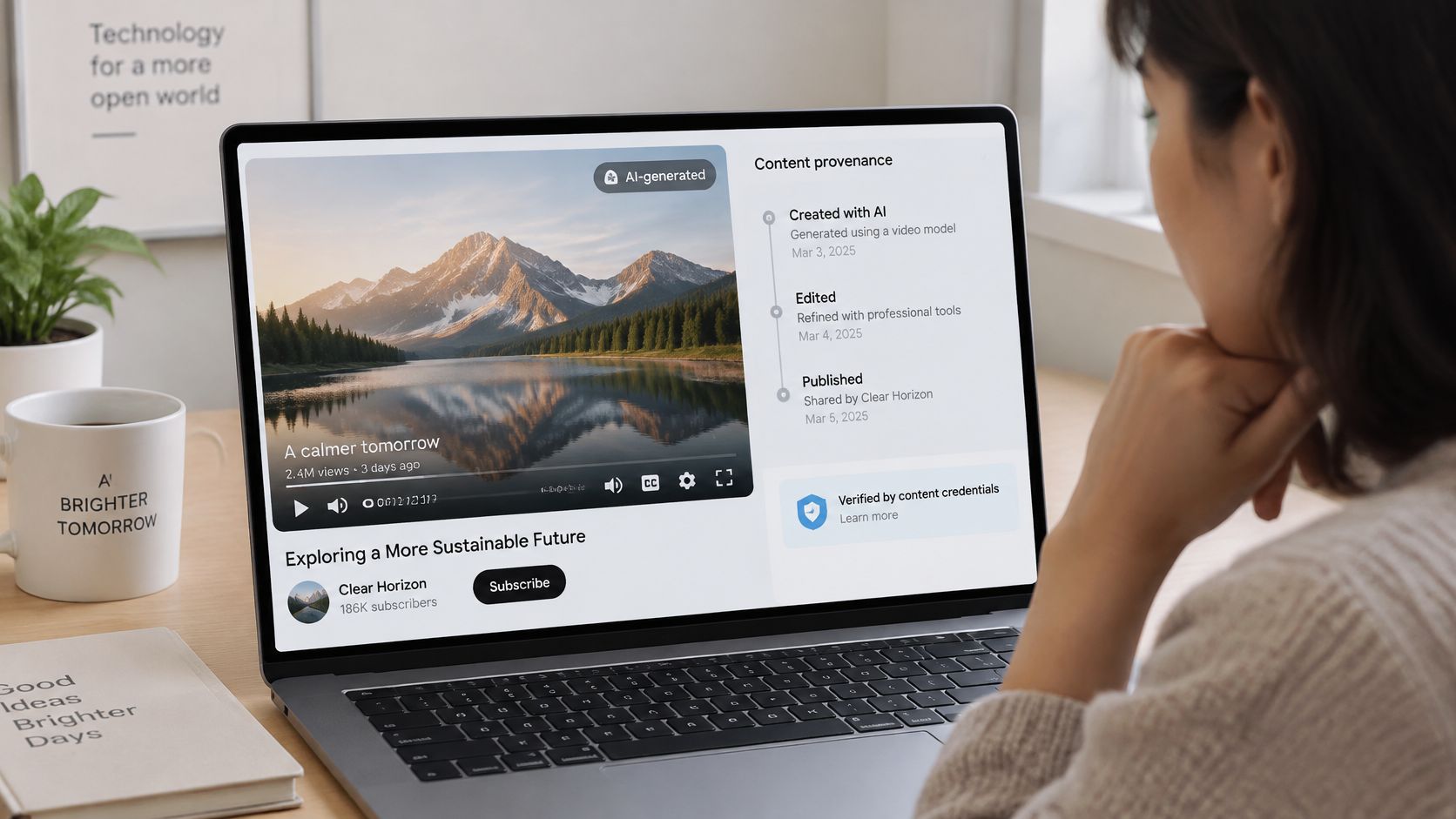
Disclosure is the explanation a publisher gives the audience, such as identifying a synthetic presenter or a reconstructed scene. Watermarking adds a visible or hidden identifying mark. Provenance metadata records information about a file's origin and editing history.
Metadata can disappear when someone takes a screenshot, re-encodes a file or uploads it to a platform that strips information. Don't assume viewers will inspect file history. Put meaningful disclosure where they'll encounter the content.
<a id="when-to-disclose-ai-use-in-a-published-video"></a>
When to disclose AI use in a published video
| Content type | Disclosure guidance | Extra check |
|---|---|---|
| Ads with an AI presenter | Disclose when viewers could mistake it for a real person | Confirm rights to any likeness used |
| Testimonials or reviews | Disclose any synthetic voice or actor | Verify the claim is true and sourced |
| News-style or documentary content | Label generated or reconstructed scenes | Check every date, name and figure |
| Translated voiceover | Disclose when the voice is synthetic | Review lip-sync and idioms in each language |
| Real person's likeness | Disclose synthetic portrayal and obtain consent before use | Confirm usage rights in writing |
| Real footage with AI cleanup | Disclose changes that materially alter what viewers believe happened | Keep the original footage for provenance |
Treat this as a publishing decision aid, not a complete statement of applicable law or platform rules. Consent, disclosure and factual accuracy are separate checks: a label doesn't grant permission to copy someone's likeness, and permission doesn't make a false claim acceptable.
Before publication, assign a person to review unnatural motion, lip sync, factual claims, consent and usage rights. For testimonials, confirm that the underlying experience is genuine; don't use a synthetic actor to invent a customer.
Trust check: Could a reasonable viewer mistake an illustration for evidence, or a generated speaker for a real witness?
For brands, credibility may be a harder barrier than image quality. Viewers don't have to reject AI altogether to lose confidence in content that feels misleading or careless.
<a id="test-one-ai-video-before-you-commit-to-a-workflow"></a>
Test One AI Video Before You Commit to a Workflow
Choose a real production task and test a complete video before committing to a recurring workflow. Don't begin with your most sensitive campaign or a scene that needs exact physical choreography.
To start with our workflow, pick a plan, then open Series for a recurring show or AI Video Studio for a single video. Choose AI Video or Moving AI Images, an aspect ratio of 9:16, 16:9 or 1:1, and an episode length from 30 seconds to 5 minutes.
<a id="run-a-small-production-trial"></a>
Run a small production trial
- Choose a concrete use case. Use an approved product image and a short product introduction, for example. Define the audience and publishing destination before generating.
- Write an acceptance brief. Specify the subject, action order, exact on-screen text and details that must not change. Include the approved facts and reference assets.
- Generate and evaluate. Apply the quality tests to the candidate output. Record the reason for each rejection so you can distinguish a weak prompt from an unsuitable task.
- Verify before posting. Check every date, name and factual detail, then watch the exported video. AI can still get those details wrong.
- Compare total effort. Count briefing, generation, retries, cleanup and approval against your current method. Render time alone won't tell you whether the workflow saves work.
If you're exploring tools without an established production process, this guide to free AI video options can help you frame an initial trial. Use the same acceptance brief when comparing alternatives so you aren't judging unrelated demonstrations.
Keep a short record of what passed, what needed manual correction, and what you couldn't fix. A successful trial should produce an asset you would publish, not just something interesting to watch.
Adopt AI video where the output meets your standard and the time savings survive revisions. Keep human-led or camera-based production where accuracy, authenticity or physical continuity makes it the better choice.
ClipNova brings scripting, scenes, voiceover, captions and music into a web-based video workflow. Visit ClipNova to create a single test video or set up a recurring series, then use your acceptance brief to decide whether the result is ready for your audience.
Ready to ship your own?
Start creating viral videos with AI in under twenty minutes, no credit card required.