
You've got a strong idea, a folder of footage, and perhaps a rough paragraph of copy. Then the edit begins. The voiceover runs longer than the visuals, the opening takes too long to reach the point, captions crowd the frame, and every platform needs a slightly different cut. A static outline rarely solves that problem.
A practical video script template should do more than hold dialogue. It should connect spoken words to shots, captions, pacing, and the final action you want viewers to take. The most useful approach is a master script with clear transformation rules, so one core idea can become several deliberate versions instead of one badly resized export.
Table of Contents
- The Anatomy of a High-Retention Video Script Template
- Engineering the First Three Seconds for Short-Form Video
- Scaling the Framework for Long-Form Tutorials and Explainers
- Writing for the Ear and Optimizing Voiceover Pacing
- Platform-Specific Repurposing and Transformation Rules
- Automating the Pipeline with AI Video Studios
<a id="the-anatomy-of-a-high-retention-video-script-template"></a>
The Anatomy of a High-Retention Video Script Template
A production can lose viewers before the edit begins. A narration-only script leaves the team guessing what belongs beside each sentence, which often leads to thin coverage, repeated visuals, mistimed captions, and cuts that feel slow despite concise voiceover.
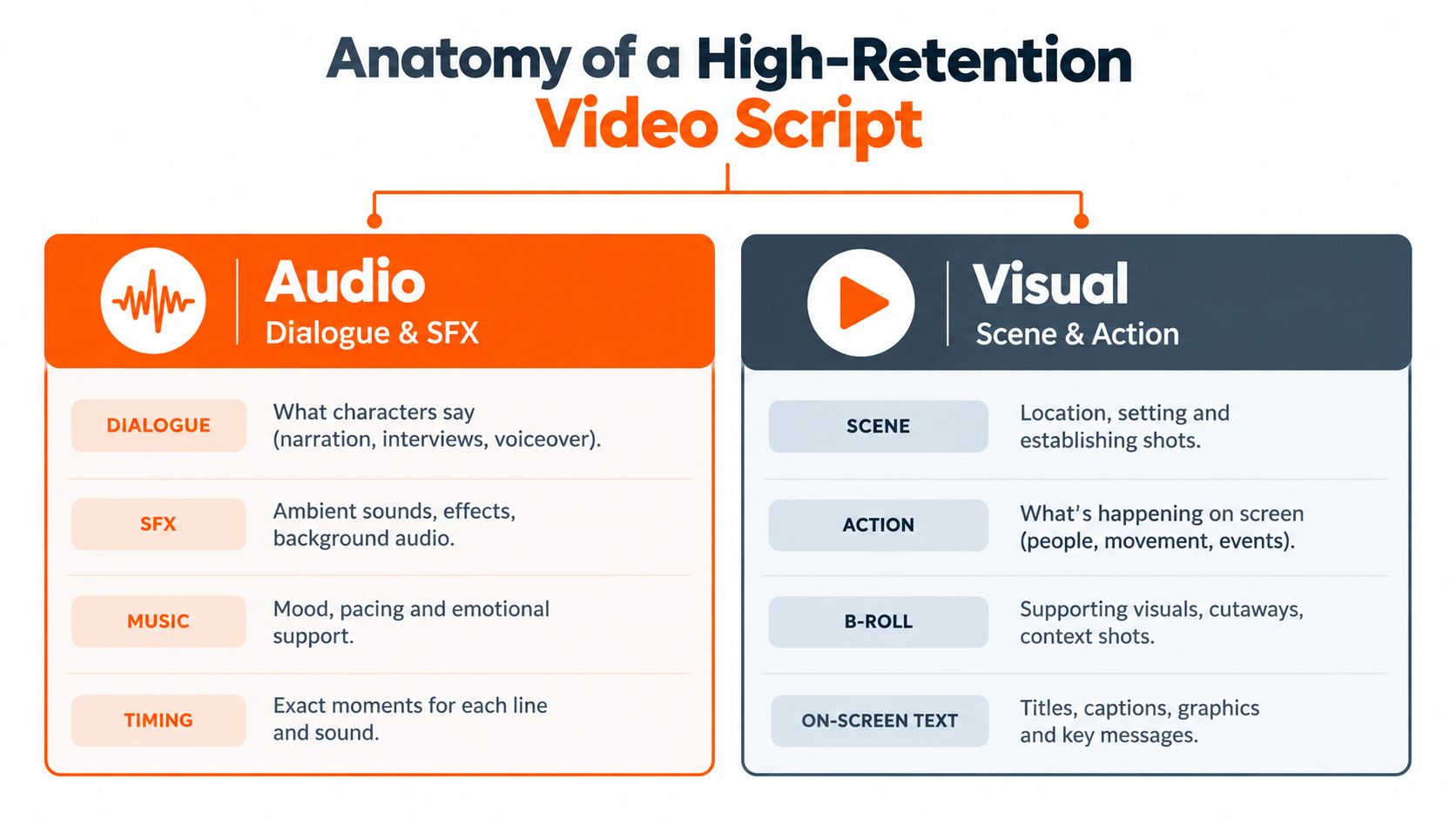
A reliable video script template starts with the two-column AV format, then adds rules for changing the same core script across platforms. The audio column holds dialogue, voiceover, sound effects, and meaningful pauses. The visual column defines scenes, actions, B-roll, on-screen text, graphics, and transitions. The format is documented for explainer, marketing, and how-to videos in StudioBinder's AV script template.
<a id="build-the-document-around-editorial-decisions"></a>
Build the document around editorial decisions
Start with a working table:
| Audio | Visual |
|---|---|
| Spoken line or sound cue | Shot, action, caption, graphic, or transition |
| Delivery note, pause, or emphasis | Framing, movement, and screen position |
| Section purpose | Proof, demonstration, reaction, or pattern change |
Write the hook first, then assign it a visual job. If the narration says a workflow wastes time, show the repeated manual action rather than opening on a logo. A useful visual should prove the promise, create contrast, or reveal the outcome.
Give viewers only the setup they need, then move through the core claim, supporting proof, demonstration, and close. A commonly used short-form structure places the hook and setup first, followed by the main point, proof, transition, and call to action. Guides place the hook in the first 0–5 seconds, context in 5–15 seconds, proof points in 30–90 seconds, and the CTA in the final 10 seconds. The timing breakdown appears in StudioBinder's AV script guidance.
Treat those ranges as transformation rules, not fixed instructions. For a vertical cut, shorten captions and keep the subject inside the safe area. For a wider version, preserve the same spoken claim but expand the visual field. For AI voiceover, split long sentences where a breath or shot change should occur. The template stays stable. The row-level decisions change.
Practical rule: Every spoken sentence needs a visual job. If the image only repeats the narration, choose a demonstration, consequence, comparison, or human reaction instead.
<a id="make-timing-visible-before-the-edit"></a>
Make timing visible before the edit
Add a duration estimate to every row. Read the audio aloud while marking where the visual changes, and overloaded passages will surface before recording. A current production script template from Business in a Box uses a bounded planning process, with an example that takes 25–30 minutes to complete and produces a 3-page document.
The objective is consistency in decisions, not identical runtimes. A director can reject an impractical shot, a voice artist can flag a breath problem, and an editor can gather assets before recording arrives. For collaborative work, add columns for status, asset owner, caption text, aspect ratio, and platform version.
A strong template carries intent through production. It tells the writer what to say, the producer what to capture, the editor what to change for each format, and the viewer why the next moment deserves attention.
<a id="engineering-the-first-three-seconds-for-short-form-video"></a>
Engineering the First Three Seconds for Short-Form Video
Short-form openings fail when they spend the first moments on information the viewer didn't ask for. A logo reveal, a greeting, or a broad statement about what the video will discuss can delay the only question that matters at the start: why should this person keep watching?
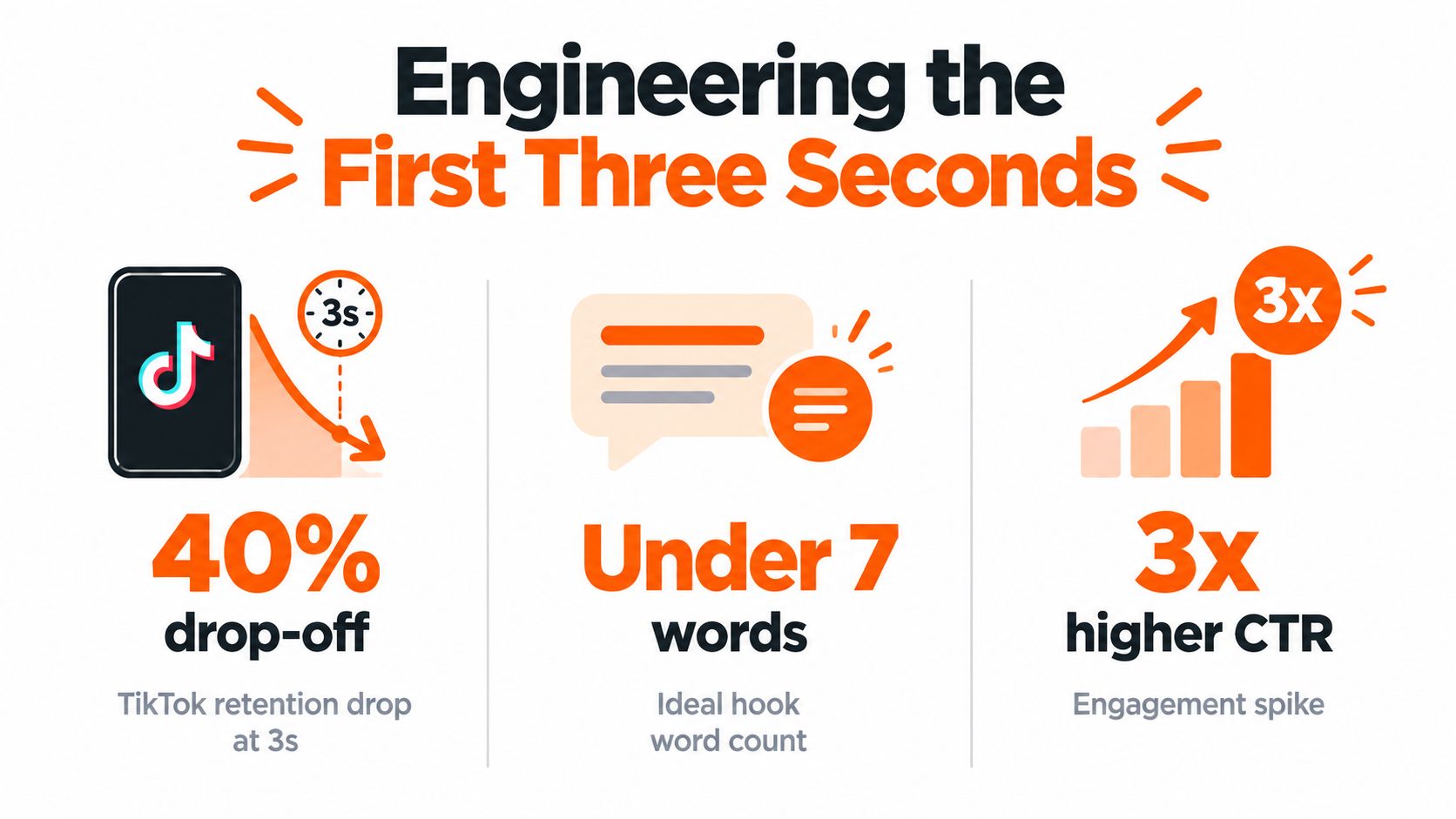
A 2026 analysis of 3,966 million-view YouTube Shorts found that successful hooks clustered around 9–11 words, with a median of 11 words and a middle range of about 9–13 words. The findings are reported in Overseeros' analysis of YouTube Shorts hooks. That doesn't make eleven words a magic formula, but it does support a useful constraint: one opening line, one promise, and no throat-clearing.
Write the first line so it can stand alone:
- Name the problem: “Your captions are hiding the product.”
- Show the contrast: “This shortcut adds work instead of removing it.”
- Promise a result: “Fix this one frame before you publish.”
- Challenge an assumption: “Your first shot may be causing the scroll.”
The line should be understandable without prior context. Put the explanation after the promise, not before it.
<a id="audit-the-opening-as-an-editor"></a>
Audit the opening as an editor
Practitioner datasets place the decision to continue watching within the first 2–3 seconds, and a 2026 summary reported that hooks appearing in the first 2 seconds retained 19% more viewers than slower openings. The same summary cites 71% of viewers deciding before the third second. Those figures come from short-form content statistics compiled by SHNO.
Use the evidence as an editing test, not a promise of performance. Ask:
- Does the first frame show the subject or the consequence?
- Can the viewer understand the promise with audio muted?
- Does the narration introduce a concrete point before branding?
- Is the first caption short enough to read while the scene changes?
- Does the second shot add information, or merely repeat the first?
Keep context tight. The next beat should clarify who the video is for, what problem is being addressed, or what proof is coming. Then deliver the first useful demonstration quickly. If the opening contains three ideas, cut two and reserve them for later variants.
A natural voice also helps the hook sound intentional rather than shouted. Creators refining executive-facing delivery may find guidance on how to communicate like a senior executive useful, particularly when the script needs authority without exaggerated energy.
For prompt-led production, the ClipNova guide to text-to-video prompts can help translate a concise opening into a visual instruction. The prompt should specify the subject, action, framing, mood, and on-screen text rather than asking for a vague “engaging intro.”
<iframe width="100%" style="aspect-ratio: 16 / 9;" src="https://www.youtube.com/embed/2byPP_9F0-Q" frameborder="0" allow="autoplay; encrypted-media" allowfullscreen></iframe>The best hook isn't necessarily loud. It's immediately legible, visually supported, and followed by a payoff that confirms the opening wasn't empty bait.
<a id="scaling-the-framework-for-long-form-tutorials-and-explainers"></a>
Scaling the Framework for Long-Form Tutorials and Explainers
Long-form video can't use the same scene density as a short vertical clip. A tutorial needs room for viewers to understand an interface, follow a sequence, or absorb a distinction. If every sentence triggers a new visual, the audience may struggle to learn the material. If the screen remains unchanged while the speaker explains a complex process, attention drifts.
The AV format still works, but the unit of planning changes. For short-form, you may map nearly every line to a shot. For a tutorial, map each teaching beat to a visual state. One screen recording can support several sentences if the cursor, highlight, zoom, or callout changes with the explanation.
<a id="use-chapters-as-promises"></a>
Use chapters as promises
Give each chapter a clear job:
- Problem: establish the task and the consequence of getting it wrong.
- Method: show the process in a logical order.
- Proof: demonstrate the result or explain why the method works.
- Application: address the situation viewers are likely to face next.
- Recap: compress the lesson into actions they can repeat.
Open loops can create momentum, but they need a real resolution. Mention a later comparison only if it adds useful context, then deliver it clearly. Empty suspense creates the exact frustration that causes viewers to leave.
<a id="build-breathing-room-into-the-edit"></a>
Build breathing room into the edit
Use pattern changes when the information changes. Move from a talking head to a screen recording, then to a close-up, diagram, example, or short recap. The transition should serve comprehension, not decorate the timeline.
Long-form scripts also benefit from writing the best explanation where it will prevent confusion, rather than mechanically saving it for the end. A viewer who reaches the middle should understand the central method and still have a reason to continue, such as an exception, a comparison, or an application that resolves a practical problem.
Read the full script aloud with the intended visuals in mind. Mark places where the viewer must pause, choose, or perform an action. Those are not opportunities to accelerate. They're points where a short silence or static frame can make the lesson easier to follow.
<a id="writing-for-the-ear-and-optimizing-voiceover-pacing"></a>
Writing for the Ear and Optimizing Voiceover Pacing
A paragraph can look polished and still sound unnatural. Written prose tolerates longer clauses, repeated qualifiers, and visual punctuation. Spoken delivery exposes all of them. The listener has no convenient way to reread a sentence, so the script must make its meaning easy to process in real time.
Write for breath first. Keep one thought per sentence, place the key word near the end of the phrase, and cut introductions that don't change the viewer's understanding. Read difficult lines aloud before sending them to a voice artist. If you stumble, the audience probably will too.
<a id="mark-delivery-instead-of-guessing-at-it"></a>
Mark delivery instead of guessing at it
Use the script to show how the line should be delivered:
- Pause: use a blank line or a clear pause marker before an important reveal.
- Emphasis: bold the word that carries the contrast or action.
- Pronunciation: add a phonetic note for names, technical terms, or unfamiliar brands.
- Speed: label a passage as measured, conversational, urgent, or reflective.
- Sound cue: separate effects from dialogue so the editor knows whether they sit under or between phrases.
Don't use emphasis marks on every sentence. If everything is highlighted, nothing directs the performance.
AI voiceover needs the same editorial care as human narration, but punctuation becomes a control surface. Short sentences generally produce cleaner pacing. Commas can suggest a brief turn, periods can create separation, and carefully placed line breaks can prevent a synthetic voice from running ideas together. Test proper nouns and numbers in the actual voice engine, because pronunciation and stress may change across voices.
<a id="match-narration-to-the-picture"></a>
Match narration to the picture
A voiceover line shouldn't describe what the viewer can already see unless repetition is intentional. Use narration for interpretation, consequence, instruction, or contrast. Let the image carry the obvious action.
For an AI voice, generate a small passage first and compare it with the planned cut. If the voice sounds breathless, shorten the sentence or add a pause. If it sounds flat, revise the wording before adding excessive punctuation. The ClipNova overview of AI voiceover tools is relevant when comparing workflows that combine voice generation with captions and visual assembly.
Keep a clean master audio script and a performance script. The first preserves exact wording for approvals. The second contains breath marks, pronunciation notes, and emphasis cues. This separation prevents production annotations from leaking into captions or subtitles.
<a id="platform-specific-repurposing-and-transformation-rules"></a>
Platform-Specific Repurposing and Transformation Rules
The costly mistake isn't creating multiple versions. It's pretending that one version belongs everywhere. A square crop can remove a product demonstration, a caption that works on Reels can cover a TikTok interface element, and a direct-response ad needs a clearer action than an educational Short.
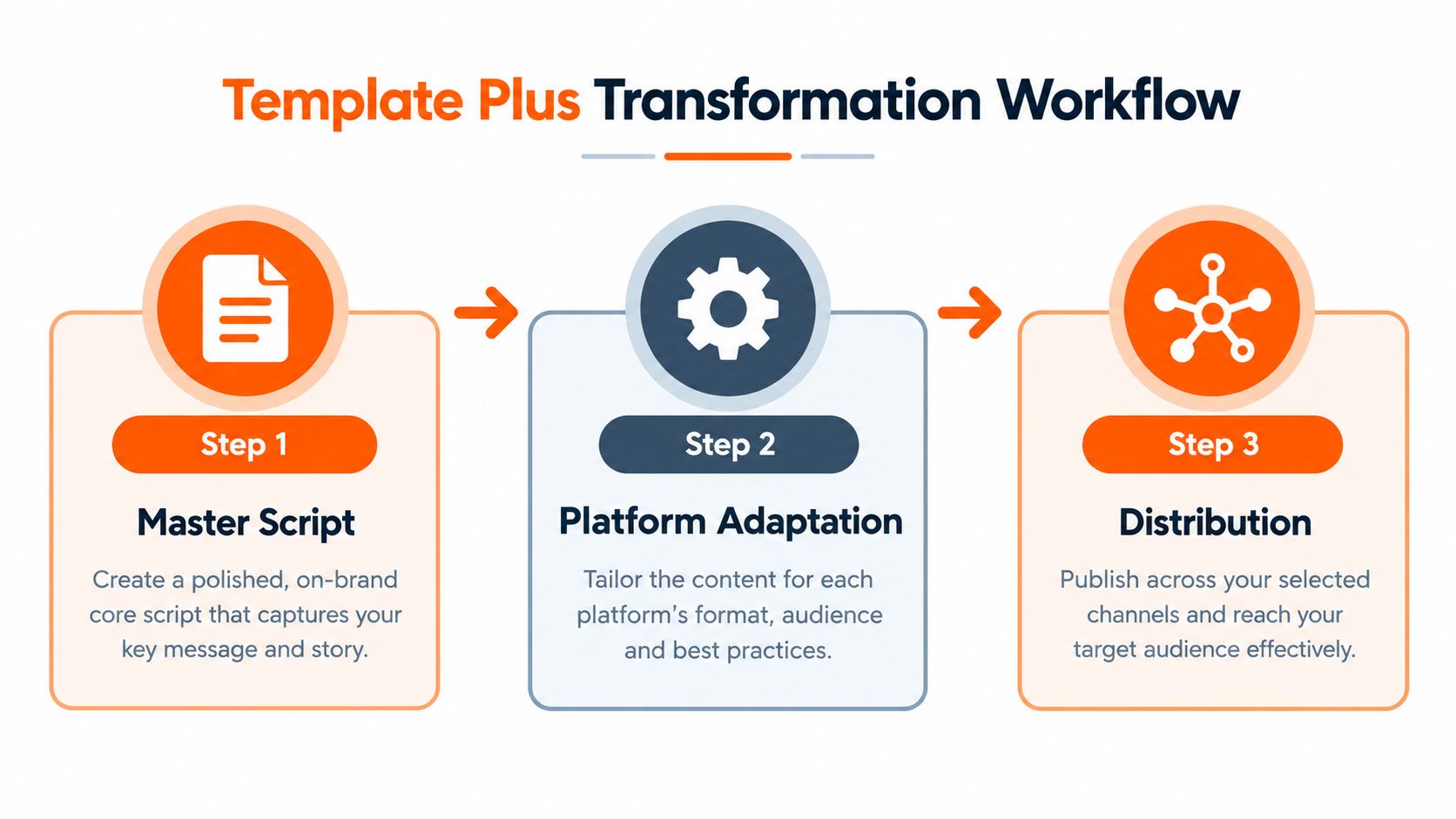
Create one master script with modular blocks, then apply transformation rules. The master should hold the central claim, proof, visual assets, and message hierarchy. Each platform version should decide what changes, not merely what gets trimmed.
<a id="separate-the-invariant-message-from-the-variable-execution"></a>
Separate the invariant message from the variable execution
Keep these elements stable:
- Core promise: the problem or outcome the video addresses.
- Proof: the demonstration, evidence, or visual result.
- Brand truth: claims and product details that must remain accurate.
- Next action: the desired response, adjusted for context.
Change these elements deliberately:
- Opening line: rewrite it to match the platform's viewing context.
- Scene density: use more frequent visual changes for scroll environments and longer demonstrations for instructional cuts.
- Framing: protect faces, products, and text when moving between vertical, square, and widescreen layouts.
- Captions: shorten lines, reposition them, and keep key words away from interface controls.
- CTA: invite a comment, profile visit, click, save, or purchase depending on the objective.
TikTok and Reels often benefit from a direct, conversational opening and visible human action. YouTube Shorts can use the same core idea, but the title and first spoken line should work together rather than repeat one another. Paid ads need earlier product clarity and a next step that makes sense without relying on an existing relationship.
<a id="design-blocks-that-survive-trimming"></a>
Design blocks that survive trimming
Write the script in detachable units: hook, setup, proof, objection, demonstration, recap, and CTA. Each block should make sense on its own and have a clear entry and exit point. That lets an editor remove the objection block for a fast awareness cut or move the proof earlier for a conversion variant without rewriting the entire piece.
Keep alternate hooks in the same document. Generate a version with a problem-led opening, another with a visual result, and a third with a question. Compare them against the same body so the opening is the variable being tested.
The transformation workflow turns repurposing into controlled adaptation. You aren't exporting one script everywhere. You're preserving the idea while changing the delivery conditions that determine whether the viewer can understand it.
<a id="automating-the-pipeline-with-ai-video-studios"></a>
Automating the Pipeline with AI Video Studios
A structured script loses much of its value when production still depends on copying text between separate voice, caption, stock, editing, and resizing tools. Each handoff introduces a chance for the narration, captions, visuals, and timing to drift apart. A unified AI studio can remove much of that mechanical friction, provided the creator still reviews the result as an editor.
The useful input isn't merely a paragraph. It's a script with scene intent, voice direction, caption priorities, visual references, and target formats. When the system can read that structure, it can assemble a draft with synchronized narration, captions, music, and visual assets instead of treating every component as an unrelated task.
<a id="automate-assembly-not-judgment"></a>
Automate assembly, not judgment
AI is well suited to repetitive production work:
- Script variations: produce alternate hooks, lengths, tones, and CTAs from the same message.
- Voiceover: generate narration and test pacing before a final performance is approved.
- Visual assembly: match scenes or generated assets to individual script blocks.
- Captions: create subtitles, then revise line breaks for readability and emphasis.
- Format conversion: reframe compositions for vertical, square, and widescreen delivery.
- Localization: translate and re-voice approved versions while preserving the original structure.
The creator still needs to check whether the chosen visual proves the spoken claim, whether the first frame communicates without sound, and whether the CTA matches the audience's intent. Automation can make a weak decision faster. It can't decide what the viewer should care about.
<a id="use-one-review-loop"></a>
Use one review loop
A practical workflow starts with the master AV script, generates a rough voice and visual cut, and then reviews the result in three passes. First, check message clarity. Second, check retention pressure, especially the opening, transitions, and moments where the screen stops changing. Third, check technical delivery, including captions, safe framing, pronunciation, and platform-specific exports.
ClipNova's automated video production workflow fits this consolidated approach by bringing scripting, voiceover, visuals, captions, music, and export preparation into one production environment. Its documented toolset includes prompt-based video creation, talking avatars, AI-generated voiceovers, automatic subtitles, multi-aspect exports, and variant generation. Treat those capabilities as a production layer around your editorial system, not as a replacement for it.
The strongest pipeline is the one that keeps the creative decision visible. Start with a clear promise, map it in AV format, create platform variants through explicit rules, and let automation handle the repetitive assembly. That gives the editor more time to improve the idea instead of repairing avoidable handoff errors.
Turn your next idea into a master AV script, then create platform-specific variants with ClipNova's tools for scripting, voiceover, visuals, captions, and multi-format export. Visit ClipNova to build a reviewable draft and move from approved script to publish-ready video in one workspace.
Ready to ship your own?
Start creating viral videos with AI in under twenty minutes, no credit card required.