
A creator has a birthday post due, a reunion reel half-edited, or a friendship campaign that needs to feel warm without looking staged. The hard part isn't finding any footage of people together. It's finding a clip with the right emotional detail, a clear license, and enough flexibility to become more than one post.
For video clips friendship projects, compare sources by scene specificity, visual quality, licensing clarity, and reuse potential. A quick stock-footage test can reveal whether a concept works before you invest time in a script, voiceover, captions, music, and alternate aspect ratios. Video can also complement other ways friends stay in touch: the American Friendship Project found that video calls sat within a broader mix of in-person conversation, voice calls, texting, and social-media contact, rather than replacing them (2024 American Friendship Project findings).
Choose footage that makes the friendship recognizable without a long explanation, then shape it for the audience and platform. A lighthearted clip might become a celebratory reel, while the same source footage, edited with a quieter voiceover, could support a post about checking in or rebuilding connection. For ideas that bring people together offline, see these community building activities for adults.
Table of Contents
- 1. Pexels
- 2. Pixabay
- 3. Adobe Stock
- 4. Shutterstock
- 5. iStock
- 6. Getty Images
- 7. Storyblocks
- Video Clip Friendship Comparison: 7 Platforms
- Turn One Friendship Clip Into a Reusable Content System
<a id="1-pexels"></a>
1. Pexels
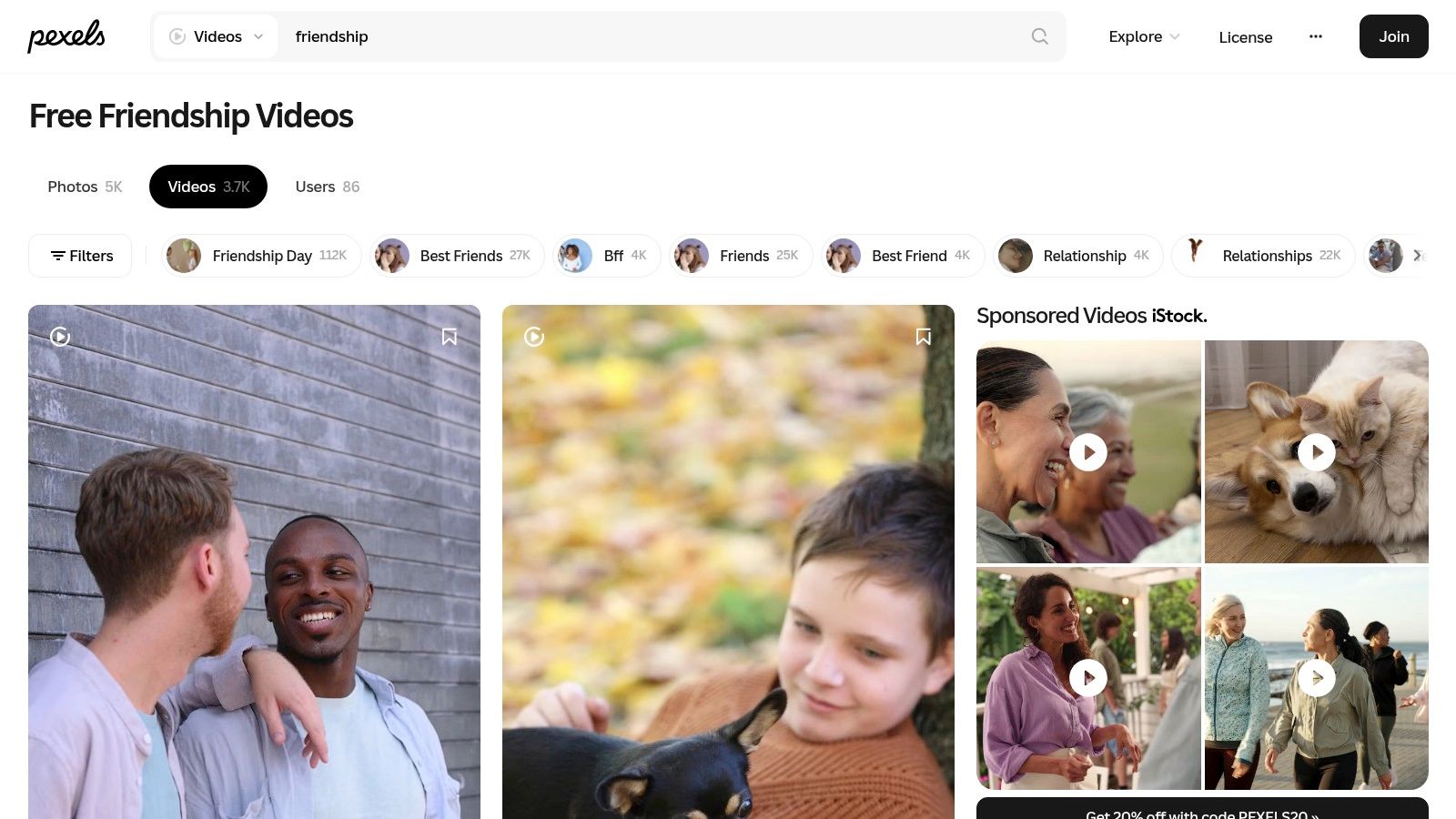
When the brief is simple and the budget is tight, start with Pexels friendship videos. The free library offers everyday scenes of friends talking, spending time outdoors, and gathering. That natural, familiar footage can suit a casual social post better than highly polished scenes that feel like an advertisement.
<a id="best-for-low-cost-social-edits"></a>
Best for low-cost social edits
Pexels allows free downloads without required attribution, and its license permits commercial use in many ordinary creative projects. You can edit clips into a larger work, which makes the library useful for social videos, creator posts, and budget-conscious campaign drafts. Read the Pexels license before publishing, particularly if a recognizable person, logo, or brand appears in the footage.
The trade-off is non-exclusivity. Another creator can use the same scene, so a downloaded clip shouldn't carry the whole identity of a campaign. Look for specific gestures or settings, then add your own hook, narration, captions, and visual treatment. A clip of friends walking outdoors, for example, could open a post about making time for an old friend, while a tighter crop and different caption could work for a story-format check-in.
Practical rule: Treat free stock as raw material, not a finished post. The edit, message, and context should make the final piece distinct.
Pexels footage can also help you test a script before generating supporting visuals. Use ClipNova's free AI video tools to explore a complementary visual approach, then compare it with the stock-footage version. Don't redistribute an unaltered clip as a standalone asset, and check whether additional permissions are needed for identifiable people or protected marks.
<a id="2-pixabay"></a>
2. Pixabay
Need more than footage for a friendship edit? Pixabay's friendship video search brings video together with other media categories, including music and illustrations. That can make it a convenient starting point for a mood-driven edit, especially when you're assembling a rough concept and want to explore several kinds of assets in one place.
<a id="useful-for-building-a-broader-edit"></a>
Useful for building a broader edit
Some clips are available in HD or 4K, but the available resolution depends on the individual asset. Check the content page before planning a crop or a multi-format export. Community-contributed footage also varies in style, framing, and production quality, so preview the actual clip rather than assuming every result will fit a polished campaign.
A free download and a license that permits modification and commercial use can make Pixabay a practical alternative to paid stock, subject to the site's terms and any applicable third-party rights. Recognizable people, brands, and other protected material can involve separate permissions. The Pixabay Content License is a useful point of reference, but it doesn't remove the need to assess the rights and context attached to a particular asset.
Here, visual consistency takes a little more work. If a video has a casual phone-camera look and the accompanying illustration is highly stylized, use one as a brief accent rather than forcing both to carry equal weight. A friendship montage can pair a single illustrative title card with live-action footage, then use music and on-screen text to connect the scenes.
A collection of available assets isn't automatically a coherent story. Choose a visual style first, then use only the media that supports it.
For an image-led concept, you can turn a still into a moving visual with ClipNova's picture-to-video workflow. That's useful when the footage search gives you the right feeling but not the exact scene. Check the license and asset details before publishing or repurposing the finished edit.
<a id="3-adobe-stock"></a>
3. Adobe Stock
When a production already uses Adobe apps or needs a mix of stock media, Adobe Stock's friendship video collection is a natural place to search. Its catalog includes searchable HD and 4K footage, along with images, templates, and audio. Subscriptions and credit packs offer different ways to buy, while business and enterprise options serve larger production needs.
<a id="convenient-for-connected-production-workflows"></a>
Convenient for connected production workflows
The main advantage is sourcing convenience. If an editor is already building a project in Adobe software, finding footage and other production assets within the same ecosystem can help keep the workflow organized. Credit packs may also suit occasional projects better than an ongoing subscription, while regular production teams may prefer a plan that supports repeated asset use.
That convenience has a cost: pricing and licensing depend on the plan and asset. Some subscriptions carry annual commitments and cancellation terms, and premium or extended-use needs may add expense. Review the purchase terms against the intended distribution before making the edit, especially when a friendship clip will appear in advertising or be reused across multiple placements. The Adobe Stock licensing overview outlines the framework, but the specific asset and plan still matter.
A practical edit starts with the purpose, not the prettiest preview. For a brand post about community, search for scenes that show active participation rather than generic smiling faces. Use the strongest shot as the opening, keep the message legible over the image, and save alternate cuts for a story, a reel, and a wider placement.
This library makes more sense when a project needs variety or the team already works in Adobe's tools. For a one-off clip on a strict budget, free libraries may be enough. For a campaign that needs consistent art direction and several asset types, paid sourcing can reduce the hunt for complementary visuals, provided the license matches the campaign.
<a id="4-shutterstock"></a>
4. Shutterstock
For recurring production or a clearly defined one-off project, Shutterstock's friendship video search offers paid footage with multiple purchase routes. Monthly video subscriptions may suit regular downloading, while one-off video packs can work for a project that doesn't justify a recurring plan. Asset pages show details such as resolution and format, so you can screen the technical fit before buying.
<a id="a-choice-between-recurring-access-and-one-off-use"></a>
A choice between recurring access and one-off use
Shutterstock's range of options is useful, but it also means the buyer has to match the purchase to the actual workflow. Subscription downloads are governed by the selected plan, and the applicable license should be checked against the intended use. A clip for a social post and a clip used in a broader paid campaign may require different scrutiny.
A good search strategy is to start with the relationship, not just the keyword. Try terms that describe the moment you need, such as friends laughing, talking, traveling, or supporting one another. Then review the clip page for format and resolution, and confirm that the footage's setting, cast, and mood fit the message. A relaxed conversation may feel more credible for a supportive check-in than a highly staged group celebration.
Use the purchase route that matches the project. A video pack can be more sensible than a subscription for occasional work, while frequent production calls for a closer look at plan limits and terms.
Once you have the footage, extract a distinct moment for each post rather than using the entire clip everywhere. A close crop may make a strong vertical hook, while a wider frame can preserve the group dynamic in a horizontal edit. For a simple workflow to combine stills and footage, ClipNova's guide to adding a photo in a video can help you build a more personal sequence. Check the exact license before publishing.
<a id="5-istock"></a>
5. iStock
A broad search for friendship can return scenes that look similar but communicate very different relationships. iStock's friendship video collection helps narrow the search through related themes and individual clip descriptions. Explore ideas such as friends talking, laughing, hugging, traveling, or gathering, then assess the setting and group dynamic before you buy.
<a id="better-suited-to-a-specific-scene"></a>
Better suited to a specific scene
The value here is the opportunity to find a more precise fit than “people smiling together.” A post about an old friendship might need an intimate conversation, while a travel reel needs movement and a shared setting. Clip titles and descriptions can help screen results before purchase, saving time when the creative brief already identifies the scene.
iStock footage is paid, and the price and license depend on the selected asset and its use. Don't assume a clip's presence in a search result means it's suitable for every channel or campaign. Review its details, consider whether any recognizable people or protected elements appear, and verify the terms for the project before building a finished edit around it.
The source works best when you arrive with a visual brief. Define what the audience should notice first, then look for footage that shows that action clearly. For example, a reunion announcement can begin with the moment of recognition, followed by a short caption that identifies the occasion. If the clip only shows a generic group, the voiceover and edit may have to do too much explanatory work.
Search refinement won't replace a strong editorial choice. If two clips fit, pick the one with room for readable captions and a clean opening frame. That gives you more options for resizing, adding a voiceover, and cutting shorter versions without obscuring the faces or gestures that make the friendship legible. Compare the license and price of each candidate before settling on a final asset.
<a id="6-getty-images"></a>
6. Getty Images
When a friendship clip needs to match a detailed creative brief, Getty Images' friendship video search offers a broad paid catalog spanning everyday social scenes, travel, gatherings, and work interactions. Search refinements and related terms can lead from a general concept toward a narrower moment, while asset pages provide descriptions and licensing details.
<a id="premium-search-for-nuanced-briefs"></a>
Premium search for nuanced briefs
The related terms are particularly useful when a campaign is about more than celebration. Searching around support, shared travel, or everyday connection can reveal footage that feels more grounded than a generic montage. Getty's descriptive captions also help editors compare what happens in a clip before committing to an asset.
The trade-off is that pricing varies by asset and licensing need, and a large catalog takes careful filtering. Check the purchase details on each clip rather than assuming one license covers every planned use. Consider whether the footage will appear in a social post, a paid placement, or multiple formats, then confirm that the terms fit those plans.
For an audience-building edit, choose footage with a clear human action in the first moments. A friend offering support or two people sharing a laugh gives the viewer an immediate cue, while a wide establishing shot may need a stronger caption or voiceover to explain the point. Keep the most expressive interaction visible and avoid covering faces with text or decorative overlays.
Getty can make sense when the brief needs a specific setting or tone and the production can support premium stock purchasing. It's less suited to a fast, low-cost experiment where a free library can establish whether the idea works. Once you've found a viable scene, create distinct social cuts from meaningful moments rather than changing the crop. Confirm each asset's terms before reuse.
<a id="7-storyblocks"></a>
7. Storyblocks
Editors who download footage frequently may prefer the subscription model at Storyblocks' friendship video search. Its results include live-action and animated clips, and plans may bundle other production assets and tools. Depending on the tier, the library offers unlimited downloads, with HD and 4K footage included.
<a id="built-for-repeated-sourcing"></a>
Built for repeated sourcing
Unlimited-download plans can suit editors who source many assets across ongoing projects, since each clip isn't purchased individually. Higher tiers may add music, sound effects, and templates, while business plans have different licensing and team provisions. The plan features and license vary by tier, so verify the terms that apply to your account and intended use before publishing.
The same model can be poor value for a project that needs only one clip. A subscription adds less benefit when the team downloads infrequently, and the right plan depends on how often you produce and what rights your work requires. Compare the plan's included assets and licensing against your real production habits rather than choosing based on the search results alone.
Storyblocks' mix of animated and live-action footage can support different treatments of the same friendship idea. Live action may feel more personal for a reunion or tribute, while animation can help explain a social prompt without implying that a specific real group is involved. Keep styles consistent within an edit unless contrast serves a clear creative purpose.
A frequent-download workflow can also support a repeatable content system. Save a small set of clips around celebration, support, humor, and shared adventure, then pair each with a distinct hook and caption. Use the strongest moments for separate reels and adapt the framing for other placements. Before publishing or reusing an asset, confirm the applicable plan and license.
<a id="video-clip-friendship-comparison-7-platforms"></a>
Video Clip Friendship Comparison: 7 Platforms
| Library | 🔄 Acquisition Complexity | ⚡ Cost / Resource Needs | 📊 Available Footage | ⭐ Key Advantage | 💡 Ideal Use Case |
|---|---|---|---|---|---|
| Pexels | Simple keyword and tag search | Free; no subscription required | Everyday friendship scenes | Straightforward licensing for many projects; no attribution required | Budget-conscious social and web videos |
| Pixabay | Simple search; clip options vary | Free; no subscription required | Friendship clips, some in HD or 4K; other media also available | Free downloads and a range of media types | Projects needing free footage alongside music or illustrations |
| Adobe Stock | Search and purchase by subscription or credits | Paid; cost and terms depend on plan and asset | Large selection of HD and 4K footage, plus other stock assets | Integrates conveniently into Adobe-centered workflows | Editors sourcing multiple production assets |
| Shutterstock | Search, then choose a subscription or video pack | Paid; subscription limits depend on plan | HD and 4K clips with resolution and format details | Video packs offer a one-off purchase option | Regular stock users or occasional projects needing paid footage |
| iStock | Search specific themes and review clip descriptions | Paid; price and license vary by asset and use | Varied scenes, settings, ages, and group compositions | Descriptions help screen clips for a specific scene | Projects needing a particular friendship scenario |
| Getty Images | Broad search with refinements and related terms | Paid; pricing varies by asset and licensing needs | Wide range of social, travel, gathering, and work scenes | Related terms support exploration of narrower concepts | Projects requiring a broad premium-oriented collection |
| Storyblocks | Search within a subscription library | Subscription; plan features and terms vary | Live-action and animated clips, with HD and 4K options | Unlimited-download plans can suit frequent asset sourcing | Creators who download footage and other production assets regularly |
<a id="turn-one-friendship-clip-into-a-reusable-content-system"></a>
Turn One Friendship Clip Into a Reusable Content System
The strongest approach isn't downloading a clip and posting it once. Start by naming the emotion the piece needs to communicate, such as celebration, support, shared adventure, inside humor, or reunion. Then choose footage that conveys that feeling without asking the viewer to decode a long setup.
Build the edit around one clear moment. Open with the most recognizable gesture or reaction, add a short hook, and use captions that invite a response without putting words in a friend's mouth. A low-pressure prompt can encourage viewers to tag someone, share a memory, or check in directly. Make sure the clip's tone fits the message: a jokey montage can feel out of place beside a serious invitation to reconnect.
<a id="repurpose-the-idea-not-just-the-crop"></a>
Repurpose the idea, not just the crop
A useful content system gives each version a reason to exist. Trim distinct moments for individual reels, resize the strongest assets for 9:16, 1:1, and 16:9, and adapt the opening line to the audience rather than merely copying the same edit into a new frame. If a campaign needs wider reach, a translated voiceover and localized captions can help the message travel without reshooting the footage.
ClipNova can assemble a prompt, script, visuals, voiceover, captions, music, and platform-ready variants in one workflow. It also supports translation and re-voicing, which can help creators localize a friendship message while keeping the underlying concept consistent. Use generated elements to complement licensed footage, not to blur where real people, recorded moments, or generated visuals came from.
Before publishing, verify the stock license and any relevant third-party rights. Avoid recognizable brands without clearance, and don't assume a clip featuring a friend is automatically okay to share publicly. Ask permission when real people appear in your own footage, and consider the audience, tags, and context in which the post may circulate.
Finally, test alternative hooks without changing every other element at the same time. Keep the footage and edit stable while you compare opening lines, then use the response to guide the next revision. That makes the production process more repeatable and keeps the focus on what gives a friendship clip its value: a recognizable moment, presented with care.
Turn your friendship-footage idea into a short video with a script, voiceover, captions, music, and versions ready for different platforms. Visit ClipNova to create and adapt friendship clips for social posts, reels, ads, or localized content.
Ready to ship your own?
Start creating viral videos with AI in under twenty minutes, no credit card required.