

A paid social team can now generate ad concepts faster than its approval process can review them. That shift is why the category deserves a different buying lens. It's not enough for a text to video app to make a clip. It has to make clips that are fast to iterate, stable enough to reuse, and safe enough to publish.
The market data makes that clear. One widely cited estimate puts the global AI video generator market at USD 716.8 million in 2025 and USD 847 million in 2026, with a projection to USD 3.35 billion by 2034 at an 18.8% CAGR according to AI video generation market statistics compiled by Morphed. That's no longer an experimental edge case. It's a real software category with budget owners, workflow expectations, and procurement questions.
Table of Contents
- Introduction Why Choosing a Text to Video App Matters Now
- What a Text to Video App Actually Does
- How to Evaluate Any Text to Video App
- Detailed Comparison of Text to Video App Types
- Real World Use Cases and When to Use Each Approach
- Where ClipNova Fits in the Text to Video Landscape
- Recommendation How to Choose the Right Text to Video App
<a id="introduction-why-choosing-a-text-to-video-app-matters-now"></a>
Introduction Why Choosing a Text to Video App Matters Now
Most buyers start with the wrong question. They ask which tool makes the prettiest output from a prompt. Marketing teams usually need something narrower and more demanding. They need a system that can turn a campaign idea into multiple usable assets before the media buyer moves on to the next test.
That difference matters because social content and paid ads tolerate different kinds of failure. A surreal transition or odd hand movement might be acceptable in an organic Reel. The same defect can sink a customer-facing ad once legal, brand, or platform review gets involved. Teams that learn this late often end up with a pile of impressive demos and very few approved deliverables.
<a id="the-operational-shift-behind-the-category"></a>
The operational shift behind the category
A modern text to video app sits inside a production bottleneck that used to require separate writing, editing, voiceover, and resizing tools. Buyers aren't only replacing manual labor. They're trying to reduce coordination overhead.
Three practical pressures are driving adoption:
- Content volume pressure: Creators and brands have to publish more short-form video across more placements.
- Variant pressure: Performance teams need multiple hooks, lengths, and aspect ratios for testing.
- Headcount pressure: Few teams get more editors just because channel demand rises.
That's why this category has moved into operations. It's also why generic feature roundups rarely help.
The real purchase decision isn't “Can this app generate video?” It's “Can my team trust the output enough to use it in the workflow that actually matters?”
<a id="who-should-evaluate-these-tools-carefully"></a>
Who should evaluate these tools carefully
This matters most for teams with commercial deadlines:
- Performance marketers testing hooks, offers, and audience angles
- Agencies juggling brand standards across clients
- E-commerce teams producing constant product and UGC-style variants
- Creators who need speed but can't afford endless cleanup
- Global teams localizing the same concept across markets
A useful comparison has to judge reliability, speed, continuity, and localization together. That's where most buying mistakes happen.
<a id="what-a-text-to-video-app-actually-does"></a>
What a Text to Video App Actually Does
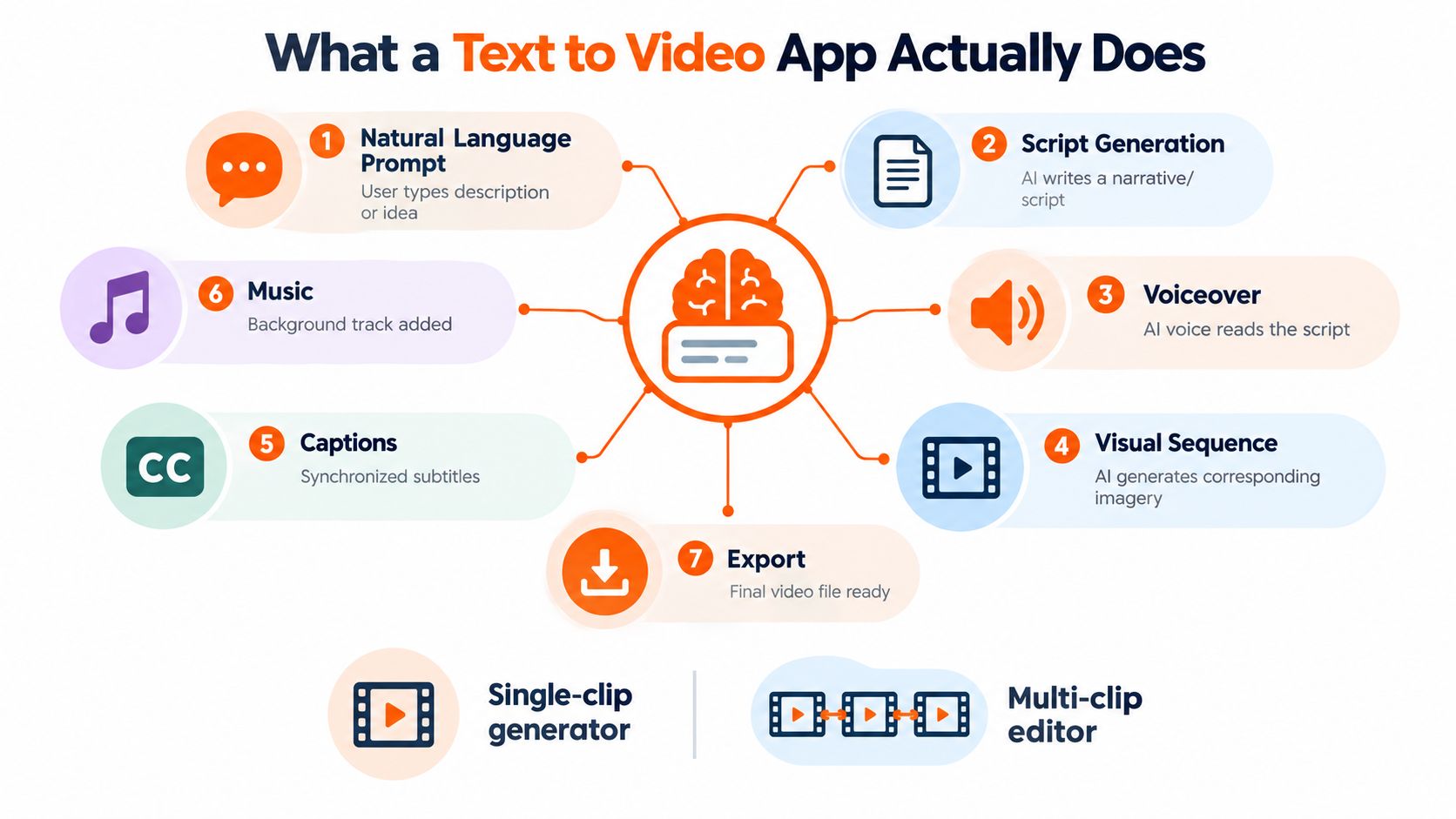
At its simplest, a text to video app turns a written prompt into a rendered clip. In practice, the better products do much more than clip generation. They assemble a mini production pipeline from script to narration to visuals to captions to export.
Some apps stop after one generated scene. Others behave more like lightweight studios that can produce a finished asset in one workflow.
<a id="from-prompt-to-asset"></a>
From prompt to asset
Most tools follow the same broad sequence:
-
Prompt input
You describe an idea, product, scene, offer, or topic in natural language. -
Script or scene planning
The app decides what should happen in each shot, or writes a voiceover-ready script. -
Visual generation
It creates footage, image sequences, motion scenes, or a combination of generated and stock-style visuals. -
Voice layer
Some apps add AI narration, avatar speech, or synced audio. Others leave sound to external tools. -
Captions and timing
Better products auto-time captions to voice and scene changes. -
Music and pacing
Background tracks and timing adjustments shape whether the result feels like a draft or a publishable short. -
Export and resizing
The final asset gets rendered for vertical, square, or horizontal formats.
If you want a broader primer on these workflows, the Adwave text to video AI guide is useful because it frames prompt-based generation as part of a marketing production stack rather than as a novelty feature.
<a id="what-these-apps-dont-do-automatically"></a>
What these apps don't do automatically
Buyers often overestimate automation. A text to video app doesn't remove judgment. It shifts where judgment happens.
Human input still matters most in these areas:
- Prompt precision: weak prompts produce generic scenes
- Brand control: logos, claims, colors, and tone still need review
- Scene continuity: character and object consistency often need checking
- Commercial suitability: a clip can look good and still be unusable in an ad account
<a id="single-clip-generator-versus-studio-workflow"></a>
Single-clip generator versus studio workflow
The biggest product split is structural.
A single-clip generator is useful when you need one short visual idea fast. It's good for concepting, moodboards, transitions, and B-roll experiments.
A multi-step studio is better when the output needs narration, subtitles, music, aspect-ratio variants, and export-ready packaging in one place.
That distinction sounds minor until your team starts making revisions. If every prompt has to leave the app for editing, voiceover, and resizing, the apparent speed gain disappears.
<a id="how-to-evaluate-any-text-to-video-app"></a>
How to Evaluate Any Text to Video App
The benchmark conversation has matured. MLCommons selected VBench as the official dataset and accuracy framework for its text-to-video inference benchmark, and recent benchmark writeups note that evaluation now often targets 30-second clips instead of the 4-second limits common in 2025 according to MLCommons on text-to-video inference benchmarking. That change matters because real buyers don't publish benchmark snippets. They publish sequences long enough to reveal continuity problems.
<a id="text-to-video-app-evaluation-scorecard"></a>
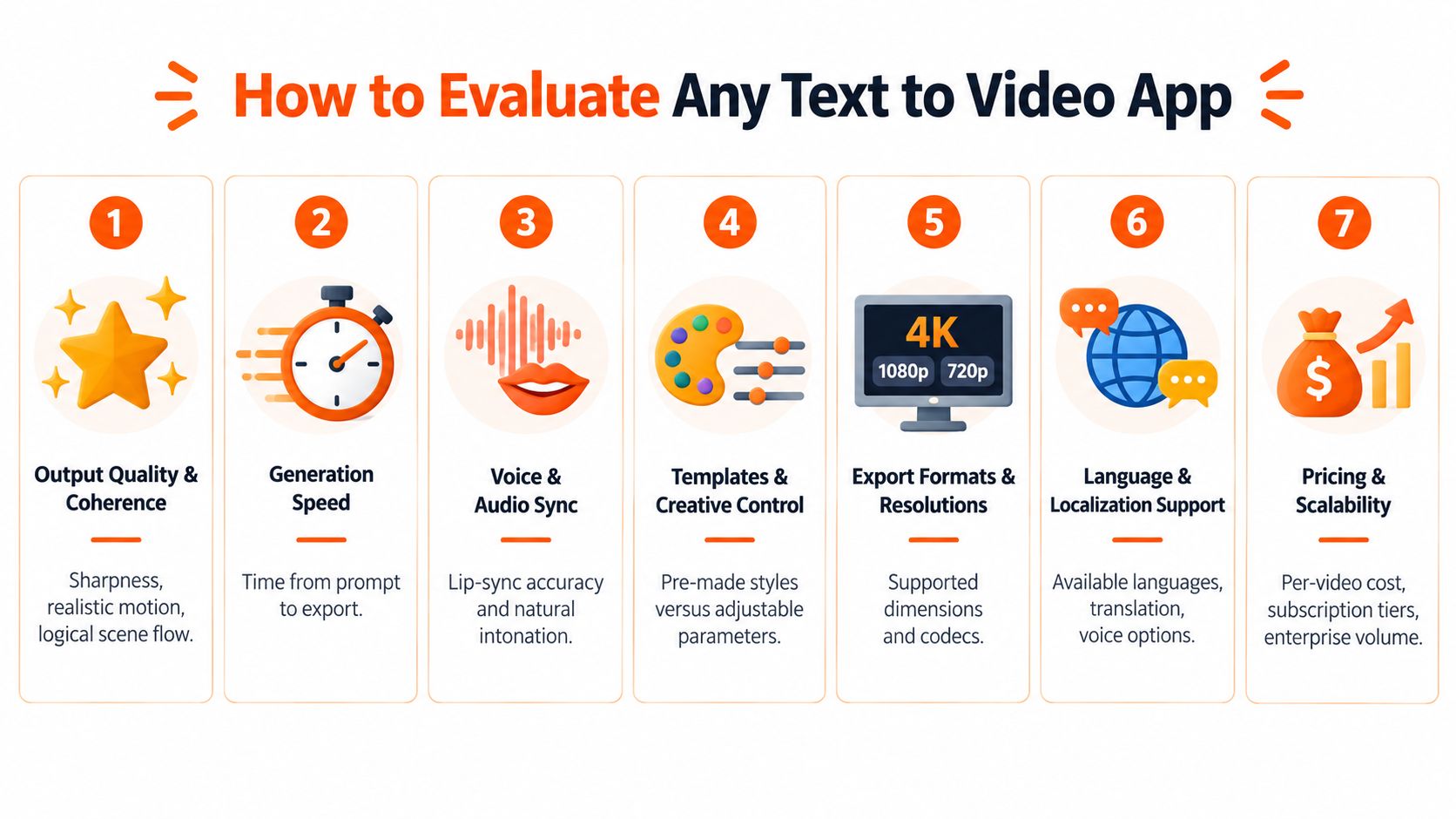
Text to Video App Evaluation Scorecard
| Evaluation Criterion | What to Test | Strong Signal |
|---|---|---|
| Output Quality and Coherence | Use one prompt with motion, people, product detail, and background changes | Scenes stay believable across the full clip, not just the opening seconds |
| Generation Speed | Measure time from prompt submission to export-ready draft | Fast enough to support back-to-back concept testing without breaking flow |
| Voice and Audio Sync | Check pacing, pronunciation, pauses, and scene alignment | Voice feels natural and lands on visual beats |
| Templates and Creative Control | Try both guided templates and freeform prompting | You can steer style without getting trapped in rigid presets |
| Export Formats and Rights | Review resolutions, aspect ratios, watermark rules, and usage terms | Clear commercial usage and direct export to required formats |
| Language and Localization Support | Test translation, re-voicing, subtitle behavior, and cultural fit | Localized outputs don't read like literal machine translation |
| Pricing and Scalability | Compare cost structure against expected iteration volume | The model supports frequent testing without workflow fragmentation |
<a id="seven-checks-that-reveal-real-quality"></a>
Seven checks that reveal real quality
Output quality and coherence comes first because prompt adherence alone isn't enough. A good app keeps subjects recognizable, motion plausible, and scene logic intact from start to finish.
Generation speed determines whether the tool fits production or just inspiration. Slow render cycles kill ad iteration because nobody waits calmly through repeated revisions if each prompt feels like a batch job.
Voice and audio sync matters more than many buyers expect. A polished visual paired with stiff narration still looks unfinished.
Practical rule: Evaluate the full asset path, not the model demo. Teams publish exports, subtitles, resized versions, and localized variants. That full chain is the product.
<a id="the-overlooked-buying-criteria"></a>
The overlooked buying criteria
Some categories get less attention in public comparisons, even though they decide whether the app survives procurement.
- Templates and creative control: Teams need both speed and steering. If a tool only works through templates, it may collapse on unusual products or niche offers.
- Export formats and rights: A beautiful draft is useless if usage rights are vague or exports need extra cleanup.
- Language and localization support: Many tools look capable in demos and brittle in actual campaigns.
- Pricing and scalability: Cheap generation can become expensive if the workflow forces you into extra editing software.
<a id="what-to-test-in-a-live-trial"></a>
What to test in a live trial
Run the same brief through every product.
Use a short script with a person, a product, a claim that needs precise wording, and a version that needs localization. Then ask:
- Does the output remain stable across multiple takes?
- Can your team revise inside the same workflow?
- Do exports match the channels you buy on?
- Can legal and brand reviewers approve what the tool produces?
That last question is where many “impressive” tools fail.
<a id="detailed-comparison-of-text-to-video-app-types"></a>
Detailed Comparison of Text to Video App Types
A buyer comparing named tools too early usually gets distracted by style presets and sample galleries. The more useful comparison is by app archetype, because products in the same archetype tend to fail in the same way.
Latency also changes how these archetypes feel in practice. One 2026 API benchmark measured Kling 1.6 Pro at a p50 latency of 18.2 seconds for a 5-second 720p clip, versus 38.7 seconds for WAN 2.1 under identical prompt conditions, according to the AI API Playbook benchmark on text-to-video latency. For marketers, that gap isn't academic. It decides whether variant testing feels interactive or sluggish.
<a id="text-to-video-app-archetypes-compared"></a>
Text to Video App Archetypes Compared
| App Type | Best For | Key Limitation |
|---|---|---|
| Prompt-only clip generators | Fast visual ideation, mood shots, B-roll concepts, social experiments | Weak continuity across longer edits and limited publish-ready packaging |
| Avatar-led presenters | Explainers, internal training, script-led announcements, talking-head formats | Can feel formulaic and less suitable for visually dynamic ad creative |
| Ad-focused UGC studios | Rapid paid social variants, product hooks, UGC-style messaging, offer testing | Style range can narrow around conversion patterns rather than broader storytelling |
| Full end-to-end studios | Teams that need script, voice, visuals, captions, music, and exports in one workspace | More features can be unnecessary if you only need a single short clip |
<a id="prompt-only-clip-generators"></a>
Prompt-only clip generators
These are the fastest route from idea to footage. They're useful when a team wants scene options, not a finished ad.
Their trade-off is structural. Once you need subtitles, a voice layer, multiple scenes, or channel-specific exports, the workflow often spills into other tools. That's manageable for creators who enjoy editing. It's less appealing for busy campaign teams.
<a id="avatar-led-presenter-tools"></a>
Avatar-led presenter tools
These products work when the message is more important than cinematic motion. Policy explainers, software tutorials, onboarding snippets, and simple announcements fit well.
Their weakness is sameness. If your goal is scroll-stopping paid creative, a synthetic presenter alone may not carry enough variety unless you mix in product shots, overlays, and cutaways.
<a id="ad-focused-ugc-studios"></a>
Ad-focused UGC studios
This archetype exists for direct response. The value isn't realism in a filmmaking sense. It's producing many ad-ready permutations with different hooks, CTAs, and framing.
If your use case centers on video ads for Meta and TikTok, this category often maps better to the job than generic cinematic generators because it starts from campaign variation rather than from pure scene generation. Teams exploring broader workflow automation often also look at operational guides like automated video production systems for marketing teams to understand where generation ends and production management begins.
<a id="full-end-to-end-studios"></a>
Full end-to-end studios
One mention belongs: ClipNova fits this archetype. It combines prompt-based generation with scripting, voiceover, visuals, captions, music, and multi-format export in one workspace, with options such as Ultra mode, multilingual voiceover, and paid-plan commercial exports based on the publisher information provided above.
The strength of this category is consolidation. The weakness is that not every buyer needs consolidation. If your team only needs a striking five-second concept clip, a full studio can be more product than job.
Fast generation only matters if the result can move directly into review, resizing, localization, or iteration. Otherwise the bottleneck just shifts downstream.
<a id="real-world-use-cases-and-when-to-use-each-approach"></a>
Real World Use Cases and When to Use Each Approach
The trust gap changes the use-case map. Independent commentary says most AI video tools still struggle beyond 30 to 60 seconds of coherent footage, with recurring issues in character consistency, environmental continuity, and physics violations, while 78% of consumers trust videos with real people more than AI-generated content according to IS4 on what works and what doesn't in AI video generation. That pushes the smartest teams toward selective use, not blanket replacement.
<a id="creators-and-solo-operators"></a>
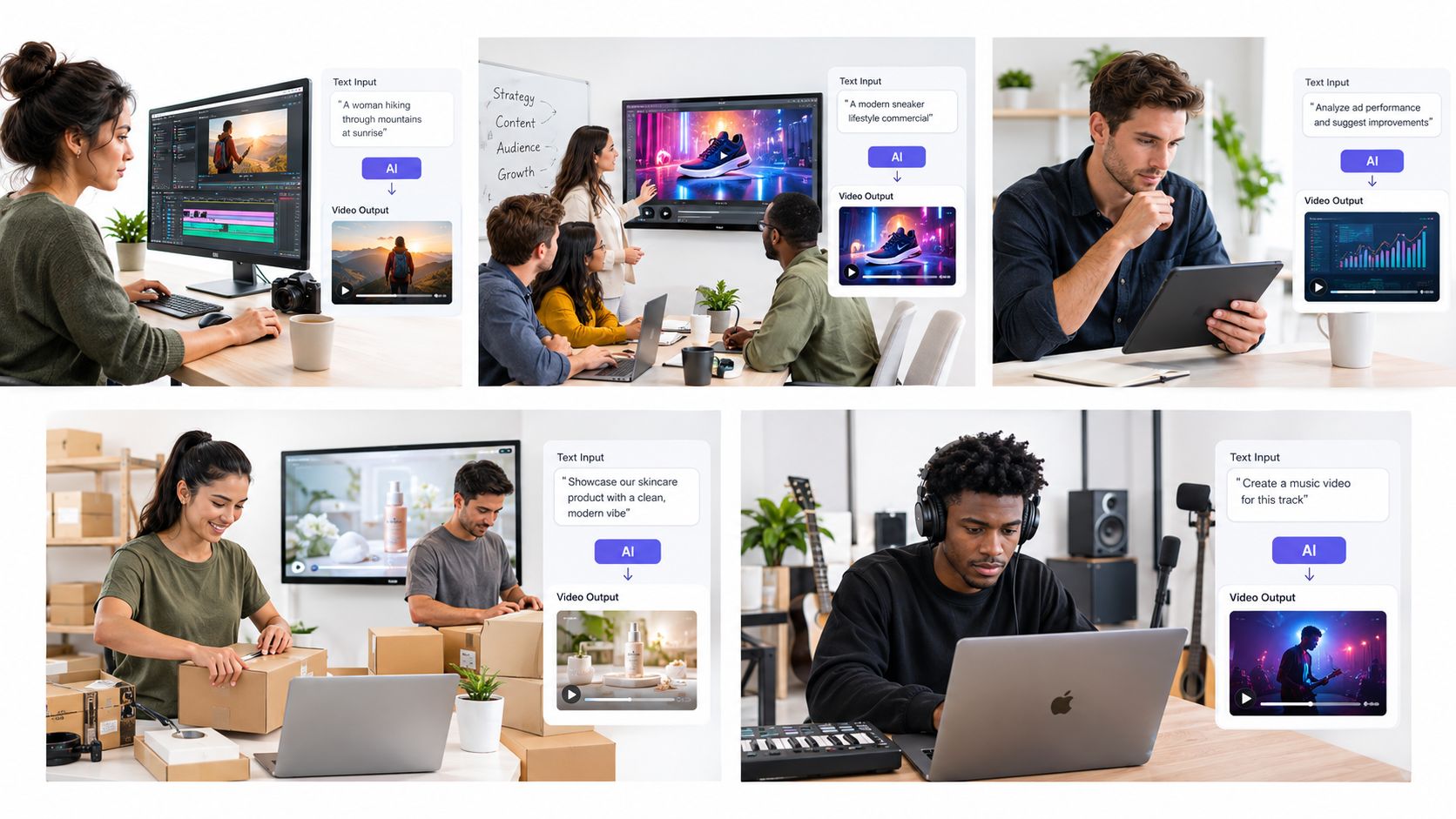
Creators and solo operators
A creator usually benefits most from using AI for speed and consistency of publishing, not for replacing their identity. Prompt-based tools work well for background visuals, intro sequences, list-based explainers, and topic-led shorts.
If you're tuning prompts for that style of output, this practical guide to writing better text-to-video prompts is useful because prompt structure often matters more than adding complexity.
<a id="agencies-and-client-teams"></a>
Agencies and client teams
Agencies need repeatability. They often use synthetic video best during concept approval, storyboard generation, and pre-production mockups.
For paid campaigns, many agencies stop short of fully synthetic hero ads unless the brand explicitly wants that aesthetic. A mixed workflow is usually safer: AI for concept frames, B-roll augmentation, cutdown variants, and localizations. Human footage for the main trust-bearing scenes.
<a id="performance-marketers-and-growth-teams"></a>
Performance marketers and growth teams
This group gets the clearest value from rapid iteration. They can test opening hooks, product framing, offer language, and visual pacing without booking a shoot for every concept.
The caveat is simple. Use full synthetic output when the creative brief tolerates stylization or abstraction. Use AI-assisted augmentation when the offer depends on authenticity, testimonial feel, or product credibility.
For paid acquisition, the highest-value use case is often not “generate the final ad.” It's “generate enough credible variants to discover what deserves human production budget.”
<a id="e-commerce-teams-and-musicians"></a>
E-commerce teams and musicians
E-commerce teams often sit between catalog volume and creative fatigue. Text to video apps help with product explainers, seasonal edits, promo cutdowns, and multilingual variations. They're less dependable when a product needs precise physical realism across many shots.
Musicians and producers can get more out of stylized visualizers, lyric-led edits, teaser loops, and mood-driven releases than from realism-heavy prompts. In music marketing, aesthetic flexibility matters more than strict continuity, so these tools often feel more natural there.
The common pattern is clear. The strongest workflows use synthetic video where imperfections are acceptable and human-captured footage where trust is carrying the conversion.
<a id="where-clipnova-fits-in-the-text-to-video-landscape"></a>
Where ClipNova Fits in the Text to Video Landscape
Adoption has moved into mainstream production. Roughly 63% of video marketers now use AI to help make their videos, according to Gradually's roundup of AI video statistics. That doesn't mean every team needs the same product shape. It means the bar has shifted from novelty to workflow fit.
<a id="where-the-product-shape-makes-sense"></a>
Where the product shape makes sense
A tool like this fits buyers who want one workspace rather than a chain of separate apps. Based on the publisher information, that includes teams that need:
- Prompt to finished asset: script, visuals, voiceover, captions, music, and export in one flow
- Multilingual production: voiceover and translation across many languages
- Aspect-ratio flexibility: vertical, square, and horizontal outputs from the same source
- Commercial-ready exports: watermark-free higher-resolution output on paid plans
That combination is especially relevant when a team's bottleneck isn't ideation alone. It's packaging, revision, and distribution.
<a id="where-it-fits-less-cleanly"></a>
Where it fits less cleanly
Not every workflow needs a full studio.
If your job is generating a single background clip, surreal cutaway, or experimental motion element for later editing, a lightweight clip generator may be faster and simpler. Likewise, if your format is mostly a presenter reading a script, a dedicated avatar tool can be a better fit than a broader studio.
<a id="the-practical-buying-takeaway"></a>
The practical buying takeaway
The useful distinction isn't “all-in-one versus specialized” in the abstract. It's whether your team loses more time in creation or in handoffs.
If handoffs between script writing, voice, captions, and resizing are the pain point, the integrated model is compelling. If the team already has a mature post-production stack and only wants generated footage as raw material, the integration matters less.
That's the lens buyers should use. A text to video app earns its place when it removes the exact stage where your workflow currently slows down.
<a id="recommendation-how-to-choose-the-right-text-to-video-app"></a>
Recommendation How to Choose the Right Text to Video App
The final decision should start with publishing risk, not with visual wow factor. Deloitte predicts that in 2026 generative video could trigger more U.S. age-verification rules and new labeling requirements for AI content on social platforms, as explained in Deloitte's analysis of generative video disruption. So the core question becomes operational: can this app produce compliant, localized, on-brand assets without creating review friction?
<a id="choose-by-job-not-by-demo"></a>
Choose by job, not by demo
Use this decision logic:
- Choose a prompt-only generator if you need concept footage, visual experimentation, or short B-roll-like assets.
- Choose an avatar-led tool if your message is script-led and you care more about clarity than cinematic variation.
- Choose an ad-focused UGC studio if your main goal is producing many direct-response variants for paid social.
- Choose an end-to-end studio if your bottleneck spans scripting, narration, captions, resizing, and localization.
<a id="what-to-verify-before-buying"></a>
What to verify before buying
Before you commit, run one live campaign brief through the trial.
Check these points:
- Rights and disclosure: confirm commercial usage terms and any labeling obligations
- Localization reality: test an actual market-specific version, not just an English draft
- Review readiness: see whether legal or brand teams can approve exports without major cleanup
- Workflow cost: count how many other tools still have to touch the asset
For teams still deciding whether AI video should supplement or replace parts of the current process, this perspective on when to use video AI tools for free and when to move into production workflows helps separate experimentation from operational use.
Buy the tool that reduces approval risk and revision drag. Most teams already have enough ways to generate ideas. They need a reliable way to ship them.
If the app can't survive a real brief with localization, rights review, and channel-specific export needs, it isn't a production tool. It's a demo environment.
ClipNova offers a text-to-video workflow that combines scripting, voiceover, visuals, captions, music, and export in one studio, which makes it relevant for teams comparing integrated production tools against single-purpose generators. If your evaluation is centered on speed, multilingual output, and fewer handoffs between idea and deliverable, visit ClipNova and test it against one real campaign brief.
Ready to ship your own?
Start creating viral videos with AI in under twenty minutes, no credit card required.