
You've finished a track, chosen a trending sound, or received a client brief, but the visual side is still an empty timeline. The music already has movement, tension, repetition, and release. The challenge is turning those musical decisions into scenes that feel intentional rather than placing attractive clips over a song and hoping the edit lands.
That's where music to video AI enters. These systems analyze audio features such as beats, tempo, energy, mood, and song sections, then translate them into visual timing, motion, transitions, colors, and scenes. The useful question isn't, “Can AI generate a video from this track?” It's, “What does this track want the viewer to see, and when?”
The distinction matters for musicians, marketers, agencies, and short-form creators. A product teaser may need sharp cuts around a drop. A lyric visualizer may need readable pacing through the verse. An artist film may follow the emotional arc of the music more loosely. This guide builds the idea from the ground up, then moves into beat matching, generation workflows, sync decisions, use cases, and commercial safety.
Table of Contents
- Introduction to Music to Video AI and Why It Matters Now
- What Music to Video AI Actually Does
- How Beat Matching and Visual Generation Work Together
- How to Create Music Synced Videos With ClipNova
- Choosing the Right Sync Style for Your Track and Format
- Real World Use Cases and Sample Outputs That Inspire
- Creating With Confidence and What to Do Next
<a id="introduction-to-music-to-video-ai-and-why-it-matters-now"></a>
Introduction to Music to Video AI and Why It Matters Now
A producer exports a finished song late at night. The chorus works, the mix is ready, and the artist wants a vertical video for social channels by morning. There's no time to organize a shoot, no footage library that matches the song, and no appetite for manually marking every beat on a timeline.
A music-to-video AI tool can turn that starting point into a visual draft. You provide the audio, describe the desired world, and let the system identify rhythmic and emotional signals. It may then arrange scenes, animate images, create transitions, add captions, and prepare versions for different formats. The output still needs direction, but the first visual interpretation can arrive much faster than a blank project file.
The technology has a relatively recent history. Earlier music-to-video systems selected tracks from existing libraries through methods such as latent semantic analysis, heuristic ranking, similarity matching, and climax synchronization. A 2026 survey of generative AI for video-to-music systems describes the shift toward generative approaches as beginning around 2020, supported by new datasets and advances in AI music generation.
That shift changed the creative model. Instead of searching for an existing soundtrack that fits finished footage, a generative system can learn relationships between audio and visuals, then construct a synchronized experience around the supplied music. The tool can respond to structure, mood, and rhythm rather than treating the track as background decoration.
Demand is rising alongside the wider AI music ecosystem. Grand View Research estimated the global generative AI in music market at USD 440.0 million in 2023 and projected USD 2,794.7 million by 2030, with a projected 30.4% CAGR from 2024 to 2030 in its generative AI in music market analysis. A separate 2026 industry summary projected the AI music generator market at USD 1.98 billion in 2025 and USD 18.04 billion by 2035.
The rest of the process becomes easier once you treat music as a set of visual instructions. First, understand what the system hears. Then examine how beats become keyframes and motion. Finally, choose whether your video should follow every rhythmic accent or move according to the song's emotional shape.
<a id="what-music-to-video-ai-actually-does"></a>
What Music to Video AI Actually Does
Think of the tool as a combination of conductor, translator, and editor. A conductor doesn't make every musician play louder at the same time. The conductor listens to the whole arrangement, recognizes changes, and coordinates entrances, emphasis, and pacing. Music-to-video AI applies a similar logic to audio and images.
It begins by examining the track. The analysis can identify repeated pulses, tempo, downbeats, changes in energy, vocal presence, density, and emotional character. These signals don't automatically tell the system what story to tell, but they provide a timing and mood map.
<a id="from-sound-signals-to-visual-decisions"></a>
From sound signals to visual decisions
A practical translation might work like this:
- The listening layer detects a recurring beat and marks likely points for cuts or motion accents.
- The timing layer groups those points into phrases, so the video doesn't change scenes randomly on every isolated sound.
- The visual layer chooses movement, framing, lighting, or transitions that fit the energy.
- The narrative layer assigns visual ideas to the track's changing sections.
- The assembly layer places the generated or selected material on a timeline and aligns it with the audio.
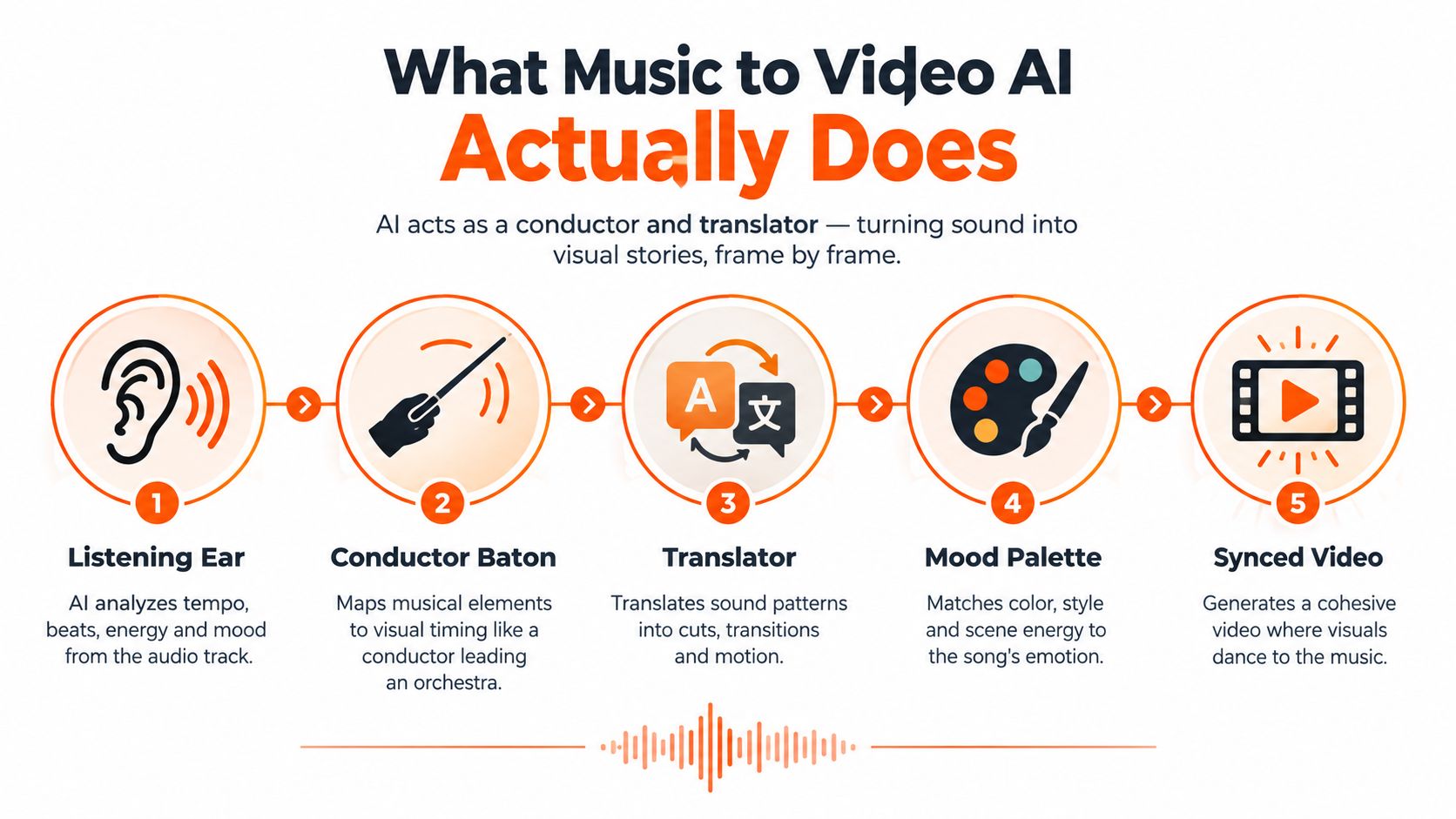
The important vocabulary is straightforward. A beat is a recurring pulse. A downbeat is a strong point that often begins a musical measure or phrase. Energy describes how forceful or active a passage feels. A visual beat is a cut, gesture, camera move, lighting change, or other visual event that gives the audience a sense of timing.
A tool can match a visual beat to a drum hit, but good interpretation goes further. If every frame reacts with equal intensity, the chorus loses its contrast. If the visuals ignore a major transition, the audience feels a disconnect even when the footage itself looks polished.
<a id="selection-is-different-from-generation"></a>
Selection is different from generation
Older recommendation-based approaches searched existing music libraries and ranked possible tracks against video content. Generative music-to-video systems reverse or combine that relationship. They can use a supplied track as a structural guide while generating visuals that respond to its rhythm and atmosphere.
That makes the system closer to a translator than a stock-footage search engine. A low, sustained vocal passage might become a slow camera push through a dim environment. A dense percussive section might become faster movement, sharper framing, or more frequent scene changes. The result depends on the prompt, the model, and the amount of human direction.
If you're also building a performance or lyric format, a practical pro-level karaoke video tutorial can help you think about timing, lyrics, and viewer readability as part of the same production problem.
Practical rule: Give the AI a visual grammar, not only a subject. “A dancer in a city” is a subject. “Handheld close-ups during the verse, wide neon movement at the chorus, and restrained dissolves during the bridge” is direction.
<a id="how-beat-matching-and-visual-generation-work-together"></a>
How Beat Matching and Visual Generation Work Together
Beat synchronization works better when the system separates timing from image generation. A direct frame-by-frame approach asks the model to invent every moment while also remembering the rhythm. As a clip becomes longer, that combination can cause drift. The visuals may remain attractive while gradually losing alignment with the music.
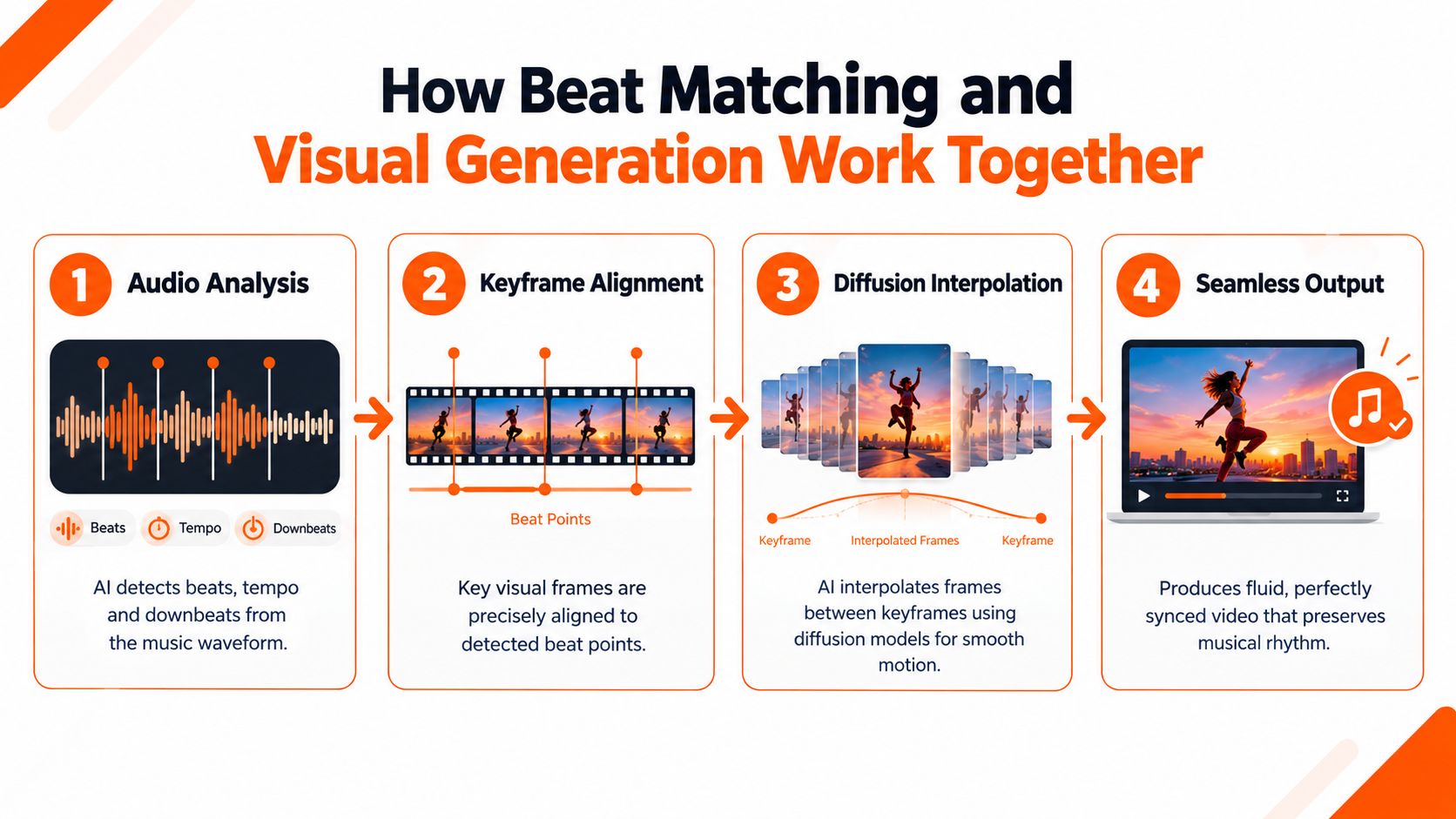
A more controlled architecture uses two stages. First, the system detects musical beats and places important visual keyframes at selected points. Second, a frame-conditioned diffusion model generates the material between those keyframes. The recent beat-aligned music-to-video framework describes this strategy as a way to preserve visual semantics while creating rhythm-aware transitions across flexible video lengths.
<a id="the-two-stage-pipeline"></a>
The two-stage pipeline
Stage one creates anchors. The audio analysis identifies beat positions, phrase boundaries, and other useful timing points. The system then assigns key visual events to those locations. A character might turn toward camera on a downbeat, a product might appear on a drop, or a new setting might begin at a section change.
Stage two fills the movement. Diffusion interpolation generates the frames between those anchors. Because the model receives conditioning from the surrounding keyframes, it has a better chance of maintaining the subject, composition, and direction of motion. The system isn't starting from scratch at every frame.
This division also gives creators more flexibility. You can change the keyframe at a chorus entrance without rebuilding the entire sequence. You can preserve a product's position while asking for more energetic motion between two cuts. You can adjust the visual intensity without abandoning the song's timing map.
<a id="how-to-judge-sync-beyond-visual-appeal"></a>
How to judge sync beyond visual appeal
A smooth-looking video can still be musically late. That's why evaluation needs beat-level measures rather than relying only on aesthetic judgment. Beats Coverage Score, or BCS, measures the fraction of musical beats represented by generated visual beats. Beats Hit Score, or BHS, measures the fraction of musical beats accurately aligned by those visual beats, as defined in the beat-based evaluation research.
You don't need to calculate those metrics manually for every social post. The concepts are still useful during review:
- Coverage: Does the visual track respond to enough meaningful beats, or does it feel static during rhythmically important passages?
- Accuracy: Do the cuts and gestures land on the beat, or do they arrive slightly before or after it?
- Hierarchy: Are the strongest visual changes reserved for the strongest musical events?
- Continuity: Does the motion between key moments preserve the subject and scene logic?
For creators using external editors, picture-to-video AI workflows can complement this process by turning selected stills or keyframes into controlled motion. The key is to treat generated movement as an interpolation problem, not as a replacement for musical judgment.
<a id="how-to-create-music-synced-videos-with-clipnova"></a>
How to Create Music Synced Videos With ClipNova
A song can change direction before the listener consciously notices it. Start by listening for those changes, then let them shape the visual plan. Mark the opening, the first rhythmic lift, the chorus, any drop or major transition, and the ending. Formal music theory is optional. What matters is a practical map of the track's energy, like a route showing where the scenery should change.
In ClipNova's Music to Video workflow, upload a song or beat and describe the visual direction in natural language. The tool applies automatic beat matching to align generated visuals with the audio. Its broader studio workflow can also bring together script elements, visuals, captions, music, and export formats in one workspace.
<a id="build-the-visual-brief"></a>
Build the visual brief
A useful prompt gives the system four kinds of information:
- Subject: Identify the person, product, environment, or abstract form that should remain recognizable.
- Style: Choose a consistent visual language, such as live-action, anime, cartoon, cinematic, editorial, or documentary.
- Movement: Describe camera behavior, subject motion, and how closely movement should respond to the rhythm.
- Structure: Explain how the intro, verse, chorus, bridge, and ending should differ.
The prompt should describe musical interpretation, not only appearance. An independent artist could request a moody night performance with restrained camera movement during the verse, more kinetic framing in the chorus, and a hazy transition into the bridge. A marketer might ask for product close-ups that hold long enough for the benefit to register, followed by sharper motion at the track's main accent.
Use the song's structure like a storyboard. A chorus may deserve larger movement, while a verse may need visual space for lyrics or a performer. The strongest beat does not always need a hard cut. Sometimes a color shift, camera move, or change in texture communicates the musical turn more clearly.
If the creative direction is difficult to phrase, this guide to writing effective text-to-video prompts shows how to turn a broad idea into concrete visual instructions.
<a id="review-the-first-assembly"></a>
Review the first assembly
Treat the first output as an interpretation draft. Watch once with the screen visible, then listen with your eyes away from the visuals. Check whether the video responds to the song's major events, rather than merely changing scenes whenever a beat appears.
Look for four problems:
- Mechanical cutting: Scene changes follow too many minor beats and make the viewer tired.
- Weak section contrast: The verse and chorus use nearly identical visuals, flattening the song's shape.
- Subject drift: The character, product, or setting changes enough to weaken continuity.
- Caption collision: Text appears during a crowded visual moment or leaves before it can be read.
ClipNova's broader studio features support auto subtitles, caption styling, voiceover generation in 32 languages, and exports in 9:16, 1:1, and 16:9 formats. Paid plans include watermark-free 1080p and 4K exports, along with commercial rights, according to the platform information provided.
Revision usually produces a better result than accepting the first generation. Ask for fewer cuts, a calmer verse, clearer chorus contrast, a stable subject, or more space around captions. Each version tests whether the visuals are following the music's structure and emotional direction.
<iframe width="100%" style="aspect-ratio: 16 / 9;" src="https://www.youtube.com/embed/9SD1l8a0uAY" frameborder="0" allow="autoplay; encrypted-media" allowfullscreen></iframe><a id="export-for-the-actual-destination"></a>
Export for the actual destination
A vertical ad, square artist announcement, and widescreen YouTube visualizer require different framing. Check the subject's position, confirm that captions remain readable after the aspect-ratio change, and make sure the opening works without a long preamble.
Short-form posts may need an early visual event. A longer visualizer can use slower transitions and leave more room for the track to breathe. Export the version suited to the platform, then watch that specific file on the device where viewers will see it.
<a id="choosing-the-right-sync-style-for-your-track-and-format"></a>
Choosing the Right Sync Style for Your Track and Format
Perfect beat matching isn't always the goal. A tightly cut edit can make a dance track feel physical and immediate, but the same treatment can flatten a ballad or distract from lyrics. Emotional matching follows the song's mood, phrases, and narrative movement with fewer literal cuts.
Use tight sync when the rhythm itself carries the message. Product flashes, kinetic typography, dance footage, and energetic social ads often benefit from visual events that land on prominent beats. Use looser matching when the audience needs to absorb lyrics, a character's performance, a product explanation, or a gradual emotional shift.
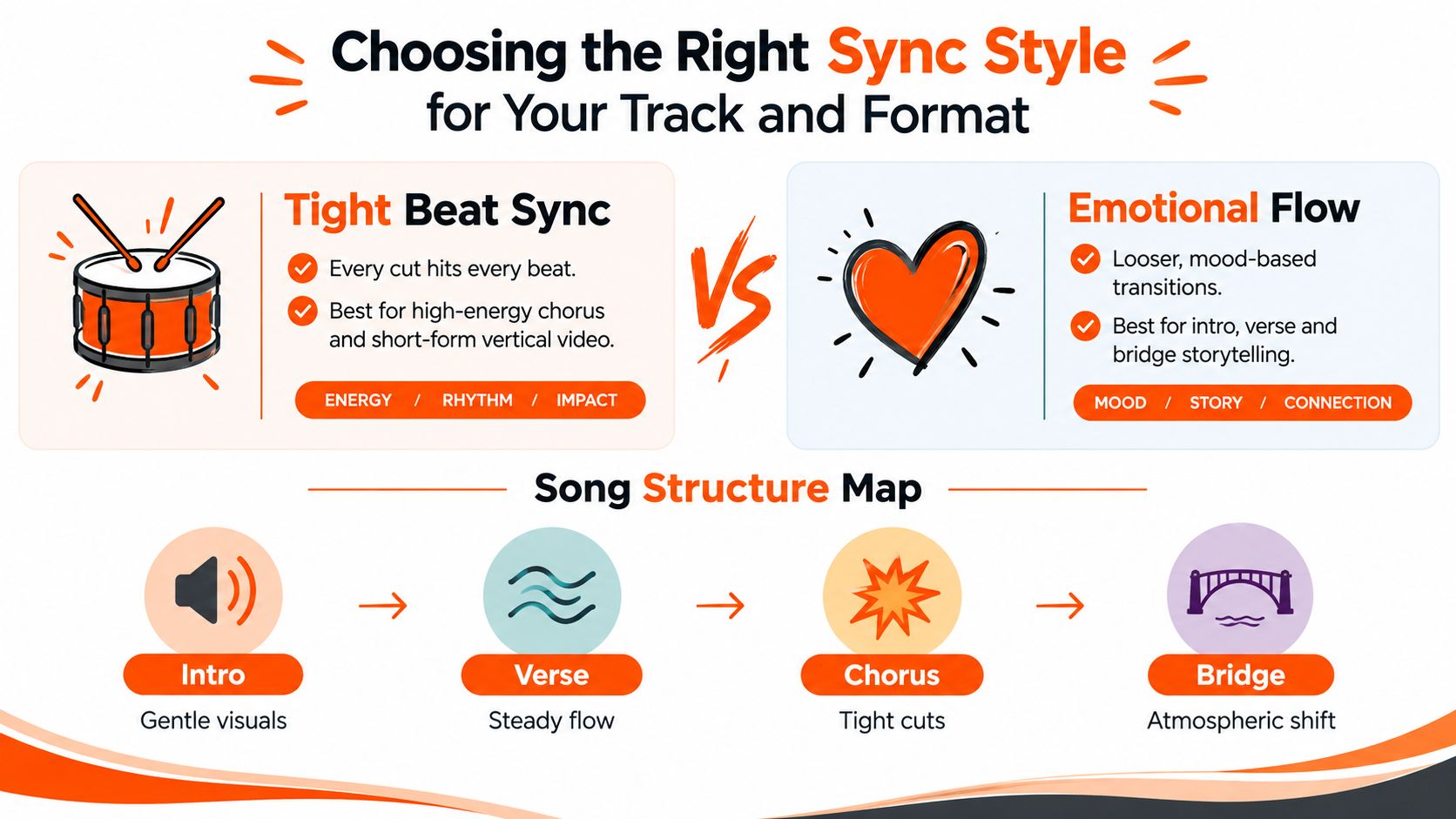
Song structure offers a practical guide. An intro can use a fade-in, establishing shot, or slow reveal. A verse often benefits from steady visual flow that supports the words. A chorus can justify sharper cuts, brighter color, or larger movement. A bridge may introduce an atmospheric change instead of increasing speed.
| Scenario | Recommended Sync Style | Visual Treatment | When to Avoid |
|---|---|---|---|
| Short product teaser built around a drop | Tight beat sync | Product reveals and graphic accents land on major rhythmic hits | Avoid cutting on every minor beat if the product needs explanation |
| Lyric visualizer for a dense verse | Emotional flow with selective accents | Hold scenes long enough for lyrics, then emphasize phrase endings | Avoid rapid transitions that compete with the words |
| Dance or performance clip | Tight beat sync | Match gestures, camera moves, and cuts to prominent beats | Avoid forcing movement when the performer's expression carries the moment |
| Ballad intro or bridge | Emotional flow | Slow pushes, dissolves, spacious framing, and color evolution | Avoid aggressive effects that break intimacy |
| Fast-changing track with several drops | Hybrid approach | Use section-level structure, then tighten cuts at each major release | Avoid one fixed sync rule across the entire song |
Tempo changes and unusual structures require special care. If the track accelerates, decelerates, or moves through irregular phrase lengths, a rigid cut-every-beat strategy may feel artificial. Let the system follow the most important musical landmarks, then allow transitional footage to breathe between them.
Rights also belong in the creative decision. If you're sourcing a sound from a social platform or editing library, review the license before publishing, particularly for paid campaigns. A resource on how to avoid copyright claims on YouTube can help you distinguish convenient access from genuine permission to use a track.
<a id="real-world-use-cases-and-sample-outputs-that-inspire"></a>
Real World Use Cases and Sample Outputs That Inspire
The same music-to-video workflow serves different jobs depending on what the viewer must understand. A musician wants the visuals to extend the identity of a track. A marketer wants the viewer to notice a product and remember a benefit. An influencer may want a fast, recognizable format that feels native to a social feed.
<a id="independent-musicians"></a>
Independent musicians
A lyric visualizer can use emotional flow for verses and more pronounced movement at the chorus. Keep typography readable, choose a limited color system, and let the most important lyric lines receive the strongest visual emphasis. An abstract track may work better with audio-reactive shapes, color shifts, and camera movement than with a literal narrative.
A performance video has a different requirement. The artist's face, gesture, and posture need continuity, so visual generation should support the performance rather than constantly replace it. Tight sync can highlight a head turn, hand movement, or lighting change, while the surrounding shots remain stable.
<a id="marketers-and-agencies"></a>
Marketers and agencies
A product teaser should map the message to the song's structure. Open with the problem or product identity, use the verse for proof or demonstration, and reserve the chorus or drop for the strongest benefit, visual reveal, or call to action. In this format, beat matching creates attention, but section structure creates comprehension.
A TikTok or Reels ad can use quick visual accents, captions, and a recognizable opening frame. However, the edit shouldn't let rhythm hide the offer. The viewer still needs to understand what's being sold, who it's for, and what action to take.
<a id="e-commerce-and-dtc-teams"></a>
E-commerce and DTC teams
For a product video, sync can organize a sequence of details. A beat may reveal a new angle, a texture, a use case, or a before-and-after comparison. Emotional matching works well when the product belongs inside a lifestyle story, while tight sync suits launches, limited-time promotions, and energetic demonstrations.
<a id="creators-and-influencers"></a>
Creators and influencers
Creators can use anime or cartoon styles to turn a familiar sound into a distinctive visual identity. The style should reinforce the tone of the track, not merely decorate it. A playful song may support exaggerated motion and bold color changes, while a reflective sound may benefit from restrained character animation and longer holds.
For more formats to test, this collection of music video ideas can help you choose an output before you write the prompt. Start with the viewer's job, then select the sync behavior that supports it.
A useful sample-output question is simple: What should the audience notice first, feel next, and remember last? That sequence prevents the music from becoming an excuse for random motion. It also gives the AI a clearer editorial brief.
<a id="creating-with-confidence-and-what-to-do-next"></a>
Creating With Confidence and What to Do Next
One-click generation doesn't remove responsibility. It changes where responsibility sits. The tool may source, transform, or pair audio and visuals quickly, but the creator still needs to check rights, quality, audience expectations, and brand safety before publishing.
Berklee's 2026 study found that musicians and video creators report concerns about quality, ethics, rights, and audience perception as AI enters the sourcing workflow. The same Berklee study reports that 45.5% of respondents save sounds from TikTok and Instagram, 41.4% use YouTube Audio Library, and 34.6% rely on the native library in their editing app. Those sources may be convenient, but availability inside a platform doesn't automatically establish permission for every commercial use or every market.
The study also reports that 83.7% of musicians shape video around trending sounds, while 19% use generative AI to find or create music for video. The gap suggests that many creators are already making music-led visual decisions but haven't yet built a clear AI workflow around sourcing, interpretation, and review.
Before publishing: Confirm the audio license, inspect the generated visuals for unwanted likenesses or brand elements, verify that captions are accurate, and review the final export in every intended format.
ClipNova's paid plans include commercial rights and encrypted projects, according to the platform information provided for this article. Those features can support a safer production process, but they don't replace checking the rights attached to an uploaded track or third-party asset. Creators exploring broader artist distribution can also compare their needs with a dedicated music creator platform.
Use this final checklist:
- Plan: Identify the song sections and decide where rhythm or emotion should lead.
- Generate: Provide a prompt that names the subject, style, movement, and structure.
- Review: Check beat alignment, continuity, readability, and the hierarchy of visual events.
- Clear: Confirm music, voice, imagery, and commercial permissions.
- Export: Render the aspect ratio and resolution required by the destination, then watch the actual published version before promoting it.
The strongest music-to-video projects don't ask AI to make every creative decision. They use AI to expose the musical logic of a track, then apply human judgment to decide what that logic should look like.
ClipNova turns an uploaded track and a natural-language visual brief into beat-matched video, with captions, voiceover, multi-aspect exports, and paid-plan commercial rights available in the same studio. Visit ClipNova to create a first music-synced draft, review its visual interpretation, and refine the result for your next release or campaign.
Ready to ship your own?
Start creating viral videos with AI in under twenty minutes, no credit card required.