
Most advice about a link to video generator starts with the wrong promise. Paste a URL, wait briefly, and expect a campaign-ready asset. In practice, the tool is much better at removing the blank page, organizing source material, and producing a usable first cut than it is at understanding your positioning, audience, offer, and media-buying context without direction.
That distinction changes the workflow. A URL-derived video should enter your production system as a structured draft, not as an unquestioned final render. The teams that get practical value from the format use it to create more relevant variants, refine the strongest ideas, and test creative against standard ads rather than treating automation itself as proof of performance.
Table of Contents
- Rethinking the One-Click Video Myth
- How Generators Extract Web Content
- Converting Links Inside the ClipNova Studio
- Optimizing the Automated First Draft
- Measuring Performance Against Standard Ads
- Scaling Your Creative Infrastructure
<a id="rethinking-the-one-click-video-myth"></a>
Rethinking the One-Click Video Myth
A webpage contains information, but it doesn't contain a finished video. It may have a headline, product images, paragraphs, testimonials, navigation elements, promotional banners, and calls to action, yet none of those components automatically provides a compelling opening or a sensible visual rhythm. A generator has to decide what matters, what to omit, how long each idea should remain on screen, and what the viewer should do next.
That's why the most useful mental model is automated first-draft engine. The system turns an existing source into a rough narrative, selects or organizes media, and gives an editor something concrete to improve. It can bypass hours of script assembly, but it can't remove the need for a clear campaign objective.
Practical rule: Judge the first render by how much useful production work it eliminates, not by whether it needs another edit.
A strong workflow begins before the URL is pasted. Decide whether the source supports education, product consideration, a direct response, or brand awareness. Then define the single message the clip must communicate. If the page contains several competing ideas, the generator may faithfully include too much, producing a technically accurate video with no persuasive center.
This approach aligns with the broader shift toward automated video production, where teams use AI to create repeatable drafts and reserve human attention for messaging, selection, and refinement. The automated video production workflow is most useful when it supports a deliberate review loop rather than replacing editorial judgment.
The commercial market reflects how quickly this category has moved beyond experimentation. One 2026 industry estimate values the AI video generator market at $1.04 billion in 2026, compared with $0.85 billion in 2025, representing 22.4% year-over-year growth. The same forecast projects continued expansion through 2030, which indicates that video generation has become a meaningful software segment, not merely a novelty feature. Research and Markets' AI video generator market report provides that estimate.
The implication for marketers is simple. Faster rendering only matters if it creates a better iteration system. Start with the URL, but finish with a reviewed script, purposeful visuals, a channel-specific format, and a testable set of alternatives.
<a id="how-generators-extract-web-content"></a>
How Generators Extract Web Content
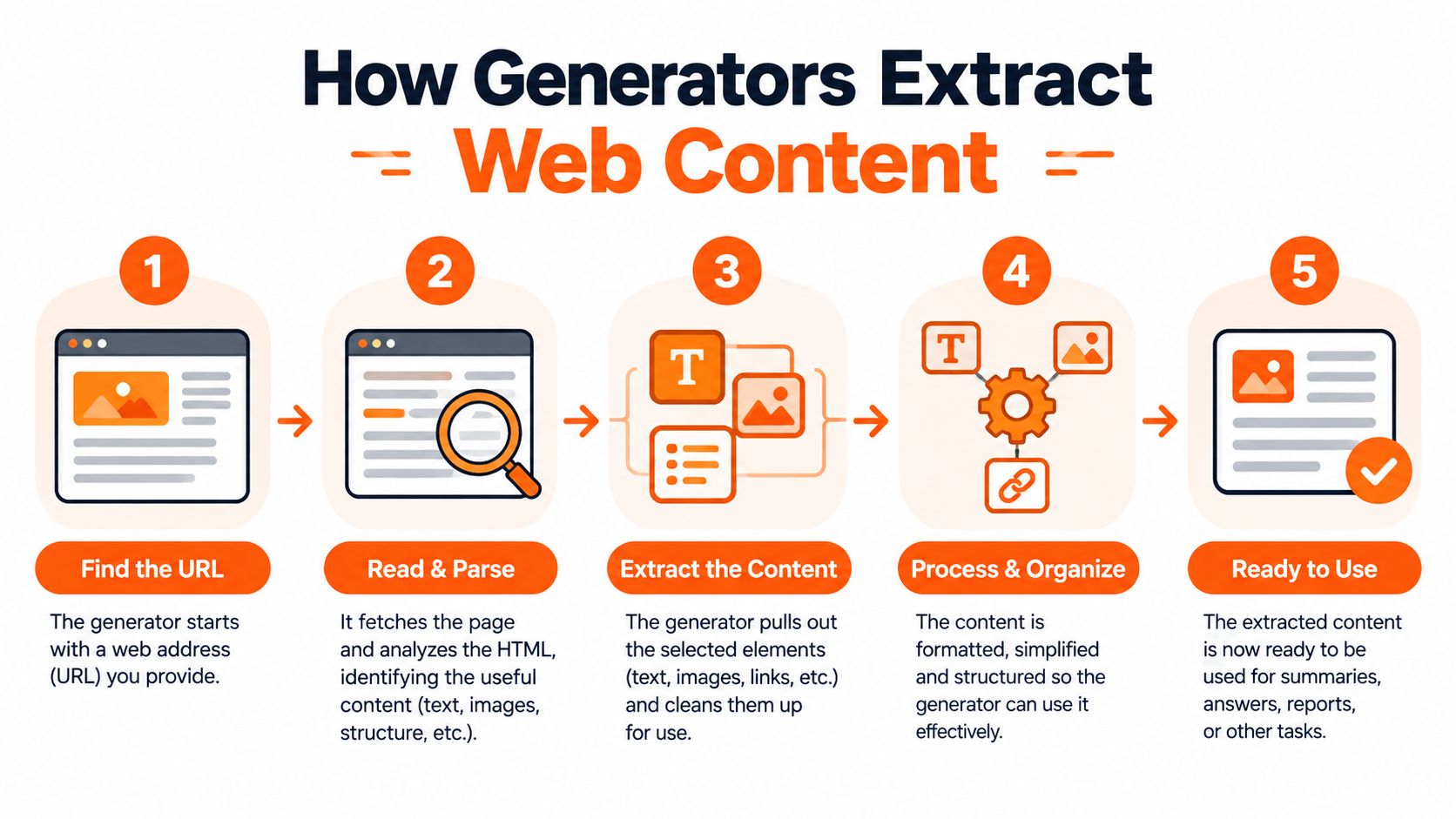
A URL-to-video system doesn't understand a page in the same way a person does. It first has to retrieve the page, identify useful elements, interpret their relationships, and translate them into a timed sequence. A peer-reviewed UIST system for converting webpages into short videos describes a four-stage process: asset analysis, temporal and visual planning, video editing, and rendering or review. It successfully created videos for all 50 tested webpages, demonstrating the feasibility of the workflow while also exposing its structural dependencies. The peer-reviewed webpage-to-video system details the approach.
<a id="what-the-pipeline-actually-does"></a>
What the pipeline actually does
Asset analysis identifies text, images, logos, colors, fonts, and layout cues. A clean article with a clear title, descriptive subheadings, and relevant images gives the system an obvious source hierarchy. A product page with well-labeled photography and concise benefit statements is also relatively easy to interpret.
Temporal and visual planning turns those assets into shots. The UIST system uses constraint programming to sequence scenes under user-specified duration and aspect-ratio requirements. That detail matters because a video isn't just a collection of extracted assets. Each element needs a place in time, a readable amount of screen space, and a relationship to the voiceover or on-screen text.
Editing applies transitions, captions, motion, narration, and supporting footage. Rendering and review then expose problems that weren't visible in the page structure, such as cropped text, weak contrast, awkward pauses, or a visual that doesn't match the sentence being spoken.
Before using a page, check whether the important content is available to the scanner. Gated articles, consent walls, login requirements, missing metadata, and JavaScript-heavy interfaces can prevent the system from seeing the same material you see in a browser. A page may appear complete to a human visitor while presenting only a partial document to an automated extractor.
For a deeper look at how automated systems retrieve and interpret web information, this guide to AI scraping tools offers useful context. The practical lesson is to inspect the source before spending production credits.
A preflight check should include:
- Visible source text: Confirm that the headline, key claims, and call to action load without an interaction.
- Extractable visuals: Verify that the images you want are present as usable page assets, not only as background effects or delayed components.
- Brand consistency: Look for stable fonts, colors, logos, and layouts that can survive conversion into video scenes.
- Rights and access: Confirm that you have permission to use the page's images, copy, product marks, and embedded media.
The market is increasingly centered on text-to-video creation. A 2026 market analysis reports that text-to-video represented 46.3% of the AI video market, with 320% year-over-year adoption growth and a projected 38.6% CAGR through 2028. Grand View Research's AI video market analysis also identifies text-to-video as the largest revenue-share segment in 2025. Link-driven workflows benefit from that maturity, but extraction quality still determines the quality of the first draft.
<iframe width="100%" style="aspect-ratio: 16 / 9;" src="https://www.youtube.com/embed/Kq4Li-qgswo" frameborder="0" allow="autoplay; encrypted-media" allowfullscreen></iframe><a id="converting-links-inside-the-clipnova-studio"></a>
Converting Links Inside the ClipNova Studio
Start with the page that contains the message you want to distribute. In the ClipNova Studio, paste the URL into the link-based creation workflow and let the system assemble an initial script, narration, visuals, captions, and music. Treat the first output as a diagnostic. If the opening sentence is weak or the selected images don't support the claim, fix the source direction before polishing transitions.
The first choice should be the destination format. Use 9:16 when the asset is intended for vertical short-form feeds, 16:9 for YouTube and conventional horizontal placements, and 1:1 when a square composition fits the channel or placement. Aspect ratio isn't a cosmetic export setting. It changes how much text fits on screen, where a subject can sit, and whether a product image remains legible after cropping.
<a id="give-the-generator-a-clear-editorial-brief"></a>
Give the generator a clear editorial brief
A source page rarely supplies a strong social hook. Use the studio's ideation tools to explore opening angles when the headline reads like a search result rather than a spoken introduction. A useful hook should identify a problem, reveal a contrast, or promise a practical outcome without making a claim the page can't support.
Then review the script before rendering. Remove background information that matters to the article but not to the clip. Replace a general introduction with the strongest audience-specific point. If the page supports multiple benefits, assign each version one dominant benefit instead of asking one video to carry the whole page.
Voice selection also affects perceived quality. Use a curated realistic voice that matches the subject, pace, and audience, then listen for pronunciation of brand names, technical terms, and proper nouns. The studio supports voiceover generation in 32 languages, which makes it possible to create localized versions without recording every script from scratch, but translation still requires review for tone and market context.
Caption styling deserves its own pass. Captions should reinforce the spoken message, not transcribe every filler word at maximum density. Choose a readable style, check safe areas for the selected aspect ratio, and make sure emphasis is reserved for the words that carry the argument or call to action.
For teams working in both directions, the video into link workflow is a useful complement. The same content operation can move from webpage to video or from existing video back into a written asset, depending on where the source material already lives.
<a id="optimizing-the-automated-first-draft"></a>
Optimizing the Automated First Draft
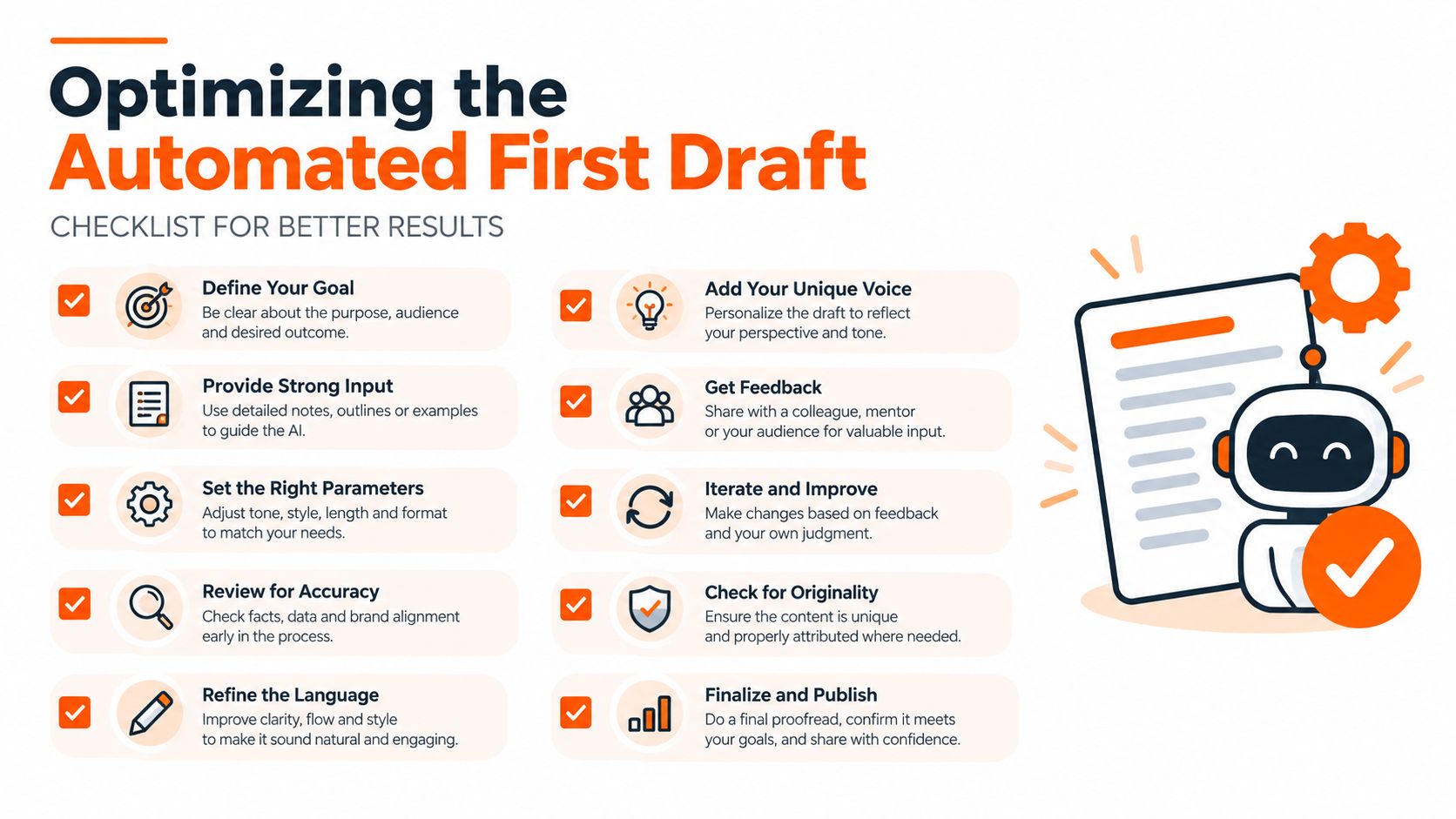
The first draft usually fails in predictable ways. It may select a decorative image for a decisive claim, repeat the same visual while the narration advances, or place several ideas into a scene that can't be read at the chosen pace. Those aren't reasons to reject URL-based generation. They're signals that the draft needs editorial control.
Begin with the script and audio, not the animation. Read the voiceover without watching the screen. Does each sentence move the viewer toward the intended action? Are the benefits specific? Does the opening earn attention before the page context becomes relevant? If the narration sounds like an article introduction, shorten it and lead with the tension that matters to the audience.
<a id="fix-the-visual-and-temporal-mismatches"></a>
Fix the visual and temporal mismatches
Swap B-roll whenever the image adds atmosphere but not meaning. A generic laptop shot won't clarify a workflow, and a polished product close-up won't explain a technical feature on its own. Use source imagery when it carries brand or product evidence, then supplement it with supporting visuals only when they clarify the narration.
Pacing needs a separate review. A scene can be factually correct and still feel slow because the visual remains unchanged after the sentence has landed. Conversely, rapid cuts can make captions unreadable. Adjust scene duration around meaning, not around a fixed template.
A practical refinement sequence looks like this:
- Protect the opening: Test several hooks that frame the same source material for different audience concerns.
- Correct the evidence: Match each major claim with a product shot, interface capture, diagram, testimonial context, or other relevant visual.
- Simplify the captions: Keep the screen focused on the phrase a viewer needs to remember.
- Re-record the delivery: Try a different voice or localized version when the original tone doesn't fit the audience.
- Export by placement: Review each aspect ratio independently because a layout that works in horizontal may fail in vertical.
<a id="turn-one-draft-into-a-test-set"></a>
Turn one draft into a test set
Variant generation is where the workflow becomes commercially useful. Create alternatives around a different hook, benefit, voice, visual opening, or call to action while keeping the underlying offer consistent. That gives performance teams something more informative than a single AI-made clip, because they can compare creative decisions rather than approve or reject automation.
The automated video editing workflow is strongest when it preserves those decisions as repeatable operations. Save the approved brand treatment, caption style, voice preferences, and export requirements so the next source page begins closer to usable quality.
Editorial test: If a viewer can remove the page context and still understand the audience, problem, benefit, and next step, the draft has a defensible structure.
<a id="measuring-performance-against-standard-ads"></a>
Measuring Performance Against Standard Ads
A generated video isn't evidence of marketing value. It's an input to an experiment. The right comparison is usually not “AI video versus no video,” but URL-derived creative versus the script-first workflow your team already trusts.
Start by defining the conversion event before production. For one campaign, that may be a qualified click or landing-page visit. For another, it may be a lead, purchase, sign-up, or view quality signal. A video that earns attention but attracts the wrong audience can look successful in a creative report while underperforming commercially.
<a id="build-a-fair-comparison"></a>
Build a fair comparison
Keep the offer, audience, placement, budget logic, and landing page as consistent as possible. Compare a link-generated draft after normal human refinement with a conventional ad produced from a manually written script. The purpose isn't to prove that one production method always wins. It's to learn which source types and creative decisions produce useful outcomes for your business.
Track the funnel in layers:
- Attention: Review early retention and whether viewers reach the message before the first major drop.
- Understanding: Check whether viewers engage with the intended benefit, not merely the visual spectacle.
- Action: Compare click-through and downstream conversion quality against the standard creative.
- Economics: Evaluate cost per qualified outcome and the production effort required to create the test set.
- Learning velocity: Record how quickly the team can move from a weak result to a better variant.
Static checks aren't enough for this kind of evaluation. Independent webpage and video research emphasizes standardized video recording in a reproducible sandbox because dynamic fidelity is difficult to judge from screenshots alone. In a study of 19 models, rubric-based automatic evaluation reached 96% agreement with human preferences, while the benchmark still found meaningful gaps in fine-grained style and motion quality. The webpage and video evaluation benchmark supports a useful principle: automated scoring can assist review, but it shouldn't replace human inspection of motion, consistency, and audience fit.
The same principle applies to campaign reporting. A visual-fidelity score can tell you whether the clip resembles its intended source. It can't tell you whether the hook attracts qualified buyers or whether the call to action creates profitable behavior.
Use the results to refine your selection rules. If article pages create clear educational clips but dynamic landing pages produce missing assets, route those page types differently. If a product-led hook works in vertical placements but a benefit-led hook performs better in horizontal format, preserve that distinction in the next production sprint.
<a id="scaling-your-creative-infrastructure"></a>
Scaling Your Creative Infrastructure
Scaling doesn't mean publishing every draft. It means building a reliable path from source material to reviewed variants without forcing an editor to rebuild the same decisions each time.
A useful operating model begins with a source library. Tag each URL by audience, offer, funnel stage, product category, and intended channel. When a new campaign starts, the team can select a page with a known extraction profile instead of discovering basic compatibility problems during rendering.
Localization is another strong use case. Translate the approved script, re-voice it for the target market, and review names, idioms, claims, and captions before export. The workflow can reduce the need for repeated recording, but it doesn't eliminate cultural or legal review. A literal translation may preserve the words while losing the persuasive meaning.
Scaling principle: Automate the repeatable decisions, then keep approval gates around claims, rights, brand safety, and final composition.
A practical daily sprint can include:
- Source review: Confirm that the page is accessible and contains usable text and imagery.
- Draft assembly: Generate the initial script, voice, visual sequence, and captions.
- Editorial pass: Remove unsupported claims, replace mismatched B-roll, and tighten the opening.
- Variant pass: Create alternatives for hooks, benefits, voices, languages, and aspect ratios.
- Quality control: Watch every export with sound, then inspect captions, cropping, pronunciation, and calls to action.
- Measurement handoff: Name files consistently and record the hypothesis behind each variant.
The long-term advantage isn't a promise of one-click publishing. It's a steadier creative pipeline that helps teams overcome irregular production, adapt one source to several placements, and learn which page structures translate into useful video. Human review remains the layer that turns automated assembly into credible marketing.
ClipNova offers a studio workflow for turning links, prompts, and topics into short-form videos with automated scripting, voiceover, visuals, captions, music, and multi-aspect exports. Use it to generate a structured first draft from a suitable webpage, refine the message, and produce testable variants through ClipNova.
Ready to ship your own?
Start creating viral videos with AI in under twenty minutes, no credit card required.