

A useful topic is sitting in your notes, but turning it into a short-form video still feels like starting from zero. You need a script, narration, visuals, captions, music, formatting, a thumbnail or opening frame, and platform-specific exports. By the time the file is ready, the original idea may already feel stale.
The strongest how to video ideas aren't just subjects. They're repeatable production formats with a clear job. One format can launch a workflow, another can sell a product, localize a campaign, build a visual niche, teach a process, test creative, or turn one long asset into several short clips. That distinction matters because short-form video now occupies a major share of audience attention. YouTube Shorts was reported to average more than 200 billion daily views in 2026, compared with 70 billion in March 2024, while independent reporting estimates short-form video accounts for about 58% of social media time. This 2026 short-form video data explains why creators and marketing teams need systems, not isolated bursts of inspiration.
The ten ideas below pair each concept with a hook, format, execution path, and platform-ready variation. Use educational, promotional, localized, animated, avatar-led, testing, repurposing, and multi-platform approaches according to the constraint in front of you. ClipNova is relevant when scripting, voiceover, visuals, captions, music, variants, translation, and aspect-ratio exports need to live in one workspace. For more topic inspiration, compare these best video concepts for 2026 with the production jobs your team needs to solve.
Table of Contents
- 1. How to Create Viral Short-Form Video Content in Minutes Using AI
- 2. How to Generate High-Converting AI-Powered Product Videos and UGC Ads
- 3. How to Localize Video Content and Generate Professional Voiceovers in 32 Languages Without Re-Shooting
- 4. How to Create Anime and Cartoon Video Content for Niche Audiences
- 5. How to Build a Consistent Content Calendar Using AI Video Batching
- 6. How to Create AI-Generated Talking Avatar Videos for Training and Onboarding
- 7. How to Create Disney and Pixar-Style AI Image Transformations for Branding
- 8. How to Maximize Ad Performance Through AI-Generated Creative A/B Testing
- 9. How to Repurpose Long-Form Content Into Multi-Format Short-Form Assets
- 10. How to Create Cohesive Instagram Reels, TikTok, and YouTube Shorts Strategies
- Comparison of 10 AI How-To Video Ideas
- Choose One Format and Publish the First Test
<a id="1-how-to-create-viral-short-form-video-content-in-minutes-using-ai"></a>
1. How to Create Viral Short-Form Video Content in Minutes Using AI
Start with a problem people already recognize, not a vague topic. “How to organize product photos for a small online store” gives you a usable direction. “E-commerce tips” doesn't. Your opening hook could be, “Your product videos look flat because you're showing the product before the problem.”
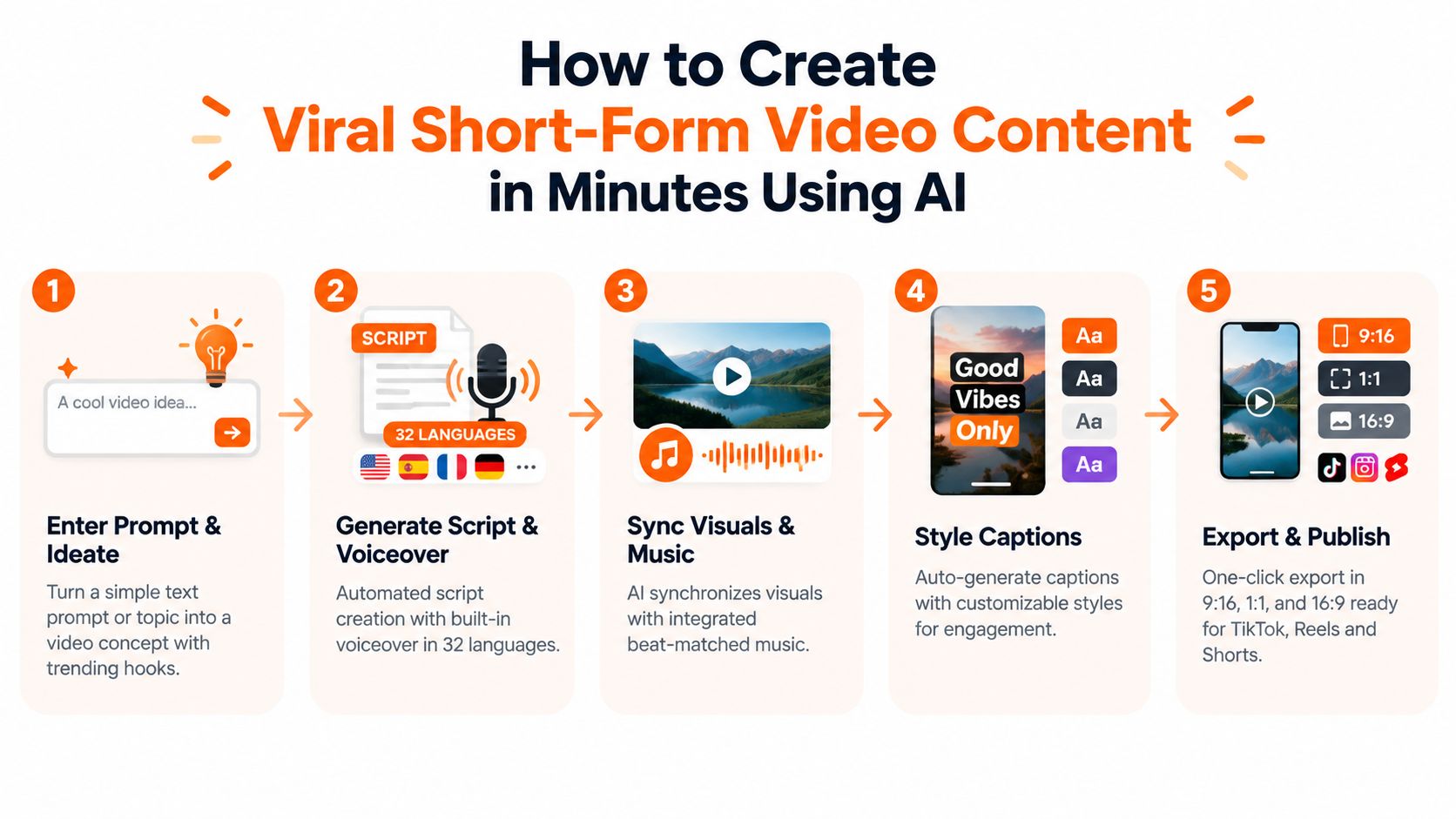
Build the video around one promise. Ask the system for a short script, then check whether the first sentence creates curiosity, the middle demonstrates a useful action, and the ending gives viewers a reason to save, comment, or visit a page. Automated scripting can remove the blank-page problem, but it won't replace editorial judgment. A polished video with a weak premise is still weak.
<a id="build-one-source-video-then-create-useful-variants"></a>
Build one source video, then create useful variants
A practical workflow looks like this:
- Choose the audience: Define whether you're addressing a creator, buyer, student, or existing customer.
- Write the hook first: Give the video a specific tension, mistake, comparison, or promised result.
- Generate the first draft: Combine narration, visuals, captions, and music, then review every scene for accuracy.
- Create controlled variants: Change one major element at a time, such as the hook, voice, pacing, or closing action.
- Export for distribution: Use vertical versions for TikTok, Instagram Reels, and YouTube Shorts, then adjust the caption and call to action for each platform.
For example, a creator could turn one workflow topic into a practical demonstration, a common-mistake version, and a before-and-after explanation. An e-commerce team could use the same product footage with different openings for discovery and retargeting. Batch generation is useful when the editorial idea is already sound, but producing more weak versions won't improve a channel.
Practical rule: Automation should shorten assembly, not remove the review pass.
A short video can communicate utility quickly, which aligns with Wyzowl's 2026 finding that 63% of consumers preferred learning about a product or service through a short video, compared with 12% who preferred text-based articles. The underlying 2026 video marketing summary reports that its late-2025 survey included 266 respondents. Use that preference as a reason to demonstrate clearly, not as permission to oversell.
Watch the workflow in practice before adapting it to your own topic:
<iframe width="100%" style="aspect-ratio: 16 / 9;" src="https://www.youtube.com/embed/XX3JzfYo1Rk" frameborder="0" allow="autoplay; encrypted-media" allowfullscreen></iframe>For a product-led version, the same structure can support a shoppable video content guide, provided the product appears in context and the viewer understands the next action.
<a id="2-how-to-generate-high-converting-ai-powered-product-videos-and-ugc-ads"></a>
2. How to Generate High-Converting AI-Powered Product Videos and UGC Ads
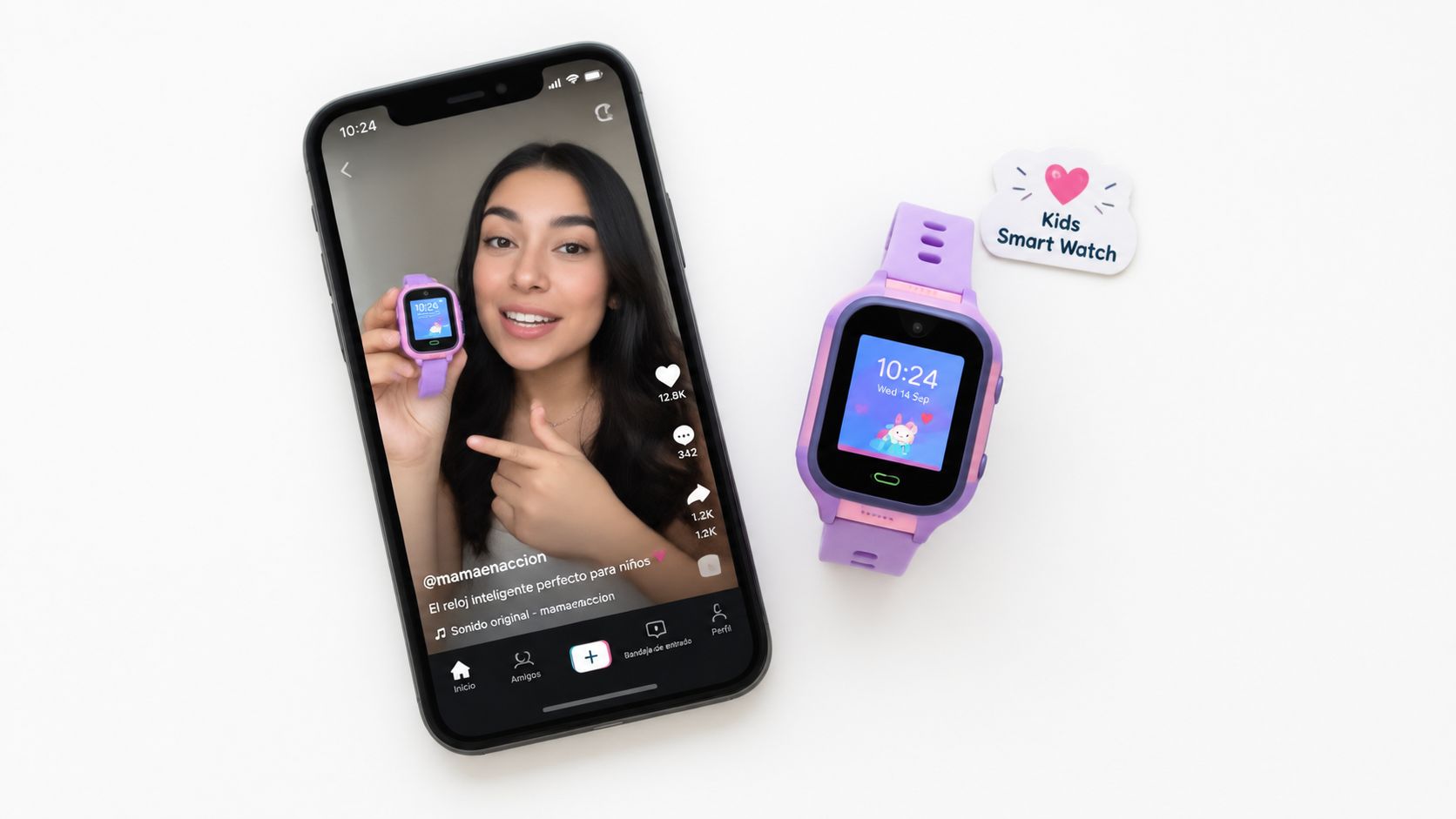
Product videos fail when they describe features before establishing a reason to care. Open with the customer's situation: “You bought a smart watch for your child, but you still don't know whether they reached school safely.” Then show the product solving one part of that concern.
UGC-style creative works best when it feels specific. A script should name the use case, show the product in a believable setting, and explain what changed in the buyer's routine. Talking avatars and generated presenters can help a team explore angles without coordinating a new shoot, but synthetic delivery can also feel generic if every version uses the same face, tone, and pacing.
<a id="organize-the-creative-around-buying-objections"></a>
Organize the creative around buying objections
Choose an angle before you write the script:
- Problem-solution: Show the frustrating moment, then demonstrate the product response.
- Benefit-led: Focus on one outcome instead of listing every feature.
- Proof-oriented: Use a customer question, demonstration, comparison, or visible product detail.
- Founder-led: Match the voice and personality of the brand owner when trust matters.
- Seasonal: Change the context and message while keeping the core product footage usable.
A direct-to-consumer team might create one video about convenience, another about setup, and a third about gifting. Those aren't different scripts. They serve different stages of consideration. Keep the product visible enough to connect the claim to the object, and avoid unsupported performance language that the footage can't prove.
Use platform-native framing and captions rather than treating one export as finished everywhere. TikTok may need a faster opening, Instagram may benefit from a saveable tip, and a paid social placement may need a clearer product and call to action in the first frame. A/B testing becomes more useful when the team records what changed between versions. Without that discipline, a “test” becomes a collection of unrelated ads.
The production shortcut is changing the message, not pretending that every campaign needs new footage. Regenerate the script for a holiday, a new customer concern, or a different product angle, then check pronunciation, claims, and visual consistency before publishing.
<a id="3-how-to-localize-video-content-and-generate-professional-voiceovers-in-32-languages-without-re-shooting"></a>
3. How to Localize Video Content and Generate Professional Voiceovers in 32 Languages Without Re-Shooting
Localization starts before translation. A script packed with idioms, jokes, or culturally specific references creates problems for every later version. Write the master narration in direct language, keep the sentence structure clean, and make sure the visuals communicate enough meaning without relying on a pun.
The production path is straightforward. Lock the original edit, create translated scripts, generate or record priority-language voiceovers, adjust the speech rate where the language requires more or less room, and review subtitles against the audio. A translated sentence can be grammatically correct and still sound unnatural in context, especially when the original timing leaves no space for a longer phrase.
<a id="protect-the-brand-while-adapting-the-delivery"></a>
Protect the brand while adapting the delivery
Choose languages according to a real distribution plan, not because a tool makes them available. Start with the markets that already have customers, search demand, sales support, or an upcoming launch. Review those versions first, then expand the workflow after you know the voice, terminology, and pacing are acceptable.
A SaaS company launching a product demonstration in several markets can retain the same screen recording while changing the narration, captions, opening text, and final call to action. That preserves the instructional sequence without forcing a new shoot for every language. A creator using auto-dubbing should still listen to the complete result. Names, technical terms, numbers, and emphasis need human approval.
For a detailed tool-focused reference, see these AI voiceover tools. ClipNova supports voiceover generation in 32 languages, alongside subtitles and caption styles, but the useful question remains editorial: does the localized version sound like the brand and make sense to the intended viewer?
Use a neutral master script, a shared pronunciation guide, and a glossary for product names. Add background music carefully, since it should support the voice rather than hide awkward timing. Export subtitles separately when possible, because local teams may need to correct spelling or adapt a phrase before publishing.
<a id="4-how-to-create-anime-and-cartoon-video-content-for-niche-audiences"></a>
4. How to Create Anime and Cartoon Video Content for Niche Audiences
A visual niche needs more than a style filter. Anime fans, manga communities, gaming audiences, and webtoon readers respond to recognizable storytelling patterns, character choices, and references that generic business content doesn't understand. The useful question isn't “Can this look animated?” It's “What does animation let this audience experience more vividly?”
Open with a premise that belongs to the niche. “The villain's power system makes no sense until you notice this rule” gives an anime commentary channel a clear tension. “Three details you missed in the latest arc” creates a list structure. A gaming channel might use an anime-inspired visual treatment to explain lore that would otherwise require expensive live-action production.
<a id="create-a-repeatable-visual-language"></a>
Create a repeatable visual language
Define the elements that must remain stable:
- Character identity: Keep clothing, hair, color palette, and proportions consistent across scenes.
- Scene logic: Give each shot one action or emotional beat rather than asking a single image to explain everything.
- Prompt vocabulary: Document the descriptors that produce the desired linework, shading, framing, and mood.
- Audio direction: Match narration and music to the audience's expectations without overpowering the explanation.
- Community feedback: Share character tests with relevant communities before committing to a full series.
A manga adaptation creator could storyboard one scene, test several character designs, then choose the version that remains recognizable across different poses. That process takes longer at the start but reduces visual drift later. Generating every scene independently may feel fast, yet inconsistent characters quickly make a series look accidental.
Don't copy a protected character or branded visual identity because an image tool can imitate it. Build an original design system with a clear point of view. ClipNova's Anime Video Generator and AI Cartoon Video Generator can support stylized scene creation, but the creative advantage comes from recurring characters, a clear premise, and a publishing rhythm the niche can recognize.
<a id="5-how-to-build-a-consistent-content-calendar-using-ai-video-batching"></a>
5. How to Build a Consistent Content Calendar Using AI Video Batching
A content calendar becomes easier to maintain when production has a clear handoff. Decide the themes and formats first, write adaptable hooks next, then assemble several videos in one focused session. A folder full of similar clips is not a strategy. Each batch needs a different audience question, offer, or teaching goal.
Build the calendar around the channel's job. An e-commerce brand can rotate product demonstrations, customer questions, seasonal uses, and behind-the-scenes footage. A newsletter creator can turn each issue into a short lesson, a myth correction, and a direct subscription invitation. Keep the visual treatment familiar, while changing the problem, proof, and call to action.
Use a simple production map rather than a repeating weekly template:
- Theme and audience need: Assign each batch to a product line, skill, campaign, or recurring customer problem.
- Format and hook: Match the idea to a tutorial, demonstration, reaction, list, or story, then prepare several openings that fit the subject.
- Asset plan: Gather footage, screenshots, product shots, captions, and music before editing begins.
- Platform variation: Reframe the same core idea for vertical short-form feeds, changing the opening, caption density, or call to action where needed.
- Review slot: Reserve space for current events, platform changes, and timely audience questions.
- Learning record: Log which hooks, visuals, and calls to action deserve another test.
Keep flexible slots in the calendar. Advice on checking YouTube's Trending tab and Google Trends by country and by YouTube Search highlights how demand can vary by market. This guide to finding YouTube trending video ideas also shows the trade-off between durable formats and short-lived trends.
A monthly batch can combine evergreen tutorials with timely posts. Produce the core version first, then export alternate hooks or captions while the project remains open. A workflow based on automated video editing can reduce repetitive assembly, but a person should approve every version for audience fit, accuracy, and campaign context. Schedule publishing only after those checks are complete.
<a id="6-how-to-create-ai-generated-talking-avatar-videos-for-training-and-onboarding"></a>
6. How to Create AI-Generated Talking Avatar Videos for Training and Onboarding
A new employee opens the onboarding video and needs to find a policy before completing the day's first task. A talking avatar can welcome the employee, point to the correct interface, and keep the lesson consistent across future updates. The same approach suits product education, policy changes, and customer support. It loses value when the avatar reads dense paragraphs while the screen shows no relevant action.
Build each lesson around one task. Start with a spoken explanation, then show the software, form, workflow, or physical setting the viewer must use. For onboarding, the sequence might cover the welcome, policy location, interface steps, and a short knowledge check. The presenter maintains continuity, while recordings, diagrams, and examples do the teaching.
<a id="design-the-video-for-revision"></a>
Design the video for revision
Keep the master script separate from the visual assets. That structure lets a training owner replace an outdated policy reference or screen recording without rebuilding the entire series. Short sentences, natural pauses, and clear section labels also make review easier.
A consistent avatar or reference voice can connect a course, but it should not dictate every lesson's tone. A SaaS company might use an executive voice for the welcome video and a neutral instructional voice for technical material. That choice preserves personality where it helps and improves clarity where precision matters.
Add a question, quiz, task, or confirmation step outside the video. HR teams should review sensitive wording, accessibility, internal terminology, pronunciation, and caption accuracy before publication. The subject-matter owner remains responsible for policy accuracy, even if production is automated.
ClipNova's talking avatar AI workflow can turn a script into a host-led video. Treat the result as a production draft, then check the spoken track against the captions and supporting visuals. Store approved scripts, source recordings, and project files together so the next update is a controlled edit rather than a new production cycle.
<a id="7-how-to-create-disney-and-pixar-style-ai-image-transformations-for-branding"></a>
7. How to Create Disney and Pixar-Style AI Image Transformations for Branding
A stylized transformation works best when the original subject remains recognizable. Choose a well-lit product, team, or founder photo with a clear subject and simple composition. Test the treatment on several source images before selecting one visual direction for the campaign.
Build the transformation into a broader brand system. An online store could turn product photos into storybook scenes for a seasonal collection. A personal brand might use an illustrated profile image, while a team could apply matching portraits across an internal page or social campaign. Preserve the product's silhouette, colors, and defining features so the result supports recognition instead of replacing it.
<a id="set-the-visual-rules-before-generating"></a>
Set the visual rules before generating
Start with a reference image, a defined palette, and a repeatable framing style. Check each output against these production requirements:
- Subject accuracy: Review logos, packaging, hands, product controls, and distinctive features.
- Visual consistency: Keep the palette, framing, and illustration direction consistent across the set.
- Usage rights: Confirm that the output and source material fit the intended commercial use.
- Audience fit: Test whether the style supports the campaign or distracts from its message.
- Format flexibility: Prepare versions for profile images, carousels, story frames, and video scenes.
A limited-edition campaign gives a team a contained way to test a new visual direction without redesigning the full identity. If the audience responds well, extend the treatment into motion graphics, packaging concepts, or short-form storytelling. If it performs poorly, the experiment remains limited to one campaign.
Treat each approved image as a reusable production asset. Keep the prompt, source image, color references, and final files together so later variations remain consistent.
Describe the visual direction accurately and avoid suggesting an official association with a studio or entertainment brand. Protect trademarks, and check that the generated image does not imply endorsement. ClipNova's image tools can support Disney/Pixar-style transformations and related creative variations, but brand approval should happen before public use.
<a id="8-how-to-maximize-ad-performance-through-ai-generated-creative-ab-testing"></a>
8. How to Maximize Ad Performance Through AI-Generated Creative A/B Testing
Creative testing needs a hypothesis. “Make more ads” isn't a testing plan. “A problem-first opening will attract more qualified viewers than a feature-first opening” is a plan because it identifies the variable and the expected behavior.
Build the first set around one product, one audience, and one primary action. Create versions that change the hook, product angle, presenter, visual order, or call to action. Keep the rest as stable as practical. If the script, audience, landing page, offer, and format all change at once, the result won't tell you which creative decision mattered.
<a id="track-the-variable-not-just-the-winner"></a>
Track the variable, not just the winner
Use a simple naming system that records the important differences. A file name such as product_problem_hook_founder_voice_reel gives the team more learning value than final_ad_3. Record the audience, placement, opening frame, script angle, and action requested.
A performance marketer might test a direct problem statement against a demonstration opening. A B2B SaaS team could compare a time-saving message with a risk-reduction message. An app team might vary the first visual while keeping the voiceover and call to action unchanged. These tests produce reusable creative knowledge even when one version underperforms.
A test is only useful when the team can explain what changed and what the result means.
Don't declare a winner from a tiny or uneven delivery sample, and don't confuse a cheap click with a qualified action. Let the platform gather enough comparable delivery for the decision you need, then document the winning pattern and create a fresh version before fatigue sets in. Exact thresholds depend on spend, audience size, conversion volume, and platform behavior, so treat any universal testing number with suspicion.
AI makes variant production faster, not measurement automatically reliable. ClipNova's ad and variant tools can help assemble different creative directions, while the marketer still owns the hypothesis, tracking, review, and decision.
<a id="9-how-to-repurpose-long-form-content-into-multi-format-short-form-assets"></a>
9. How to Repurpose Long-Form Content Into Multi-Format Short-Form Assets
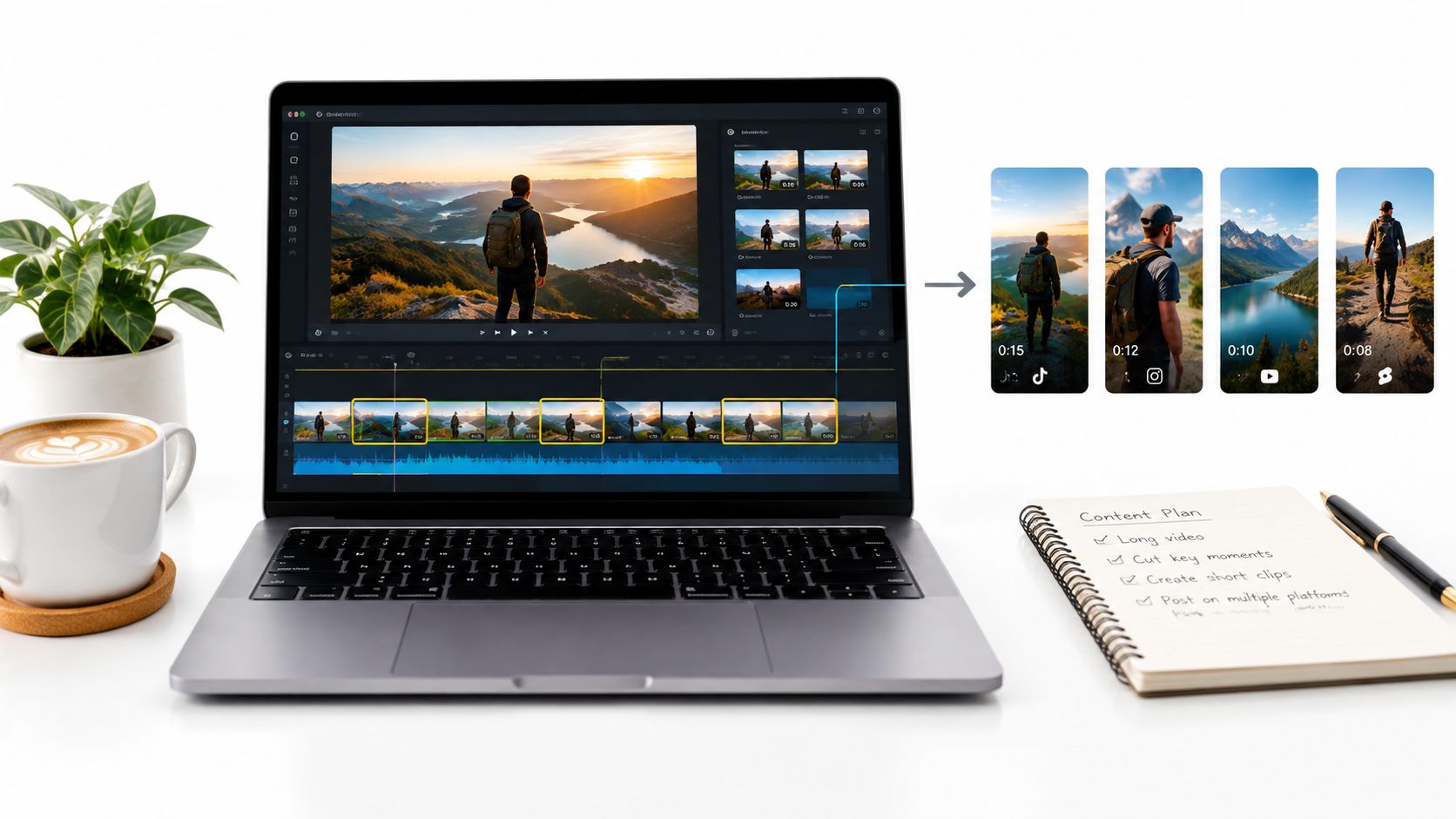
Long-form content contains several possible short videos, but not every timestamp deserves to become one. Start by finding complete ideas, strong explanations, surprising observations, demonstrations, or audience questions. A clip should make sense on its own before it asks viewers to watch the full episode.
For a podcast, isolate a single claim and open with the conclusion or tension. For a blog post, convert one section into a visual tutorial rather than reading the article word for word. For a webinar, extract a practical answer, add context in captions, and make the original recording available for viewers who want the extended discussion.
<a id="give-every-clip-a-separate-publishing-job"></a>
Give every clip a separate publishing job
A useful repurposing pass includes:
- Topic breaks: Mark where the speaker changes questions, claims, or examples.
- Standalone openings: Rewrite the first line so the clip doesn't depend on the original introduction.
- Visual support: Add captions, diagrams, product footage, or relevant B-roll instead of leaving a talking head unchanged.
- Destination action: Invite viewers to read, subscribe, download, or watch the source content when that next step is useful.
- Platform adaptation: Adjust crop, caption density, title, thumbnail, and pacing for each destination.
A creator can turn one podcast discussion into an explanatory clip, a disagreement clip, and a practical tip. Those assets share a source but shouldn't share identical packaging. Change the opening and visual emphasis so the feed doesn't look like a repeated upload.
Use links and tracking conventions that identify which clip generated visits to the original. Batch processing is efficient when the source library is organized, but quality falls when an automated tool cuts arbitrary sentences without checking context. ClipNova can help turn topics or source material into short-form assets, yet a human should confirm that each clip preserves the speaker's meaning.
<a id="10-how-to-create-cohesive-instagram-reels-tiktok-and-youtube-shorts-strategies"></a>
10. How to Create Cohesive Instagram Reels, TikTok, and YouTube Shorts Strategies
A multi-platform strategy shouldn't mean posting the same file everywhere without changes. The core idea can stay consistent, but the opening, text, call to action, sound, crop, and caption should reflect how people use each platform.
TikTok is a natural place to test a bold premise or trend-aware opening. Instagram Reels can package a useful idea that viewers may save or share with someone else. YouTube Shorts can act as an entry point to a deeper channel, so the ending may direct viewers toward a related explanation or subscription. These are working assumptions, not rigid laws. Your own audience data should decide where a format earns more attention.
<a id="separate-the-master-message-from-the-platform-wrapper"></a>
Separate the master message from the platform wrapper
Create one content brief with:
- Core promise: The single lesson, product benefit, or story all versions must preserve.
- TikTok treatment: Use a direct hook, quick visual change, and a conversational closing.
- Instagram treatment: Make the takeaway easy to save, share, or revisit through clear captions.
- YouTube treatment: Connect the Short to a related long-form topic or channel theme.
- Distribution record: Track the version, platform, hook, caption, and destination so results remain interpretable.
A fitness creator might demonstrate one exercise across all three platforms, but change the opening from a challenge to a form correction to a beginner explanation. An educational creator could use the same concept for a quick misconception on TikTok, a saveable summary on Instagram, and a deeper lesson path on YouTube.
Exporting multiple aspect ratios helps preserve the source project, but don't let convenience dictate the edit. Check safe areas, text size, audio levels, and the first frame on each platform. For related visual treatments, see this guide to Instagram filters for video, then decide whether a filter supports the message or adds decoration.
<a id="comparison-of-10-ai-how-to-video-ideas"></a>
Comparison of 10 AI How-To Video Ideas
| Item | Implementation Complexity 🔄 | Resource Requirements ⚡ | Expected Outcomes ⭐ | Ideal Use Cases 📊 | Key Advantages / Tips 💡 |
|---|---|---|---|---|---|
| How to Create Viral Short-Form Video Content in Minutes Using AI | Medium, platform learning & brand setup | Low–Med subscription + templates | High, rapid, publish-ready short videos | Creators, e‑commerce demos, agencies | Use trending prompts, batch-create, A/B variants |
| How to Generate High-Converting AI-Powered Product Videos and UGC Ads | Medium, avatar/scene setup and iterations | Med, reference assets, platform access | High, conversion-focused, ad-ready creatives | DTC brands, performance marketers, ad agencies | Train avatars, test emotional angles, export native specs |
| How to Localize Video Content and Generate Professional Voiceovers in 32 Languages | Medium–High, translation nuance & review | Med–High, voice library + localization reviewers | High, scalable multilingual distribution | Global SaaS, streaming platforms, localization teams | Avoid idioms, test priority languages, adjust prosody |
| How to Create Anime and Cartoon Video Content for Niche Audiences | Medium, precise prompt engineering for style | Low–Med, style assets and iterations | Medium–High, strong niche engagement, distinct visuals | Anime/manga communities, gaming creators, niche brands | Use detailed art descriptors, test character variations |
| How to Build a Consistent Content Calendar Using AI Video Batching | Medium, upfront planning and workflow design | Low–Med, time for batch sessions, scheduling tools | High, consistent cadence and lower decision fatigue | Solopreneurs, social managers, agencies | Batch by theme, keep short buffer for trends, review metrics |
| How to Create AI-Generated Talking Avatar Videos for Training and Onboarding | Low–Med, avatar training and scripting discipline | Med, avatar creation, voice references | High, scalable, consistent training content | HR, L&D, SaaS onboarding, e‑learning | Train with exec voice, write conversational scripts, reuse avatar |
| How to Create Disney and Pixar-Style AI Image Transformations for Branding | Low, iterative prompt/photo selection | Low–Med, high-quality photos, batch transforms | Medium, memorable brand visuals, shareable assets | E‑commerce, personal brands, merchandise creators | Use well-lit photos, test angles, apply style consistently |
| How to Maximize Ad Performance Through AI-Generated Creative A/B Testing | Medium–High, testing rigour & analytics | Med, ad spend for valid samples + creative variants | High, improved ROAS and clear creative insights | Performance marketers, growth teams, e‑commerce | Test one variable, 3–5 variants, ensure sufficient impressions |
| How to Repurpose Long-Form Content Into Multi-Format Short-Form Assets | Medium, editorial judgement for segments | Low–Med, existing long-form assets + AI tools | High, multiplies reach and ROI from single asset | Podcasters, YouTubers, bloggers, media outlets | Pick high-value moments, add hooks, batch process episodes |
| How to Create Cohesive Instagram Reels, TikTok, and YouTube Shorts Strategies | Medium–High, platform-specific adaptation & strategy | Med, multi-account management, analytics, scheduling | High, cross-platform growth and brand consistency | Multi-platform creators, influencers, agencies | Adapt hooks per platform, test formats, monitor analytics |
<a id="choose-one-format-and-publish-the-first-test"></a>
Choose One Format and Publish the First Test
Ten ideas can create momentum, but they can also create another form of procrastination. Choose the format that matches the constraint causing the most friction today. If production speed is the issue, start with the prompt-to-video workflow. If sales are the priority, use a product demonstration or UGC-style ad. If you're entering a new market, localize an existing asset before commissioning an entirely new campaign.
Choose visual differentiation when your audience responds to animation, illustration, or a recognizable niche aesthetic. Choose batching when the team misses publishing dates because every video starts from a blank project. Choose an avatar-led format when training, onboarding, or product education requires a consistent presenter. Choose testing when you already have distribution and need better evidence about which message works.
Repurposing is the right answer when your long-form library is strong but your short-form presence is thin. A multi-platform system makes sense when one audience is already distributed across TikTok, Instagram, and YouTube. You don't need to launch all ten approaches at once. You need one production job, one audience, and one video that can teach you something.
<a id="scope-the-first-video-tightly"></a>
Scope the first video tightly
Write a brief with four decisions:
- One audience: Name the person who should feel the video was made for them.
- One hook: State the tension, question, mistake, or promise in the opening.
- One primary action: Ask for a save, click, comment, purchase, subscription, or completion.
- One platform format: Set the aspect ratio, pacing, caption style, and publishing context before production.
Then create the smallest publishable version. A tutorial should teach one action. A product video should demonstrate one benefit. A localized video should target one priority market first. An avatar training clip should answer one employee question. A test should change one meaningful creative variable.
Review the result as a viewer, not as its maker. Is the subject clear without extra context? Does the opening earn the next few seconds? Do the visuals prove or illustrate the narration? Are captions readable on a phone? Does the ending make the requested action obvious? These questions catch more problems than another round of decorative editing.
<a id="turn-the-result-into-a-series"></a>
Turn the result into a series
After publishing, record the elements that deserve another attempt. That might be the hook structure, the visual order, the presenter, the language, the product angle, or the platform wrapper. Don't copy the entire video blindly. Reuse the part that created a useful signal, then apply it to a new question or scenario.
An AI workspace can help without taking over the strategy. ClipNova can combine prompting, scripts, voiceovers, captions, visuals, music, variants, translation, and multi-aspect exports when a team wants fewer handoffs between tools. Its AI video and image tools can support creators, agencies, performance marketers, e-commerce teams, and educators, but human review still determines whether the idea is accurate, relevant, and worth publishing.
The best how to video ideas become valuable when they reduce the distance between a useful topic and a repeatable series. Start with one format, publish one honest test, study what viewers understood and acted on, then build the next version from that evidence. A content system should grow from real production friction, not from a complicated process designed before the first result exists.
ClipNova brings prompts, scripts, voiceovers, visuals, captions, music, variants, translation, and 9:16, 1:1, and 16:9 exports into one AI studio for short-form production. Use it to turn one of these how to video ideas into a reviewed first draft and visit ClipNova when you're ready to build the workflow.
Ready to ship your own?
Start creating viral videos with AI in under twenty minutes, no credit card required.