
You've got a campaign idea, a rough script, and a deadline that leaves no room for a location shoot, a camera crew, voice recording, editing, and separate versions for every channel. You type a prompt into an AI video tool and receive a clip in moments. The result may look impressive, but the important question is more practical: how does AI video generation work well enough to produce a stable, usable asset rather than a short visual trick?
The answer is not merely “the model turns words into pixels.” Modern systems interpret language, plan scenes, model motion across time, refine noisy video representations, and increasingly coordinate visuals with audio. The production platform around the model then adds scripting, narration, captions, localization, formatting, and review steps. Understanding that complete pipeline helps you write better prompts, judge tool quality, and design workflows that survive contact with real production demands.
Table of Contents
- The Evolution of Text to Video Synthesis
- Core Architecture and Model Design
- The Step-by-Step Synthesis Pipeline
- Solving the Temporal Consistency Challenge
- End-to-End Studio Workflows for Creators
- Quality Trade-Offs and Market Realities
- The Future of AI Video Production
<a id="the-evolution-of-text-to-video-synthesis"></a>
The Evolution of Text to Video Synthesis
A creative team once had to turn “a cyclist moving through a rainy city at night” into a storyboard, location plan, shoot, and edit. An AI video system can begin with the same natural-language description. That change came through several engineering advances, each addressing a different production problem: representing motion, extending scenes, preserving subjects, and connecting generation with studio work.
In September 2022, Meta released Make-A-Video, one of the early systems widely cited for convincing text-to-video synthesis, as documented in this overview of the AI video generator market. Its importance was conceptual as well as visual. The system helped establish that a model could learn motion from video and associate that motion with language, rather than treating a clip as unrelated still images.
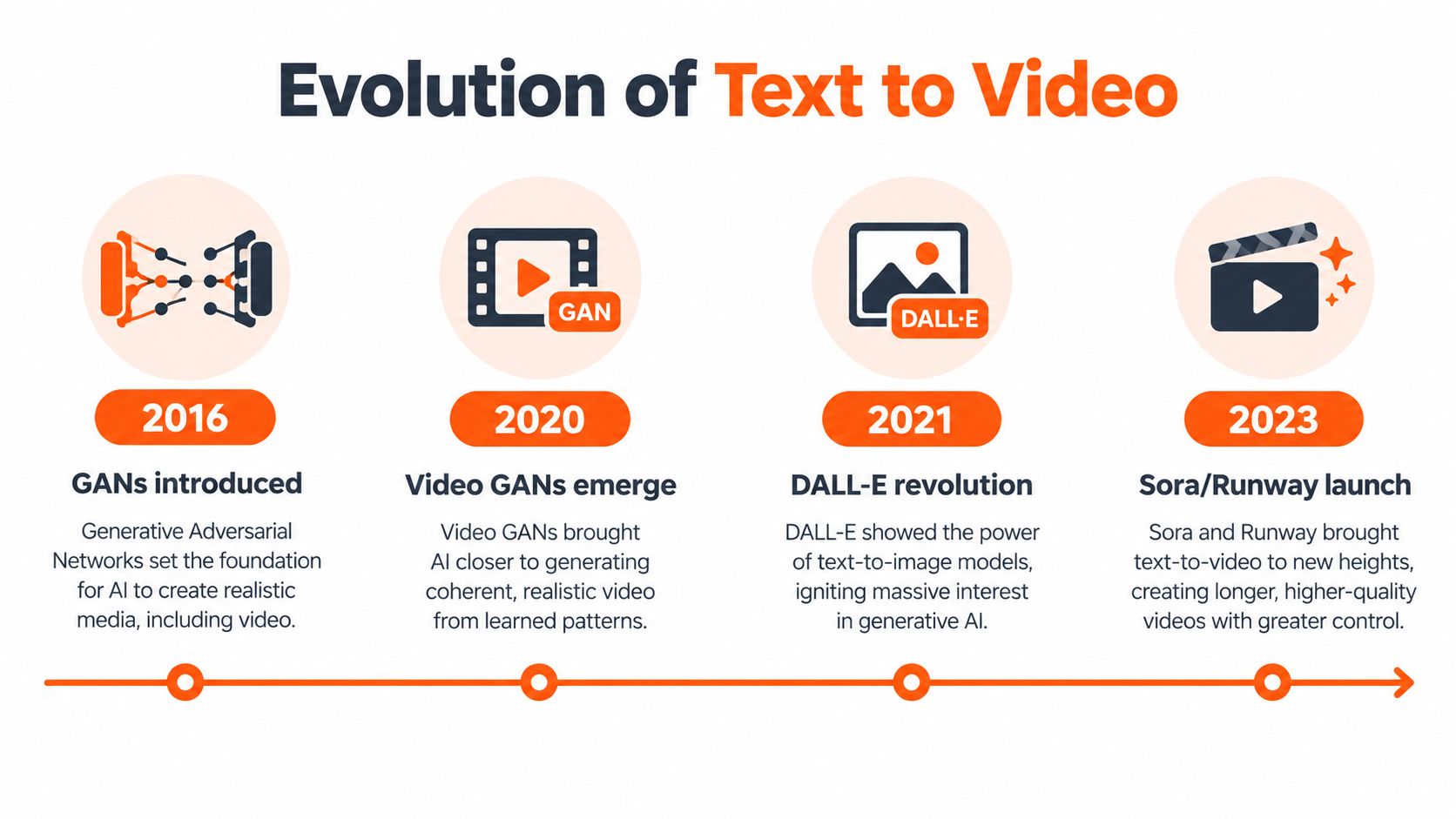
Runway Gen-2 followed in June 2023, bringing commercial text-to-video generation with clips up to 4 seconds at 720p. The short duration exposed the central production challenge. A system must keep the subject, camera, lighting, and movement reasonably stable across a shot. As duration increases, small errors become visible: a face changes, an object bends, or motion loses its direction.
OpenAI's Sora preview in February 2024 pushed the field toward minute-level, high-fidelity video. Its significance extended beyond longer clips. The system indicated progress in internal scene planning, including relationships among actions, objects, and camera behavior. For creative teams, that meant generated video could begin to resemble a planned sequence rather than a moving collection of attractive frames.
<a id="from-novelty-to-production-pipeline"></a>
From novelty to production pipeline
The 2024 to 2025 wave expanded the commercial model stack with Adobe Firefly Video, Google Veo 2, and Veo 3. Independent reviews described Sora and Veo 3 as major advances in visual coherence and native audio-visual synchronization. The field was shifting from isolated generation toward a production pipeline in which scene planning, temporal compression, audio, editing, and delivery could work together.
That progression gives producers a practical test for evaluating tools:
- Scene creation: Can the system turn a written concept into a plausible composition with clear subjects and depth?
- Motion control: Can people, objects, and cameras move without drifting?
- Continuity: Does a character or product remain recognizable from the opening frame to the closing frame?
- Production integration: Can the result receive voice, music, captions, localization, and the required export format?
These questions explain why newer systems are judged by workflow impact, not only by their first impressive clip. Early tools could demonstrate a visual idea. More mature systems aim to preserve identity across shots, compress complex temporal information into workable representations, and pass usable material into the rest of a studio process.
AI video now belongs to a meaningful global software category. One 2026 industry report valued the market at USD 716.8 million in 2025 and projected USD 3.35 billion by 2034, with an 18.8% CAGR. Another estimated US$761.6 million in 2025 and projected US$2.9 billion by 2032, with a 21.1% CAGR, as reported by Fortune Business Insights. The figures differ because researchers define and measure the category differently. Together, they show a market moving beyond laboratory demonstrations toward repeatable creative production.
<a id="core-architecture-and-model-design"></a>
Core Architecture and Model Design
A creative director approves a shot in which an actor turns toward camera. The generator must preserve the actor's face, clothing, position, and motion across the turn. Producing each frame independently would make that continuity difficult. Modern video models adapt image-generation architectures to reason about space and time together, giving the system a shared representation of the scene as it changes.
A film editor working from a storyboard provides a useful comparison. Each shot has its own composition, but the subject, lighting, and movement must connect across the sequence. Video models add temporal capacity for the same reason. They compare information across frames instead of treating every image as a separate design.
<a id="diffusion-with-a-sense-of-time"></a>
Diffusion with a sense of time
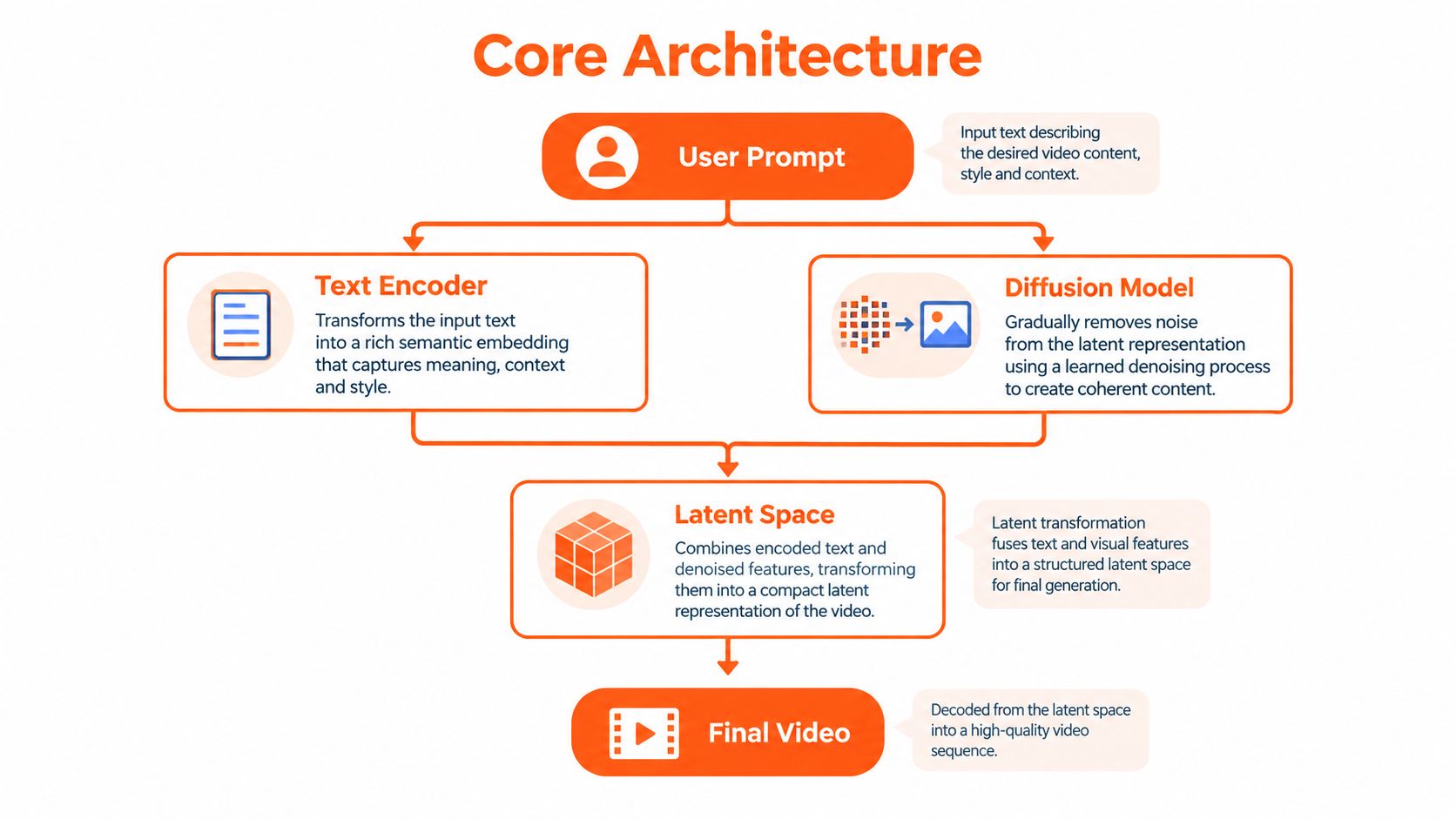
A conventional image diffusion system learns to turn noisy visual data into a coherent image. A video model extends that process with temporal layers, which learn how visual states change from frame to frame. These layers help the generator distinguish meaningful movement from random variation.
ModelScopeT2V combines a VQGAN, a text encoder, and a denoising U-Net with 1.7 billion parameters. The architecture assigns 0.5 billion parameters specifically to temporal capability, according to the ModelScopeT2V technical report. That design exposes a production trade-off. More temporal capacity can improve motion coherence, while increasing model size and computational demand.
The model works in a latent video space instead of processing every full-resolution pixel directly. It first compresses visual information into a smaller representation. Diffusion then denoises that representation, while spatio-temporal blocks coordinate changes across frames. A decoder converts the finished latent result back into visible video.
The practical effect is stronger identity preservation. The system evaluates how an object relates to earlier and later states, so a face, product, or moving subject has a better chance of remaining recognizable through the shot.
<a id="the-shift-to-diffusion-transformers"></a>
The shift to diffusion transformers
Newer systems use diffusion transformers, often called DiTs, together with flow matching and heavily compressed video latents. Compression reduces the number of tokens that attention must process, making longer clips more manageable.
Step-Video-T2V reports a 30-billion-parameter DiT with 48 layers and 48 attention heads per layer. Its Video-VAE compresses spatial information by 16x16 and temporal information by 8x, as described in the Step-Video-T2V report. The model can generate up to 204 frames, showing how compression, attention, and clip length interact in a production system.
Producer's rule: A simple interface can conceal major architectural differences. Check temporal capacity, latent compression, and attention design when comparing tools, because those choices affect continuity, render cost, and usable clip length.
The same design logic connects to video prediction for embodied AI. That field predicts how visual environments may change over time, while text-to-video systems generate a requested scene. Both represent motion as a sequence of related states rather than isolated images. For a studio, that shared idea matters because believable movement and consistent subjects must survive the handoff from generation into editing and finishing.
<a id="the-step-by-step-synthesis-pipeline"></a>
The Step-by-Step Synthesis Pipeline
A prompt such as “a red fox walking through fresh snow at sunrise” enters the generator as language, but the model can't use the sentence in its original form. It converts the words into numerical representations, extracts relationships between the requested elements, and uses those relationships to guide video generation.
<a id="1-prompt-interpretation"></a>
1. Prompt interpretation
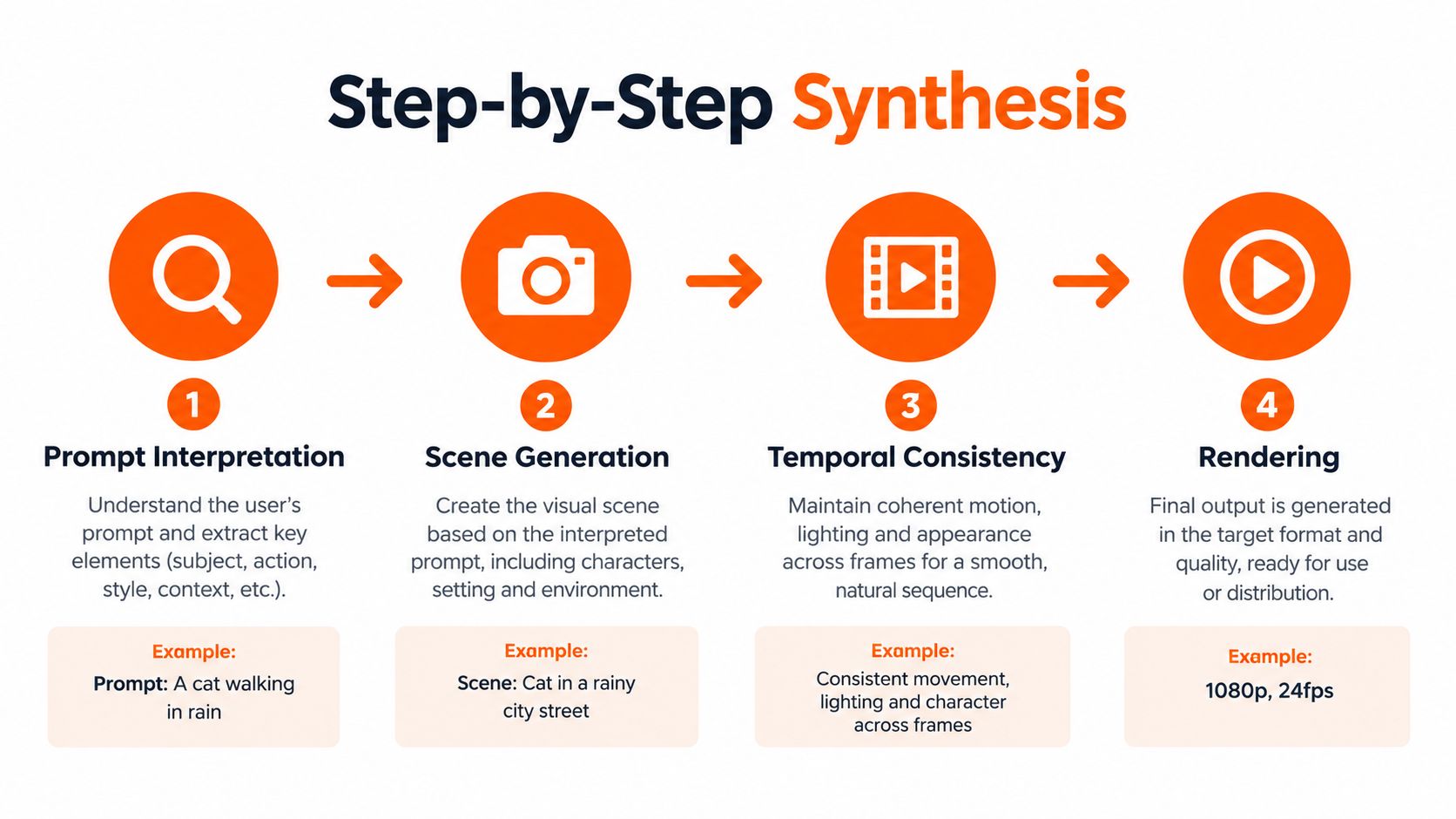
The text encoder identifies the subject, setting, action, visual style, and relationships in the request. “Fox” describes an object. “Walking” describes movement. “Through fresh snow” adds an environment and interaction. “At sunrise” provides lighting and atmosphere.
A weak prompt may contain attractive adjectives but little information about composition. A production-oriented prompt gives the system stronger instructions about who or what is present, where it is, what it's doing, and how the camera behaves. If the shot needs a close-up, a slow tracking movement, or a subject that stays centered, those details matter.
<a id="2-scene-planning"></a>
2. Scene planning
Modern systems increasingly translate language into a structured representation similar to a scene graph. The graph can include objects, spatial relationships, and temporal trajectories. Instead of treating the sentence as one undifferentiated description, the model can represent a fox as the main subject, snow as the ground, sunrise as the light source, and walking as the action that changes across time.
This planning stage is one reason newer systems can outperform earlier diffusion-only approaches on coherence, motion realism, and human preference evaluations, as described in recent text-to-video research coverage. The model creates a rough internal storyboard before it commits to detailed visual structure.
<a id="3-noise-becomes-a-video"></a>
3. Noise becomes a video
The generator starts with a noisy latent representation. It then performs progressive denoising, repeatedly estimating a cleaner version that better matches the prompt and the planned scene.
The model doesn't retrieve a finished fox video from a library. It generates a new sequence based on learned relationships between text, visual appearance, movement, lighting, and composition. The noise provides variation, which is why repeated generations from the same prompt can produce different camera paths or poses.
<a id="4-refinement-and-rendering"></a>
4. Refinement and rendering
Spatio-temporal blocks review information across both dimensions. Spatial processing helps maintain details within a frame. Temporal processing helps connect those details across the sequence. Multi-stage refinement can then improve edges, movement, identity, and overall visual stability.
The final latent representation is decoded into frames and exported as a video file. Depending on the product, the workflow may then add audio, captions, upscaling, color adjustments, or platform-specific formatting. For practical prompt-writing guidance, this text-to-video prompt guide can help translate creative intent into more explicit visual and temporal instructions.
<iframe width="100%" style="aspect-ratio: 16 / 9;" src="https://www.youtube.com/embed/A3Ey22-Y67Y" frameborder="0" allow="autoplay; encrypted-media" allowfullscreen></iframe>The result is best understood as controlled synthesis, not automated filming. The model creates a plausible visual sequence from learned patterns, and the producer still needs to select, revise, and approve the output.
<a id="solving-the-temporal-consistency-challenge"></a>
Solving the Temporal Consistency Challenge
A creative director approves a strong opening shot, then scrubs forward and sees the jacket change shape, the product label warp, or a hand gain and lose fingers. The problem is not just image quality. The system must preserve a subject's identity while allowing its pose, lighting, camera position, and surroundings to change.
A glass snow globe provides a useful comparison. Its mountains, deer, and snow should remain part of one scene as the viewpoint shifts or snow moves inside. If the model redraws the globe independently at every moment, the scenery drifts. Treating the sequence as a connected visual system gives stable elements a shared reference.

<a id="attention-across-frames"></a>
Attention across frames
Temporal attention compares information from different points in the clip. A later view of a face can be checked against its earlier appearance. A moving car can retain its body shape while changing position. During a camera pan, the background can reveal new areas without forcing the subject to be rebuilt from scratch.
As noted in the Step-Video-T2V technical report, 3D full attention and Video-VAE compression are key controls for balancing quality and cost. In practical terms, attention helps coordinate motion across space and time, while compression reduces the amount of information the system must process during generation. Clip length and compression settings therefore affect both visual stability and production efficiency.
<a id="why-longer-clips-are-difficult"></a>
Why longer clips are difficult
Longer generation windows give small errors more chances to accumulate. A subtle facial change may pass unnoticed in one transition but become obvious later. A drifting camera can push a subject out of frame, while a prop that shifts position can weaken the scene's continuity.
A stable continuous shot therefore requires different handling from a short looping background. The system must preserve more relationships across more frames without making computation impractical. Scene planning, reference conditioning, and temporal checks help divide that burden, but they do not remove the need for review.
Practical test: Do not judge a generator only by its strongest opening frame. Scrub through the full clip and check the subject's identity, hands, text, product geometry, lighting, and camera path.
Talking-head projects add another constraint: the face must remain recognizable while mouth movement follows the voice. A reference-driven tool may fit that job better than a text-only system that invents a presenter for every generation. Talking avatar production shows why reference conditioning and synchronized movement matter when a recognizable person carries the message.
<a id="end-to-end-studio-workflows-for-creators"></a>
End-to-End Studio Workflows for Creators
The raw generator is only one part of a professional video workflow. A finished social asset needs a script, a voice, music or sound design, captions, framing, brand treatment, and an export suited to its destination. If a creator must move each output through separate tools, the time saved during generation can disappear during assembly.
A modern AI studio treats the process as an automated production line. The workflow might begin with a topic or link, generate a script, create visual scenes, select a voice, synchronize narration, add captions, and produce versions for vertical, square, and widescreen placements. The model creates the visual material, while orchestration software turns separate components into a deliverable.
<a id="what-the-studio-layer-adds"></a>
What the studio layer adds
- Script planning: The system converts a topic into a sequence with a hook, supporting points, and a conclusion.
- Voiceover: A selected synthetic voice reads the script with controlled pacing and emphasis.
- Visual assembly: Generated clips, images, and supporting footage are arranged around the narration.
- Captioning: Spoken words become timed subtitles with a chosen visual style.
- Music synchronization: Audio tracks can guide cuts, transitions, and visual changes.
- Localization: Translation and re-voicing create language versions without arranging a new shoot.
- Format adaptation: The same concept can be reframed for 9:16, 1:1, and 16:9 outputs.
The creative director's role changes as a result. Instead of approving one linear edit after a long chain of handoffs, the team can define the visual system, review variants, and spend more time on message, brand fit, rights, and audience response. That doesn't remove editorial judgment. It moves judgment earlier, where the team establishes rules that the automated pipeline can follow.
<a id="storyboard-thinking-still-matters"></a>
Storyboard thinking still matters
Automation doesn't eliminate previsualization. A strong sequence still needs a clear subject, action, camera intention, and transition between shots. Guidance on how to storyboard a music video like a pro remains relevant because AI systems perform better when the creator has already resolved the visual logic of the piece.
ClipNova is one example of this studio approach. Its AI-powered workflow can turn a prompt, photo, or script into a short-form video with generated visuals, voiceover, captions, and music, while its paid plans provide commercial rights and watermark-free exports. A broader overview of an AI movie maker workflow shows how generation becomes more useful when scripting, editing, and publishing are handled in one environment.
The main benefit isn't that every output is finished without review. It's that creators can test more creative directions without rebuilding the entire production stack for each variation.
<a id="quality-trade-offs-and-market-realities"></a>
Quality Trade-Offs and Market Realities
A creative team may receive a striking five-second clip, then discover that the character's face changes in the next shot, the product label is unreadable, or the camera motion breaks continuity. These failures expose the central trade-off in AI video: resolution, speed, and consistency compete for computation. Higher-quality settings usually require more processing, while faster modes may simplify motion, detail, or scene planning.
Resolution increases the amount of visual information the model must generate. Longer clips require it to preserve identity, object shape, camera direction, and lighting across more frames. Temporal compression can make generation practical, but it also makes continuity decisions harder. Native audio adds another coordinated stream, because dialogue, effects, and music must align with events on screen.
<a id="what-buyers-should-compare"></a>
What buyers should compare
| Evaluation area | What to inspect |
|---|---|
| Visual fidelity | Texture, faces, hands, typography, lighting, and product details |
| Temporal stability | Identity, object shape, camera direction, and continuity throughout the clip |
| Audio capability | Whether sound is generated natively or added as a separate layer |
| Workflow fit | Scripts, captions, localization, aspect ratios, review, and export |
| Commercial readiness | Rights, privacy controls, approvals, and documentation |
Market projections explain why vendors continue investing in the category. One analysis valued the global AI video generator market at USD 716.8 million in 2025 and projected USD 3.35 billion by 2034. Another estimated US$761.6 million in 2025 and projected US$2.9 billion by 2032, according to Fortune Business Insights' market analysis. These figures indicate expected market expansion, not proof that every platform can meet a production team's requirements.
Adoption shows a similar gap between interest and operational readiness. The IDOMOO 2025 market study reports that 65% of people were interested or open to AI videos from brands, while 41% of brands were using AI for video creation in 2025, compared with 18% in 2024. The study also describes growing interest in native audio, higher resolution, and multi-format output.
Decision rule: Test the complete path from brief to approved export, rather than judging a platform by its most cinematic demo.
Rights management, consent, brand safety, and editability often decide whether a team can publish repeatedly. A useful evaluation should therefore include scene planning, character references, review controls, and final exports. Raw model quality attracts attention, while dependable studio integration determines whether the result can enter a real campaign.
<a id="the-future-of-ai-video-production"></a>
The Future of AI Video Production
The next stage of AI video won't be defined only by prettier clips. It will be defined by whether a system can produce consistent, editable, localized, and compliant assets inside a real studio workflow.
Native audio-visual synchronization is already changing the production brief. Instead of generating silent footage and adding every sound later, newer systems increasingly coordinate dialogue, effects, and visuals as connected elements. The challenge now is reliability. A convincing voice is useful, but a publishable scene also needs the correct words, timing, tone, rights, and brand context.
Long-video generation will depend on the same technical levers discussed earlier: token compression, temporal attention, scene planning, and progressive decoding. Better prompts alone won't solve continuity. Models need internal representations that preserve characters, locations, props, and camera logic across longer sequences.
Creative teams should prepare in practical ways:
- Build prompt libraries around camera movement, composition, character references, and brand rules.
- Review full clips rather than selecting outputs from a single frame.
- Keep human approval for claims, likeness, rights, and sensitive subjects.
- Choose tools that connect generation with narration, captions, localization, and export.
- Save editable project information so a successful concept can be revised instead of regenerated blindly.
AI video is becoming less like a novelty generator and more like a production system. The teams that gain lasting value won't just generate more footage. They'll design repeatable processes that turn model output into assets people can review, adapt, and publish with confidence.
ClipNova turns prompts, photos, and scripts into short-form videos with visuals, voiceover, captions, music, and multiple export formats in one studio workflow. Visit ClipNova to create publish-ready video concepts and test how an integrated AI production pipeline fits your content process.
Ready to ship your own?
Start creating viral videos with AI in under twenty minutes, no credit card required.