
Search for copyright free music for YouTube videos and the same three tips come back every time: filter for "no copyright" channels, stick to the Audio Library, and always credit the artist in the description. The first tip is how channels get claimed. The second is closer to right than the people giving it usually understand. The third is a license condition, not a permission.
The phrase itself is the problem. Copyright free is a marketing label that describes how a listing feels, not what a license allows. Every decision that protects a channel lives in the license text, and that text usually sits one link away from the download button that nobody clicks.
Three events get flattened into "a copyright problem" when they're nothing alike: holding a valid license, absorbing a Content ID claim, and taking a strike. They carry different costs and demand different responses. I would treat "copyright free" as a warning sign to investigate, never as a permission slip.
Table of Contents
- What Copyright-Free Music Really Means
- Where to Find Music You Can Use Safely
- How to Verify a Track Before You Publish
- Writing Attribution for Creative Commons Tracks
- What to Do When Content ID Flags Your Video
- Safe Habits for Batches and Client Work
- Publish Only After a Go or No-Go Gate
<a id="what-copyright-free-music-really-means"></a>
What Copyright-Free Music Really Means
“Copyright-free” is a marketing label, not a license category. It does not tell you whether a track can be used in a monetized YouTube video, whether attribution is required, or whether the permission covers the recording as well as the composition. The license terms answer those questions.
License types behind “copyright-free” music
| License type | What it allows | Usual condition |
|---|---|---|
| Public domain | Use the composition without asking permission | A particular recording may still be protected |
| Creative Commons CC0 | Use freely, including commercially | No credit required; confirm the license is CC0 |
| Creative Commons CC BY | Use freely, including commercially | Credit the author, title and license link |
| Royalty-free license | Repeated use under the license terms | Restrictions may apply to resale, platforms or commercial use |
| YouTube Audio Library standard license | Use inside YouTube videos | Some tracks require Creative Commons attribution; check each listing |
| All rights reserved | Use only with permission | Get a license from the rights holder |
The label on a download page is not the permission. Read the terms that apply to the specific track.
<a id="the-two-rights-inside-every-track"></a>
The two rights inside every track
A song has a composition, which covers its melody, harmony and lyrics, and a sound recording, which covers the particular performance in the audio file. Different people or companies may control each right. Permission for one does not automatically clear the other. A public-domain melody recorded recently, for example, may have a protected recording.
A valid license and a Content ID claim are separate issues. A license documents permission to use the music; a claim is a platform action that may affect a video, such as directing its revenue or restricting its availability. A claim is not the same as a copyright strike. Keep the license and any proof of purchase or permission with the audio file, so you can identify what use was granted if a claim appears.
The test for every track: Cover the title and read the license. Does it name the use you need, such as monetized YouTube publishing? If it says “personal use,” “noncommercial,” or gives no permission for publishing, do not treat credit as a substitute for permission. If you need to extract audio from a YouTube video, do not assume a tool or a claim of permitted YouTube audio download workflows establishes that you have the rights to use the recording.
<a id="where-to-find-music-you-can-use-safely"></a>
Where to Find Music You Can Use Safely
Five categories cover almost everything creators use, ordered here from least paperwork to most.
<a id="start-with-the-audio-library-then-widen"></a>
Start with the Audio Library, then widen
YouTube's own library earns its reputation. The YouTube Audio Library help page states that it holds royalty-free production music and sound effects creators can use in videos, and that downloads from the library won't be claimed by a rights holder through Content ID. That last part is the key value: not that the music lacks copyright, but that the platform's matching system is configured not to flag it.
The limits are just as concrete. Some tracks require Creative Commons attribution, and the standard license is written for use inside YouTube videos, not for a course platform, a paid ad campaign, or a client's website. Publish the same file to Instagram and TikTok and you've stepped outside the cover you had.
<a id="marketplaces-sell-terms-not-tracks"></a>
Marketplaces sell terms, not tracks
A royalty-free marketplace grants repeated use after a single payment or a subscription, and the restrictions sit on the terms page rather than in the headline. Open that page before you download. Look for the tier that names client work, paid ads and monetized channels, because the free or personal tier frequently doesn't, and the price difference buys you the sentence you need.
Creative Commons repositories are the same problem with a shorter label. CC BY requires credit, CC BY-SA forces adaptations onto the same license, NC restricts uses primarily intended for commercial advantage, and ND blocks derivatives. For a monetized channel or a brand video, NC and ND are disqualifying rather than negotiable.
Public domain archives clear the composition but not always the recording. Commissioned music is the cleanest of the five, because the agreement is drafted for your project, and it's only as good as the clauses it contains.
<a id="where-free-downloads-go-wrong"></a>
Where free downloads go wrong
A download link on a random site, or a "no copyright" channel with a big subscriber count, tells you nothing verifiable. The uploader may not own the track, may have built it on a sample they don't control, or may register it with a distributor six months from now. For a personal upload the risk is yours to take. For a channel that earns revenue or a client deliverable, it isn't a trade worth making.
If your pipeline runs from a prompt or topic to a finished cut, the music decision still sits with you; this walkthrough of building a video with music shows where the track choice slots into the build, which is exactly the point where you should be saving the license.
Music source categories and what each one clears
| Source | Rights usually cleared | What to check |
|---|---|---|
| YouTube Audio Library | Use inside YouTube videos; downloads not claimed through Content ID | Credit on some tracks; limits on use outside YouTube |
| Royalty-free marketplace | Commercial use under the stated license | Noncommercial tiers, credit, resale and platform limits |
| Creative Commons repository | Use under the chosen CC license | Attribution, NC and ND restrictions |
| Public domain archive | Works whose copyright has expired | Recordings and arrangements may have separate rights |
| Commissioned music | Whatever the signed agreement grants | Written license covering sync, monetization and edits |
| Free-download link on a random site | Often nothing verifiable | Usually no license; avoid for channels that earn revenue |
A source is only as safe as the license it documents. Save the license page or a screenshot of it for every track, and name the file after the track so you can find it a year later.
<a id="how-to-verify-a-track-before-you-publish"></a>
How to Verify a Track Before You Publish
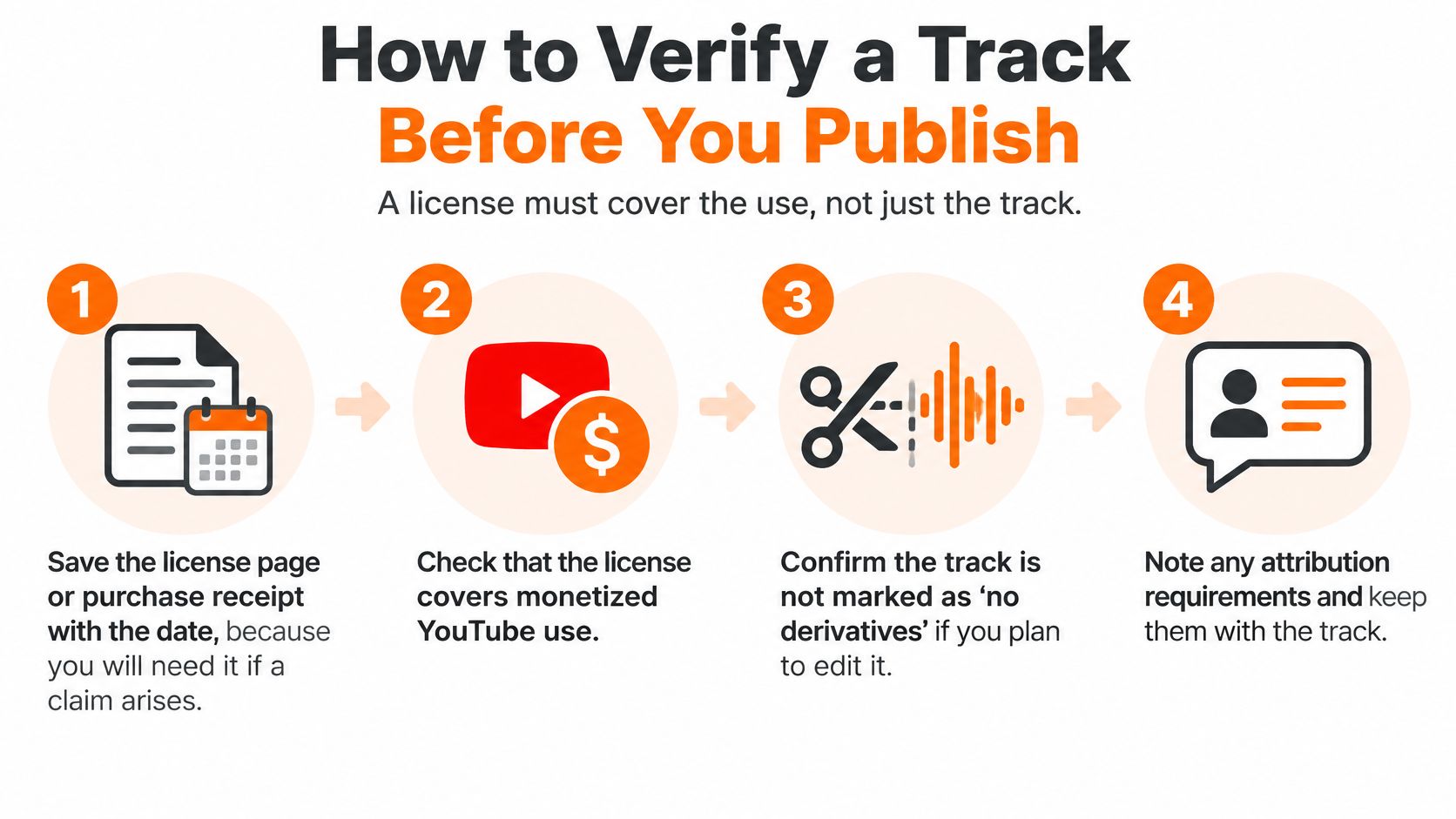
A track can be labeled “copyright-free” and still be wrong for your video. Before publishing, check what the license permits, what the recording covers, and what you'll do if YouTube's Content ID system flags the upload. A claim is not the same as a strike, and neither one tells you by itself whether your license is valid.
- Save the license page with the date. Keep a screenshot of the terms, plus the purchase receipt or download confirmation. If a claim arrives later, the page may have changed or disappeared.
- Confirm the license covers pairing music with video. Check that you have permission to synchronize the music with visual content. Also confirm that the license applies to the specific recording, not only the underlying composition.
- Check monetized publishing. A license that mentions YouTube may still exclude commercial use. Look for terms covering monetized videos and advertising.
- Check client and brand use. For a client project, confirm that the license allows use on the client's behalf and that the rights holder grants permission to the party that needs it.
- Check editing rights. Trimming, looping and lowering the music under narration can all matter under license terms. Confirm that the permitted uses cover the edits you plan to make.
- Copy the required credit text. If attribution is required, follow the license's instructions for the author, track title, license name and link. YouTube's Audio Library guidance explains how to find attribution details for tracks that require them.
- Record territory, duration and platforms. Note where the license applies, how long it lasts and which platforms it covers. Terms can vary, so keep the specifics with your track record.
A Content ID claim can restrict or redirect a video's monetization without being a copyright strike. A strike is a separate enforcement action. Keep the license evidence and any permissions in one place so you can respond to a claim with the relevant documents.
Remixes need an additional rights check because the new version may involve more than one recording or rights holder. These remix rights checks for SoundCloud cover permissions to consider before using or building on a remix.
Track: Long Quiet Road. Source: named library. License: royalty-free, single payment, sync and commercial use permitted, no attribution. Proof: invoice filed 12 March. Platforms: YouTube, Reels. Edits allowed: trim, loop, duck. Recheck: next March.
Keep one record per track. For example, note the source, license terms, proof, allowed platforms and edits in a single row. If a claim arrives, you can match the disputed use against the permission you saved.
<a id="writing-attribution-for-creative-commons-tracks"></a>
Writing Attribution for Creative Commons Tracks
A credit line has three jobs: identify the author, identify the track, and point to the license that granted the use. Get all three into one sentence and the obligation is met.
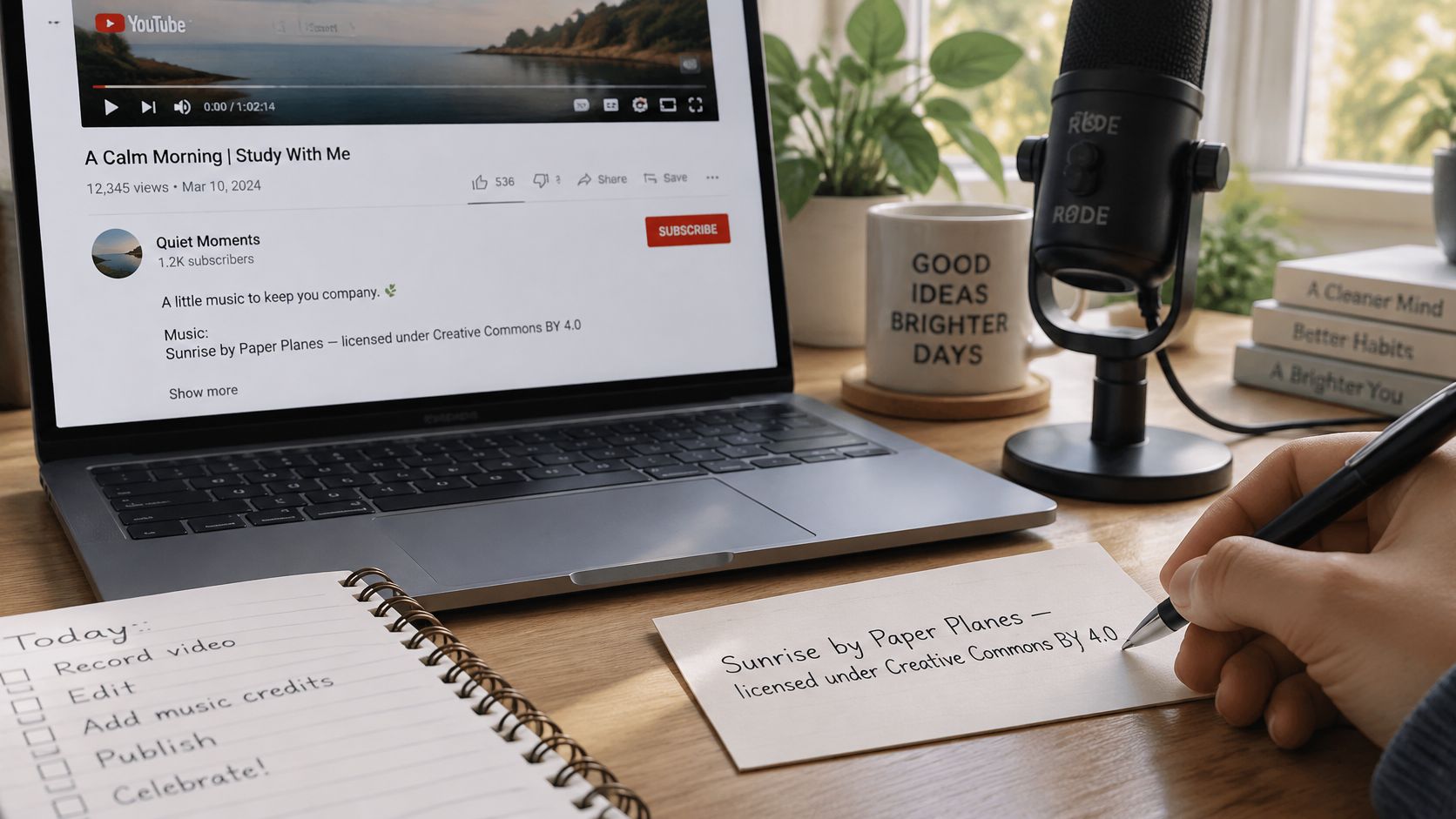
Here's the shape of it, with placeholders you replace.
Track title by Artist name, licensed under CC BY 4.0. License: linked URL.
Each part earns its place. The title identifies what was used, which matters in a description holding ten tracks. The artist name is what the license requires, and misspelling it is the most common quiet failure. The license name and version tell a reviewer which conditions applied, since a track offered under 3.0 and re-offered under 4.0 carries different requirements. The link lets anyone verify the grant without emailing you.
<a id="where-the-credit-goes"></a>
Where the credit goes
The description is the default location, and it's the one a reviewer checks first. When the license asks for credit in the work itself, add it to an end card or a corner of the frame that stays up long enough to read. A credit posted only in a pinned comment counts as missing, because comments aren't part of the video's published record.
<a id="the-mistakes-that-cost-the-most"></a>
The mistakes that cost the most
- Missing the license link. The author and title alone don't tell anyone what you were allowed to do.
- Changing the version. Copying the text from a similar track and swapping the number breaks the chain between your credit and your permission.
- Confusing CC0 with CC BY. CC0 asks for nothing. CC BY asks for credit. Assuming the first when you have the second is the most common attribution failure.
- Retyping instead of copying. The library interface provides ready attribution text for tracks that require it. Paste it, then check the spelling once.
- Hiding credit in the comments. Out of sight of the place the license specified.
For a Short, a single line at the end in the same treatment as your captions works better than a scrolling block, since vertical viewers read fast and skip faster. Before publishing, hand the video to someone who hasn't seen the project and ask them to find the author, the title and the license. If they can't, the credit isn't in place yet.
<a id="what-to-do-when-content-id-flags-your-video"></a>
What to Do When Content ID Flags Your Video
Three different things get called "a copyright problem," and only one of them is a penalty.
<a id="three-things-that-get-mixed-up"></a>
Three things that get mixed up
- A license is the permission you hold. It's a document, and it's either in your folder or it isn't.
- A Content ID claim is an automated match against a rights holder's reference file. It typically redirects ad revenue or limits where the video can be seen. It isn't a mark against your channel.
- A copyright strike is a formal penalty applied after a valid takedown request. It expires, but repeats put the channel itself at risk.
Claims are the routine event. YouTube's policy reporting counted more than 722 million Content ID claims in the first half of 2021, over 99% of all copyright actions on the platform that period, and by December 2024 Content ID had paid rights holders more than $12 billion from advertising revenue. The copyright transparency report raises the current scale to more than 2 billion Content ID claims in 2025, with rights holders monetizing over 90% of them. Fewer than 1% of those claims were disputed, yet over 65% of disputes were resolved in the uploader's favor.
That last pair is the part worth sitting with. Most claims go unchallenged, and when creators do challenge them, they usually win. A licensed track can still be claimed because matching happens on audio fingerprint before anyone reads your paperwork. Legal permission lowers your risk; it doesn't produce zero claims.
<a id="the-response-sequence"></a>
The response sequence
Open YouTube Studio, find the claimed video and note which rights holder filed and which portion of the audio was matched. Then pull the license, receipt and download date from your register. If your document covers the use described, dispute with that proof and one plain sentence stating what you hold. If it doesn't cover the use, replace the track rather than arguing.
Content ID outcomes and your response
| Outcome | What it does | Your response |
|---|---|---|
| Monetization claim | Ads run and revenue goes to the rights holder | Dispute with your license if you hold one |
| Tracking only | Rights holder sees viewing data, no revenue change | Usually no action needed |
| Blocked in some countries | Video unavailable in named regions | Dispute with proof or replace the track |
| Muted audio | The matched sound is removed | Replace the track or submit license documents |
| Copyright strike | Formal penalty applied to the channel | Handle through the strike process, separate from the claim |
<a id="when-to-wait-and-when-to-replace"></a>
When to wait and when to replace
A tracking-only claim needs nothing from you, so leave it alone. A monetization claim on a video that earns little may cost less to accept than to fight, especially if your license is thin or the claimant is a distributor acting for the artist. A regional block on your largest market is worth disputing the same day. Muted audio on a video where the music sat under narration usually means replacing the bed, since a mute leaves a hole the edit can't fill.
A claim attaches to a video, not to a track. The same audio file generates a fresh claim on every upload that carries it, which is why the next decision matters more than this one.
<a id="safe-habits-for-batches-and-client-work"></a>
Safe Habits for Batches and Client Work
One unlicensed track placed into a template doesn't stay one problem. It becomes one problem per export, and batch production multiplies it faster than anyone can review by hand.
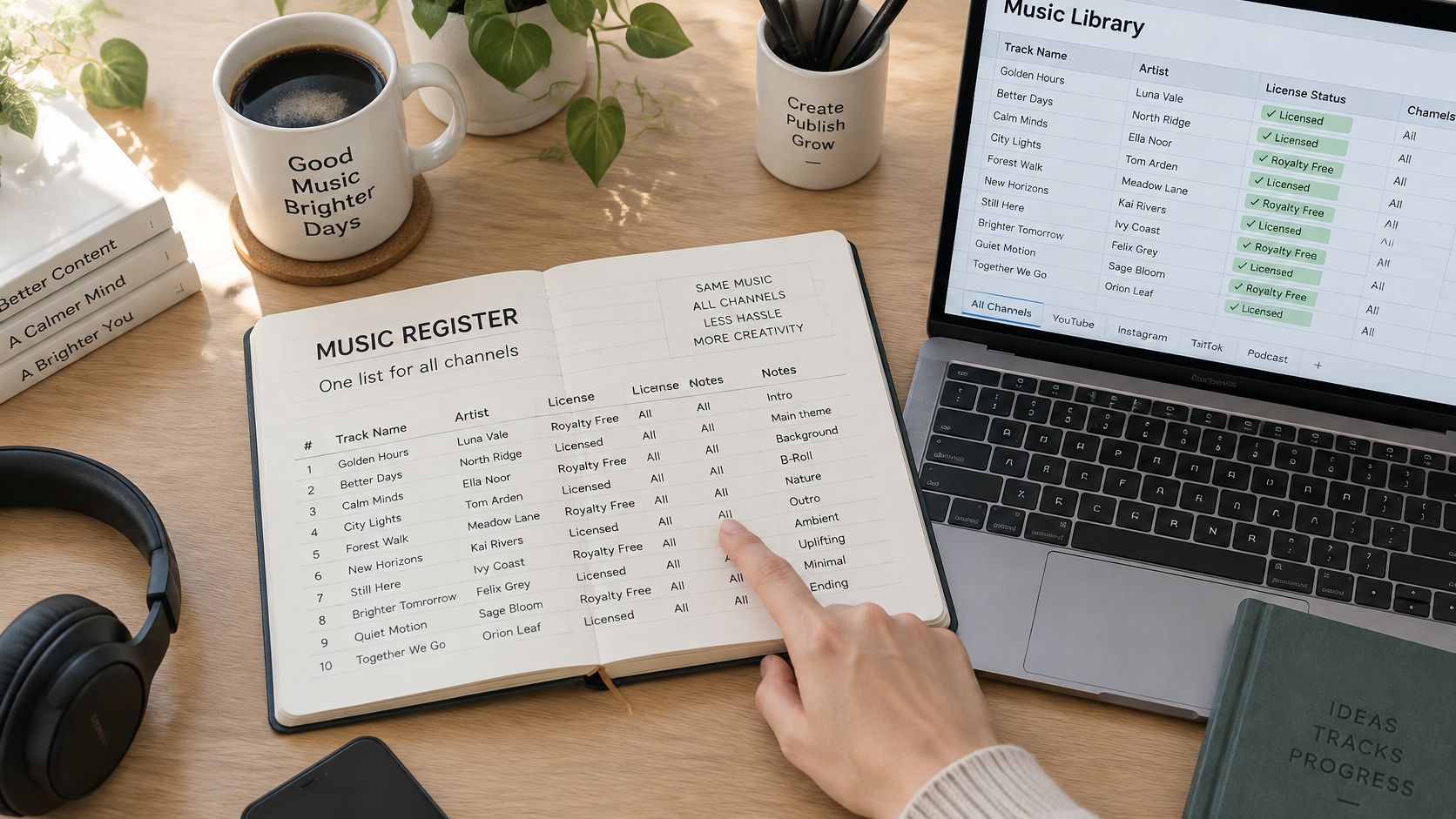
Keep one register. Track name, source, license file or screenshot, attribution text if required, permitted platforms and the date you checked. Give each track an ID and record that ID in the video's project notes. The register is the only thing standing between a claim and an afternoon of forensic work.
Approve tracks before the batch, not during it. Vetting a track once and then building twenty variants on top of it means a bad track costs you one replacement pass instead of twenty separate discoveries. Review the register before each new batch, since licenses expire and providers change terms.
Say a studio produces twenty variations of a product video and all twenty share one approved bed. If a claim lands, the register shows exactly which twenty exports need updating, and the replacement is a single evening rather than a slow crawl through the upload history.
Put music in the client contract. State who supplies the track, which uses the license covers, and who handles a claim if one arrives. When the client supplies music, get their written confirmation that it covers monetized publishing and editing; otherwise the deliverable carries a risk you accepted and can't cure.
Automating video editing doesn't remove this step, it concentrates it, because a template applied across a library applies the same music decision everywhere. These automated video editing workflows reward teams that already know which tracks are cleared.
Your register needs five fields to start this week: track name, source URL, license file location, attribution text, and approved platforms. Add a review date and a video ID column when the second project arrives.
<a id="publish-only-after-a-go-or-no-go-gate"></a>
Publish Only After a Go or No-Go Gate
A track goes live only when three things line up: the license names the exact use, the saved file matches the register entry, and any required credit is in place. Run four gates in order before rendering, and treat any failure as a stop rather than a warning.
- Open the saved license or receipt. Confirm the date and track ID match the register row for this specific video, not a similar one from the same library.
- Find the words that matter. The license should name monetized YouTube publishing and synchronization. If either is missing, the track fails.
- Place the credit. If a credit is required, it needs to sit where the license specified, not where it's convenient.
- Check every edit in the final render. Looping, trimming, ducking under narration and format conversion all need to be permitted by the terms you saved.
If a gate fails, swap the track before rendering. Replacing music after upload means re-editing, re-rendering and re-uploading, and the original claim stays attached to the original video regardless. Small productions feel this most: when you're making your own movies with a two-person crew, a blocked upload on launch day has nobody else to absorb it.
On ClipNova, videos created on paid plans come with full commercial rights and no watermark, and can be used on any platform including monetized channels. This applies to the video we generate. The music you add still needs its own verified license, which is why the gate applies to every export. If you're juggling several projects at once, tracking which track cleared which export is project management before it's copyright work, and a comparison of project management apps for Mac will help you pick somewhere to keep the register.
One task worth finishing today: open your current project, run the four gates on its track, and file the license before the next upload.
ClipNova builds videos from a prompt or a topic, complete with script, scenes, voiceover, captions and a music bed, and you can upload a track you've already cleared and set its volume under the narrator. Every plan includes commercial rights and watermark-free exports, so the license you verified stays the license you publish under. Take the track you just gated and put it into your next export at ClipNova.
Ready to ship your own?
Start creating viral videos with AI in under twenty minutes, no credit card required.