
Most business video programs don't fail because the videos look bad. They fail because the team chooses a format before choosing a business outcome, then celebrates views that never become qualified demand. That mistake is expensive in a market where digital video ad spending exceeded $191.3 billion in 2024, with projections reaching about $223.5 billion in 2026 and $241.9 billion by 2028 according to Statista's digital video advertising overview.
Business video marketing works when you treat it as an operating system for attention, education, conversion, and retention. The video itself is only one component. Distribution, pacing, captions, page speed, measurement, and production economics determine whether that asset creates revenue or becomes another file in a content library.
Table of Contents
- Why Business Video Marketing Is a System, Not a Format
- The Main Types of Business Videos and When to Use Each
- Short-Form vs Long-Form and the Power of Pacing
- Distributing Business Video Across Owned, Earned, and Paid Channels
- Production Options From In-House to AI Studios
- KPIs That Actually Measure Business Video ROI
- Accessibility as a Performance Lever, Not an Afterthought
- Putting It Together Across E-Commerce, SaaS, and Agencies
<a id="why-business-video-marketing-is-a-system-not-a-format"></a>
Why Business Video Marketing Is a System, Not a Format
The most common mistake is simple: teams pick “short-form video,” “product demo,” or “brand film” first, then search for a goal afterward. That reverses the decision. A video should exist because it moves a defined business outcome, not because the company needs more content.
YouTube illustrates how far distribution has shifted from traditional broadcast. YouTube launched in 2005, and by the following year it had reached 100 million views per day, helping move video from a broadcast medium into a mainstream marketing channel, as described in this history of video marketing. Today, YouTube is identified as the top global video platform, with 9 in 10 marketers using it for marketing and ranking it as the most effective video channel, according to Statista.
<a id="four-decisions-must-connect"></a>
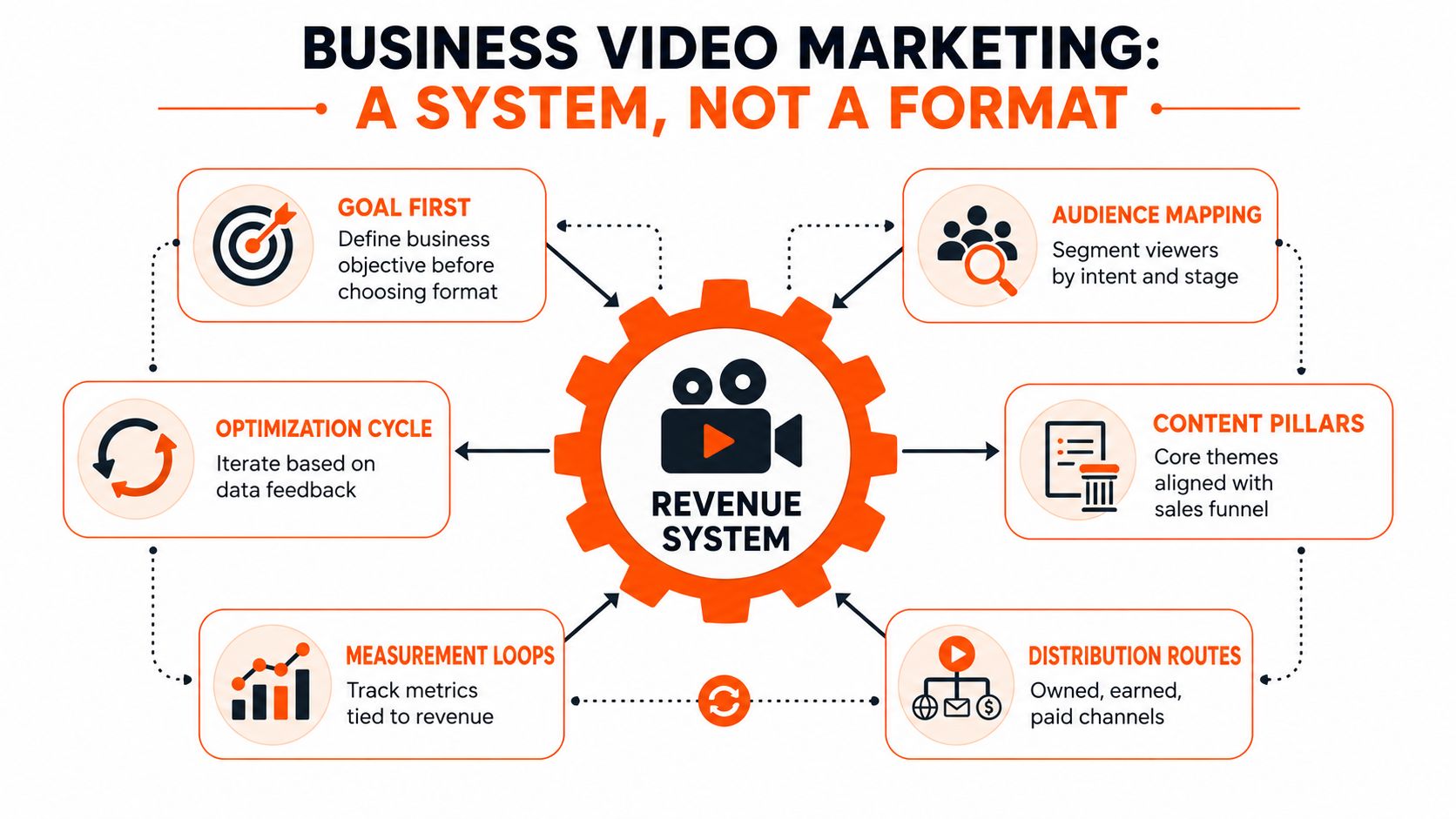
Four decisions must connect
A serious program links four decisions before production begins:
- Format and funnel stage: Use a short ad to earn attention, a demo to remove product uncertainty, and a testimonial to handle purchase objections.
- Distribution and buyer behavior: Put the asset where the audience already researches, scrolls, compares, or receives follow-up.
- KPIs and revenue events: Measure completion, clicks, qualified opportunities, purchases, or retention according to the video's job.
- Production economics and cadence: Choose a workflow your team can sustain. A beautiful asset that ships once won't support a weekly acquisition program.
Pacing, accessibility, and landing-page speed multiply every one of these decisions. A strong demo with no captions loses silent viewers. A compelling ad that sends traffic to a slow page burns paid spend. A brand film with no distribution plan becomes an internal showreel.
Practical rule: Don't approve a video brief until the owner can name the audience, funnel stage, distribution route, primary KPI, and next action.
The rest of the program should follow that discipline. Produce fewer disconnected assets and build a repeatable system that turns one approved idea into channel-specific creative, measurable traffic, and useful feedback for the next production cycle.
<a id="the-main-types-of-business-videos-and-when-to-use-each"></a>
The Main Types of Business Videos and When to Use Each
A video type is a strategic choice, not a creative preference. The right question isn't “What can we make?” It's “What must the viewer understand or do next?”
<a id="match-the-asset-to-the-buying-job"></a>
Match the asset to the buying job
| Video Type | Funnel Stage | Typical Length | Primary KPI | Production Complexity |
|---|---|---|---|---|
| Explainer | Awareness and early consideration | Short to mid-form | Qualified engagement or assisted traffic | Medium |
| Product demo | Consideration | Mid to long-form | Demo requests, product-page actions | Medium to high |
| Customer testimonial | Conversion | Mid-form | Conversion rate and sales influence | High |
| Short-form ad | Acquisition and retargeting | Short-form | Thumbstop, click-through, qualified acquisition | Low to medium |
| Talking avatar or AI presenter | Education, onboarding, and awareness | Short to mid-form | Completion, content output, activation | Low to medium |
| Brand film | Awareness, recruitment, and trust | Mid to long-form | Brand engagement or qualified visits | High |
Explainer videos belong near the top of the funnel. They frame a category, simplify a difficult problem, and give unfamiliar buyers language for what your company does. Keep the message focused on the problem and the new way to approach it, rather than listing every feature.
Product demos earn their budget when prospects are evaluating functionality. Show the workflow, the decision points, and the result. For SaaS, that may mean a real product tour. For DTC, it may mean demonstrating application, texture, fit, or use in context.
Testimonials and customer stories work closest to the decision. They should answer objections that product claims can't resolve, including implementation concerns, reliability, switching risk, or expected results. Avoid scripted praise. Specific customer experience carries more weight than polished adjectives.
Short-form ads are acquisition instruments. Use a direct opening, visible context, captions, and one action. Create variants for different objections, audiences, and landing pages instead of forcing one edit to do every job.
Talking avatar and AI presenter videos suit repeatable education, internal onboarding, product updates, and localized thought leadership. They don't replace a founder or customer when personal trust is central, but they can remove production friction from routine communication.
Brand films support broad awareness, recruitment, and positioning. They need a distribution plan before production starts. If you can't state the single business goal, don't produce the video yet.
<a id="short-form-vs-long-form-and-the-power-of-pacing"></a>
Short-Form vs Long-Form and the Power of Pacing
Length is not the performance lever the right strategy assumes it is. Temporal compression, meaning how quickly the video delivers useful information, determines whether viewers continue watching and reach the conversion opportunity.
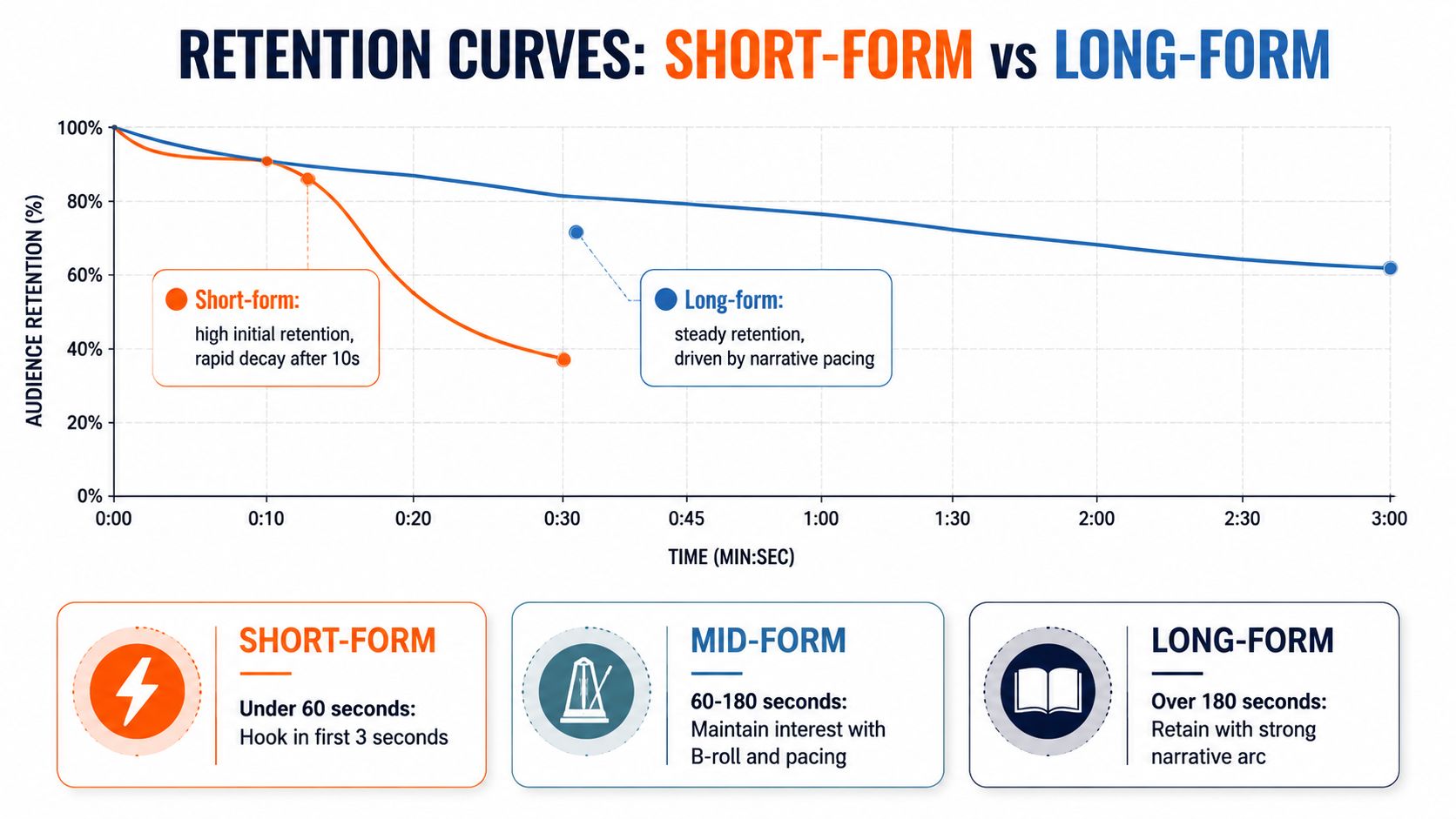
A practical classification helps. Short-form is under 60 seconds, mid-form runs from 60 to 180 seconds, and long-form extends beyond two minutes. Use short-form to interrupt scrolling and support retargeting, mid-form to demonstrate a product or reinforce social proof, and long-form to answer complex questions or support sales conversations.
<a id="compress-the-message-not-just-the-runtime"></a>
Compress the message, not just the runtime
Industry benchmarks report that videos under 90 seconds retain about 50% of viewers on average, while completion rates for videos under 2 minutes are reported to be roughly 70% higher than for videos over 5 minutes, according to Shorts Intelligence's short-form video statistics. YouTube Shorts end-to-end viewing is often reported at 60% to 70%, while reported platform averages sit around 78% on TikTok, 73% on YouTube Shorts, and 65% on Instagram Reels in the same source.
Those benchmarks don't justify cutting every message into a tiny clip. They do justify ruthless editing:
- Put the payoff, proof, or tension in the opening.
- Remove greetings, logos, pauses, repeated claims, and setup that doesn't help the viewer.
- Add visual change when the idea changes, not merely to create noise.
- Build a clear next step before the viewer reaches the final frame.
The supplied retention graphic presents useful creative categories, but don't treat its illustrative curve as a universal forecast. Your own retention data should decide whether the opening, pacing, or message needs revision.
Length should follow message density. Don't stretch a simple idea into a long video, and don't crush a complex buying decision into a clip that cannot explain it.
<a id="distributing-business-video-across-owned-earned-and-paid-channels"></a>
Distributing Business Video Across Owned, Earned, and Paid Channels
Distribution is where many video programs fail. Teams produce a master asset, upload it everywhere, and assume the platforms will do the strategic work. They won't.
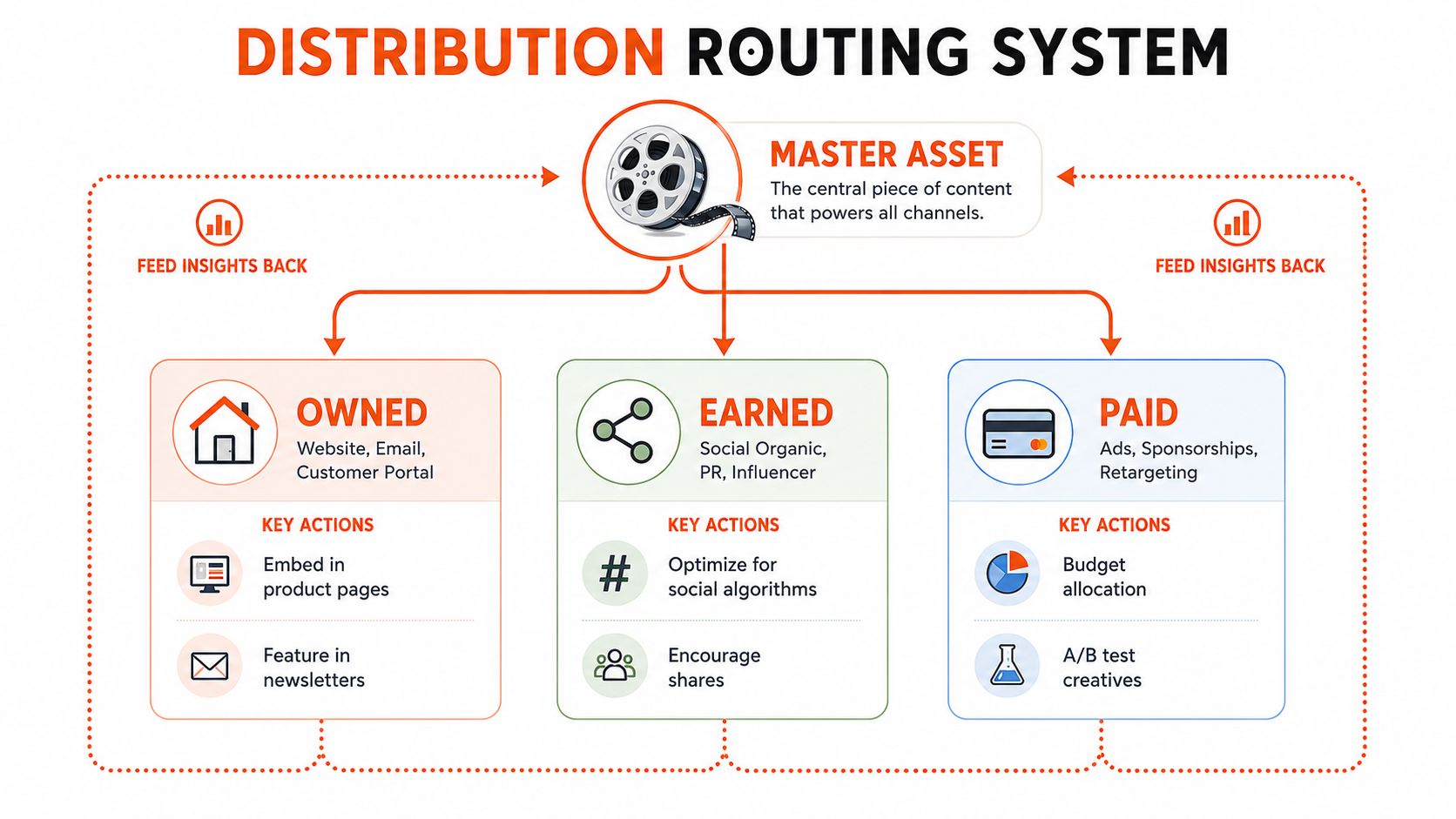
Route every asset through three lanes:
- Owned channels: Product pages, landing pages, email, knowledge bases, customer portals, and apps. These environments are useful when the viewer already has context and needs education, reassurance, or activation.
- Earned channels: Organic social, YouTube search, partner content, public relations, and creator or influencer distribution. These channels require native hooks and platform-specific packaging.
- Paid channels: Social ads, sponsored placements, connected television, prospecting, and retargeting. Paid media should fund controlled creative tests, not absorb leftover edits.
<a id="build-one-master-asset-then-route-intelligently"></a>
Build one master asset, then route intelligently
Owned placements reward clarity and depth. A product video on a product detail page should show the buyer what the item does and what happens after purchase. A SaaS demo on a pricing page should resolve evaluation questions instead of repeating the homepage headline.
Earned distribution rewards relevance to the feed. Use vertical 9:16 creative with on-screen text for TikTok and Reels, and use searchable titles, descriptions, and chapters for YouTube. LinkedIn content often needs a business problem in the opening rather than a trend-driven hook.
Paid distribution is a testing layer. Vary the first frame, opening claim, proof point, caption treatment, and call to action. Keep the destination consistent when you want to isolate creative performance, then test landing pages separately.
Instrument every upload with campaign parameters and a defined conversion event. If a viewer clicks from a short-form asset into a product page, the team should be able to connect that session to the creative, audience, placement, and eventual business outcome.
For teams that need to turn existing articles into publishable video, this guide to converting video into a link is a practical workflow reference. The principle is broader than the tool: make the asset easy to share, easy to identify, and easy to attribute.
<a id="production-options-from-in-house-to-ai-studios"></a>
Production Options From In-House to AI Studios
Choose a production model according to volume, turnaround, brand risk, and reuse. Trendiness is a poor procurement strategy.
| Model | Best For | Typical Turnaround | Cost Per Asset | Main Risk |
|---|---|---|---|---|
| In-house | Recurring weekly content and product knowledge | Fast once the workflow is established | Internal production cost | Capacity bottlenecks |
| Freelancer or boutique studio | Flagship pieces and specialist craft | Moderate | Project-based | Inconsistent availability |
| Full-service agency | Enterprise campaigns and multi-market work | Longer | Higher project or retainer cost | Overhead and slower approvals |
| AI studio workflow | High-volume shorts, variants, captions, and localization | Fast | Subscription or usage-based | Brand inconsistency without review |
An in-house team wins when subject-matter access and institutional memory matter. Product marketers can capture feature updates quickly, and sales teams can request content without rebuilding the brief each time. The weakness appears when the same small team must handle scripting, filming, editing, motion design, localization, and distribution.
Freelancers and boutique studios fit work where craft carries the message. Use them for founder interviews, customer stories, brand films, and executive thought leadership. Give them a strong brief and a clear approval owner, or revision cycles will consume the schedule.
Agencies make sense for enterprise rebrands, campaign systems, and complex market coordination. They also introduce more layers, so don't hire one for a content cadence that your internal team could manage with a repeatable workflow.
AI studios such as ClipNova can turn prompts, links, or topics into short-form assets with scripting, voiceover, visuals, captions, music, talking avatars, and exports for multiple aspect ratios. Teams should use this model for ad variations, social cuts, routine explainers, and localization, while keeping human-led production for trust-sensitive founder and customer content. For a broader comparison of AI marketing video generator tools, evaluate editing control, commercial rights, brand governance, and export requirements rather than judging tools only by demo quality.
A documented workflow for automating video editing can help teams decide which steps should be automated and which still need human approval.
<a id="kpis-that-actually-measure-business-video-roi"></a>
KPIs That Actually Measure Business Video ROI
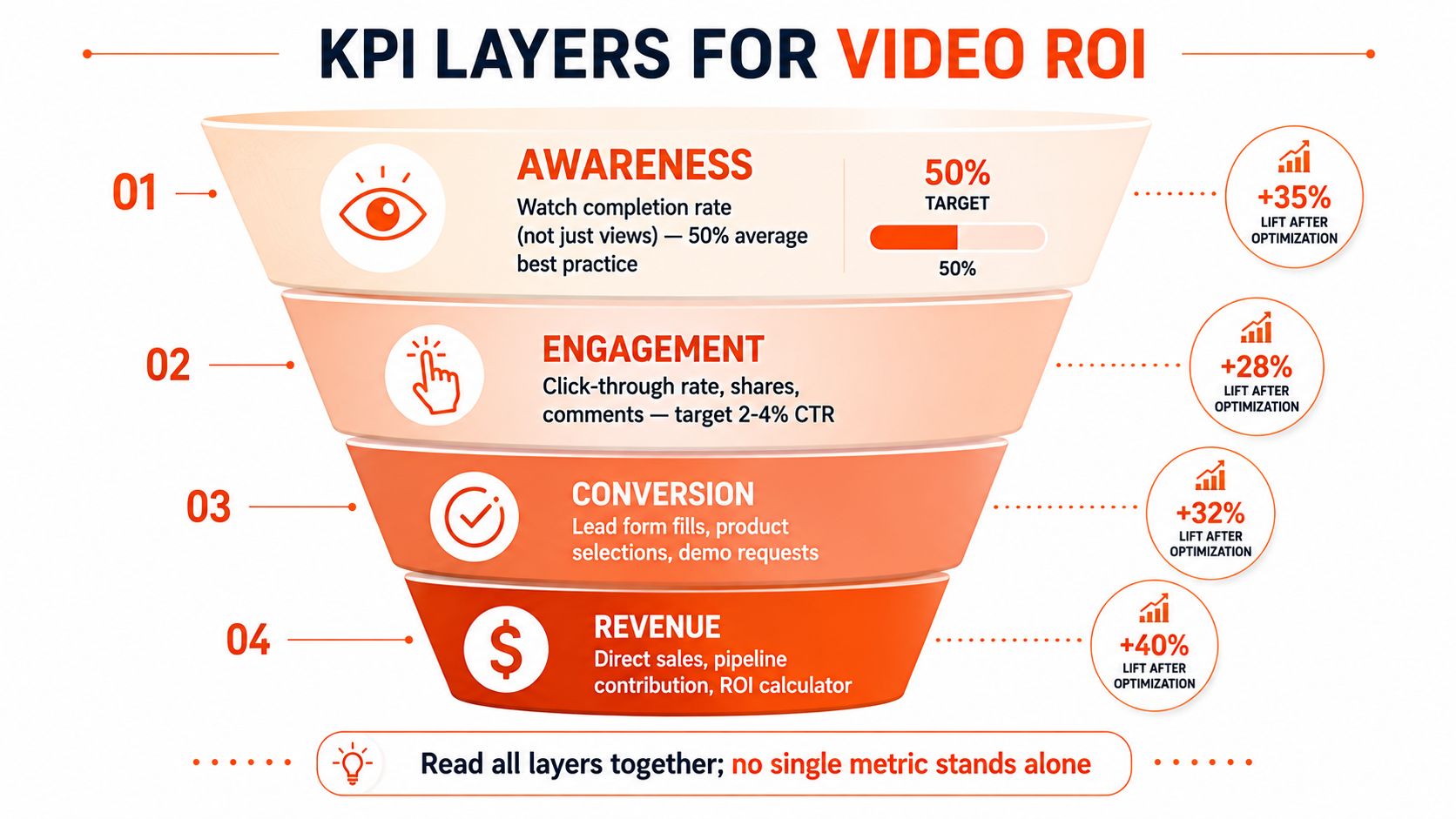
Views are useful for distribution diagnosis, but they aren't a business case. Leadership needs to know whether video earned attention from the right audience, created action, influenced pipeline, and improved acquisition economics.
<a id="read-the-funnel-as-one-measurement-chain"></a>
Read the funnel as one measurement chain
Awareness metrics include watch completion and thumbstop behavior. A view count tells you that playback occurred. Completion tells you whether the message held attention long enough to do its job.
Engagement metrics show whether the viewer moved from passive watching to active interest. Track click-through rate, shares, comments, landing-page sessions, and scroll depth after the play. The right benchmark depends on audience, placement, offer, and creative, so compare against your own historical cohorts.
Conversion metrics connect video to an action. Use demo requests, lead-form completions, product selections, add-to-cart events, purchases, and qualified opportunity creation. Apply first-touch and last-touch attribution carefully, because one model can over-credit discovery while the other can over-credit the final interaction.
Revenue metrics settle the argument. Track cost per qualified opportunity, sales-cycle movement, pipeline contribution, customer acquisition cost, and CAC payback for video-sourced or video-influenced cohorts.
Measurement rule: Assign one primary KPI before launch. Add supporting metrics only when they explain why the primary metric moved.
Compare cohorts rather than hiding behind averages. A video that creates fewer but better-qualified actions may be more valuable than one that generates broad reach. Review retention timestamps, creative variant, audience, placement, landing-page behavior, and sales outcome together.
For a wider performance-marketing measurement perspective, the AdStellar AI marketing playbook provides useful context on connecting campaign activity with business outcomes.
<iframe width="100%" style="aspect-ratio: 16 / 9;" src="https://www.youtube.com/embed/mPiWWnJsVGw" frameborder="0" allow="autoplay; encrypted-media" allowfullscreen></iframe><a id="accessibility-as-a-performance-lever-not-an-afterthought"></a>
Accessibility as a Performance Lever, Not an Afterthought
Accessibility belongs in the creative brief because it affects comprehension, search visibility, and watch-through behavior. It isn't a compliance layer added after the editor exports the final cut.
Captions matter most when viewers watch with the sound off, which is common in mobile feeds and workplace environments. An accessibility resource from Utah State University cites research reporting that 80% of consumers are more likely to finish a video with captions enabled, while captioned YouTube videos received 13.48% more views in the first two weeks and 7.32% more lifetime views than uncaptioned videos, according to the university's captions guidance.
<a id="build-accessibility-into-production"></a>
Build accessibility into production
Captions should identify speakers, preserve meaningful sound cues, and match the spoken timing. Auto-generated captions save time, but someone should review names, product terms, numbers, and punctuation before publication.
Transcripts create a second useful asset. They make product education searchable, give sales teams a reference they can send after a call, and help buyers scan the message before committing to playback. Audio description can make product demonstrations clearer for viewers who can't rely on visual-only cues, especially when the narrator says “as you can see” instead of explaining the action.
Use sufficient color contrast for lower-thirds and captions. Don't place text over busy footage without a readable background treatment. Embedded players should expose keyboard controls and avoid forcing users to interact with inaccessible custom interfaces.
A pre-publish checklist should confirm:
- Captions: Accurate, synchronized, and reviewed for terminology.
- Transcript: Available beside or beneath the video where useful.
- Alt text: Describes the visual asset without pretending it replaces the video.
- Color contrast: Text and controls remain legible across the entire edit.
- Player controls: Keyboard and assistive-technology users can play, pause, seek, and adjust volume.
Use this guide to adding subtitles to a video as a production reference, not a last-minute rescue plan.
Accessibility, page speed, and conversion belong in the same quality check. A viewer who can't understand the video, can't load the destination, or can't complete the form is still a lost opportunity.
<a id="putting-it-together-across-e-commerce-saas-and-agencies"></a>
Putting It Together Across E-Commerce, SaaS, and Agencies
The framework changes by business model because the buying action changes. An e-commerce team needs creative that moves product consideration into a cart. A SaaS team needs to reduce uncertainty across a longer evaluation. An agency needs proof that helps its own prospects trust the service before a proposal call.
| Vertical | Primary Format | Distribution | KPI | Budget Tier |
|---|---|---|---|---|
| E-commerce and DTC | Short paid hooks and product demos | TikTok, Reels, paid social, product pages | Add-to-cart activity and CPA by creative | Lean to mid |
| SaaS | Product tour and founder-led clips | Pricing page, LinkedIn, YouTube, email | Demo-request rate and CAC payback | Mid |
| Agency | Talking-avatar explainers and customer stories | Onboarding, outbound, LinkedIn, website | Sales-cycle length and proposal win rate | Lean to high |
<a id="e-commerce-and-dtc"></a>
E-commerce and DTC
A DTC skincare team might use a very short paid hook to interrupt scrolling, then show a product demonstration on TikTok and the product detail page. The hook earns attention. The demo answers application and product-use questions. The KPI system should separate creative-level CPA from add-to-cart behavior, because a cheap click isn't useful if the product page fails to persuade.
Landing-page speed is part of this campaign. Google-linked guidance cited by Website Speedy notes that every one-second delay in mobile page load can reduce conversions by up to 20%. The same source cites Portent analysis showing pages loading in one second can average nearly 40% conversion, compared with about 34% at two seconds and 29% at three seconds. These figures make the operational point clear: compress the media, prioritize mobile rendering, and audit the page before scaling paid traffic.
<a id="saas"></a>
SaaS
A B2B software company can place one thorough product tour on its pricing page, then use shorter founder-led clips on LinkedIn to frame the problem and create qualified visits. The product tour handles evaluation. Founder content supplies context and credibility.
Track demo-request rate by asset and audience, then connect those requests to opportunity quality and CAC payback. If viewers complete the tour but don't request a demo, the problem may be the offer or page experience rather than the video.
<a id="agencies"></a>
Agencies
An agency can use talking-avatar explainers for repeatable client onboarding and customer stories for outbound campaigns. The first reduces repetitive explanation. The second gives prospects evidence that the agency can solve a problem similar to theirs.
Use proposal win rate and sales-cycle length as the commercial tests. Don't judge an agency video by social reach if the intended job is to support a sales conversation.
<a id="a-practical-starting-checklist"></a>
A practical starting checklist
- Choose one revenue goal: Select acquisition, conversion, activation, retention, or sales efficiency.
- Select the format and length: Match the message to the buying stage.
- Define three KPIs: Assign one primary measure and two diagnostic measures.
- Set the distribution split: Decide what belongs on owned, earned, and paid channels.
- Publish accessibly: Add captions, transcript support, readable design, and a fast destination before launch.
Start with a program you can sustain, then use performance evidence to expand. Don't wait for a perfect production system when a disciplined first cycle can reveal what deserves more budget.
ClipNova turns prompts, links, or topics into short-form business videos with scripts, voiceovers, visuals, captions, music, talking avatars, and exports for 9:16, 1:1, and 16:9 placements. Visit ClipNova to build accessible creative variants for your next acquisition, product education, or retargeting campaign.
Ready to ship your own?
Start creating viral videos with AI in under twenty minutes, no credit card required.