

The usual advice on AI video generator pricing is to compare monthly plans and choose the cheapest tier with enough credits. That's the wrong starting point. Compare the cost of an approved, publish-ready video instead, including the generations you reject and the work someone still has to do before posting.
A low subscription fee can be a good deal for a repeatable series and a poor deal for demanding product shots. The difference isn't just output volume. It's how the provider meters production, which features your deliverables require, and how reliably the result passes review.
Table of Contents
- Why the Monthly Price Misleads Buyers
- Subscription, Credit and Per-Second Pricing Side by Side
- Which Features Each Plan Gates
- What One Publishable Video Costs at 15, 30 and 60 Seconds
- When a Subscription Actually Lowers Total Cost
- Choose the Plan That Matches Your Monthly Output
<a id="why-the-monthly-price-misleads-buyers"></a>
Why the Monthly Price Misleads Buyers
The pricing-page figure is the least useful number for production budgeting on its own. It tells you the subscription charge, but not how many assets your team can approve. A plan usually buys an allowance of compute or generation capacity, not a guaranteed batch of finished videos.
That distinction matters when a rejected scene consumes allowance, an editor has to repair captions, or an export needs another pass. An inference-cost analysis from NeuralRack estimates that individual AI-generated clips can cost roughly $12–$90 under its current-inference assumptions. That's not a universal retail price, but it illustrates why an unlimited-looking creative workflow needs a carefully defined allowance.
<a id="the-layers-behind-the-advertised-fee"></a>
The layers behind the advertised fee
Read a plan as a stack of charges and constraints:
- Monthly fee. The recurring amount you pay to access the workspace and its included allowance.
- Included capacity. Credits, generations, or seconds available during the billing period.
- Consumption rules. The units deducted for your chosen model, quality, resolution, duration, and additional processing.
At ClipNova, plans start from $39 per month, with captions and commercial rights included. However, the Starter offer showing $39 for the first month renews at $49 per month. Don't treat that introductory Starter price as its ongoing production budget.
The fee is only the numerator in your calculation. The denominator is the number of deliverables you approve, not the number of times you press Generate.
Budgeting principle: A subscription purchases production capacity. Your review standard determines how much of that capacity becomes publishable work.
Say a store needs product ads with several opening hooks and localized narration. Its budget should cover the rejected hooks and corrected versions, not just the approved master. Otherwise, the forecast assumes every generation succeeds and every export is ready for delivery.
Before choosing a plan, settle these questions: Which billing model matches your workload? Which features must your tier include? What does an approved video cost at your target length? Those answers turn a subscription comparison into a production budget.
<a id="subscription-credit-and-per-second-pricing-side-by-side"></a>
Subscription, Credit and Per-Second Pricing Side by Side
Billing models compared on the same criteria
| Pricing model | What you pay for | Cost predictability | Best fit | Main trap |
|---|---|---|---|---|
| Flat monthly plan with fixed allowance | Monthly fee covering a set output allowance | High within the allowance | Steady single-format creators | Caps and quality limits buried in the fine print |
| Subscription with credit balance | Monthly fee plus credits spent per generation, weighted by quality and length | Medium to high with fixed settings | Mixed formats, variants, and teams | Premium quality modes drain credits quickly |
| Per-second API metering | Each second of generated output, priced by model and resolution | Low until measured | Developers and batch pipelines | Rejected generations cost money; technical-failure billing needs checking |
| One-off pay-per-export | Each finished export | Variable with export count | Occasional, one-off videos | Per-video charges accumulate as volume rises |
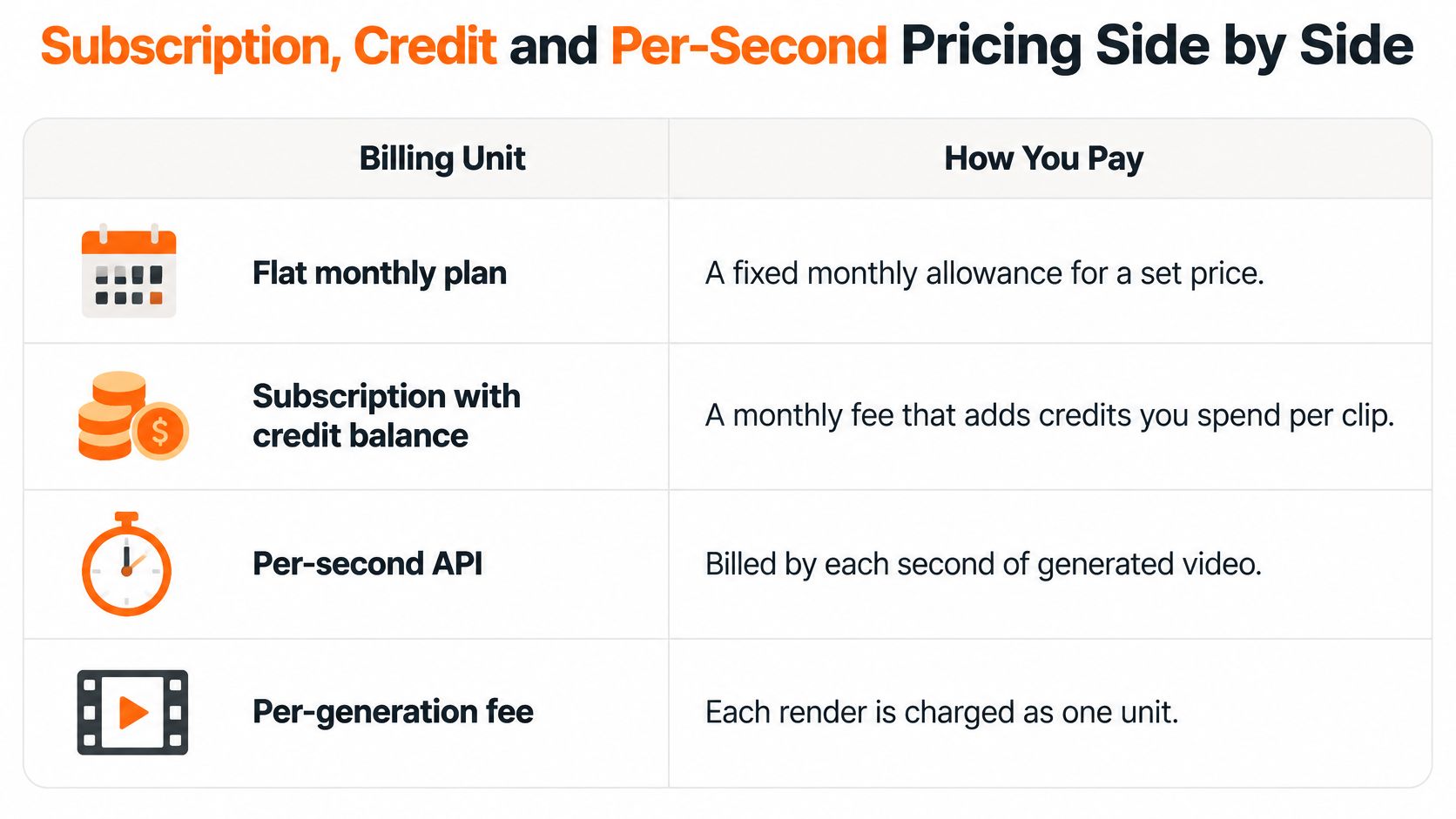
The visual below summarizes billing units. Its per-generation row is a separate arrangement from pay-per-export: a render isn't necessarily an approved deliverable.
<a id="match-the-unit-to-your-production-pattern"></a>
Match the unit to your production pattern
Flat monthly allowances suit a stable workload with similar deliverables. Predictability comes from staying inside the same duration and quality envelope. Read the definition of an included video carefully: a generation allowance and a finished-export allowance aren't interchangeable.
Credit subscriptions accommodate mixed work in a shared budget. Our tools use one credit balance, with Base, Pro, and Ultra quality choices. Exact per-level deductions aren't established here, so don't assume equal consumption across those settings or translate the balance into a promised video count.
A shared balance helps a team allocate capacity between video and image work. It also means the person generating premium assets can consume allowance another teammate expected to use. Record deductions by project, not just the account total.
Per-second APIs expose the relationship between generated duration and spend. A visually rejected output is still generated footage, so include it in your budget. Check technical-error and refund terms separately rather than assuming every failed request is billable or refundable.
Pay-per-export purchases can fit an occasional deliverable when a recurring subscription would sit unused. Confirm whether drafts, revisions, audio, and alternate formats are included before treating the checkout price as the complete project cost. For a concrete niche comparison, DwellShot's guide to video marketing costs for listing agents can help frame the deliverable being purchased alongside the software allowance.
The practical verdict is straightforward: steady single-format creators favor fixed allowances; mixed-format teams favor credits; developers should meter usage only after measuring rejected output. Occasional buyers should compare the complete export purchase with the subscription they would otherwise leave partly unused.
<a id="which-features-each-plan-gates"></a>
Which Features Each Plan Gates
Resolution, model choice, and processing requirements affect production cost, so it's reasonable to expect different allowances for different outputs. The Artificial Analysis video methodology includes benchmarks of approximately $0.034–$0.042 per generated second for Wan 2.1 at 480p and $0.14–$0.21 for HunyuanVideo at 720p on different hardware. These aren't consumer subscription rates or a controlled resolution-only comparison, but they show why output seconds aren't interchangeable.
Features gated by tier
| Feature | Typical tier gate | ClipNova position |
|---|---|---|
| Export resolution | Lower resolution at entry level; higher resolution on paid tiers | Verified workflow supports up to 1080p per video; confirm tool-specific 4K availability before budgeting for it |
| Watermark removal | May require a paid export | Paid-plan videos have no watermark |
| Commercial rights | Free-use scope may be narrower | Every plan lists commercial rights; paid-plan videos explicitly carry full commercial rights |
| Talking avatars with lip sync | May require particular modes or plans | Talking characters work with AI Video on Base and Pro |
| Voice or avatar training | Enterprise or custom access | Enterprise includes custom credits, seats, and voice or avatar training |
| Video length | Duration caps can restrict entry tiers | Up to 5 minutes per video |
| Aspect ratio | Available formats may be restricted | Choose 9:16, 16:9, or 1:1 per video |
<a id="separate-access-from-delivery-suitability"></a>
Separate access from delivery suitability
Resolution is a delivery requirement, not a quality guarantee. Our verified video workflow outputs up to 1080p. Company materials also list 4K on paid plans, but don't buy specifically for that capability without confirming that it applies to your chosen tool and export.
Rights and watermarks deserve the same attention. Videos created on our paid plans carry full commercial rights, have no watermark, and can be used on monetized channels. The broad every-plan commercial-rights statement shouldn't substitute for checking the precise scope of any free offer.
The free AI video evaluation guide is a useful starting point for examining a trial workflow. Judge the downloaded file, not only the preview inside the editor.
A talking character also creates a different requirement from a custom-trained spokesperson. Access to lip sync doesn't establish that personal voice or avatar training is included, and access to a workspace doesn't establish its seat allowance.
An inexpensive export you can't deliver is wasted production spend, regardless of how attractive the subscription looked.
Use a short acceptance test before committing:
- Export a trial video. Follow the same workflow you intend to use for paid production.
- Inspect the file. Look for watermarks, caption readability, framing, and audio problems.
- Confirm delivery eligibility. Check resolution and usage terms against the actual client or channel requirement.
<a id="what-one-publishable-video-costs-at-15-30-and-60-seconds"></a>
What One Publishable Video Costs at 15, 30 and 60 Seconds
Cost per video at fixed lengths by model and resolution
| Model and resolution | Rate per second | 30-second video |
|---|---|---|
| Sora 2, 720p | $0.10 | $3.00 |
| Sora 2 Pro, 720p | $0.30 | $9.00 |
| Sora 2 Pro, 1024p | $0.50 | $15.00 |
| Sora 2 Pro, 1080p | $0.70 | $21.00 |
| Sora 2 Pro, 1080p, batch rate | $0.35 | $10.50 |
| Google Veo | $0.75 | $22.50 |
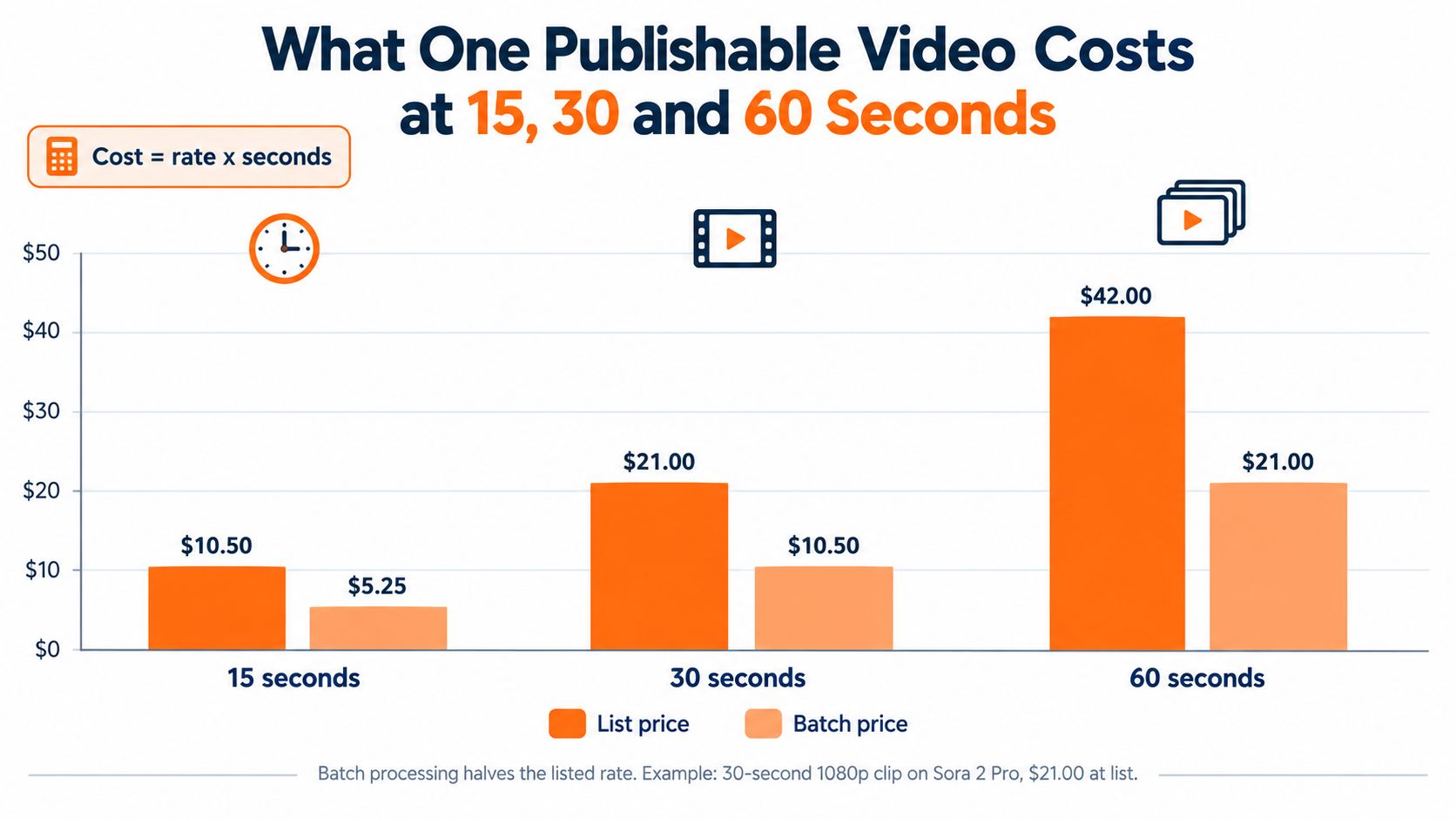
The table multiplies the rates reported in American Movie Company's pricing comparison by the target duration; that comparison lists Sora 2 Pro at $0.70 per second for 1080p, with batch processing halving its listed rate, and Google Veo at $0.75 per second. These are rate-based budget equivalents, not a promise that each model generates the full target duration in a single request.
The duration comparison below applies that published premium rate before retries, assembly, or editing.
<a id="generated-footage-isnt-a-finished-asset"></a>
Generated footage isn't a finished asset
The arithmetic is rate × generated seconds. The chart applies that calculation to list and batch processing at the same resolution, so it isolates the billing difference rather than differences in creative quality.
Despite the publishable-video heading, neither the table nor the chart establishes usable-output cost. They assume you retain all generated footage. If a sequence needs replacement shots, its production cost exceeds the clean list-rate calculation.
For a fair comparison, use this formula:
Generation cost per usable asset = total generation spend ÷ approved assets
A benchmarking framework from Runway recommends testing 20–100 production-representative prompts; its usable-output examples show that $0.50 ÷ 80% = $0.625, while $0.20 ÷ 30% ≈ $0.667. The lower-priced generation is therefore the more expensive usable result in that example.
Run a controlled test rather than borrowing someone else's acceptance rate:
- Hold the brief constant. Use comparable prompts, duration, resolution, audio settings, and model tier.
- Record charged work. Include rejected generations and any billable retries or upscaling.
- Apply delivery criteria. Score prompt fit, visual quality, subject consistency, motion, and artifacts.
- Add finishing labor. Track editing and review time at your actual staff cost.
For multi-scene work, define the script, shot requirements, and approval criteria before generation. The production planning advice from Blu Dragonfly provides a planning resource to use alongside that test.
The embedded video can sit alongside your workflow review, but your own exported files should determine acceptance.
<iframe width="100%" style="aspect-ratio: 16 / 9;" src="https://www.youtube.com/embed/w1O7Ot9-09I" frameborder="0" allow="autoplay; encrypted-media" allowfullscreen></iframe><a id="translate-the-credit-balance-without-inventing-a-rate"></a>
Translate the credit balance without inventing a rate
Our Starter plan includes 2,600 credits per month. To estimate capacity, divide that balance by the measured credit consumption of your target episode, including scene corrections. Without the exact deduction for your selected settings, a precise monthly video count would be speculation.
The episode workflow offers 30 seconds to 5 minutes, with a choice between AI Video and Moving AI Images. Moving AI Images, which add camera motion to pictures, cost about a third of AI Video per episode. That's a meaningful format choice when the story doesn't require fully generated action.
Use the AI voiceover tools guide to assess narration as part of the deliverable, not as an unrelated subscription. A footage-only API quote and an assembled, narrated episode don't purchase the same work.
Budget using usable-video cost × planned output, with a separately measured allowance for corrections. Once your usable-video cost already includes rejects, don't add the same reject allowance again.
<a id="when-a-subscription-actually-lowers-total-cost"></a>
When a Subscription Actually Lowers Total Cost
Cheaper production can lead to higher total spending if your team uses the savings to commission more variants, languages, and tests. That isn't necessarily a bad outcome. It does mean you should distinguish lower cost per asset from a smaller production budget.
The survey evidence summarized in Goldcast's AI video research report reports that 85% of marketers achieved significant production savings and 74% reduced outsourcing to agencies or freelancers after adopting AI video tools. Those findings support evaluating displaced production work, not assuming every subscription produces equivalent savings.
The workspace matters because someone still has to organize, review, and approve the output.

<a id="price-the-work-removed-and-the-work-added"></a>
Price the work removed and the work added
Our generation step automatically produces voiceover, visuals, B-roll, and captions in 1080p, with the option to add your own music track. That's a broader purchase than raw footage, but the economic value depends on which of those tasks your team would otherwise pay someone to perform.
Use the automated video production guide to map the workflow you intend to replace. Compare equivalent deliverables: a narrated, captioned export against another narrated, captioned export, not against an unedited clip.
Build the cost comparison around:
- Production removed. Scripting, voice recording, footage selection, captioning, editing, and resizing that no longer require separate work.
- Review added. Prompt revision, factual checks, brand approval, pronunciation fixes, and visual inspection.
- Delivery overhead. Rights clearance, translation corrections, export repairs, and coordination across reviewers.
Total cost per winning creative = total production and review cost ÷ creatives meeting the campaign's success criterion.
The numerator should include the subscription, purchased top-ups, separately billed services, and labor. Don't add the monetary value of credits already included in the subscription a second time. Allocate included credit usage for project accounting, but keep the cash-spend calculation free of double counting.
For teams comparing recurring capacity with metered purchases, PostPulse explains usage based pricing as another way to frame the buying decision.
Decision rule: A subscription lowers total cost when the production work it replaces costs more than the subscription, review, and rework it adds.
A low-cost asset that never passes brand approval offers no production saving. A more expensive generation that removes several manual handoffs may be the better purchase.
<a id="choose-the-plan-that-matches-your-monthly-output"></a>
Choose the Plan That Matches Your Monthly Output
Choose according to the work you repeatedly deliver, not the most impressive sample in a product gallery. Solo creators need sustainable capacity, agencies need deliverable permissions and collaboration, and developers need measured generation economics. Those buyers shouldn't optimize for the same plan feature.
A credit plan is a sensible starting point for mixed creative work, but don't upgrade merely because the balance looks generous. First identify the constraint: credit capacity, required output, collaboration access, or review time.
Use your own publishing setup as the test environment, including the device and channel where the finished video will appear.

<a id="picks-by-production-workload"></a>
Picks by production workload
For a solo creator, start with a measured Starter evaluation. Generate representative posts and record the credit balance before and after each project. Keep topic, duration, and quality reasonably consistent while establishing your baseline, then assess whether the allowance covers your publishing calendar.
Don't commit to a larger recurring purchase just to obtain a lower theoretical unit cost. Unused capacity doesn't reduce the cost of the videos you publish.
For a faceless channel, choose the visual format around the story. A narrated history or explanatory series may work with camera movement over images, while a story dependent on physical action needs a different treatment. Evaluate the visual requirement before selecting the highest-cost generation mode by default.
Episode length matters at the script stage. Our videos can run up to 5 minutes, with voice, captions, and music, so longer planned installments need a different assembly approach rather than an assumption that a higher tier removes the duration cap.
For an agency, assess the handoff before the allowance. Put an actual client deliverable through review, approval, and export. Then verify seat limits and whether the selected workspace supports the people who need access; don't infer collaboration capacity from the number of credits.
<a id="buyers-who-need-tighter-cost-controls"></a>
Buyers who need tighter cost controls
Performance teams should organize tests around the creative change they're evaluating. If only the opening scene needs revision, our Studio workflow lets you redo a single scene rather than regenerate the entire episode. Keep the accepted material intact so the experiment doesn't introduce unrelated changes.
Developers should compare APIs using their own acceptance criteria and billing logs. Track charged output against usable footage, then include assembly and review before comparing the result with a finished-video subscription. A reliable cost estimate requires both technical success and editorial approval.
Before scaling, complete these checks:
- Count real consumption. Measure the credits used by your target video and its corrections.
- Validate the longest deliverable. Make sure your planned episodes fit the workflow's duration and assembly requirements.
- Confirm team access. Establish the seats and permissions needed for production and approval.
Pick a plan, then open Series for a recurring show or AI Video Studio for a single video. Compare the finished result with the alternative you would buy or produce. Increase spending only when the measured cost per usable video, including staff work, supports the decision.
ClipNova brings scripting, voiceover, visuals, captions, and music into a finished-video workflow with a shared credit balance. Visit ClipNova, choose a plan, and test a representative project in AI Video Studio or Series before committing to a larger monthly production budget.
Ready to ship your own?
Start creating viral videos with AI in under twenty minutes, no credit card required.