
You have a product launch tomorrow, three ad variations to prepare, and a social calendar that needs vertical, square, and horizontal versions of the same idea. The concept is clear, but the motion pipeline is not. Someone still has to write the script, animate the opening, place captions, match music, resize every composition, and check that the brand looks consistent in each export.
AI motion graphics can shorten that path, but only when you use them for the right jobs. The useful question isn't whether AI can “make a video.” It's whether AI should create the rough cut, handle repetitive adaptations, or contribute to the final polished animation. This guide builds that judgment step by step, from the basic idea behind AI-assisted motion to a practical workflow in ClipNova Studio, with special attention to resizing, captions, localization, and brand control.
The opportunity is expanding beyond experimentation. One estimate places the global generative AI in animation market at USD 652.1 million in 2024, with a projection of USD 13,386.5 million by 2033 and a 39.8% CAGR from 2025 to 2033. Another forecast projects USD 2.57 billion in 2025 and USD 70.87 billion by 2035, with a 39.5% CAGR from 2026 to 2035. These are projections, not guarantees, but they signal a shift toward repeatable production across advertising, short-form video, social content, and branded explainers. Grand View Research's generative AI animation market estimate provides the market context.
Table of Contents
- Introduction to AI Motion Graphics and Why They Matter Now
- What AI Motion Graphics Are and How They Work
- Core Techniques and Models Behind AI Motion Graphics
- How AI Motion Graphics Are Created Inside ClipNova Studio
- Pros and Cons and When to Use AI Versus Human Polish
- Real World Use Cases and Examples for Social Ads Intros and Promos
- Getting Started with AI Motion Graphics in ClipNova
<a id="introduction-to-ai-motion-graphics-and-why-they-matter-now"></a>
Introduction to AI Motion Graphics and Why They Matter Now
A marketer may start with a simple request: “Can we make this product benefit feel more energetic?” Traditionally, that request can become a chain of handoffs. A writer creates the message, a designer prepares assets, an animator builds keyframes, an editor adds sound and captions, and another person reformats the result for each channel.
AI motion graphics change the starting point. Instead of treating every movement as a manual construction project, a team can describe a visual direction, provide an image or link, and let an AI system propose scenes, transitions, timing, narration, and supporting motion. The result still needs judgment, but the first playable version arrives earlier.
This distinction matters because motion graphics have moved well beyond specialist post-production. One forecast estimates the broader motion graphics market at about USD 85.5 billion in 2024, rising to USD 98.3 billion in 2025 and roughly USD 280 billion by 2034, a projected 12.2% CAGR over 2025 to 2034. A separate forecast projects USD 112.8 billion in 2026 and USD 177.5 billion by 2035, with a 12% CAGR across 2026 to 2035. These figures are projections, and the estimates differ, but both point to sustained demand across marketing, entertainment, product demonstrations, and digital publishing. The motion graphics market overview from Accio outlines that broader expansion.
The practical idea: Use AI to remove repetitive production work, then decide deliberately where human taste must remain visible.
You don't need to become a machine-learning specialist to evaluate the output. You need to know what the system generated, what you can edit, whether the movement supports the message, and whether the final asset still looks like your brand.
This is also why automated video production belongs in a wider content system rather than in a separate creative silo. A useful overview of automated video production workflows shows how scripting, visuals, narration, and publishing can connect. The rest of this guide focuses on the motion layer, where teams usually feel the tension between speed and control most sharply.
<a id="what-ai-motion-graphics-are-and-how-they-work"></a>
What AI Motion Graphics Are and How They Work
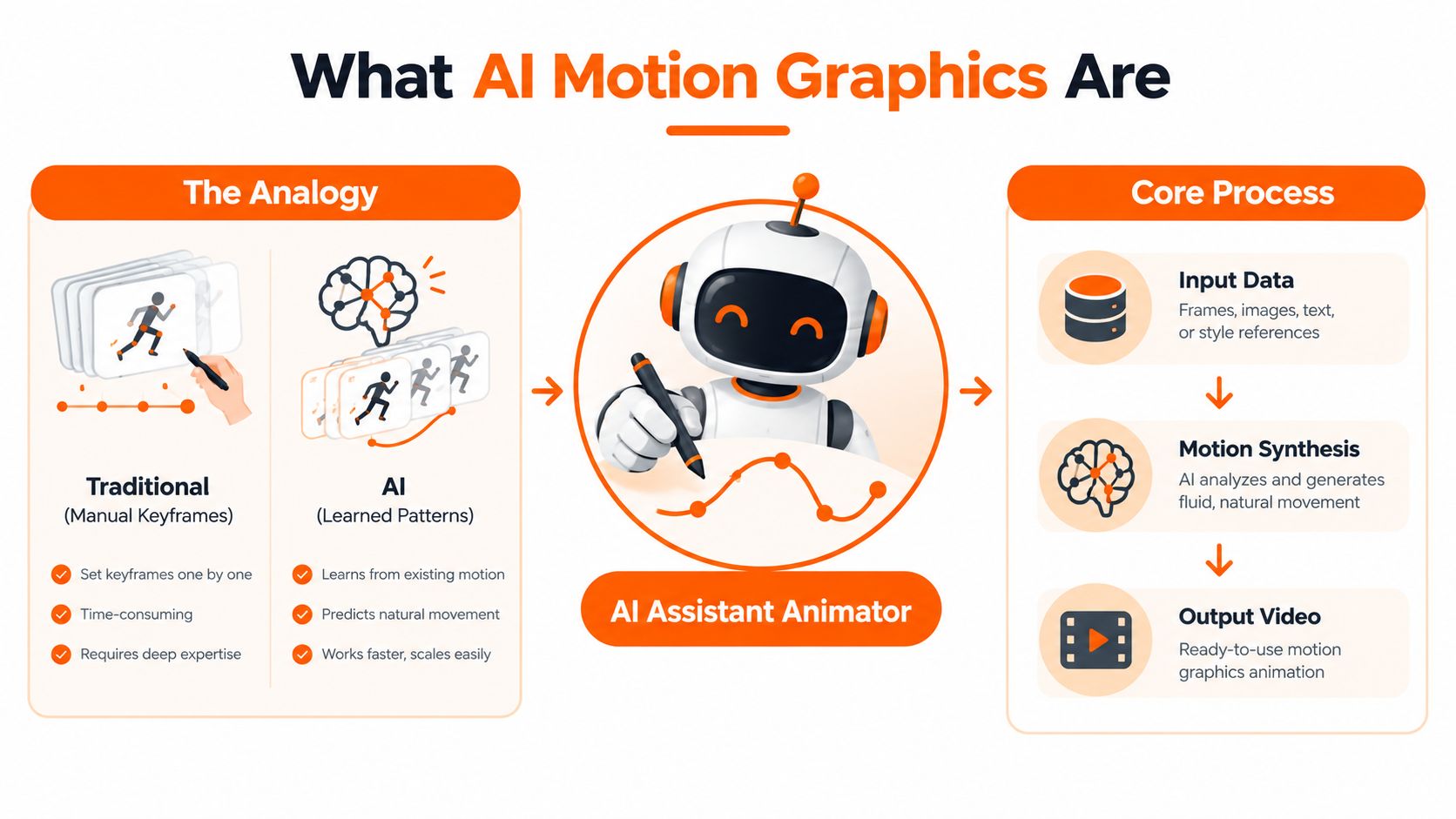
Think of a traditional animator sitting beside an assistant. The animator decides that a logo should enter from the left, accelerate slightly, settle into place, and make room for a headline. The assistant prepares the movement, repeats it for other assets, and adjusts the timing when the composition changes.
AI motion graphics use a similar division of labor, except the assistant learns movement relationships from examples and instructions. You provide a prompt, an image, a product asset, a script, or a reference style. The system interprets the intended action and synthesizes motion rather than requiring you to place every keyframe manually.
<a id="the-basic-process"></a>
The basic process
A useful mental model has three parts:
- Input data gives the system something to work with. That might be a text instruction, a product image, a URL, a short script, or a collection of brand assets.
- Motion synthesis turns the intention into movement. The system may create camera motion, object movement, transitions, animated typography, or a sequence of scenes.
- Output video combines the visual result with timing, sound, captions, and a chosen format.
Traditional motion design usually starts with a fixed composition and a detailed animation plan. The designer controls the layers, easing, timing, masks, and transitions directly. AI-assisted motion starts with a higher-level instruction and produces a proposed result, which can be faster but may be less predictable or less editable at the layer level.
Generic AI video is a broader category. It may generate a cinematic clip, a talking subject, or a realistic scene from a prompt. AI motion graphics are more concerned with designed communication: a headline entering at the right moment, a diagram revealing its relationships, a product image moving with purpose, or a branded transition guiding attention.
If the movement exists only because it looks impressive, it may be AI video. If the movement helps explain, identify, compare, or sell something, you're closer to AI motion graphics.
The difference from a template is important too. A template follows predetermined rules. An AI system can interpret a new instruction or asset and propose a fresh arrangement. That doesn't make every result original or suitable for final delivery, but it gives creators more flexibility than swapping text inside a fixed preset.
<iframe width="100%" style="aspect-ratio: 16 / 9;" src="https://www.youtube.com/embed/78SRywUO3ps" frameborder="0" allow="autoplay; encrypted-media" allowfullscreen></iframe><a id="core-techniques-and-models-behind-ai-motion-graphics"></a>
Core Techniques and Models Behind AI Motion Graphics
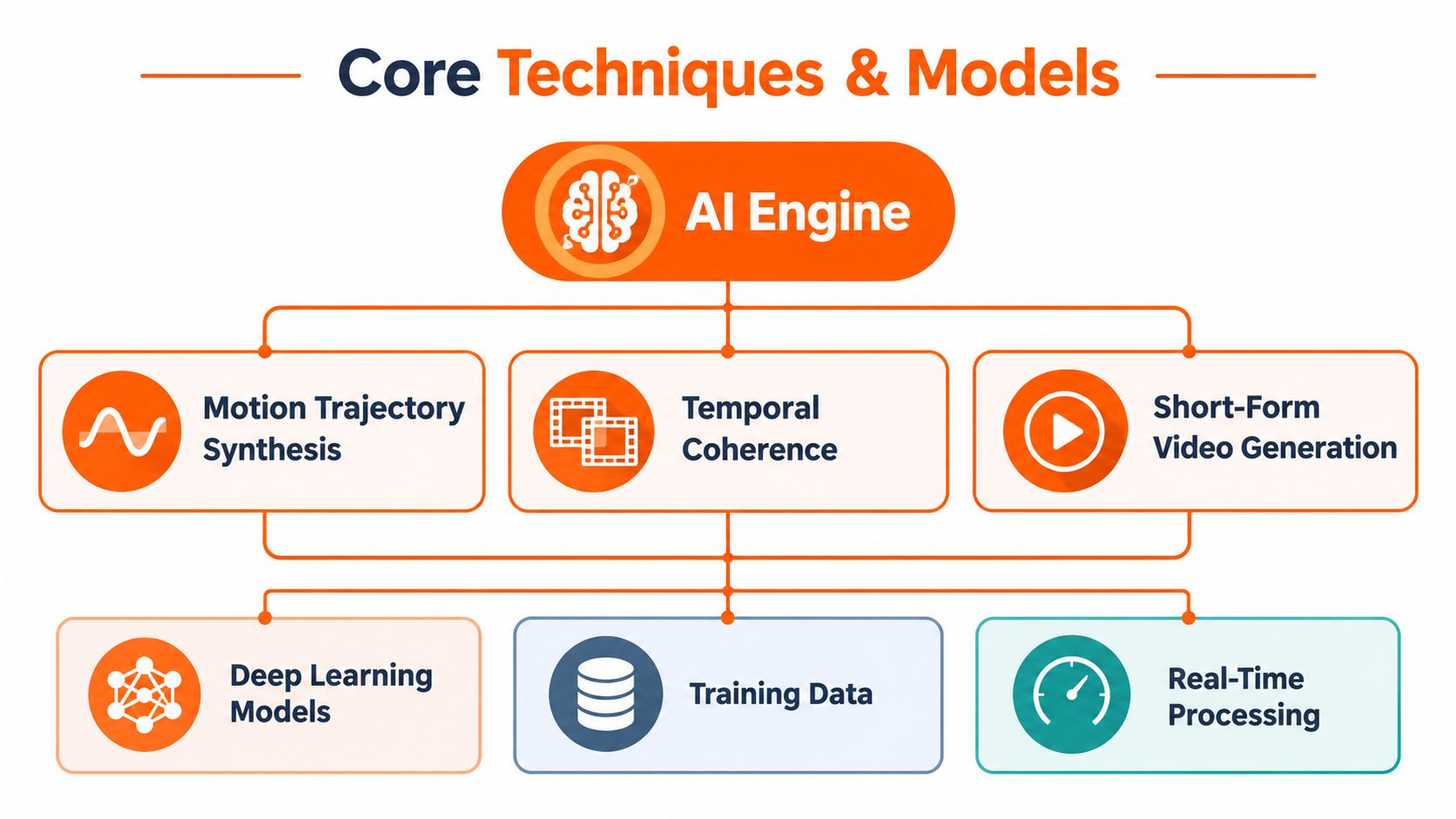
The visible result may be a short animated ad, but several different capabilities work underneath it. Understanding them helps you diagnose a weak generation. A clip can have attractive graphics and still fail because the object changes shape, the camera drifts, or the movement doesn't follow the intended path.
<a id="motion-trajectory-synthesis"></a>
Motion trajectory synthesis
A motion trajectory is the route an object takes through time. In a simple product animation, a bottle might rise, rotate, and stop beside a benefit statement. The system needs to infer not only the start and end positions, but also the path, speed, direction, and relationship between those changes.
Good trajectory synthesis feels intentional. Bad synthesis can look like an object slipping, snapping, or floating. For creators, the useful test is visual rather than technical: does the motion lead the viewer's eye toward the message, or does it compete with it?
<a id="temporal-coherence"></a>
Temporal coherence
Temporal coherence means that the visual world remains stable from one moment to the next. A product should retain its proportions. A character's face shouldn't flicker. A logo shouldn't gain or lose details as the frames progress.
This is one reason static image quality isn't enough. GraphicDesignBench, a 2026 benchmark for AI graphic design, includes motion trajectory synthesis and short-form video generation alongside layout, typography, and vector tasks. Its motion evaluation considers motion type accuracy, transition smoothness through mean LPIPS, motion evenness through LPIPS variance, and mean SSIM. The benchmark separates semantic correctness from visual smoothness, which matches what a designer notices during playback. GraphicDesignBench's evaluation framework describes that distinction.
<a id="short-form-video-generation"></a>
Short-form video generation
Short-form generation combines scenes, timing, transitions, and often audio into a compact sequence. The system has to decide how long an idea deserves to remain on screen and where the next visual should appear.
Recent video-motion evaluation has become more detailed than simple frame comparison. VMBench covers 969 motion categories, while related evaluation work discusses 16 dimensions in VBench, including motion smoothness and dynamic range. The practical lesson is simple: a system must preserve appearance, timing, object identity, and movement quality together. The motion benchmark discussion explains why these dimensions matter.
<a id="what-to-inspect-in-a-generated-clip"></a>
What to inspect in a generated clip
Look for four signals before you publish:
- Object stability: Does the main subject remain recognizable throughout the shot?
- Movement logic: Does every transition have a communicative purpose?
- Timing: Do captions, narration, and visual emphasis arrive together?
- Editability: Can you change the weak part without rebuilding the entire asset?
A polished still frame can hide a poor animation. Watch the complete clip at normal speed, then inspect the moments where objects enter, turn, overlap, or leave the frame. Those transitions reveal whether the system understood the design or merely produced attractive fragments.
<a id="how-ai-motion-graphics-are-created-inside-clipnova-studio"></a>
How AI Motion Graphics Are Created Inside ClipNova Studio
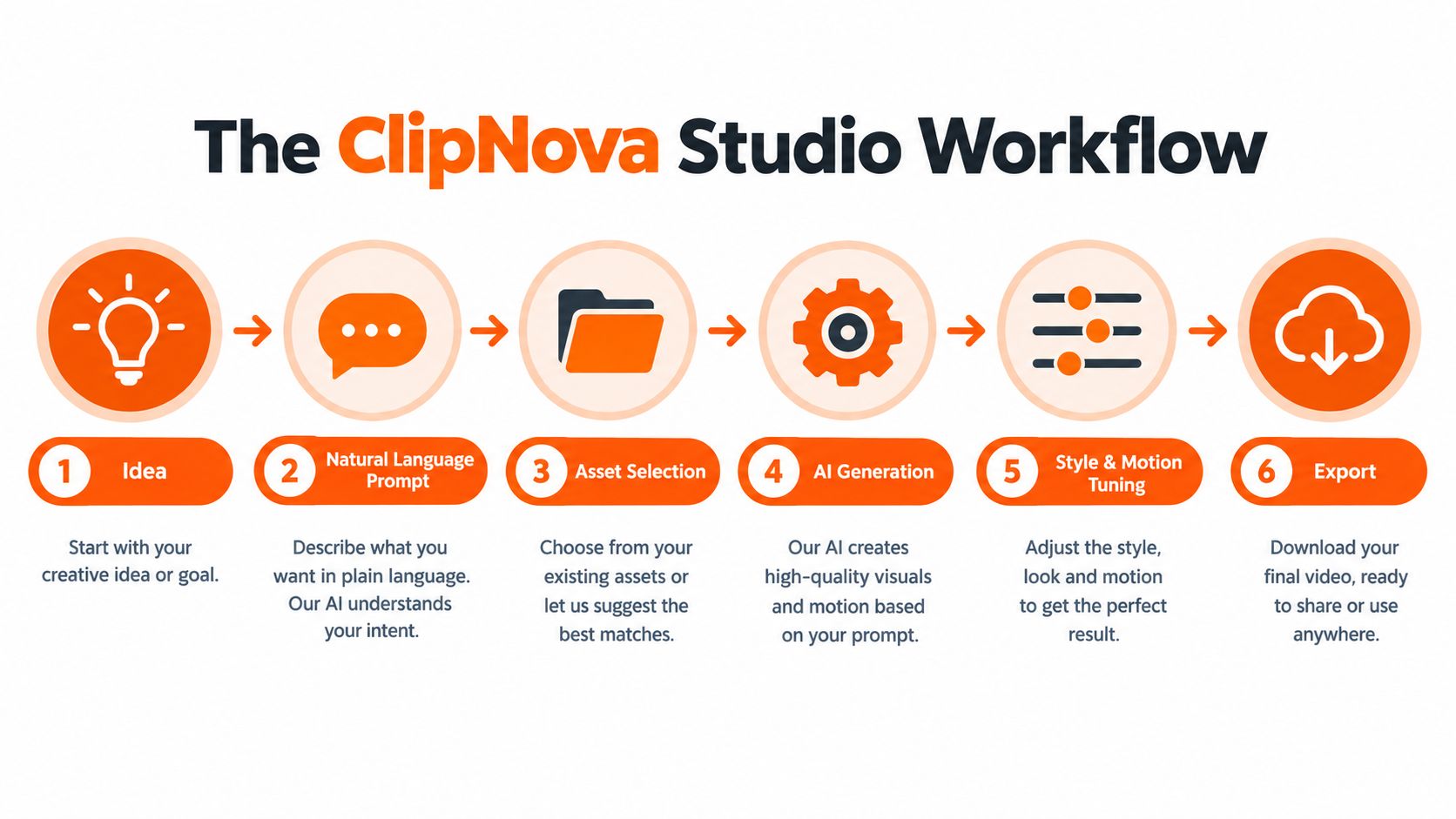
A practical workflow begins with the message, not the effect. Suppose you want a short product explainer for a new hydration bottle. Start with the audience, the benefit, the desired tone, and the placement. A prompt such as “Create a clean, energetic product explainer for people who carry water during busy commutes, with bold captions and a clear closing action” gives the system a communication goal rather than a vague request for something cool.
Inside ClipNova Studio, the idea can begin as a natural-language prompt, a topic, or a link. The system then turns the starting material into a script and visual sequence. That matters because a motion graphic works best when each movement has a job. A headline can introduce the problem, a product shot can establish the solution, and a transition can move the viewer into proof or a call to action.
<a id="from-script-to-assembled-sequence"></a>
From script to assembled sequence
Once the message is shaped, the workflow adds narration, visuals, captions, music, and transitions. Voiceover is available in 32 languages, which lets a team plan localization without recording every version from scratch. Auto subtitles and caption styles can turn spoken lines into readable on-screen emphasis, but a human should still check names, technical terms, line breaks, and the amount of text shown at once.
The model catalog includes Grok Imagine, Nano Banana Pro, Nano Banana 2, and Nano Banana 2 Lite. Different models may suit different visual goals, so treat the catalog as a selection stage rather than assuming one model will handle every shot equally well.
For a more complete generation, Ultra mode supports synced audio and 1080p output. That can be useful when the motion depends on a relationship between beat, narration, and visual change. It doesn't remove the need to review the edit. Audio synchronization can be technically aligned while the creative emphasis still feels wrong.
<a id="where-the-designer-takes-over"></a>
Where the designer takes over
The most reliable workflow is iterative. Generate a rough cut first, then review the first few seconds, the product reveal, the main claim, and the final frame. If the system chooses the wrong pacing or a generic visual, change the instruction or replace the asset rather than trying to polish a weak idea.
A single workspace can replace separate stages for writing, voice acting, editing, and motion assembly. It can also produce exports in 9:16, 1:1, and 16:9, which is especially useful when the same campaign needs vertical, square, and standard versions. The hidden benefit isn't merely convenience. It's consistency across the adaptation layer, where manual resizing, caption changes, translation, and re-voicing often create small differences between versions.
<a id="pros-and-cons-and-when-to-use-ai-versus-human-polish"></a>
Pros and Cons and When to Use AI Versus Human Polish
AI is strongest when the work is repetitive, exploratory, or easy to describe. Human motion designers are strongest when the work depends on taste, nuanced storytelling, precise brand behavior, or unusual art direction.
That division gives teams a more useful choice than “AI versus people.” The core choice is where to place human attention. Let AI generate alternatives, assemble routine versions, and prepare rough timing. Keep human control over the moments that define the brand.
<a id="a-practical-decision-matrix"></a>
A practical decision matrix
| Deliverable Type | Best Approach | Why |
|---|---|---|
| Internal concept test | AI only or light review | Speed matters more than final polish when you're testing a direction. |
| Routine social variation | AI-assisted | The system can help with resizing, captions, narration, and repeated layouts while a person checks accuracy. |
| Brand launch film | Hybrid with strong human polish | The opening, visual language, transitions, and final message need deliberate authorship. |
| Product demonstration with precise features | Hybrid | AI can assemble the structure, but a human should verify every visual claim and interaction. |
| Experimental mood piece | Manual or hybrid | Distinctive texture and controlled imperfection may matter more than fast generation. |
| Multilingual campaign version | AI-assisted with human review | Translation and re-voicing can accelerate adaptation, while native reviewers protect meaning and cultural fit. |
<a id="the-trade-offs"></a>
The trade-offs
Speed is AI's clearest advantage. It can produce a starting point before a traditional timeline would be fully assembled. That makes it valuable during ideation and for campaigns with many variations.
Editability is less predictable. A manually built composition usually exposes its layers and timing decisions. A generated clip may look finished while giving you fewer precise controls, so teams should preserve source assets and use AI where replacement is acceptable.
Brand distinctiveness requires supervision. Generative systems often favor familiar visual patterns. If every company uses the same polished transitions, the result becomes forgettable. Current motion-design coverage also points toward renewed interest in craft, imperfection, and analog texture as a response to overly smooth generated output. Envato's motion design trends coverage discusses that countertrend.
Use AI for the parts your audience won't remember. Use human polish for the parts they will associate with your brand.
That rule works well for rough cuts, versioning, and production housekeeping. It works less well for a signature title sequence, a carefully staged product interaction, or an emotional story beat where timing carries meaning.
<a id="real-world-use-cases-and-examples-for-social-ads-intros-and-promos"></a>
Real World Use Cases and Examples for Social Ads Intros and Promos
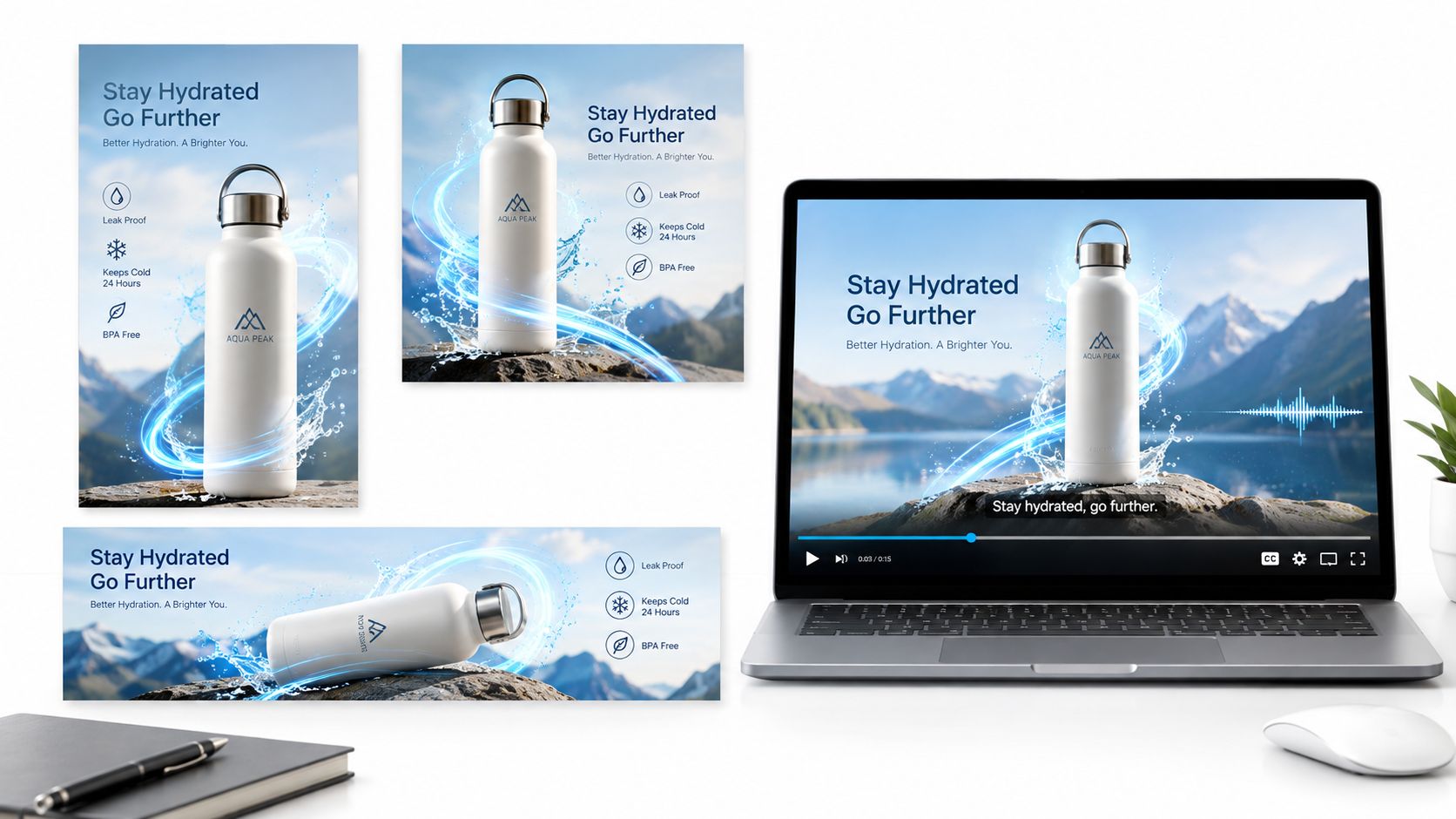
A direct-to-consumer brand might start with one product photograph and a simple promise. The team needs a vertical ad for a mobile feed, a square version for another placement, and a horizontal cut for a website or video platform. Rebuilding each composition manually would repeat much of the same work.
With an AI-assisted workflow, the product image becomes the visual anchor. The system can add a controlled camera move, reveal a benefit in animated type, place captions over the narration, and prepare the aspect-ratio variants. A person still checks whether the bottle remains accurate, whether the text is readable, and whether the movement supports the product rather than distracting from it.
<a id="a-product-promo-built-from-an-image"></a>
A product promo built from an image
The costly part of this campaign may not be creating the first animation. It may be producing every required version. Automatic resizing, caption placement, translation, and re-voicing compress that adaptation layer, especially when the campaign must serve different markets.
For a still-first concept, a picture-to-video AI workflow can help turn a product image into a moving starting point. The marketer can request a slow push-in, a rotation, a background change, or a reveal timed to the first spoken benefit. The output belongs in the rough-cut category until the team confirms product accuracy and brand fit.
<a id="a-youtube-intro-with-a-host"></a>
A YouTube intro with a host
An educational channel may want a repeatable opening that introduces the topic, establishes the host, and displays captions for viewers who aren't listening with sound. A Talking Avatar can provide the presenter layer, while animated text and supporting visuals give the intro structure.
The important design choice is restraint. Keep the identity cue consistent, but vary the topic-specific graphic. That preserves recognition without forcing every episode into an identical visual rhythm.
<a id="a-music-led-short-promo"></a>
A music-led short promo
A musician, retailer, or event organizer may begin with a track rather than a script. Music to Video can match visual changes to the beat, while anime or cartoon generation can provide a deliberate stylized direction instead of an accidental mixture of realistic and illustrated elements.
The final review should ask whether the beat matching supports the intended mood. A cut on every musical event may feel busy. Sometimes the best motion holds a visual longer and lets the sound create the energy.
Localization adds another layer. Captions need translation, voiceover needs culturally appropriate delivery, and layouts may need different line lengths. AI can accelerate those versions, but native review remains essential because literal translation can still produce awkward emphasis or crowded typography.
<a id="getting-started-with-ai-motion-graphics-in-clipnova"></a>
Getting Started with AI Motion Graphics in ClipNova
Start with one deliverable, not an entire content operation. Choose a short social ad, an explainer intro, or a product image that already has a clear message. Write the audience, action, visual style, format, and voice direction into the prompt, then treat the first result as a draft to evaluate.
Creators can use that draft to explore hooks and pacing. Agencies can use it to prepare options before a client review. Performance marketers can build a controlled set of variations, then compare the creative direction rather than spending the first production cycle on repetitive assembly.
The strongest habit is to separate generation from approval. Let AI propose the sequence and handle routine adaptations, but check claims, product details, captions, pronunciation, transitions, and brand behavior before publishing. For prompt structure, this text-to-video prompt guide can help turn a general idea into clearer instructions.
ClipNova Studio supports natural-language video creation, automated scripting, voiceover, visuals, captions, music, and multi-aspect exports. Paid plans offer watermark-free 1080p and 4K exports with commercial rights, while subscription tiers are available for individual creators, teams, and enterprises. Details can change, so review the current plan and usage terms before committing.
The useful outcome isn't a fully automated creative department. It's a workflow where your team spends less time rebuilding the same asset and more time deciding what the motion should communicate.
ClipNova offers a single workspace for turning prompts, links, topics, and images into short-form videos with scripts, voiceover, motion, captions, music, and channel-ready exports. Visit ClipNova to test an AI motion graphics workflow on one real campaign, then decide which parts deserve automated speed and which deserve your final creative polish.
Ready to ship your own?
Start creating viral videos with AI in under twenty minutes, no credit card required.