
You're halfway through a launch asset. The first image looked promising, but the product is tilted, the model's expression feels wrong, and the headline has turned into unreadable symbols. Starting over might fix one problem while creating another, and the deadline isn't moving.
That's the practical reality of working with an AI image generator and editor. Generation gives you a visual starting point. Editing turns that starting point into something usable. Treating them as one connected workflow helps you preserve the good parts, repair the weak ones, and make deliberate decisions about quality, consistency, privacy, and commercial rights.
Table of Contents
- The Moment a Creator Needs Both Generation and Editing
- What an AI Image Generator and Editor Actually Does
- Core Features That Define a Modern AI Image Generator and Editor
- A Real Workflow From Prompt to Finished Image
- Comparing the Major Models Behind AI Image Generation
- Best Use Cases for an AI Image Generator and Editor
- Honest Limits, Risks, and Governance Gaps
- How to Choose the Right AI Image Generator and Editor
<a id="the-moment-a-creator-needs-both-generation-and-editing"></a>
The Moment a Creator Needs Both Generation and Editing
A marketer is preparing a product hero image for a landing page. The brief sounds straightforward: a matte black water bottle on a pale stone surface, morning light, a few green leaves, and enough empty space on the left for copy.
The first prompt produces an attractive scene. The lighting works. The background feels premium. The bottle, however, leans slightly, its cap is distorted, and the label contains something that resembles a brand name but isn't one. A second generation fixes the cap but changes the composition, leaving no room for the headline. A third version gets the layout right and makes the bottle look like a different product.
A generator alone stops being a dependable production tool. You don't need another random image. You need to keep the useful composition and target individual defects.
Practical rule: Generate broadly, then edit narrowly. Don't throw away a strong image because one region needs repair.
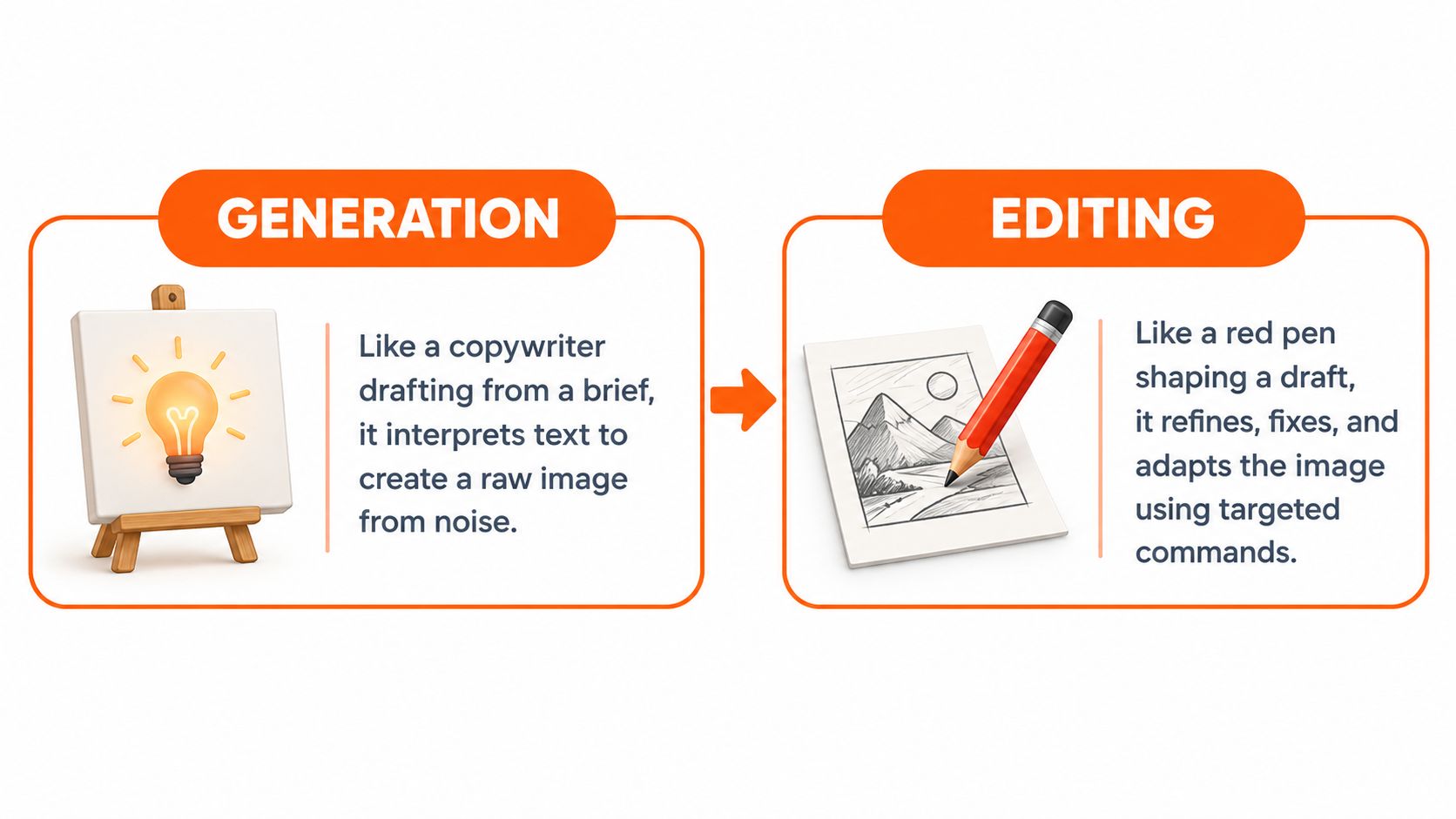
Generation is the first draft. You describe the subject, setting, camera angle, lighting, and mood, and the model creates a complete visual interpretation. Editing is the red pen. You mask a cap, remove an unwanted object, extend the canvas, adjust a color, or instruct the system to replace a background while protecting the parts that already work.
The rest of the workflow comes down to four practical questions:
- What are these tools doing? You'll need a simple mental model before prompts and settings make sense.
- Which features matter in production? A polished demo means little if the editor can't preserve structure.
- Which model family fits the job? Photorealistic scenes, readable text, brand consistency, and self-hosting involve different trade-offs.
- How do you avoid preventable risk? Uploaded faces, copyrighted references, platform terms, and commercial ownership deserve attention before publication.
The creator still has a deadline. The next hour shouldn't be spent chasing a perfect first generation. It should be spent building a controlled loop from prompt to image, image to edit, and edit to approved export.
<a id="what-an-ai-image-generator-and-editor-actually-does"></a>
What an AI Image Generator and Editor Actually Does
A useful analogy is a copywriter and a red pen. The generator writes the first draft from a creative brief. The editor reshapes that draft until it meets the requirements. You'll get better results when you stop expecting the first pass to be final.
When you submit a text prompt, the system converts your words into a machine-readable representation of meaning. A diffusion model then starts with noise and repeatedly removes uncertainty until the pixels match the concepts, relationships, and visual style it inferred. Transformer-based systems use a different internal design, but the user-facing idea is similar: language guides the construction of an image.
The model doesn't retrieve a finished photograph from a filing cabinet. It predicts visual structure from patterns learned during training. That's why a prompt such as “a glass bottle beside a folded linen napkin, soft side light, clean advertising composition” can produce a coherent scene, but also why small ambiguities can change the bottle shape, camera angle, or object placement.
<a id="generation-creates-the-visual-draft"></a>
Generation creates the visual draft
A prompt usually establishes four things:
- Subject, what must appear.
- Composition, where it appears and how the frame is arranged.
- Appearance, including material, color, style, and lighting.
- Constraints, such as an empty area for copy or a specific camera viewpoint.
The system converts that instruction into a rendered image. You can also begin with an input image through image-to-image generation, which uses the source as a structural or stylistic reference rather than starting entirely from text.
<a id="editing-targets-a-region-or-relationship"></a>
Editing targets a region or relationship
Inpainting replaces a masked area while attempting to preserve nearby content. It's suited to a damaged hand, an incorrect label, or an unwanted prop. Outpainting expands beyond the original frame, which helps adapt a square image to a wider banner.
Control systems can add stronger guidance. Pose or depth references constrain the arrangement, while instruction-based editors let you write commands such as “change the jacket from red to navy, keep the face and lighting unchanged.” The best systems make these operations feel continuous because generation and editing use related internal representations, often called a latent space.
That shared representation matters. You can move from a complete scene to a local correction without rebuilding every visual decision from scratch. It doesn't guarantee perfect preservation, but it gives you a practical way to steer the image instead of accepting every detail the model invents.
<a id="core-features-that-define-a-modern-ai-image-generator-and-editor"></a>
Core Features That Define a Modern AI Image Generator and Editor
A capable AI image generator and editor should be judged by the full production path, not by the prettiest sample in a gallery. Start with creation, then examine how precisely the tool lets you correct, control, and export the result.
<a id="creation-and-transformation"></a>
Creation and transformation
Text-to-image is the obvious entry point, but it's only one part of the system. Image-to-image transformation lets you provide a sketch, product photo, or rough composition and ask for a new visual treatment. Reference or style transfer can help carry a palette, texture, or character direction across variations, although consistency still needs checking.
<a id="targeted-editing"></a>
Targeted editing
Inpainting is the surgical tool. A careful mask lets you replace a logo area, repair an object, or alter clothing without regenerating the whole frame. Outpainting is useful when a creative needs extra negative space for a headline or a different aspect ratio.
Background removal and replacement separate the subject from its setting. Relighting and recoloring then let you align the asset with a campaign palette. Upscaling can increase usable detail, but it shouldn't be treated as a magic repair for a badly generated face or warped product.
For a deeper look at the enlargement stage, this guide to AI image upscaler software is useful when you're deciding whether to upscale inside the generator or in a dedicated tool.
<a id="control-and-repeatability"></a>
Control and repeatability
Professional workflows need more than a prompt box:
- Seed locking: Reuses a starting random state, making related variations easier to compare.
- Negative prompts: Tells the model what to avoid, such as extra fingers, logos, blur, or clutter.
- Pose and depth guidance: Keeps a person, object, or camera arrangement closer to a supplied reference.
- Precise masking: Controls whether an edit affects only the painted region or blends into its surroundings.
- Batch variation: Produces alternatives for testing while preserving the same creative brief.
<a id="output-and-accountability"></a>
Output and accountability
Check resolution ceilings, aspect-ratio options, transparent backgrounds, and export formats. PNG may suit compositing, while a layered PSD-style workflow can be more valuable when a designer needs to continue editing outside the platform.
Metadata and provenance fields also matter. A production team should be able to record the prompt, reference inputs, model, edit history, and final approver. That record won't settle every legal question, but it creates an audit trail that helps explain how an asset was made.
| Feature Family | What It Does | Why Creators Rely On It |
|---|---|---|
| Generation | Creates visuals from text or references | Establishes concepts and initial compositions quickly |
| Image transformation | Changes a source image using a prompt | Preserves useful structure while changing style or context |
| Inpainting and outpainting | Repairs selected areas or extends the frame | Solves local defects and layout problems without a full restart |
| Guidance and controls | Uses masks, poses, depth, seeds, and exclusions | Improves consistency and makes iteration more deliberate |
| Finishing and export | Upscales, removes backgrounds, adjusts color, and exports files | Prepares assets for publishing, design handoff, and review |
| Provenance support | Records source and creation details | Helps teams document decisions and investigate rights questions |
<a id="a-real-workflow-from-prompt-to-finished-image"></a>
A Real Workflow From Prompt to Finished Image
Take the product hero shot from the opening scene. The goal isn't to create a beautiful bottle in isolation. The goal is to create an approved asset that fits a layout, survives edits, and can be exported in the format the campaign needs.
<a id="start-with-a-layout-aware-prompt"></a>
Start with a layout-aware prompt
Write the prompt around the final use, not just the object:
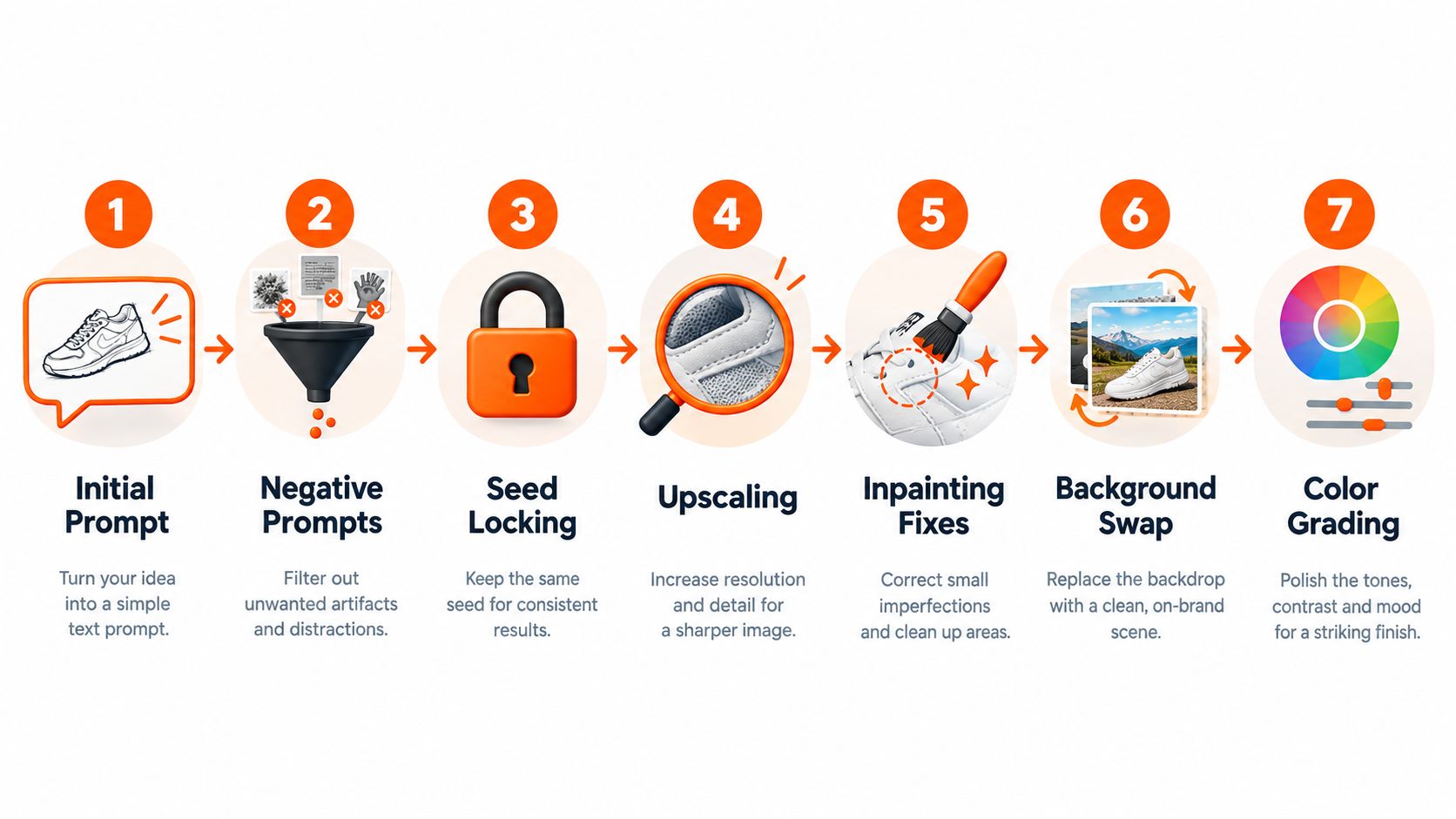
A matte black insulated water bottle standing upright on pale limestone, soft morning light from the right, subtle green leaves in the background, premium product photography, clean negative space on the left for headline text, wide horizontal composition.
The phrase about negative space is a design requirement. Without it, the model may center the bottle and leave you no usable copy area.
<a id="add-exclusions-before-you-judge-the-result"></a>
Add exclusions before you judge the result
Use negative prompts or exclusion controls for issues that repeatedly appear: tilted bottle, warped cap, extra objects, visible brand text, harsh reflections, cluttered background, and cropped product. These controls can reduce unwanted variation, but they won't guarantee clean typography or perfect geometry.
<a id="lock-the-useful-direction"></a>
Lock the useful direction
Once the composition is close, lock the seed if the platform supports it. Then change one variable at a time, such as lighting, prop density, or color temperature. If you change the prompt, seed, aspect ratio, and reference strength together, you won't know which decision improved or damaged the image.
<a id="edit-instead-of-restarting"></a>
Edit instead of restarting
Mask the cap and ask for “a straight matte black screw cap, aligned with the bottle neck, matching the existing light.” If the edit changes the bottle body, reduce the mask or lower the edit strength. A small correction should remain small.
Upscale only after the structure is approved. Enlarging too early wastes time and may make artifacts harder to inspect.
Here's a short visual reference for how an idea can move through generated imagery and later media production:
<iframe width="100%" style="aspect-ratio: 16 / 9;" src="https://www.youtube.com/embed/gEHe1-1futI" frameborder="0" allow="autoplay; encrypted-media" allowfullscreen></iframe>The same loop works for other visual planning tasks. For example, a tattoo sleeve concept workflow shows why broad composition and local refinement need to stay connected when a design must wrap around a real form.
<a id="finish-for-the-destination"></a>
Finish for the destination
Replace the background only after the product edges look clean. Then apply a restrained color grade, check the label area at actual viewing size, add descriptive accessibility text where the image conveys meaning, and export the required format.
If the approved image needs motion later, an image-to-video workflow can become the next stage. The important point is that the still image should be approved before animation adds another layer of variables.
<a id="comparing-the-major-models-behind-ai-image-generation"></a>
Comparing the Major Models Behind AI Image Generation
Model names matter less than the workflow they support. DALL-E, Stable Diffusion, Midjourney, Firefly, Imagen, SDXL, and Flux can all produce compelling images, but they emphasize different combinations of prompt interpretation, visual style, control, deployment, and rights documentation.
OpenAI introduced DALL-E in January 2021 as a system that generated images from written descriptions, according to this history of generative AI milestones. Stable Diffusion was released in August 2022 with openly available model weights, expanding access to users who wanted to run models on consumer hardware. Midjourney V5 arrived in March 2023, with photorealistic results that could resemble real photographs. These milestones describe a shift from research demonstrations to accessible creative products.
The market's commercial scale reflects that shift. One estimate values the AI image generator market at USD 412.51 million in 2025, projecting USD 484.29 million in 2026 and USD 1.74763 billion by 2034, with a 17.40% CAGR from 2026 to 2034. A broader estimate places the market at USD 8.7 billion in 2024 and projects USD 60.8 billion by 2030, with a 38.2% CAGR. The estimates use different market definitions, so they shouldn't be merged, but both describe a category with substantial commercial demand. North America held 40.34% of the first estimate's market in 2025, according to Fortune Business Insights' AI image generator market analysis.
| Model Family | Quality Strength | Control and Editing | Openness | Licensing and Cost |
|---|---|---|---|---|
| DALL-E | Conversational prompt handling and broad visual ideation | Straightforward edits where supported | Closed service | Review current commercial terms and usage limits |
| Stable Diffusion and SDXL | Flexible styles and customizable outputs | Strong ecosystem for masks, ControlNet-style guidance, and fine-tuning | Open-weight options support self-hosting | Deployment costs and license obligations depend on the model and setup |
| Midjourney | Distinctive artistic direction and photorealistic styling | Useful creative controls, with a less open production stack | Closed service | Check plan-specific commercial terms |
| Firefly | Design-oriented generation and Adobe workflow integration | Useful for creative-suite editing and compositing | Closed service | Review Adobe's current terms and indemnification conditions |
| Imagen | Strong general image quality within Google's ecosystem | Access depends on the product or API surface | Closed service | Verify availability, pricing, and commercial conditions |
| Flux | Strong candidate for detailed prompts and varied production workflows | Control depends on the host interface or self-hosted setup | Open-weight variants exist | Compare hosting, model, and platform terms before commercial use |
No model wins every category. A closed tool may offer a faster interface, while an open-weight family may give a technical team more control over deployment and customization. A visually impressive model can still be a poor choice if its editor can't preserve a product shape or if its rights terms don't match a client contract.
<a id="best-use-cases-for-an-ai-image-generator-and-editor"></a>
Best Use Cases for an AI Image Generator and Editor
The strongest use cases have a clear division of labor. The generator explores the visual direction, and the editor handles the details that must match a brief.
<a id="youtube-thumbnails"></a>
YouTube thumbnails
A thumbnail needs an immediate focal point, a readable subject, and room for manually added typography. Generate several compositions, then use inpainting to correct facial expression, clothing, or object placement. Add the final headline in a design tool instead of trusting the model with critical brand text.
<a id="e-commerce-product-photography"></a>
E-commerce product photography
Start from a real product reference when shape and finish matter. Generate lifestyle contexts, remove or replace backgrounds, relight the scene, and mask small defects. Keep the original product photo available for comparison, especially around packaging, controls, seams, and labels.
<a id="avatars-and-mascots"></a>
Avatars and mascots
Character consistency depends on reference images, controlled poses, and restrained changes. Build a small approved reference set, then test whether the tool preserves facial structure, costume details, and palette across scenes. If every new prompt changes the character, the problem isn't solved by generating more images. You need stronger reference and editing controls.
<a id="advertising-variants"></a>
Advertising variants
A campaign team can generate different backgrounds, crops, and seasonal treatments from a shared concept. Batch variation helps exploration, while masks protect the product and fixed brand elements. Before publication, review each variant for trademark collisions, invented claims, and visual differences that could misrepresent the offer.
Teams that turn one campaign concept into multiple social formats may also benefit from tools that turn posts into carousels, provided a human reviews the copy and visual hierarchy before publishing.
<a id="game-and-film-concept-art"></a>
Game and film concept art
Sketch-to-image transformation, pose guidance, depth references, and image-to-image workflows are valuable when the director already knows the silhouette or staging. The model can accelerate exploration without replacing art direction. Preserve the sketch, references, prompts, and selected iterations so the final concept has a traceable development history.
For projects that continue into moving scenes, an AI movie maker workflow can extend approved still concepts into sequences. That extension works best when the original image already has a stable subject, camera intention, and color direction.
The common thread is editability. A tool that creates attractive first drafts but offers weak masks, inconsistent references, or limited exports can create more cleanup than it saves.
<a id="honest-limits-risks-and-governance-gaps"></a>
Honest Limits, Risks, and Governance Gaps
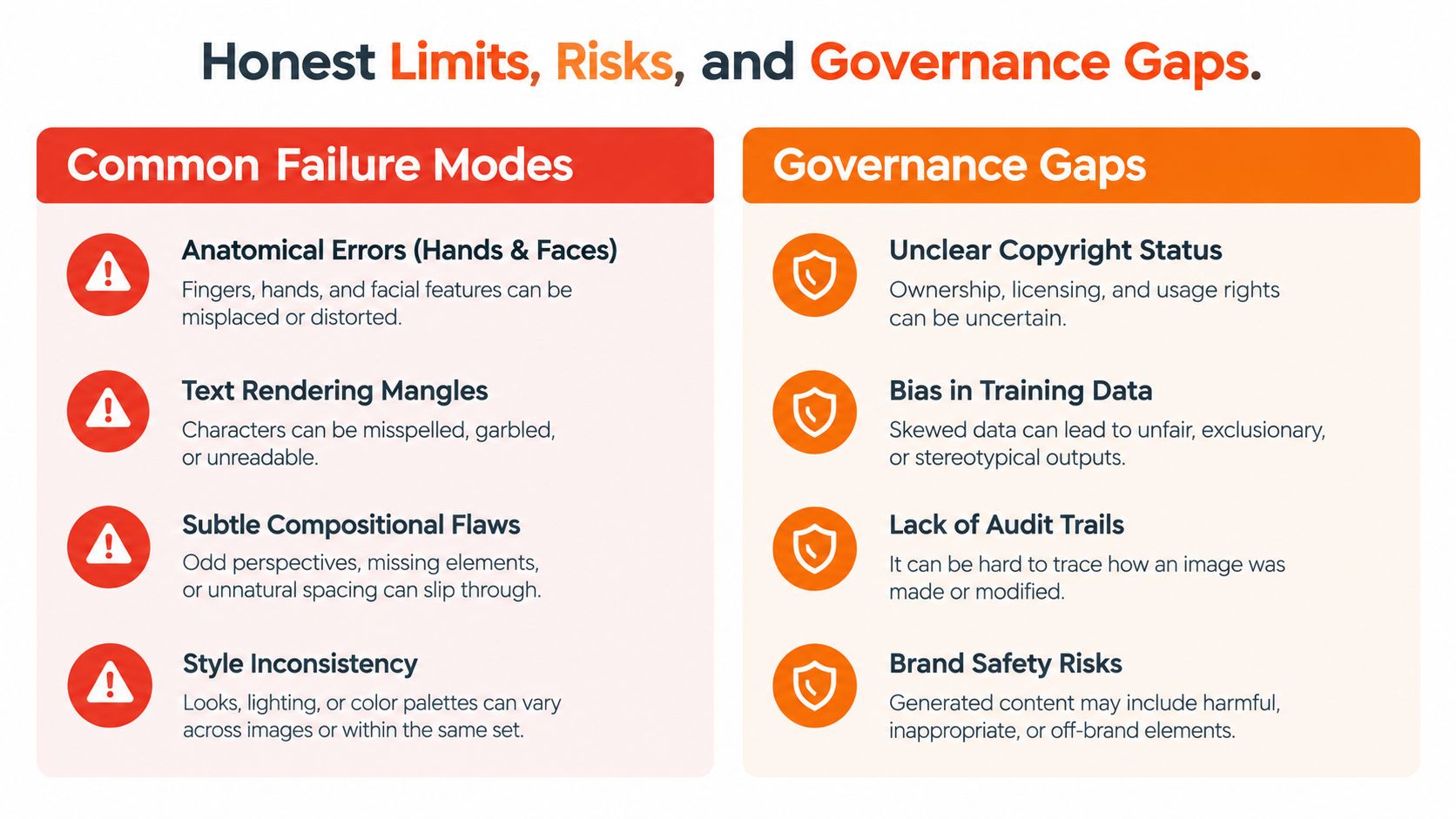
The most dangerous assumption is that a good-looking first image is a finished asset. Models still make anatomical mistakes, distort small product features, mangle text, and drift stylistically across a batch. Editing can repair a local problem, but it can't always rescue a composition whose underlying geometry or subject relationship is wrong.
Recent prompt-adherence research found that state-of-the-art text-to-image systems struggled with rigid instructions even for binary images containing only one geometric shape, as described in this study of constrained prompt adherence. That result is a useful warning for production work. Simple instructions aren't automatically easy for a model, especially when the requirement is precise rather than descriptive.
Diffusion editing now uses more formal evaluation because casual human judgment makes method comparisons noisy. The EditVal framework evaluates 13 editable attribute types with an automated pipeline using pretrained vision-language models, while related work discusses an LMM-based score for text-guided editing quality in this image-editing evaluation survey. The operational lesson is simple: test both semantic accuracy and content preservation.
<a id="the-person-in-the-upload-matters"></a>
The person in the upload matters
Privacy and consent become urgent when you upload a real person's photograph. In January 2026, Reuters reported that xAI restricted Grok image editing after sexualized outputs raised concerns from regulators in California and Europe. BBC also reported that the feature could edit uploaded images without the depicted person's consent, as summarized in the privacy-focused guide on AI image tools.
Ask whether the platform retains uploads, reuses them for training, exposes them publicly, or lets you delete them. Get permission before editing someone's likeness, and take extra care with children, public figures, intimate images, and photographs supplied by clients.
<a id="commercial-use-isnt-the-same-as-ownership"></a>
Commercial use isn't the same as ownership
A paid plan may permit commercial use without giving you exclusive ownership, copyright protection, or indemnification. A legal guide summarizing the current U.S. position says that purely AI-generated images generally lack human-authored copyright protection, while platform terms can allow commercial use without transferring ownership or providing a defense if a dispute arises. Reuters also reported in March 2026 on U.S. disputes involving AI training, piracy, market harm, and allegations that models were trained on copyrighted works, as discussed by The Guardian's report on Grok and AI imagery.
Before a client campaign ships:
- Record provenance: Save prompts, source images, model names, settings, edits, and approvals.
- Read the license: Confirm commercial use, public-gallery exposure, training treatment, and indemnification language.
- Protect likenesses: Obtain consent for identifiable people and avoid deceptive or sexualized alterations.
- Check brands: Inspect logos, packaging, characters, and recognizable trade dress for accidental collisions.
- Preserve metadata: Keep provenance information, including available C2PA-style records, with the final asset.
<a id="how-to-choose-the-right-ai-image-generator-and-editor"></a>
How to Choose the Right AI Image Generator and Editor
Choose against a real assignment, not a feature checklist. Define whether you need ideation, production-ready assets, or both. A concept artist may prioritize visual exploration, while an e-commerce team may care more about masks, background replacement, product preservation, and export control.
Run the same prompt set through two or three candidates. Score the first-pass composition, the quality of targeted edits, consistency across variations, processing speed, and the amount of manual cleanup. Include difficult examples, such as a product with small text, a person with a specific pose, and a layout requiring clean negative space.
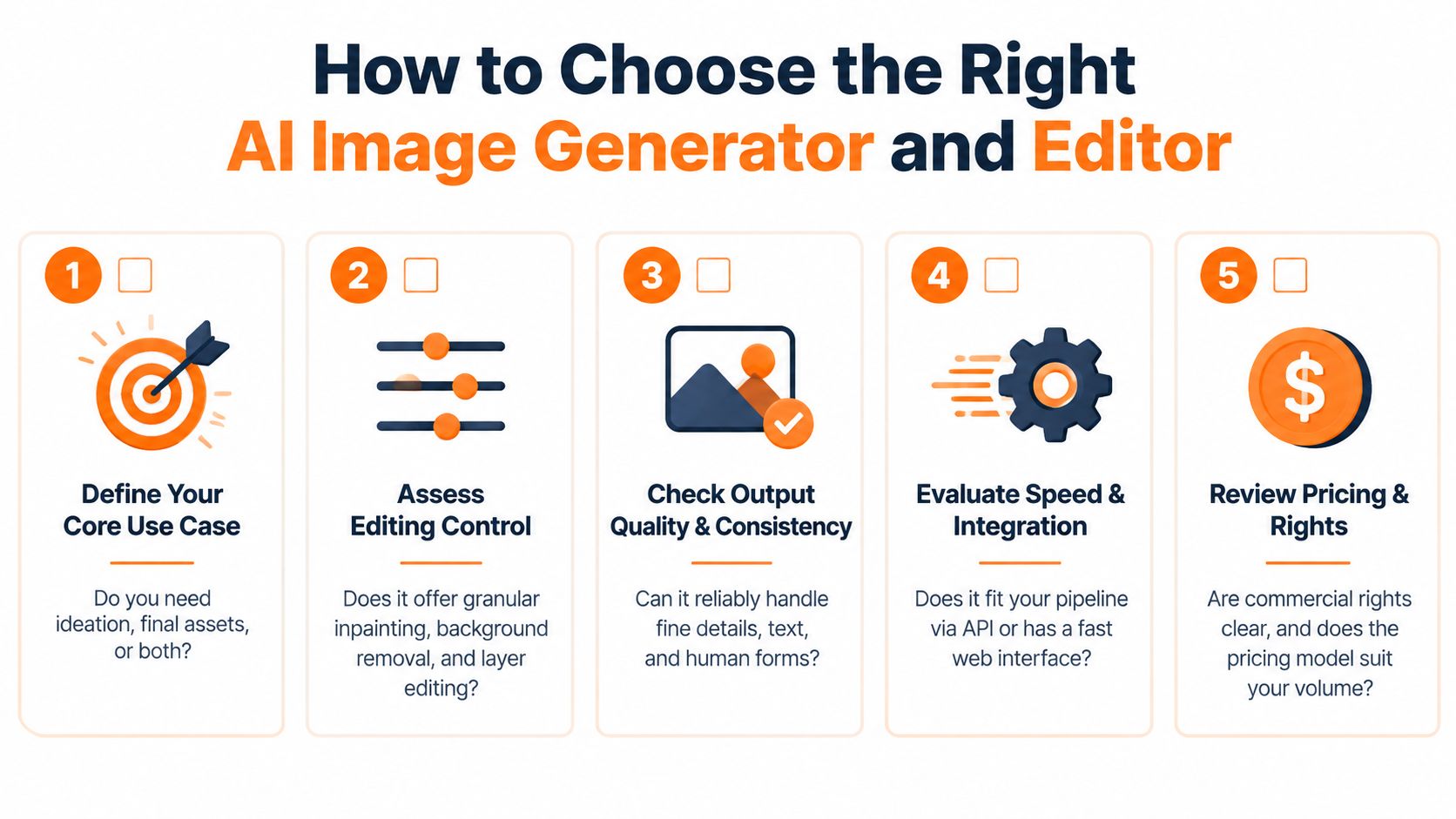
Use this decision filter:
- Define the output: Decide where the asset will appear and what must remain exact.
- Match the model: Prioritize photorealism, text handling, style, control, or deployment based on that job.
- Test the editor: Check whether inpainting, masking, references, and background tools repair the model's actual failures.
- Verify rights: Read the current terms for commercial use, ownership, retention, training, and indemnification.
- Measure the complete loop: Judge prompt-to-export time, not just generation speed.
ClipNova offers image generation from natural-language prompts, image-to-image transformation, and written edits such as object removal, recoloring, background changes, and detail fixes. It also connects image work with short-form video creation, which can help when a campaign needs both still assets and animated formats in one workspace.
A strong demo gets attention. A reliable prompt-to-export workflow earns a place in production.
For a connected workflow, visit ClipNova to generate images from prompts, transform references, and apply written edits such as background changes or detail fixes. You can also carry approved visuals into short-form video, captions, voiceover, and multi-aspect exports when the project moves beyond a single image.
Ready to ship your own?
Start creating viral videos with AI in under twenty minutes, no credit card required.