
52% of consumers were most concerned about brands posting AI-generated content without disclosure, according to a Q3 2025 Sprout Social survey of more than 2,000 consumers in Australia, the United Kingdom and the United States, reported by eMarketer. For creators, that concern raises a practical question: will the disclosure still be visible when the video leaves the original account?
AI disclosure on social media isn't just a caption-writing task. A creator can declare AI use at upload, then distribute a downloaded, cropped or translated version that no longer carries the same notice. The useful standard is therefore a disclosure package that travels with the asset, rather than confidence that a platform will identify it.
Table of Contents
- AI Disclosure Rules on Each Major Platform
- What AI Disclosure Means and Why It Matters
- EU AI Act Disclosure Duties Now in Force
- Enforcement Gaps and Risks When Labels Fail
- Label Wording and Placement Templates
- Realistic People, Avatars and Translations
- Creator Checklist for Labeling Every Post
- Confirm Your Disclosure Before You Publish
<a id="ai-disclosure-rules-on-each-major-platform"></a>
AI Disclosure Rules on Each Major Platform
Platform disclosure mechanisms for creators
| Platform | How the label is set | What creators must do |
|---|---|---|
| X | Synthetic and manipulated media policy, with labeling or removal for deceptive synthetic media | Disclose realistic synthetic media that could mislead viewers and check the current policy |
| Automatic AI information label from detected signals or creator disclosure | Use the platform AI label option when offered and add a caption note | |
| Meta labeling system, using detection signals or creator disclosure | Declare realistic synthetic video and audio, and identify generated images through available upload controls | |
| TikTok | Creator AI-generated setting or automatic identification through content credentials | Switch on the AI-generated setting for realistic synthetic content |
| YouTube | Altered or synthetic content setting associated with the video | Turn it on when realistic scenes could be mistaken for real footage |
The important distinction is how a disclosure reaches the viewer. A creator setting records what the uploader declares. Metadata-based detection reads signals attached to a file. A policy-based intervention addresses material the platform considers deceptive. These mechanisms aren't interchangeable.
For Instagram and Facebook, TechCrunch's account of Meta's labeling announcement describes labels triggered by industry-standard AI indicators or uploader disclosure, alongside a requirement to identify photorealistic synthetic video and realistic-sounding synthetic audio. Meta's approach expanded beyond images made with its own tools to encompass video, audio and images more broadly.
<a id="what-to-check-at-upload"></a>
What to check at upload
On YouTube, turn on the altered or synthetic content setting when realistic scenes could be taken for real footage. A generated interview, fabricated street scene or simulated product demonstration deserves closer attention than an obviously illustrated animation.
For TikTok, inspect the AI-generated disclosure control rather than assuming content credentials will settle the question. On X, distinguish disclosure from permission: identifying a synthetic clip doesn't resolve whether its presentation is deceptive.
Labels can appear within feeds, Reels and Stories, or alongside and over video players. Their precise wording, placement and upload controls can change, so review each platform's help centre before launching a campaign, especially when scheduling through another publishing tool.
Working rule: If a platform asks you to disclose, do it. If it doesn't ask, still identify realistic AI content that viewers could mistake for an authentic recording.
The table is an operational comparison, not a guarantee that every account will see identical controls or that a disclosed post satisfies every applicable policy.
<a id="what-ai-disclosure-means-and-why-it-matters"></a>
What AI Disclosure Means and Why It Matters
AI disclosure tells viewers that a post's visuals, voice or text were generated or materially altered using AI. Think of an ingredients label: it tells the buyer what's inside, not whether the product is good. An AI notice likewise doesn't establish accuracy, quality or permission to use someone's likeness.
Disclosure can use distinct signals:
- Visible wording appears within the video or accompanying text.
- Platform-native labels appear through the publisher's upload controls or the platform's detection systems.
- Machine-readable provenance records information that software can inspect, such as file metadata.
These signals serve different audiences. Viewers need understandable language; automated systems need detectable information; publishing teams need a record they can trace to the finished asset.

The scale is substantial: Meta's transparency report records more than 380 billion views of AI-labeled content on Facebook and more than 1 trillion on Instagram during October 2024. Those are content views, not unique people or a count of generated posts.
<a id="transparency-in-an-automated-workflow"></a>
Transparency in an automated workflow
The publishing process matters as much as the generation process. Exerta's explanation of what an AI social agent does offers useful context for separating automated content tasks from the decisions a publisher still needs to own. For AI explainer videos, that means identifying which scenes are illustrations and which statements viewers should understand as factual claims.
Audience expectations are clear, although a survey doesn't prescribe the best label design: 84% of respondents agreed or strongly agreed that AI-generated social-media content should be clearly labeled and watermarked in a Boston University survey conducted August 22–25, 2025.
<a id="eu-ai-act-disclosure-duties-now-in-force"></a>
EU AI Act Disclosure Duties Now in Force
EU AI Act disclosure duties for creators and tools
| Obligation | Who it applies to | Requirement |
|---|---|---|
| Machine-readable marking | Providers of generative AI systems | Mark synthetic audio, images, video and text so they can be detected as artificially generated or manipulated |
| Visible deepfake disclosure | Deployers publishing qualifying deepfakes | Provide clear disclosure no later than first exposure |
| Public-interest AI text | Deployers publishing AI text to inform the public | Disclose unless the applicable human-review, editorial-control and editorial-responsibility exception is satisfied |
| Application date | Providers and deployers | The transparency obligations apply from 2 August 2026 |
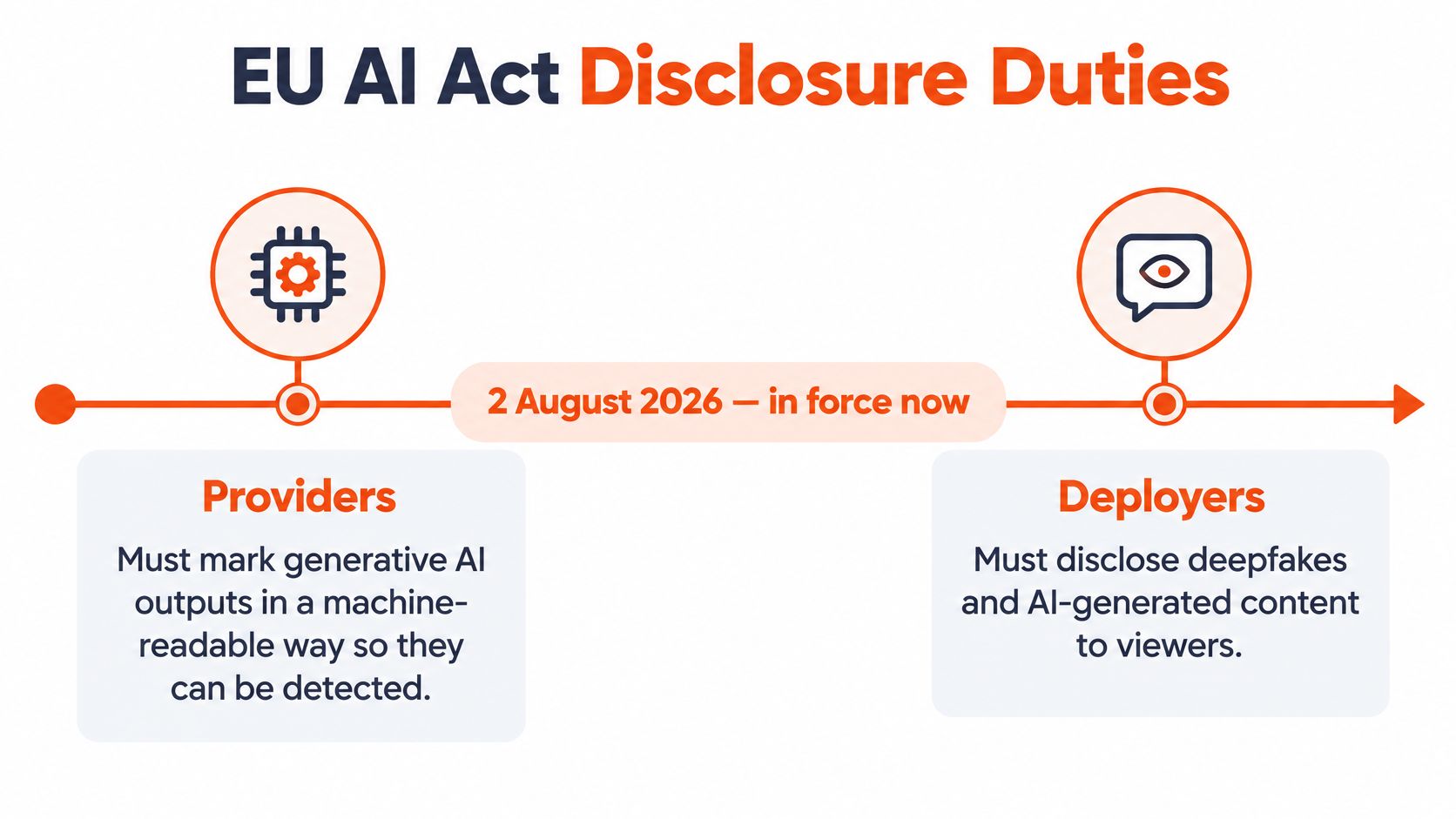
The distinction between providers and deployers is central to Article 50 of the EU AI Act: providers must support machine-readable identification of generated outputs, while deployers have disclosure duties for qualifying deepfake content and certain public-interest text. These transparency obligations apply from 2 August 2026; that application date, rather than the date a tool was purchased, should guide publishing preparation.
The provider duty concerns information a machine can detect. The deployer duty concerns what a person can understand. A business using a generation tool to publish a realistic synthetic spokesperson shouldn't assume the tool's output markings settle its own disclosure responsibilities.
The following graphic separates those roles.
<a id="turn-the-duty-into-an-export-record"></a>
Turn the duty into an export record
For qualifying content, disclosure must be clear, distinguishable and understandable, and available no later than first exposure. That calls for a publishing decision before export, not a note added after viewers have already encountered the scene.
Maintain an asset manifest containing the model used, generation time, substantive edits, voice or avatar use, and human-review status. Map that record to the appropriate visible notice, then preserve available provenance when exporting. Treat a realistic synthetic video intended for EU publication as a review item, rather than assuming every use of AI creates the same legal obligation.
Remixed audio deserves the same attention as visuals. A production walkthrough such as Drumloop AI's step-by-step AI remix guide can help identify the stages at which audio changes; the legal assessment still concerns the resulting content and its presentation.
Outside the EU, check applicable national law and platform policy for the intended market. Keep the manifest with the approved export so the publishing team can explain what was generated, what was reviewed and why a particular notice was selected.
<a id="enforcement-gaps-and-risks-when-labels-fail"></a>
Enforcement Gaps and Risks When Labels Fail
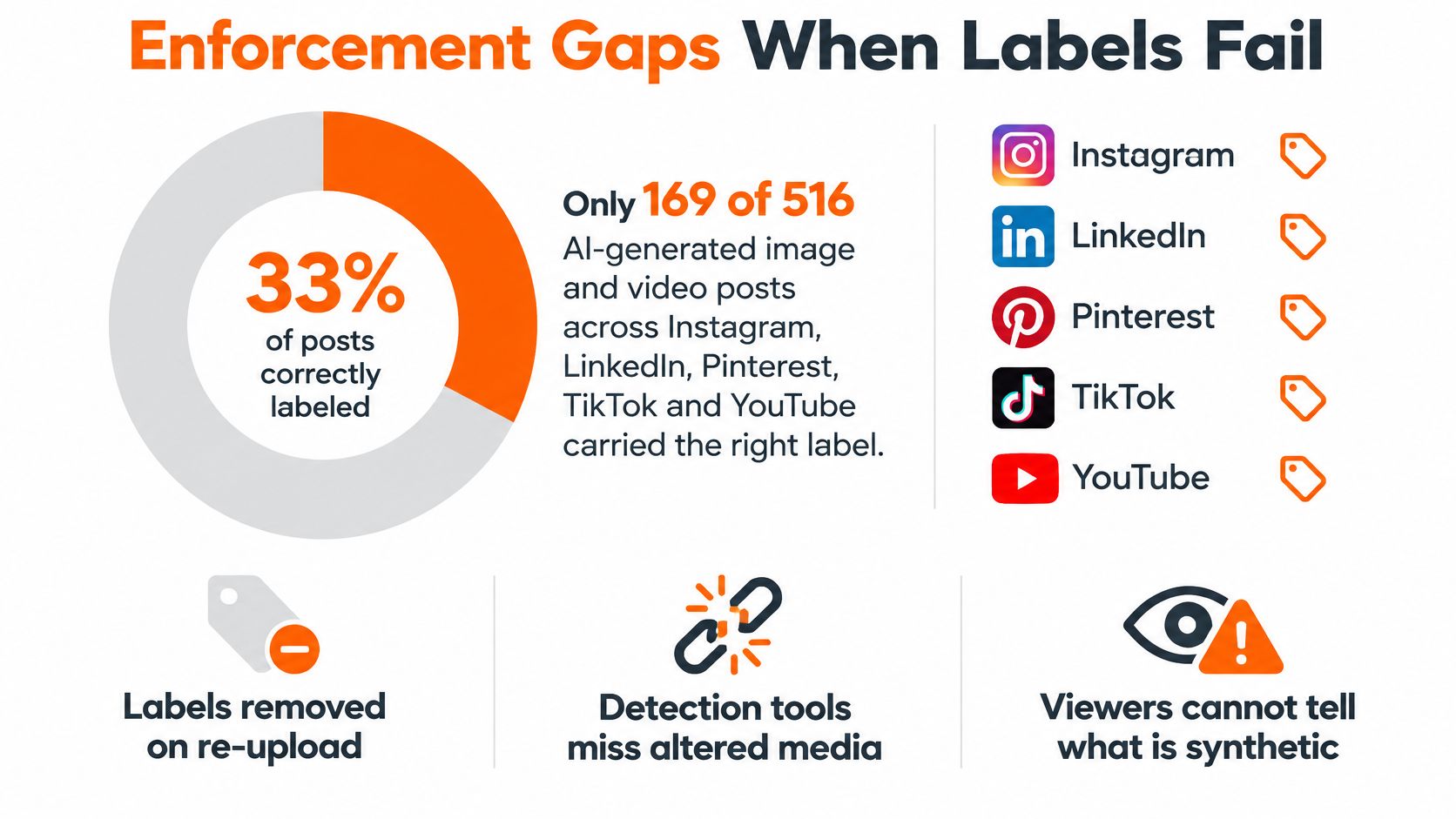
Platforms correctly labeled 169 of 516 AI-generated image and video posts, about 33%, in a 2025 audit reported by MediaNama covering Instagram, LinkedIn, Pinterest, TikTok and YouTube. That's a finding about the audited posts, not a universal detection rate for every platform or format.
It nevertheless challenges a common assumption: that uploading an AI asset is enough for a platform to recognize and identify it. A missing label tells viewers little about whether a clip is authentic.
The audit's central finding is illustrated below.
<a id="different-failures-create-different-risks"></a>
Different failures create different risks
Creators should separate the possible consequences rather than treating them as a single enforcement category:
- Platform action: A service may intervene under its synthetic-media or deception rules; disclosure isn't blanket permission to publish.
- Regulatory scrutiny: Where disclosure duties apply, publishers need to assess their own compliance rather than rely on platform detection.
- Audience criticism: A viewer who discovers undisclosed synthetic elements may question the surrounding claims, even when the creator intended only a visual illustration.
A file's journey creates additional failure points. Downloading, recompression and format conversion can remove metadata; cropping can cut away visible wording; reposting can separate a video from its caption. A translated or re-voiced export should therefore be treated as a new publication asset requiring inspection.
A disclosure that existed in the editing project isn't necessarily a disclosure that reached the viewer.
For teams discussing synthetic-media risks, the embedded video offers an additional viewing resource.
<iframe width="100%" style="aspect-ratio: 16 / 9;" src="https://www.youtube.com/embed/LyR5mRBrRsk" frameborder="0" allow="autoplay; encrypted-media" allowfullscreen></iframe>The practical response isn't to abandon platform labels. It's to avoid making them the only evidence of disclosure. Keep a visible notice within the asset, use the service's native control, and retain provenance wherever the distribution process supports it.
<a id="label-wording-and-placement-templates"></a>
Label Wording and Placement Templates
Disclosure wording and placement by scenario
| Scenario | Suggested on-screen wording | Placement |
|---|---|---|
| Fully AI-generated video | AI-generated video | Opening frame and caption |
| AI-assisted editing or enhancement | AI-assisted editing | Caption or end card for low-risk enhancement |
| Synthetic voiceover | Synthetic voice | Visible notice accompanying the narration, plus caption and description |
| AI presenter that is not a real person | AI presenter, not a real person | Opening moments and caption |
| Translated or re-voiced version | Translated with AI voice | Every localized version, in a consistent position |
These are editorial templates, not prescribed legal formulas. An end card may explain a minor background edit, but it's not an appropriate substitute for first-exposure disclosure when the content requires one.
Specific wording helps viewers understand the actual intervention. AI-assisted editing describes a different process from AI-generated video. A broad word such as enhanced leaves unanswered whether the creator adjusted lighting, replaced a voice or invented the scene.
A randomized social-media experiment published in Electronic Markets found that AI-generated or AI-enhanced labels reduced affective and behavioral engagement relative to human-created content, with the strongest penalty for emotional content; revealing AI involvement after viewing mitigated some negative effects. That finding identifies a trade-off, not a reason to delay a disclosure that viewers are entitled to receive at first exposure.
<a id="design-for-the-actual-viewing-surface"></a>
Design for the actual viewing surface
Place wording where it remains readable after the planned portrait, square and horizontal crops. Don't put it against the outer edge, underneath interface controls or over a moving background without sufficient contrast.
For example, a synthetic cooking presenter could carry a compact notice above the subtitle area rather than across the food or the presenter's face. An informational product animation might use an opening disclosure panel followed by a smaller persistent notice.
Use these checks during layout:
- Separate from subtitles: Leave enough space for both the disclosure and dialogue text.
- Maintain contrast: Use a solid or translucent backing when the scene changes brightness.
- Match the intervention: Identify the voice when only the voice is synthetic, rather than describing the entire recording as generated.
- Localize deliberately: Translate the notice along with the spoken script, then inspect the final composition.
A guide to adding subtitles to a video is useful for coordinating disclosure text with captions without letting the overlays compete.
<a id="test-legibility-not-concealment"></a>
Test legibility, not concealment
Compare alternative label positions on the same clip while keeping the wording unchanged. Start with emotionally driven creative, where disclosure may affect reception differently from a straightforward explanation.
Judge whether viewers can read the notice without losing the subject. A tiny label defeats the purpose; an oversized panel can obstruct the content. Don't interpret stronger retention from a less noticeable notice as proof that you've found the better disclosure.
<a id="realistic-people-avatars-and-translations"></a>
Realistic People, Avatars and Translations
An AI label doesn't make every synthetic scene equally safe. A fictional presenter introducing a software feature poses a different question from a fabricated recording that appears to show a real executive endorsing it.
Use proportional disclosure, with the prominence tied to what a viewer could reasonably misunderstand:
- Realistic people and consequential claims: Put a prominent notice within synthetic news-style scenes, apparent endorsements and depictions of events that could be mistaken for documentary footage.
- Stylized or limited alterations: Use a clear but less intrusive notice for an illustrated product demonstration or an AI-enhanced background that doesn't change the underlying claim.
- Recognizable likenesses and voices: Keep separate consent documentation when a real person's identity is involved, including an avatar imitating an existing spokesperson.
The last category isn't just a stronger-label problem. Disclosure tells viewers about artificial production; consent addresses whether the creator had permission to use the person's identity.
<a id="recognition-isnt-the-same-as-protection"></a>
Recognition isn't the same as protection
A 2025 CHI study of 911 participants found that labels significantly increased participants' belief that content was AI-generated, but didn't significantly change sharing, commenting or liking behavior. That limits what publishers should promise: a label may improve recognition without changing what audiences do next.
Consider a synthetic news-style clip showing a flooded street. A notice identifying generated imagery doesn't validate the location, the weather claim or the accompanying advice. The publisher still needs factual review and source attribution.
For a talking AI avatar, review the script, the apparent identity and the performance together. A fictional host should not accidentally resemble an authorized spokesperson or present invented personal experience as testimony.
Editorial safeguard: Label the production method, but verify the message independently.
Translation adds another decision. A re-voiced presenter should carry an understandable notice in the new language, and the translated script needs its own review for changed meaning. AI can still get a date, a name or a detail wrong, so check the facts and watch the complete video before posting.
<a id="creator-checklist-for-labeling-every-post"></a>
Creator Checklist for Labeling Every Post
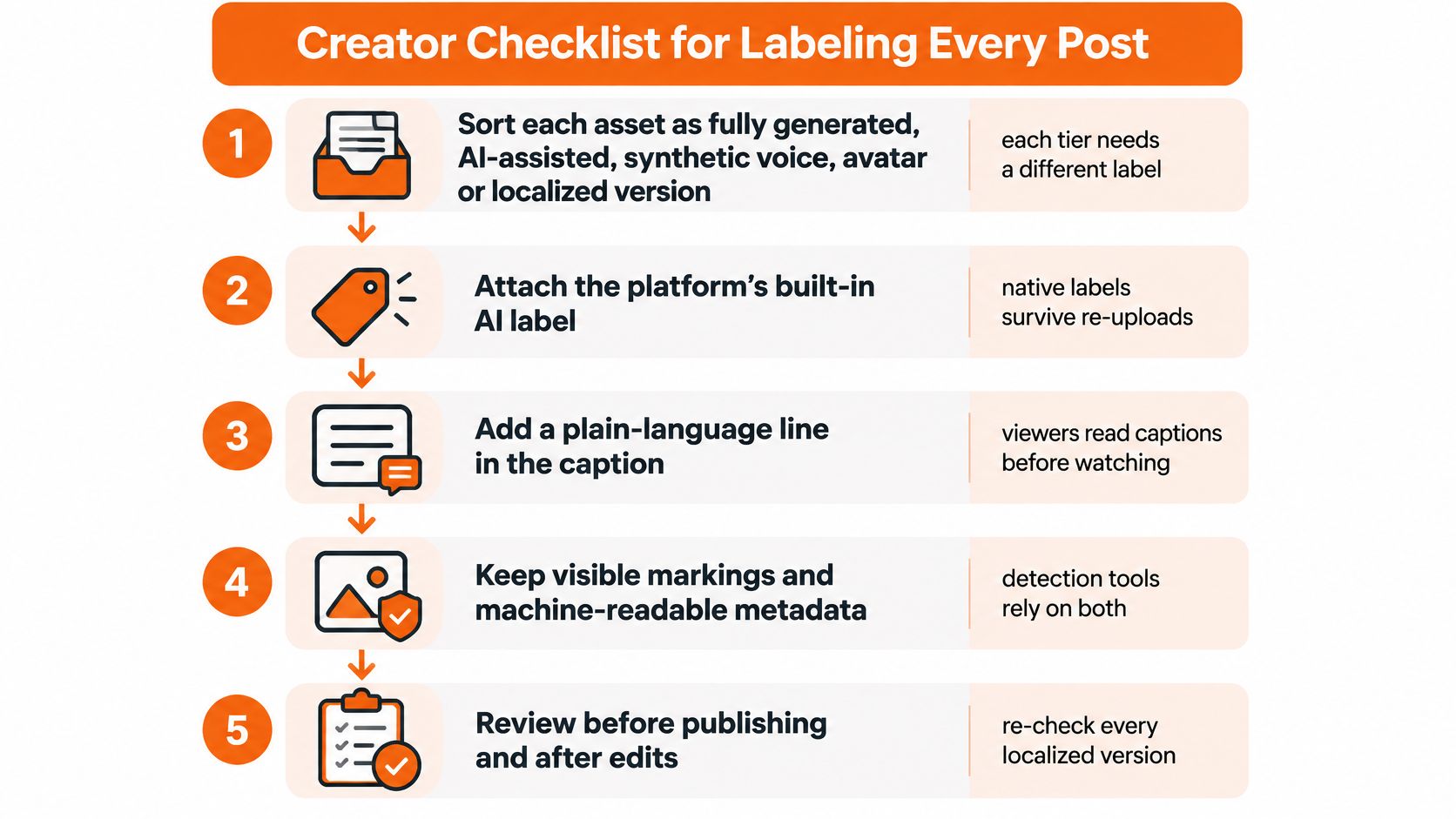
One caption can't carry a disclosure on its own. Platform labels miss a large share of AI content, file metadata can break when a video is reposted or re-encoded, and post copy separates from the file the moment it is downloaded or screen-recorded. A label that lasts has to be layered: embedded in the video itself, set on the platform and written into the post, so that losing any single link still leaves a visible trace.
Approve the final export, since the editing preview can't show how the caption renders or where interface controls sit. Assign one person to confirm the disclosure even when a colleague generated the asset or prepared the upload.
- Classify the asset as fully generated, AI-assisted, synthetic voice, avatar or localized content, so the wording names the actual intervention.
- Complete the asset manifest with the model, generation time, edits, voice or avatar use and human-review status, so a reviewer can trace the label back to the production record.
- Choose specific wording from the scenario templates, because a consistent vocabulary makes discrepancies easier to spot across a campaign.
- Embed a readable notice in the opening frame or a caption-safe area for realistic synthetic content, because an accompanying post can become separated from the file.
- Enable the platform control where one exists, including YouTube's altered or synthetic content setting when realistic scenes could be taken for real footage.
- Approve facts, permissions and playback before posting, because a polished export can still contain an incorrect detail or an unauthorized likeness.
- Inspect every delivery version after resizing and translation, because approving the source project says nothing about whether each exported composition stays readable.
The visual checklist below works as a production reminder. Native labels, embedded metadata and caption text each occupy a different link in the chain, and none should be assumed to survive re-uploading intact.
<a id="make-approval-easy-to-repeat"></a>
Make approval easy to repeat
Keep the approved disclosure wording beside the script, where the uploader can reach it, rather than in a private message. Store the consent record and factual sources with the asset, and name files so the approved language and export shape are obvious. A vertical short and a widescreen master of the same story need separate label checks.
A brand-styled text watermark keeps the notice consistent without imitating a platform badge. If the narration carries a spoken disclosure, confirm the subtitle transcript reproduces it accurately. Automatic transcription still needs a human read.
A standing account-bio note can describe a channel's general production approach. It can't substitute for disclosure on an individual realistic synthetic scene, since viewers may meet that scene through a repost, an embed or a recommendation feed without ever visiting the profile.
<a id="review-the-published-result"></a>
Review the published result
Open each version where it lives. Confirm the platform toggle survived upload processing, that the disclosure line still sits in the visible part of the caption, and that interface controls or pinned overlays don't cover the embedded notice. Check the weakest link too: a re-share or screen recording can strip file-level metadata entirely, which is why the notice embedded in the frame matters most.
Save the approved export and the publication record together. When an editor replaces a scene, changes the voice or produces another language version, reopen approval rather than carrying forward the earlier sign-off.
<a id="confirm-your-disclosure-before-you-publish"></a>
Confirm Your Disclosure Before You Publish
The decision isn't whether AI labels are perfect. It's whether the next post gives viewers a fair opportunity to understand what they're seeing before they mistake a generated performance for an authentic recording.
Take the next AI video through the checklist, compare alternative label positions on the same clip and keep the wording consistent across versions. For LinkedIn distribution, the Linkboost preview tool for creators can help inspect the accompanying post presentation, though a preview doesn't replace checking the uploaded video.
Publication check: Review the file and the destination post as separate deliverables.
ClipNova doesn't post videos for you. You download the MP4 file and post it yourself, so the visible notice and each channel's disclosure setting remain your responsibility. Keep the approved disclosure line with the publishing copy so it isn't rewritten inconsistently during localization.
Watch the clip with sound on and the post caption hidden. If a viewer can still tell which realistic elements are AI-made, the notice is doing its job. If not, move or enlarge it before publishing, and check again after upload.
ClipNova offers scripting, voiceover, visuals and captions for short-form videos, giving creators a workspace for preparing both the content and its disclosure wording. Visit ClipNova to build your next video, then include a readable AI notice in the export and confirm the platform setting before you post.
Ready to ship your own?
Start creating viral videos with AI in under twenty minutes, no credit card required.