
You've got a campaign brief at 11 PM, three video variations are due in the morning, and the launch date isn't moving. The copywriter is offline, the editor needs narration, the designer needs scene direction, and the paid media manager is asking which version is for Meta and which is for TikTok.
That's where an AI ad script generator earns its place. It doesn't replace the campaign strategy or the final review. It turns a clear brief into a structured starting point that can feed voiceover, visuals, captions, localization, and exports without forcing every team member to wait for the previous step.
Table of Contents
- The Marketer's 11 PM Deadline Problem
- What an AI Ad Script Generator Actually Is
- How the Generator Turns a Prompt into an Ad
- Prompt Examples You Can Adapt Today
- Engineering the First Three Seconds
- Disclosure as a Persuasion Variable
- Plugging the Script into an End-to-End Video Workflow
- Common Pitfalls and a Reusable Checklist
<a id="the-marketers-11-pm-deadline-problem"></a>
The Marketer's 11 PM Deadline Problem
The blank document isn't usually the core issue. The issue is that one missing script blocks several deliverables at once.
A marketer may know the product, audience, offer, and landing page, yet still need to decide what the viewer sees first, what the voice says, what appears as text, and how the same idea changes across placements. A paragraph of copy might satisfy the writer, but it won't tell an editor when to cut to the product or tell a captioning system which words should appear on screen.

A useful generator changes the sequence of work. You enter a focused brief, receive several hooks and script structures, select the strongest message, and then hand the approved version to narration, scene creation, captions, and export. The work still needs judgment, but the team isn't waiting for a single person to create every component from scratch.
Practical rule: A script is production-ready only when another person or tool can understand what should be spoken, shown, captioned, and tested.
This matters even more when multiple campaigns share approvals, budgets, and launch dates. Teams comparing campaign management software for enterprise teams will recognize the same operational issue: creative work needs a clear handoff, not just a final text file. The generator becomes valuable when it reduces ambiguity between marketing, creative, and media buying.
The right reframe is simple. An AI ad script generator isn't a novelty writing toy. It's the first stage of a video production pipeline, and its output should be designed for everything that happens after the words are drafted.
<a id="what-an-ai-ad-script-generator-actually-is"></a>
What an AI Ad Script Generator Actually Is
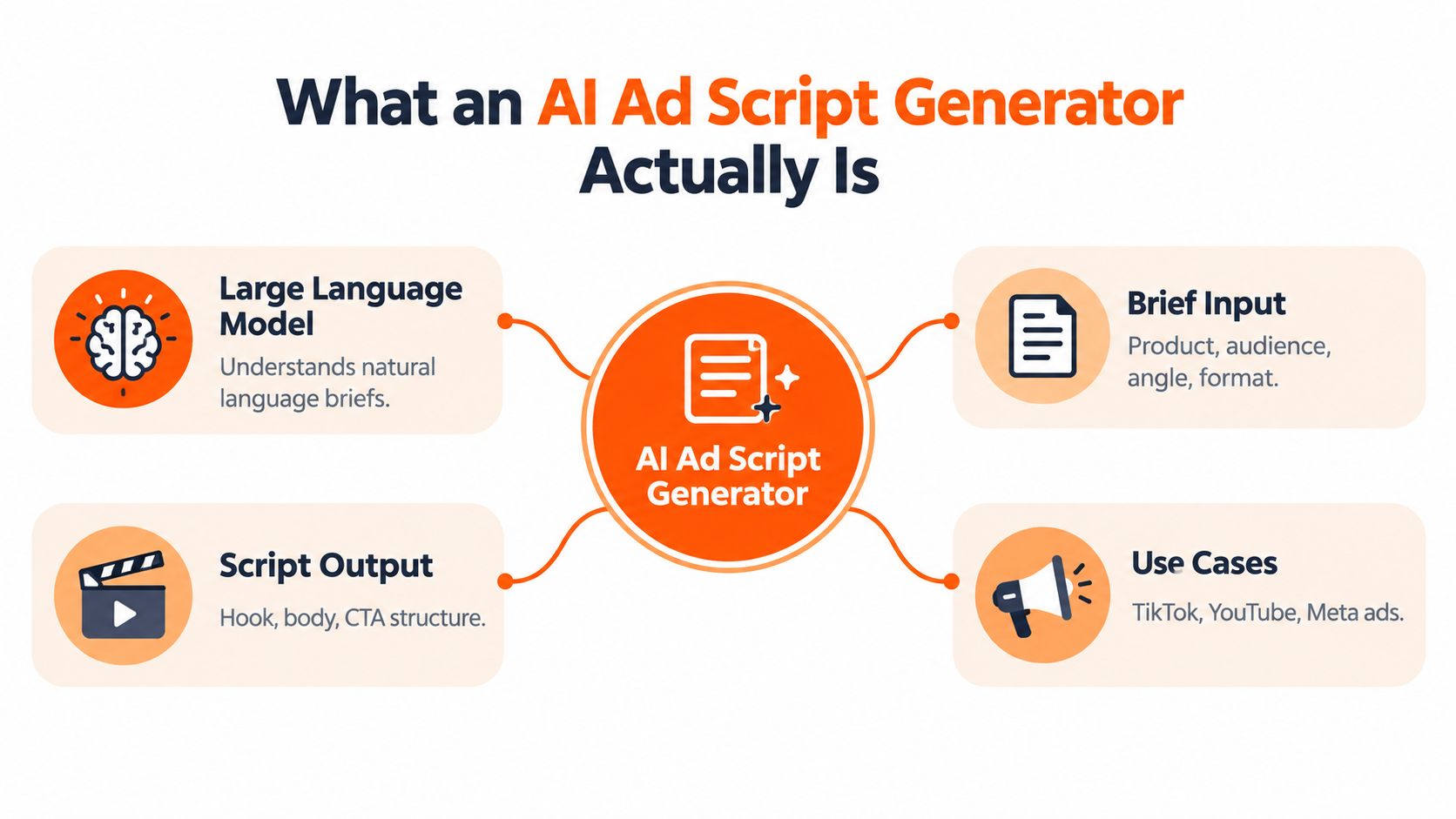
An AI ad script generator is software that uses a language model to turn a natural-language brief into structured advertising copy. You provide information such as the product, audience, platform, offer, tone, and desired action. The tool can then return a hook, spoken script, call to action, on-screen text, visual suggestions, and alternative versions.
Think of it as a recipe writer in a shared kitchen. You supply the ingredients and restrictions. The tool proposes a recipe, but a human still checks whether the ingredients are accurate, whether the dish suits the guest, and whether it can be prepared with the equipment available.
<a id="the-inputs-that-shape-the-draft"></a>
The inputs that shape the draft
A useful brief usually contains four kinds of information:
- Campaign instruction: State the platform, duration, objective, format, and required action.
- Brand parameters: Add approved terminology, tone, prohibited claims, visual identity, and mandatory disclaimers.
- Audience signal: Describe who the viewer is, what problem they recognize, and what they already understand.
- Offer and proof: Specify the benefit, evidence, promotion, product mechanism, or demonstration the script may use.
The more important the claim, the less you should leave it for the model to invent. Give the generator verified product facts and tell it not to create reviews, prices, guarantees, or performance claims that aren't in the source material.
<a id="the-outputs-you-should-expect"></a>
The outputs you should expect
A practical output isn't just a block of prose. It should include:
- Hook line: The opening spoken phrase or first-frame text.
- Spoken script: The narration or creator dialogue.
- On-screen text: Short captions that remain readable without duplicating every spoken word.
- Visual direction: Product actions, demonstrations, scenes, or B-roll cues.
- Call to action: One clear next step.
- Variant set: Alternative hooks, benefits, or formats that preserve the campaign intent.
The generator isn't a video renderer, media buyer, legal reviewer, or brand-safety system. Those jobs require other tools and human decisions. For a broader view of how teams connect these stages, practical AI marketing workflows can help place script generation inside a larger operating process.
<a id="how-the-generator-turns-a-prompt-into-an-ad"></a>
How the Generator Turns a Prompt into an Ad
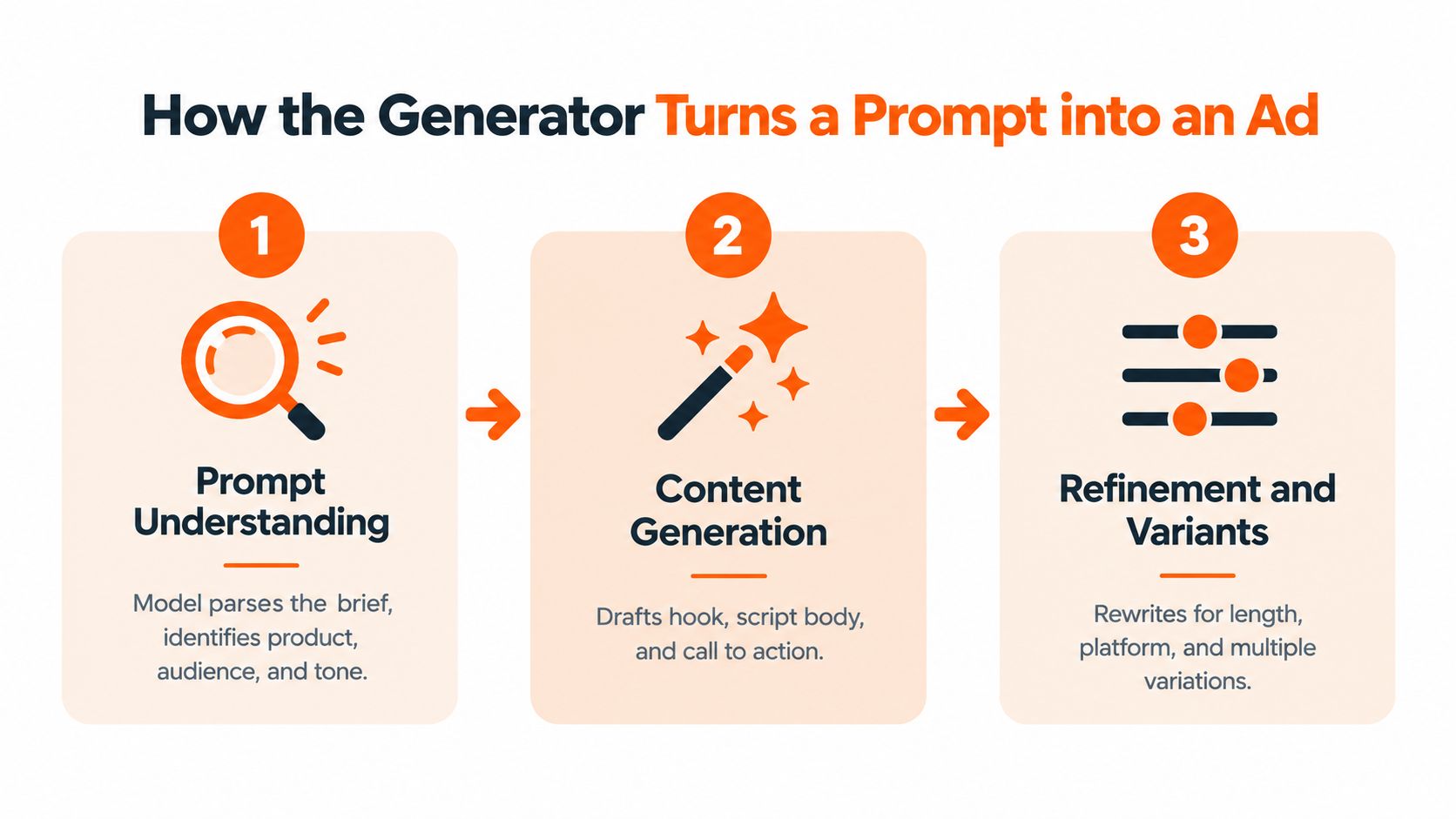
The model doesn't understand an ad brief the way a senior creative director does. It recognizes patterns in language and applies instructions to produce a plausible response. Your job is to give it enough structure that the result is useful rather than merely fluent.
<a id="first-it-parses-the-brief"></a>
First, it parses the brief
The generator identifies the product, audience, platform, objective, tone, and constraints. It may also infer conventions from the requested format. A prompt for a creator-style vertical ad will lead to different pacing and language from a prompt for a narrated product demonstration.
Ambiguity creates weak drafts. “Write a compelling ad for our app” doesn't define the customer, problem, proof, or action. “Write a short Meta video for remote finance teams that struggle to reconcile invoices, using only the approved dashboard demonstration and ending with a request to view the workflow” gives the model something it can organize.
<a id="next-it-fills-an-advertising-structure"></a>
Next, it fills an advertising structure
The tool usually maps the information into familiar functions:
- Attention: A problem, result, question, movement, or unexpected visual.
- Context: The product or category that addresses the problem.
- Benefit: What changes for the viewer.
- Proof: A demonstration, feature, comparison, or verified reason to believe.
- Action: The next step after the video.
The output becomes more useful when each function has a separate field. A flat paragraph hides timing and makes downstream production slower.
<a id="finally-it-refines-and-formats"></a>
Finally, it refines and formats
A capable generator can rewrite the draft for length, platform, audience, tone, or hook type. It can return timestamps, scene markers, spoken audio, text overlays, visual actions, and claim notes. That structure lets a voice tool read only the narration, a caption system use the text fields, and an editor build scenes from the visual cues.
The AI didn't finish the ad when it wrote the words. It created a production map that still needs selection, verification, and assembly.
For host-led formats, the approved dialogue can move into a talking-avatar workflow such as ClipNova's talking avatar tool, while product-led concepts may send visual cues to a text-to-video or B-roll system. The point is not to automate every decision. It's to make each handoff explicit.
<a id="prompt-examples-you-can-adapt-today"></a>
Prompt Examples You Can Adapt Today
Good prompts control the variables that affect creative performance. They don't ask the model to “make it viral.” They define the audience, message, proof, format, and limits.

<a id="tiktok-product-demonstration"></a>
TikTok product demonstration
Weak prompt:
“Write a TikTok ad for my travel mug.”
Why it fails: It doesn't identify the buyer, frustration, product proof, tone, or action.
Stronger prompt:
Write three creator-style TikTok scripts for [travel mug] aimed at [commuters who buy coffee on the way to work]. The problem is [leaks inside a work bag]. Focus on [the locking lid and one-handed use]. Use only these approved facts: [insert product facts]. Create a different hook family for each version: problem-first, demonstration-first, and result-first. Return timestamps, spoken audio, on-screen text, visual action, and one CTA. Don't invent prices, reviews, or performance claims.
Sample output:
- 0.0 to 1.0 seconds, visual: A bag tips sideways over a desk.
- Spoken audio: “Coffee leak in your work bag?”
- On-screen text: “The commute test.”
- 1.0 to 8.0 seconds, visual: Close-up of the lid locking, followed by a controlled demonstration.
- Spoken audio: “This locking lid closes with one hand, so your drink stays contained while you move from the train to your desk.”
- CTA: “See how the lid works.”
The output is useful because the claim, demonstration, and action are visible as separate production tasks.
<a id="facebook-feed-ad"></a>
Facebook feed ad
Facebook placements often need a clearer product explanation than a fast creator hook. Ask the model to keep the visual simple and make the value proposition legible with sound off.
Prompt:
Create two Facebook video ad scripts for [project management software] aimed at [small agency owners]. The campaign goal is [demo bookings]. The problem is [work gets scattered across chat, email, and spreadsheets]. Use this proof only: [approved workflow screenshot or product demonstration]. Keep the tone practical, not exaggerated. Return a 20-second version with an opening text overlay, voiceover, visual cues, captions, and a direct CTA. Keep the landing-page promise aligned with “book a workflow demo.”
Sample output:
- Opening text: “Still rebuilding project status updates?”
- Voiceover: “Bring tasks, owners, and deadlines into one visible workflow.”
- Visual cue: Show a project board moving from unassigned to scheduled.
- Proof cue: Highlight the status view used in the demonstration.
- CTA: “Book a workflow demo.”
<a id="youtube-shorts-educational-ad"></a>
YouTube Shorts educational ad
Shorts can support a quick lesson, demonstration, or myth correction when the product needs context.
Prompt:
Write three YouTube Shorts ad scripts for [language-learning app] aimed at [adults preparing for a work trip]. The viewer wants [useful spoken phrases without studying long grammar lessons]. Use a quick teaching moment as the proof. Include a curiosity-based opening, one practical example, the product transition, captions, and a CTA to try the lesson. Avoid claims about fluency, guaranteed results, or speed unless supported by the supplied facts.
Sample output:
- Hook: “Know the phrase that makes a business introduction less awkward?”
- Teaching moment: Show the phrase and its plain-language meaning.
- Product transition: “The app turns useful travel situations into short practice sessions.”
- CTA: “Try the first lesson.”
You can use ClipNova's text-to-video prompt guidance when the visual direction needs to be detailed enough for an automated scene generator. Change one controlled variable at a time, such as audience, offer, or hook family, instead of rewriting every part of the brief.
<iframe width="100%" style="aspect-ratio: 16 / 9;" src="https://www.youtube.com/embed/oivzU7c0eSc" frameborder="0" allow="autoplay; encrypted-media" allowfullscreen></iframe>The most useful prompt is often the one that tells the model what not to do. Ban unsupported claims, vague superlatives, invented testimonials, and visual actions the product cannot perform.
<a id="engineering-the-first-three-seconds"></a>
Engineering the First Three Seconds
The opening deserves its own specification. A reported Facebook and Nielsen finding indicates that up to 47% of a video campaign's value can arrive in the first three seconds (Hooked). That figure is a prioritization heuristic, not a universal forecast, because results vary by platform, format, audience, and offer.
A generator should therefore return the opening as a timed unit rather than burying it inside a general introduction.
| Time window | Script job | Possible creative cue |
|---|---|---|
| 0.0 to 1.0 seconds | Present a problem, anomaly, or outcome | A spill, a surprising result, or a bold question |
| 1.0 to 2.0 seconds | Identify the product or category | Product in hand, interface, package, or presenter |
| 2.0 to 3.0 seconds | State a benefit or proof cue | Demonstration, comparison, or specific outcome |
<a id="hook-families-worth-requesting"></a>
Hook families worth requesting
- Problem-first: Name the frustrating moment the audience already recognizes.
- Result-first: Show or state the desired outcome before explaining the product.
- Demonstration-first: Begin with an action that proves the product has a useful function.
- Creator-testimonial: Open with a personal observation, provided the speaker and experience are real and verifiable.
- Curiosity-gap: Raise a specific question that the next scene can answer.
Keep the offer, audience, landing-page intent, and proof stable while changing the hook. That gives the team a cleaner test than changing the entire ad and then guessing which component caused the result.
Ask vendors whether their generator can produce timestamped fields for spoken audio, on-screen text, visual action, and claim substantiation. Then validate the openings with hook-level measures such as three-second view rate, thumb-stop rate, hold rate at five seconds, and click-through rate. To study how different openings are built in practice, you can browse seven video ad examples from AdCrunch.
<a id="disclosure-as-a-persuasion-variable"></a>
Disclosure as a Persuasion Variable
Disclosure isn't only a compliance field that gets appended after rendering. It can change how viewers interpret the production, the speaker, and the organization behind the ad.
In a controlled experiment with 304 participants, disclosure that generative AI was used reduced trust in both the advertisement and the organization. Mean ad-trust scores fell from 5.01 without disclosure to 4.51 with disclosure, while organization-trust scores fell from 4.69 to 4.17 (Journal of Interactive Advertising). The result doesn't mean every disclosure will damage performance. It means disclosure language belongs in the creative decision, especially where the viewer is evaluating human credibility.
<a id="match-the-explanation-to-the-context"></a>
Match the explanation to the context
Research on AI-generated advertising imagery found that negative reactions were moderated when brands explained AI use through privacy protection. By contrast, framing AI mainly as a cost-saving measure reduced trust and purchase intention (Journal of Advertising and Marketing Science).
That distinction matters. “AI-assisted production used to protect customer privacy” communicates a viewer-centered reason. “Generated to reduce production costs” may cause people to wonder whether the brand prioritized efficiency over care or authenticity.
Higher-risk creative includes healthcare, finance, public services, testimonials, expert endorsements, and synthetic presenters that appear to be real people. In those cases, the generator should preserve human credibility where the claim depends on lived experience or professional identity, while synthetic production can support tangible elements such as backgrounds, product visualization, or transitions.
<a id="encode-disclosure-into-the-script"></a>
Encode disclosure into the script
- Identify the credibility source. Is the claim based on a real person's expertise, experience, or testimony?
- Mark synthetic elements. Flag generated scenes, voices, presenters, and altered demonstrations.
- Verify evidence and identity claims. Don't let the model invent a customer story or imply an endorsement.
- Test the wording by audience segment. Compare disclosed and minimally disclosed executions where appropriate, while following applicable platform and legal requirements.
Transparency needs a reason, not just a label.
<a id="plugging-the-script-into-an-end-to-end-video-workflow"></a>
Plugging the Script into an End-to-End Video Workflow
The approved script should behave like a set of connected production instructions.
The spoken-audio field goes to a voiceover engine or presenter. The on-screen text field drives captions and text styling. The visual-action field guides B-roll, product scenes, talking avatars, or generated motion. The claim field gives reviewers a place to check whether each promise has evidence before export.
A platform such as ClipNova can sit in this workflow as one option for teams that want scripting connected to production. Its AI advertising tools turn a product brief into a script and shot list, with hooks, visuals, voiceover, captions, and a call to action. The studio also supports curated voiceover generation in 32 languages, automatic subtitles, and exports in 9:16, 1:1, and 16:9, according to the publisher's product information.
<a id="one-approved-message-several-assets"></a>
One approved message, several assets
The variant set shouldn't create unrelated ads. It should preserve the central promise while changing a controlled element:
- Hook variant: Problem-first versus result-first.
- Presenter variant: Creator-style delivery versus product-led narration.
- Proof variant: Demonstration versus interface walkthrough.
- Format variant: Vertical short-form, square feed asset, or widescreen placement.
- Localization variant: Re-voiced language with the same approved promise and CTA structure.
This approach prevents a common production mistake: translating or resizing an ad while accidentally changing the claim. Localization should preserve the promise, proof cue, and action, even when the wording becomes natural for another market.
<a id="what-to-evaluate-in-a-platform"></a>
What to evaluate in a platform
Look for a handoff that preserves structure rather than forcing the team to copy and paste between disconnected apps. The useful capabilities are:
- Script-to-voice connection: Narration stays synchronized with the approved text.
- Scene-aware visuals: Visual cues become editable scenes rather than generic stock suggestions.
- Caption controls: Captions can be generated, reviewed, and styled separately from narration.
- Variant management: Versions remain tied to the same campaign brief and landing page.
- Multi-aspect export: The approved concept can be adapted without rebuilding every scene.
- Human approvals: Reviewers can check claims, disclosure, brand voice, and final frames before publishing.
A fuller overview of this operating model is available in automated video production with connected creative stages. The principle is straightforward: automate repetitive assembly, but keep message selection, evidence review, and disclosure decisions with accountable people.
<a id="common-pitfalls-and-a-reusable-checklist"></a>
Common Pitfalls and a Reusable Checklist
Most poor outputs come from workflow mistakes rather than a lack of model sophistication.
<a id="four-failure-modes"></a>
Four failure modes
- Vague prompt: The output sounds polished but could advertise almost anything. Fix: Add a specific audience, problem, benefit, proof source, platform, duration, and CTA.
- No disclosure decision: The team adds a generic label after the video is finished, without considering trust or category risk. Fix: Decide which elements are synthetic and how the reason for using AI should be communicated before generation.
- Uncalibrated brand voice: The script uses familiar AI phrases and exaggeration. Fix: Supply approved examples, banned wording, sentence preferences, and a clear tone.
- Draft treated as final: The team accepts fluent copy without checking product facts or human credibility. Fix: Review every claim, visual implication, testimonial, price, and landing-page match.
<a id="a-checklist-you-can-reuse"></a>
A checklist you can reuse
- Define the brief: Include the audience, offer, problem, promise, proof, platform, and action.
- Request timestamped output: Separate spoken audio, text overlays, visual cues, and claim notes.
- Generate hook families: Ask for at least three distinct openings while keeping the core message stable.
- Choose disclosure strategy early: Identify synthetic voices, presenters, scenes, and credibility-sensitive claims.
- Run human review: Verify facts, brand voice, evidence, identity, captions, and the final CTA.
The best AI ad script generator won't remove judgment from the process. It gives your judgment a better starting point, makes production handoffs clearer, and helps the team create controlled variations without losing the original campaign promise.
ClipNova turns a product brief into ad scripts, shot lists, voiceovers, visuals, captions, music, and exports for formats including 9:16, 1:1, and 16:9. Visit ClipNova to connect script generation with the rest of your short-form video workflow and start building reviewable ad variants from one workspace.
Ready to ship your own?
Start creating viral videos with AI in under twenty minutes, no credit card required.