
You've uploaded a product demo, generated a share URL, and sent it to a client. Then the editor asks for an unlisted preview, the sales team needs a password-protected version, and marketing wants an embeddable player for a landing page. The original link still works, but it no longer serves every purpose.
That's the practical problem with turning a video into a link. Uploading and copying a URL is easy. Choosing the right destination, controlling access, preserving context, tracking engagement, and adapting the asset for each channel requires a deliberate workflow. Video is now a mainstream business format, with 91% of businesses using video as a marketing tool in 2026, compared with 61% in 2016, according to G2's video marketing statistics roundup. The link has become part of distribution strategy, not just file storage.
Table of Contents
- Why Turning Video Into a Shareable Link Is Harder Than It Sounds
- Comparing the Three Main Approaches to Creating Video Links
- Creating Video Links with ClipNova for Social and Marketing Use
- Privacy Controls, Expiration, and Tracking for Professional Video Links
- Choosing the Right Video Link Strategy for Your Use Case
- Common Mistakes When Creating Video Links and How to Avoid Them
<a id="why-turning-video-into-a-shareable-link-is-harder-than-it-sounds"></a>
Why Turning Video Into a Shareable Link Is Harder Than It Sounds
A creator may think the task is finished once the upload completes. In practice, the same video often needs several delivery formats. An editor might need a private review link with comments enabled. A client may want something that opens cleanly inside Slack. A prospect may need a simple page with a call to action, while a training manager may require a password and a link that expires after the course review.
Each request changes the correct link type.
<a id="one-video-can-need-several-destinations"></a>
One video can need several destinations
A public URL is convenient, but convenience can create problems. Anyone who receives it may be able to forward it. A cloud-storage link may reveal an awkward preview screen or ask viewers to download the file. A social platform link may offer excellent reach but limited control over branding, playback, or viewer data.
The destination also affects how people interact with the video. A viewer opening a sales demo from a CRM note has a different intent from someone discovering a short clip through YouTube. Sending both people to the same raw file wastes the context that helps the video do its job.
For social distribution, the mechanics matter too. A guide to sharing a YouTube video on Facebook is useful when the destination is a social network, but a social share URL isn't automatically the right choice for a sales page, internal review, or gated campaign.
<a id="governance-matters-more-than-the-url"></a>
Governance matters more than the URL
Professional sharing requires decisions about:
- Audience: Should anyone with the link watch, or should access be restricted?
- Duration: Does the URL remain active permanently, or should it expire?
- Presentation: Will viewers see a branded player, a storage preview, or a social feed?
- Measurement: Can you see views, completion, or click activity?
- Reuse: Can the same source video produce platform-specific variants?
A link that ignores these questions may still open successfully. It can also expose sensitive material, leave outdated campaigns accessible, or make performance impossible to evaluate.
Practical rule: Create the link for the viewer's next action, not for the file's current location.
File weight creates another source of friction. Before sharing, check whether the video needs compression, a different codec, or a smaller export. A useful internal reference is this guide to the best video compressors, especially when a client needs fast playback on mobile connections.
The strongest workflows separate the source asset from its delivery layer. Keep the master file safely stored, then create links that match the audience, channel, and level of control required.
<a id="comparing-the-three-main-approaches-to-creating-video-links"></a>
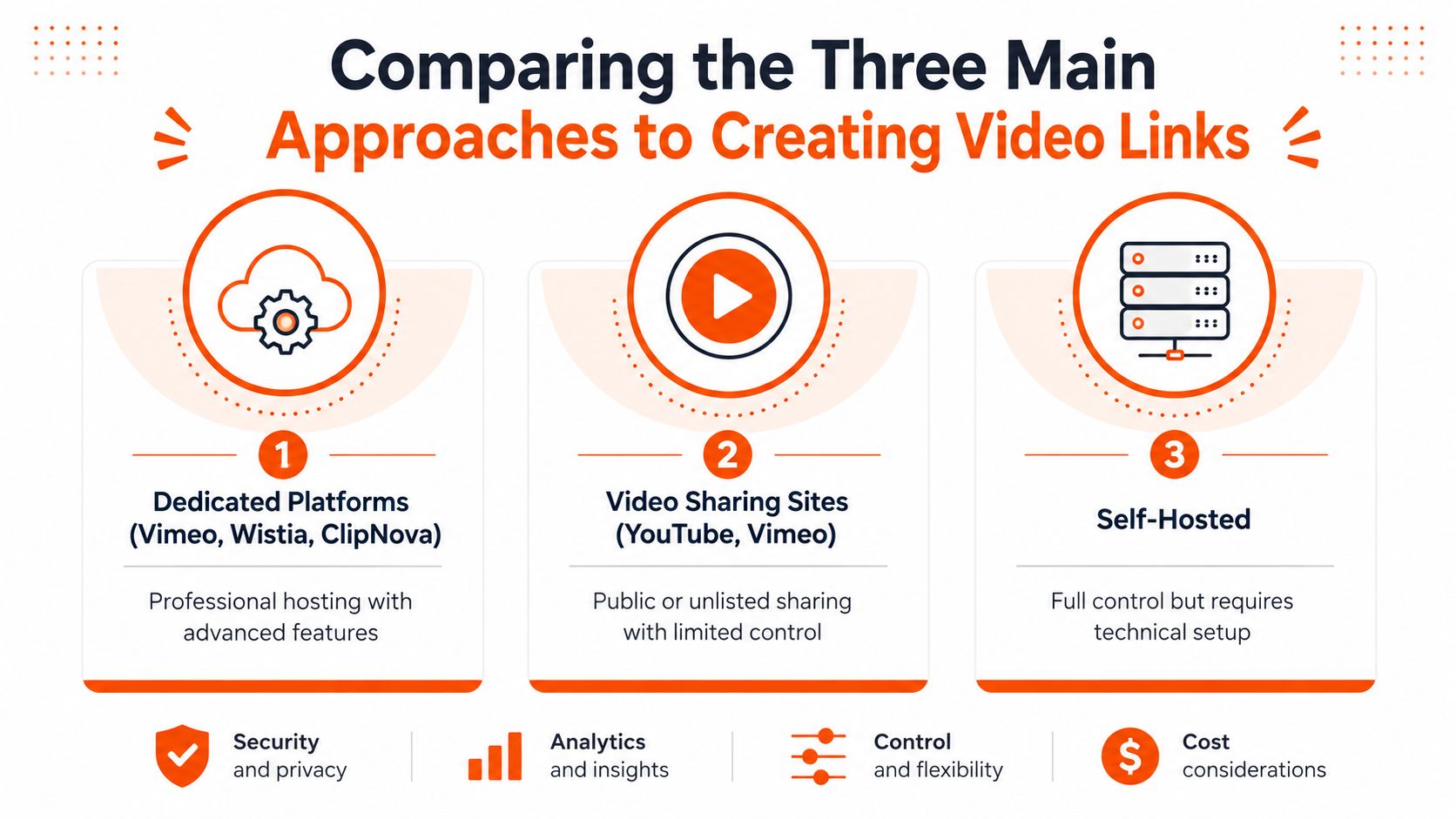
Comparing the Three Main Approaches to Creating Video Links
The right approach depends on what the recipient must do after clicking. A dedicated host, cloud-storage service, and short-link tool solve different problems, even though each can produce something that looks like a shareable URL.
<a id="dedicated-video-hosting"></a>
Dedicated video hosting
Platforms such as Vimeo, Wistia, and ClipNova are built around playback rather than generic file storage. They typically provide a branded player, embed options, privacy settings, and analytics. That makes them a strong fit for landing pages, sales enablement, customer onboarding, and internal review.
The trade-off is complexity and cost. You're relying on a platform's hosting terms, player behavior, and plan limits. A professional host also asks you to organize permissions, domains, folders, and reporting instead of dropping a file into a shared directory.
Choose dedicated hosting when the video is part of a business process and the viewer experience matters.
<a id="cloud-storage"></a>
Cloud storage
Google Drive, Dropbox, and OneDrive work well when your team already stores the video there. They're practical for sending drafts, exchanging large files, and collaborating with people who need download access. Permission settings can also be sufficient for basic internal sharing.
Cloud storage becomes less suitable when you need polished playback or granular engagement data. Links may open a storage interface rather than a focused video page, and viewers may see file names, folder context, or download controls that don't fit a public campaign.
Use this option for collaboration and handoff, not as the default landing-page experience.
<a id="short-link-services"></a>
Short-link services
Bitly and Rebrandly shorten an existing URL. They can make a link easier to type, place in a printed asset, or include in a social post. They may also provide click reporting and branded link management.
A short-link service doesn't host the video or improve its player. It only redirects the viewer to the underlying destination, so it can't fix weak permissions, a confusing storage page, poor mobile playback, or a missing call to action.
| Approach | Best fit | Main strength | Main limitation |
|---|---|---|---|
| Dedicated host | Campaigns, embeds, sales, training | Playback and governance | More setup and platform dependence |
| Cloud storage | Drafts, files, internal exchange | Familiar and convenient | Limited presentation and engagement context |
| Short-link service | Printed or compact sharing | Clean redirect and link management | Doesn't solve hosting or access issues |
A public video-sharing site can be useful for reach, while an unlisted upload may work for controlled distribution. Neither automatically provides the privacy and destination control of a purpose-built hosting workflow. Decide whether the priority is reach, collaboration, presentation, or governance before choosing the URL format.
<a id="creating-video-links-with-clipnova-for-social-and-marketing-use"></a>
Creating Video Links with ClipNova for Social and Marketing Use
For creators and marketing teams, the workflow often starts before hosting. You may have a topic, a source URL, or an existing video, and you need a finished asset that fits a specific channel. ClipNova supports a workflow where users can provide a prompt or link, generate or upload video, and create shareable outputs for distribution and review.
<a id="match-the-export-to-the-destination"></a>
Match the export to the destination
Start by identifying where the viewer will encounter the asset. A vertical composition is appropriate for TikTok and Reels, a square version suits many feed placements, and a widescreen version generally fits YouTube, LinkedIn, presentations, and website embeds.
ClipNova supports 9:16, 1:1, and 16:9 exports, allowing one source concept to become several channel-ready variants. That matters because cropping a widescreen video after the fact can remove a speaker's face, product detail, or on-screen text.
A practical sequence looks like this:
- Choose the source: Paste a link, enter a topic, or upload an existing video.
- Set the purpose: Define whether the output is a social clip, ad, review draft, or marketing asset.
- Select the aspect ratio: Use 9:16 for vertical short-form, 1:1 for square feeds, or 16:9 for widescreen destinations.
- Review captions and voiceover: Check text timing, pronunciation, and safe areas before sharing.
- Create the delivery link: Keep each variant's URL associated with its platform and campaign.
- Record the naming convention: Use labels that identify the channel, language, audience, and revision.
Paid plans support watermark-free 1080p and 4K exports, commercial rights, voiceover localization in 32 languages, and automatic captions with style options such as the Hormozi format. These features are useful when a team needs multiple publish-ready versions without rebuilding the project separately for every channel.
A link should also make the intended next step obvious. For broader guidance on how to captivate your audience with video, focus on the opening frame, message clarity, and the path from viewing to action. A technically correct link won't rescue a video that asks the viewer to guess what to do next.
The production side becomes more efficient when scripting, narration, visuals, captions, and resizing stay in one workspace. Teams exploring automated video production can use that approach to reduce handoffs, but each exported link still needs a human review for accuracy and channel fit.
Here's a short product walkthrough before you build your own workflow:
<iframe width="100%" style="aspect-ratio: 16 / 9;" src="https://www.youtube.com/embed/AlrC-XaKwew" frameborder="0" allow="autoplay; encrypted-media" allowfullscreen></iframe>Treat the links as campaign assets, not disposable URLs. Store the destination, variant, language, audience, and revision in the same campaign record so the next person can share the correct version without opening every file.
<a id="privacy-controls-expiration-and-tracking-for-professional-video-links"></a>
Privacy Controls, Expiration, and Tracking for Professional Video Links
A shareable link becomes professionally useful when it carries rules. The most important questions are simple: who can watch, how long can they watch, where can the video play, and what happens after playback?
Password protection suits material that isn't public but still needs external review. Examples include sales presentations, unreleased product demonstrations, client drafts, and internal training modules. It adds a small amount of friction, but that friction is justified when forwarding the URL alone shouldn't grant access.
Expiration serves a different purpose. A launch teaser, temporary offer, event recording, or review draft may become misleading after the campaign ends. Setting a date for link deactivation reduces the chance that an old asset continues circulating without oversight.
<a id="separate-access-from-measurement"></a>
Separate access from measurement
View tracking helps answer whether the recipient engaged with the asset. Depending on the platform, you may be able to review viewer activity, playback progress, and interaction with a call to action. Those signals are useful for deciding whether a sales representative should follow up, whether a training lesson needs revision, or whether a landing page video attracts attention without producing action.
Embedding creates another layer of control. Instead of exposing the raw file, you place a player inside a landing page, help center, LMS, or campaign page. Domain restrictions can limit where that player works, which helps prevent unauthorized embedding and keeps the presentation tied to approved destinations.
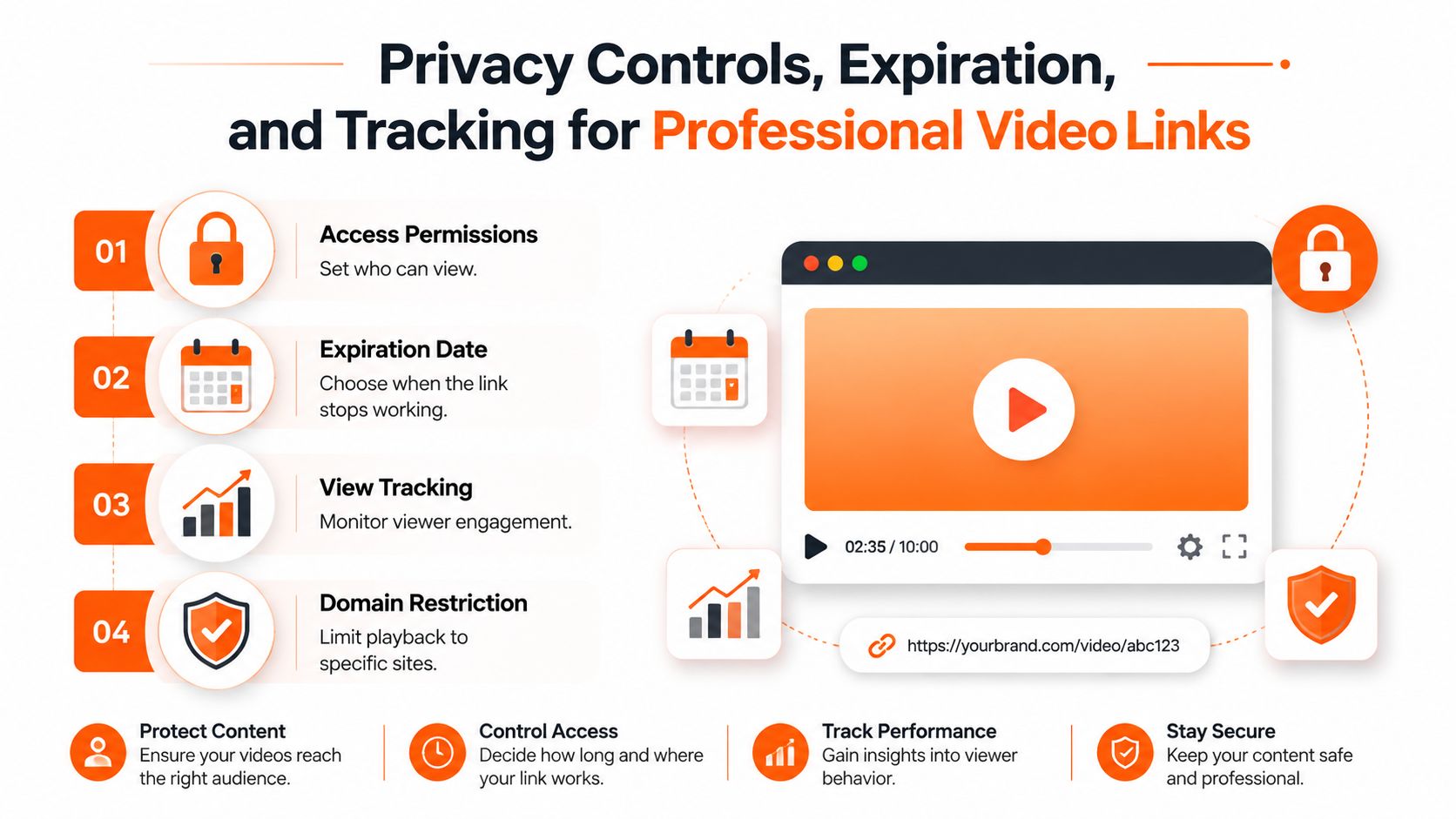
Use controls according to the workflow rather than enabling everything by default:
- Public access: Appropriate for content designed for broad discovery.
- Unlisted access: Useful for sharing without placing the video in a public profile or search result.
- Password protection: Better for sensitive previews, proposals, and private training.
- Expiration: Appropriate for time-bound campaigns and review cycles.
- Embedding restrictions: Valuable when the player belongs only on approved sites.
- Tracking: Essential when the video supports sales, education, or conversion analysis.
The link is only the address. Governance determines what that address means.
Don't confuse tracking with conversion success. Independent landing-page research from Unbounce found that embedded video doesn't reliably improve conversions overall, with results varying by device and conversion goal, as summarized by MarketingProfs' analysis of video on landing pages. Test the video against the page context, offer, CTA, traffic source, and load experience instead of assuming that adding a player will increase results.
<a id="choosing-the-right-video-link-strategy-for-your-use-case"></a>
Choosing the Right Video Link Strategy for Your Use Case
The choice becomes clearer when you start with the workflow instead of the feature list. Online video is no longer a specialist format. One recent compilation estimates that internet users watch about 19 hours of online video per week, with global online video audiences reaching about 3.48 billion viewers in 2026, as reported by Kapwing's 2026 video marketing statistics. Those figures are projections or estimates presented by the cited compilation, not a guarantee that every linked video will perform.
<a id="scenario-one-a-performance-marketer"></a>
Scenario one, a performance marketer
A performance marketer running short-form ads needs variants that respect each platform's composition. The priority is speed, aspect-ratio control, captions, clear campaign naming, and a link or destination that makes measurement possible.
Use a dedicated production and hosting workflow when the team must generate multiple versions and keep them organized. A shortened URL may be useful in a compact ad or printed QR code, but it shouldn't replace a properly configured destination page.
<a id="scenario-two-an-internal-review-team"></a>
Scenario two, an internal review team
An internal team reviewing a training video usually values access control over public reach. The link should be easy for approved reviewers to open, but the project shouldn't remain exposed indefinitely.
A private or unlisted host with password protection and tracking is a practical fit. Cloud storage may be enough for a rough cut when reviewers need to download and annotate the file, but a hosted player is cleaner when the team is reviewing timing, captions, and overall viewing experience.
<a id="scenario-three-an-e-commerce-landing-page"></a>
Scenario three, an e-commerce landing page
An e-commerce brand needs more than a playable file. The video must load in the right page context, support the surrounding offer, and lead naturally toward the purchase action. Embedding is usually more appropriate than sending shoppers to a separate storage page.
Test the player's placement, mobile behavior, thumbnail, captions, and CTA. Research summarized earlier shows why the video should be treated as one variable in a controlled page test, not as an automatic conversion lever. Teams developing video for blogs should apply the same discipline to editorial pages.
| Decision factor | Favor a dedicated host | Favor cloud storage | Favor a short link |
|---|---|---|---|
| Audience | External or mixed audiences | Known collaborators | Broad redirect traffic |
| Privacy | Strong controls required | Basic permissions sufficient | Inherited from destination |
| Tracking | Viewer analytics needed | File access may be enough | Click tracking only |
| Distribution | Multiple channels and embeds | Review and handoff | Compact sharing |
| Budget | Investment supports governance | Existing storage is adequate | Low-friction redirect |
The practical shortcut is simple: use the least complicated option that still protects the content and supports the viewer's next action.
<a id="common-mistakes-when-creating-video-links-and-how-to-avoid-them"></a>
Common Mistakes When Creating Video Links and How to Avoid Them
Most failures happen after production, not during it. The video looks finished, but the delivery choice creates friction for viewers, reviewers, or campaign managers.
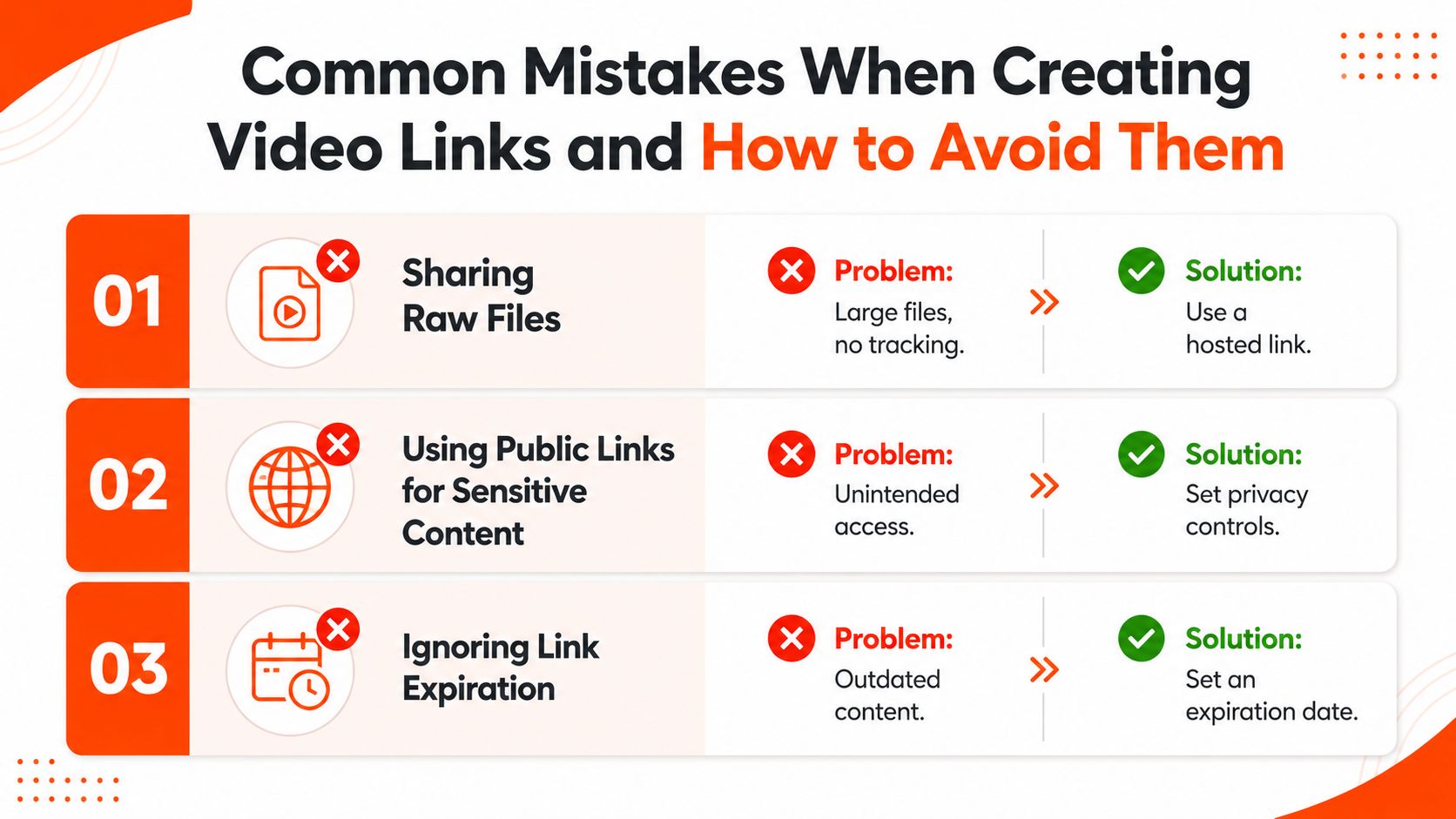
<a id="sharing-the-raw-file-instead-of-a-hosted-experience"></a>
Sharing the raw file instead of a hosted experience
A raw download link forces the viewer to manage the file. It can create slow downloads, confusing permissions, and unnecessary exposure of the master asset. It also gives you little insight into whether the recipient watched the video or just opened the URL.
Fix: Share a hosted player for viewing, and reserve the downloadable master for editors, clients, or collaborators who need the file.
<a id="using-one-universal-link-everywhere"></a>
Using one universal link everywhere
A single link may seem tidy, but different destinations impose different expectations. Vertical social content, widescreen website video, and a CRM preview don't need the same framing, captions, thumbnail, or call to action.
Fix: Create channel-specific variants and label each URL by destination, campaign, language, and revision. Keep the source project separate from the published delivery links.
<a id="leaving-sensitive-content-public"></a>
Leaving sensitive content public
Public links are easy to forward. That's acceptable for content intended for discovery, but it's a weak default for unreleased campaigns, proposals, customer recordings, or internal lessons.
Fix: Choose unlisted or restricted access, add a password when appropriate, and review whether embedding should be limited to approved domains.
<a id="forgetting-expiration"></a>
Forgetting expiration
A temporary campaign can become an outdated promise if its link remains active after the offer or launch window ends. Review links also create clutter when old versions continue circulating.
Fix: Set an expiration date for time-sensitive assets and maintain a simple link register showing the owner, purpose, destination, and status.
<a id="sending-without-testing"></a>
Sending without testing
A link can work for its creator and fail for the recipient because of permissions, browser behavior, mobile layout, caption timing, or an expired session. Sending it without testing undermines trust at the exact moment the viewer is deciding whether to continue.
Run this pre-send check:
- Access: Open the URL in a private browser window.
- Device: Test both desktop and mobile playback.
- Context: Confirm the thumbnail, title, player, and CTA match the destination.
- Permissions: Verify the intended audience can watch without unnecessary requests.
- Timing: Check captions, voiceover, and visual sequence.
- Lifecycle: Confirm the expiration rule, if the asset is temporary.
- Measurement: Make sure the required view or click data will be captured.
Benchmark-style validation also helps with generated or heavily edited content. The Video-Bench project describes structured evaluation for video quality, while related benchmark work highlights checks such as temporal coherence, instruction adherence, and workflow completeness. Apply the same thinking before publication: verify event order, key visual steps, captions, and continuity rather than judging only the first few seconds.
Choose the link based on the job. If the priority is reach, use an appropriate public destination. If it's review, protect the asset. If it's conversion, embed it in a tested page. If it's multi-channel distribution, create variants instead of forcing one URL to do everything.
ClipNova combines link-based video creation with captions, voiceover, multi-aspect exports, localization, and shareable campaign assets in one workspace. Visit ClipNova to turn a source link or idea into platform-ready video variants, then organize each delivery link around its audience, destination, and access requirements.
Ready to ship your own?
Start creating viral videos with AI in under twenty minutes, no credit card required.