
The popular advice about making your own movies is backwards. People tell you to buy a cheaper camera, learn an editing program, and start shooting. Those tools help, but they don't solve the failure that ends most independent projects: a finished film with no clear route to viewers, buyers, or revenue.
The history of home moviemaking proves that access has never been the whole story. Kodak's 16mm Ciné-Kodak system arrived in 1923, 9.5mm film appeared in 1922, 8mm followed in 1932, and Super 8 launched in 1965. Super 8's easy-load cartridge helped home filmmaking take off in the 1970s, while the addition of a magnetic full-coat sound strip in 1973 made the format more capable of carrying recorded sound. Encyclopedia.com's history of home movies shows the pattern clearly, production becomes accessible first, then creators discover that finishing, presenting, and reaching an audience require a separate discipline.
I've seen the same problem in modern micro-budget work. A film can survive weak equipment, a small crew, and a borrowed location. It rarely survives a vague audience, unfinished deliverables, or a distribution plan invented after the final export. The practical approach is to design the film backward from the people you want to reach, then use traditional craft and carefully chosen AI tools to protect the schedule.
Table of Contents
- Why Most Indie Films Never Reach an Audience
- Planning Your Film Around Distribution First
- Running a Micro-Budget Shoot Without Losing Your Mind
- Post-Production Workflows That Blend Human and AI Tools
- Getting Your Finished Film in Front of Real Viewers
- Adapting One Project for Multiple Platforms and Languages
<a id="why-most-indie-films-never-reach-an-audience"></a>
Why Most Indie Films Never Reach an Audience
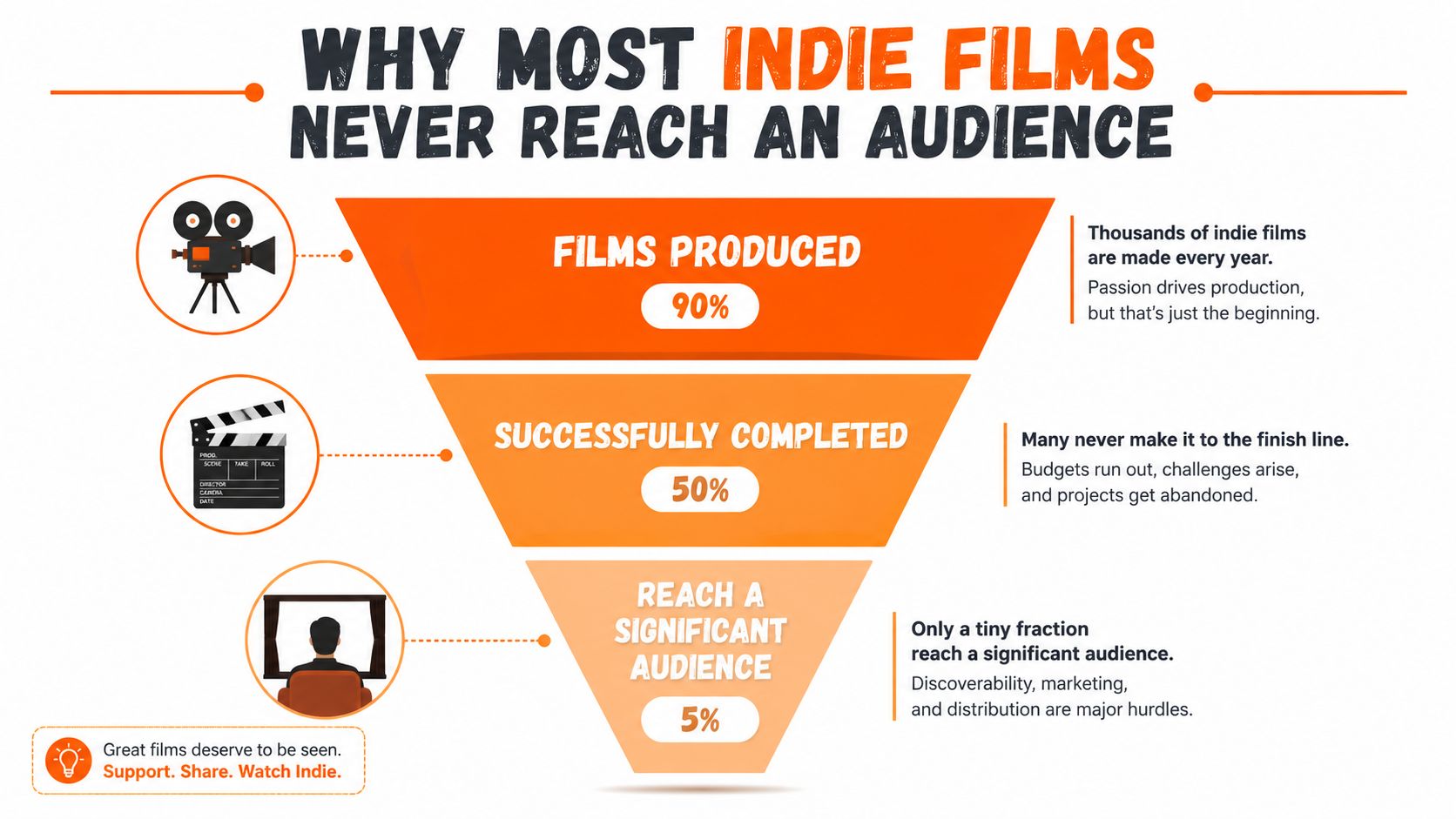
A finished film is not a marketable film. A cheaper camera and free editing software can reduce production friction, yet neither creates a reason for someone to click, watch, recommend, or license the result. The hidden bottleneck is the handoff from completion to access. Distribution, packaging, and monetization need decisions before production, not after the final export.
The economics remain tight in a major market. One industry compilation reports an average U.S. independent film budget at $1.2 million in 2023, down from $1.5 million in 2019, with 68% of projects under $500,000. It also records 4,327 independent feature films released in the United States in 2023, up from the previous year, while 30% took 18 months or more to produce. The independent film industry compilation from Worldmetrics describes a crowded field where limited resources and long schedules leave less time for release preparation, outreach, and revenue planning.
<a id="completion-isnt-the-same-as-access"></a>
Completion isn't the same as access
UK low-budget production makes the gap visible. Around 100 low- and micro-budget feature films are produced each year, with about £18.5 million spent annually, yet only 18% receive a theatrical release in the UK, according to Zipdo's independent film industry data. The remaining films need other routes, such as festivals, digital platforms, community screenings, educational licensing, or direct audience sales. Without a deliberate route, they can remain technically complete but commercially invisible.
The failure often appears late. After months of shooting and editing, a filmmaker may discover that the sound mix misses a platform requirement, the poster does not communicate the premise, the trailer has no usable hook, or a festival window conflicts with an online release. The film exists, but its materials do not give a programmer, platform, community, or viewer a clear reason to choose it.
Practical rule: Before you write scene one, identify the audience, the viewing context, and the action you want that audience to take.
Reverse-engineering the release does not flatten the art into market research. It means choosing a contained story that fits a known audience interest, setting a runtime appropriate to the intended channel, and building memorable moments that can survive as a trailer clip or thumbnail. It also means preparing captions, stills, metadata, and alternate cuts while the project is still manageable. A film made for a recognizable community has a starting point for outreach. A film made for “everyone” usually has none.
Lower production cost leaves the business problem intact. Reporting on the independent film market says 71% of surveyed producers identified financing and budgets as their biggest challenge, while 39% worried about domestic programming inventory and 36% about international market interest. Mark Litwak's 2025 industry analysis places those pressures beside market access. AI can help generate release checklists, subtitle drafts, contact research, and promotional variations, but it cannot supply a clear audience or replace the work of earning attention.
<a id="planning-your-film-around-distribution-first"></a>
Planning Your Film Around Distribution First
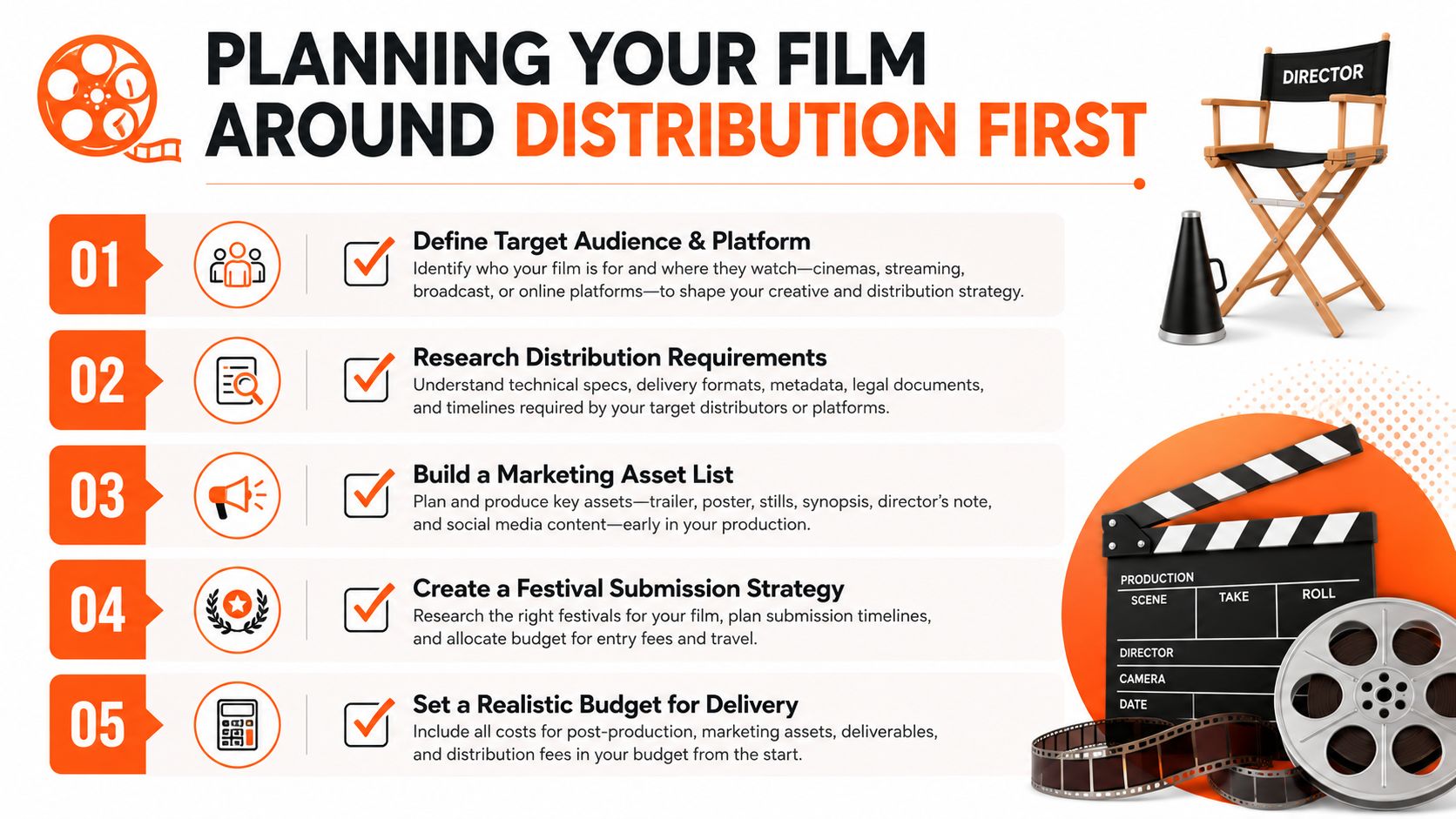
Treat pre-production as a validation exercise, not only a preparation period. Before you lock a shooting date, you should know who might watch the film, where those viewers already spend time, what materials a distributor or festival will require, and how you'll keep the project moving if your first route fails.
<a id="start-with-the-audience-and-the-outlet"></a>
Start with the audience and the outlet
Write a one-sentence audience definition that names an interest, community, or viewing habit. “People who like films” isn't useful. “Viewers who seek contained psychological thrillers and discover them through genre communities” gives you a direction for tone, artwork, clips, and outreach.
Then choose a primary and secondary path. A festival strategy has different needs from a YouTube release, an educational license, or an aggregator submission. Research comparable films, not just their stories. Study their trailers, poster language, runtime, subtitles, release timing, and audience discussions. A useful Crowbert distribution guide can help you think about channel selection as a planned publishing process rather than a final administrative task.
<a id="lock-the-script-against-the-delivery-plan"></a>
Lock the script against the delivery plan
A market-aware script still needs a strong dramatic engine. The practical changes happen at the edges:
- Contained locations: Fewer locations simplify permits, transport, sound control, and continuity.
- Recognizable hooks: A clear premise gives the trailer and thumbnail a job.
- Flexible casting: Write roles that can be performed convincingly by the people you can realistically secure.
- Deliverable-friendly scenes: Avoid building the entire film around effects or music you can't legally clear.
Create a costed breakdown before you promise the budget. Include production, post-production, captions, artwork, trailer creation, legal review, festival submissions, storage, and delivery exports. Proper dialogue mixing and clean captions aren't decorative extras. They affect whether viewers can follow the film and whether a buyer can use the files.
Write a minimum viable audience plan without pretending you can predict exact revenue. Define what a successful first release would mean, such as a festival response, a mailing-list sign-up, a community screening, a licensing conversation, or sustained channel viewing. That definition prevents you from judging every project only by theatrical sales.
A short film can also be a demand test. Release a scene, production diary, or character-focused clip before the full film, then observe which premise and format attract meaningful conversation. Don't confuse a spike of curiosity with a business case, but do use audience behavior to refine the trailer, title, artwork, and release message.
<iframe width="100%" style="aspect-ratio: 16 / 9;" src="https://www.youtube.com/embed/qnRaQmwhGtE" frameborder="0" allow="autoplay; encrypted-media" allowfullscreen></iframe>Build a delivery checklist while the script is still changing. Keep clean dialogue stems, music documentation, captions, stills, a logline, a synopsis, a director statement, cast and crew credits, and versions suited to the intended platforms. The time to discover a missing asset is before the shoot, when fixing the plan is cheap.
<a id="running-a-micro-budget-shoot-without-losing-your-mind"></a>
Running a Micro-Budget Shoot Without Losing Your Mind
Micro-budget filmmaking becomes difficult in ordinary, uncinematic ways. An actor cancels in the morning, the location owner needs the room back before lunch, or construction noise appears after you've already lit the scene. The crew doesn't care that your shot list was beautiful. They need a decision.
A reliable day begins with a schedule that contains usable alternatives, not just optimistic timing. Mark scenes that can be shot as inserts, close-ups, phone calls, or reaction shots if the main setup collapses. Protect the scenes that require specific locations or actor combinations, and leave flexible coverage for the end of the day.
<a id="make-the-fallback-visible"></a>
Make the fallback visible
On one-person or tiny-crew shoots, I'd rather have a simple backup plan than another accessory. A smartphone can capture an insert, reference angle, continuity detail, or emergency coverage when the main camera fails. It won't replace a deliberate visual strategy, but it can protect the edit from a missing connective moment.
Your go bag should include spare batteries, media, charging options, gaffer tape, basic tools, adapters, headphones, a marker, release forms, and a way to monitor sound. Audio remains the failure point that audiences notice fastest. Test every microphone in the actual location, listen for refrigeration, traffic, ventilation, construction, and reflective walls, then record room tone before moving on.
When the location changes, save the scene before you save the shot. A tighter angle, altered blocking, or motivated cutaway can preserve the story. Protecting a setup that no longer works only burns time.
Location scouting needs to happen at the same time of day as the shoot whenever possible. Check access, power, public interruptions, echo, weather exposure, parking, restroom access, and whether the owner understands the crew size. A quiet room during a casual visit can become unusable once lights, stands, voices, and movement fill it.
<a id="keep-volunteer-crews-functional"></a>
Keep volunteer crews functional
Unpaid collaborators still need structure. Give every person a clear responsibility, explain the day's priorities, and make breaks predictable. A safety briefing should cover cables, stands, vehicles, electrical loads, stairs, weather, and who has authority to stop work. Morale improves when people know what “done” looks like and when the director makes quick calls instead of debating every imperfect option.
Green screen work creates its own traps. Uneven lighting, spill, soft focus, and wrinkled fabric can turn a simple composite into a post-production rescue mission. Before committing to that approach, test the background, wardrobe, eyelines, and camera movement. This guide to creating backgrounds for green screen video is a useful reference when you're deciding whether a generated or composited environment will support the shot.
If a setup is failing, call it early. Move to clean dialogue, cutaways, silent inserts, or the next location. A finished scene with modest coverage is more valuable than a technically ambitious scene that consumes the day and leaves the rest of the film exposed.
<a id="post-production-workflows-that-blend-human-and-ai-tools"></a>
Post-Production Workflows That Blend Human and AI Tools
Post-production fails when every task receives the same creative attention. Story structure, performance, rhythm, and emotional context require human judgment. File searches, transcription, technical matching, distraction removal, and version preparation can often be accelerated with AI, provided an editor reviews the result instead of accepting it automatically.
<a id="build-a-controlled-pipeline"></a>
Build a controlled pipeline
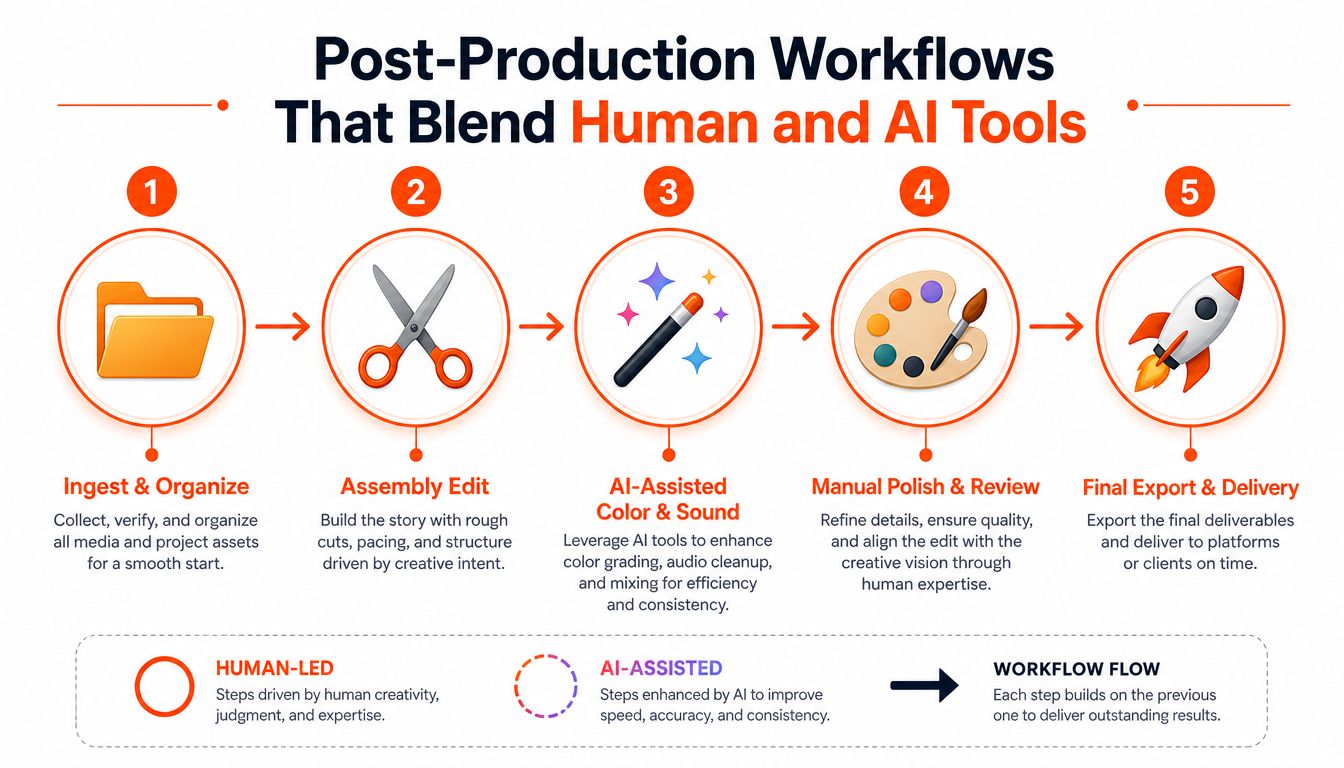
Start with disciplined media management. Ingest the original camera files, create clear project folders, back up the material, and label audio consistently. Use DaVinci Resolve or Premiere Pro as the editorial spine. Scene detection, transcription, searchable dialogue, and automated string-outs shorten the path from raw footage to a workable assembly, but they cannot identify which pause carries emotional weight.
A practical five-stage workflow looks like this:
- Ingest and organize: Verify files, sync audio, label scenes, and preserve originals.
- Assembly edit: Build the story from performances and continuity before polishing individual shots.
- AI-assisted cleanup: Test dialogue isolation, rough subtitle generation, color matching, noise reduction, and selective rotoscoping.
- Manual polish: Refine pacing, reactions, transitions, sound perspective, color, and legal text.
- Delivery review: Watch the complete export on more than one device, check captions, inspect levels, and confirm every version.
<a id="automate-labor-not-meaning"></a>
Automate labor, not meaning
AI can generate a rough transcript, identify dialogue, suggest a first-pass assembly, isolate speech, reduce background noise, and create subtitle drafts. Adobe Podcast can assist with speech cleanup, while Runway can help with masking and rotoscoping. These tools work best when the source material is already understandable. They cannot reliably decide whether a character should hesitate, whether a reaction shot reveals too much, or whether an imperfect line reading feels more truthful than a clean replacement.
Noise reduction needs restraint. Excessive processing creates watery voices, metallic ambience, and unnatural room tone. The video denoising best practices guide helps assess how much cleanup a shot can tolerate. Compare the processed result with the original every time, and retain an unprocessed fallback.
For a feature-length project, set internal milestones instead of waiting for a mythical final pass. Complete the assembly, lock the narrative edit, finish sound and color, prepare captions, and inspect delivery files. AI can shorten individual stages, but the schedule still depends on decisions. Ten generated cuts have no value if the editor refuses to choose one.
Keep rights and privacy visible throughout the process. Confirm that voices, music, footage, reference images, and generated assets can be used for the intended release. Tools such as ClipNova can create prompt-based multi-scene videos, voiceovers, captions, music, and exports in multiple aspect ratios. That makes them suitable for trailers, social cutdowns, and promotional variations, not a substitute for editorial judgment. For a wider view of delegating repetitive work, automated video production methods offer a useful way to identify workflow steps that can be assigned to software.
<a id="getting-your-finished-film-in-front-of-real-viewers"></a>
Getting Your Finished Film in Front of Real Viewers
A filmmaker can spend months finishing a feature, then lose the audience before anyone understands what it is. One release I worked on found viewers only after we stopped presenting it as a general drama and built outreach around its specific subject. The lesson was practical: packaging and contact lists deserve as much attention as the final export.
Start with the viewer you can reach. A local screening, genre community, educational group, or creator network may produce more useful momentum than a broad platform launch with no audience plan. Build a permission-based mailing list, collect contacts at screenings, and share production notes that give people a reason to follow the project before release.
Your trailer has one job: make the premise clear quickly. Use a strong conflict or question, show the film's tone, and end with a specific action, such as joining the list, reserving a seat, or watching the full release. A press kit should include a concise synopsis, credits, stills, trailer link, filmmaker statement, screening information, and rights contact. Programmers and journalists should not have to search for basic facts.
<a id="match-the-release-to-the-channel"></a>
Match the release to the channel
Festivals work best when they provide a relevant audience, useful relationships, or credible programming context. Check the event's focus, submission cost, premiere rules, screening terms, and rights requests. A laurel has limited business value if the event does not reach people who might watch, recommend, license, or program the film.
Online release gives you control over timing and presentation, but the platform does not create demand by itself. Prepare the thumbnail, title, description, captions, content warnings, and opening moments for the intended audience. Test the sales path before announcing the film. Confirm that payment, access, customer support, and refund handling work on the device your viewers use.
| Distribution Channel | Main Use | Primary Trade-off |
|---|---|---|
| Festivals | Credibility, feedback, and in-person discovery | Submission cost and uncertain selection |
| AVOD platforms | Broad viewing access | Revenue depends on contracts, advertising, placement, and viewing |
| Aggregators | Delivery to multiple services | Fees, technical requirements, and limited control |
| Direct audience sales | Ownership of the customer relationship | You must create demand and handle transactions |
| Educational or community licensing | Targeted institutional or group access | Negotiation takes time and depends on fit |
Release in stages when each stage has a purpose. A private community screening can expose confusing scenes before public launch. A trailer and short excerpt can build recognition, while an interview or production note gives press and partners material to share. Written outreach can also use a video asset for blogs to explain the film's premise without asking readers to start with the full feature.
Use AI multi-channel promotion for marketers to organize variations of one campaign message, then review every caption, clip, and claim yourself. AI can help schedule posts, resize approved assets, and identify gaps in a release calendar. It cannot decide whether a promise misrepresents the film or whether a community will trust the person making the pitch.
Track more than views. Record email sign-ups, trailer completion, screening attendance, sales, watch-time patterns, replies, referrals, and licensing conversations. Those signals show which audience responds and whether the next release should prioritize reach, revenue, or relationships. Keep rights, territory limits, music clearances, and platform terms attached to every delivery decision.
<a id="adapting-one-project-for-multiple-platforms-and-languages"></a>
Adapting One Project for Multiple Platforms and Languages
A finished film is not one file. It's a source asset that can become a trailer, short vertical clips, chaptered episodes, character introductions, audio-led material, still-image posts, and localized versions. Adaptation works best when you protect the original composition and narrative context instead of cropping every shot automatically.
<a id="use-a-versioning-checklist"></a>
Use a versioning checklist
- Master first: Keep a high-quality textless master, separate dialogue and music elements where possible, clean captions, credits, artwork, and metadata.
- Reframe carefully: Prepare 16:9, 1:1, and 9:16 versions. Recompose faces, titles, and action manually when an automatic crop cuts away the story.
- Create short hooks: Select moments with a complete idea, conflict, reveal, or emotional turn. Don't publish random fragments that require the full film to make sense.
- Chapter the long cut: YouTube episodes can give viewers a lower-commitment entry point, but each chapter needs its own title, thumbnail, description, and opening context.
- Localize the meaning: Translate captions first, then review timing, names, jokes, cultural references, and reading speed. AI dubbing tools such as ElevenLabs and Deepdub can create working versions, but a fluent reviewer should approve the final performance.
- Sequence the release: Lead with a trailer and a strong short clip, then release the main film and follow with behind-the-scenes material, interviews, and localized cuts. Keep metadata consistent so viewers can find the central project.
Don't assume a translated voice track automatically preserves character. Check pronunciation, emotional register, pauses, and whether the performance still matches the actor's intention. Keep language-specific subtitle files and review every export on the platform where it will appear.
The same project can also support direct promotion. A talking-avatar introduction, a creator commentary, or a short explainer can reach viewers who won't click a traditional trailer. The goal isn't to flood every channel. It's to give the right audience several clear, accessible ways to discover and understand the film.
If you're making your own movies and need promotional versions without rebuilding every asset manually, ClipNova can turn scripts or prompts into short videos with visuals, voiceover, captions, music, and exports for multiple formats. Use it to create trailers, social cutdowns, and localized campaign assets, then bring the strongest human judgment back into the edit and release plan.
Ready to ship your own?
Start creating viral videos with AI in under twenty minutes, no credit card required.