
A three-person content team finishes a twenty-minute interview at lunch. By the afternoon, the team needs one polished long-form video and six short clips for TikTok, Reels, and YouTube Shorts. The footage is good, but the publishing queue is already full: someone has to find the strongest moments, remove pauses, reframe every clip, style captions, design thumbnails, check brand elements, and export versions that won't fight each platform's interface.
That's the point where teams start searching for ways to automate video editing. The wrong approach replaces judgment with a button. The right approach separates repeatable production work from decisions that still need an editor's eye.
Table of Contents
- The Daily Production Reality Teams Are Trying to Escape
- What Automated Video Editing Actually Means in 2026
- The Four Core Automation Approaches and Their Trade-Offs
- A Reusable Workflow That Combines All Four Layers
- Why Distribution-Aware Editing Is the Real Gap
- Batch and Template Patterns for Short-Form at Scale
- Keeping Human Oversight Where It Matters Most
- A Four-Week Roadmap to Adopt Automation Safely
<a id="the-daily-production-reality-teams-are-trying-to-escape"></a>
The Daily Production Reality Teams Are Trying to Escape
The team's day starts with an interview file, camera cards, separate audio, and a project brief that calls for one long-form edit plus six short-form cuts. One person reviews and logs the footage, another cleans the transcript and marks possible clips, and the third starts building the long-form timeline. Even with a consistent process, the work overlaps and creates bottlenecks.
The manual workload is easy to underestimate because no single task feels enormous. Footage review takes attention. Clip selection requires context. Reframing a speaker for vertical video means checking headroom and keeping captions away from interface elements. Caption correction is repetitive but unforgiving, especially when names, product terms, and technical language are involved.
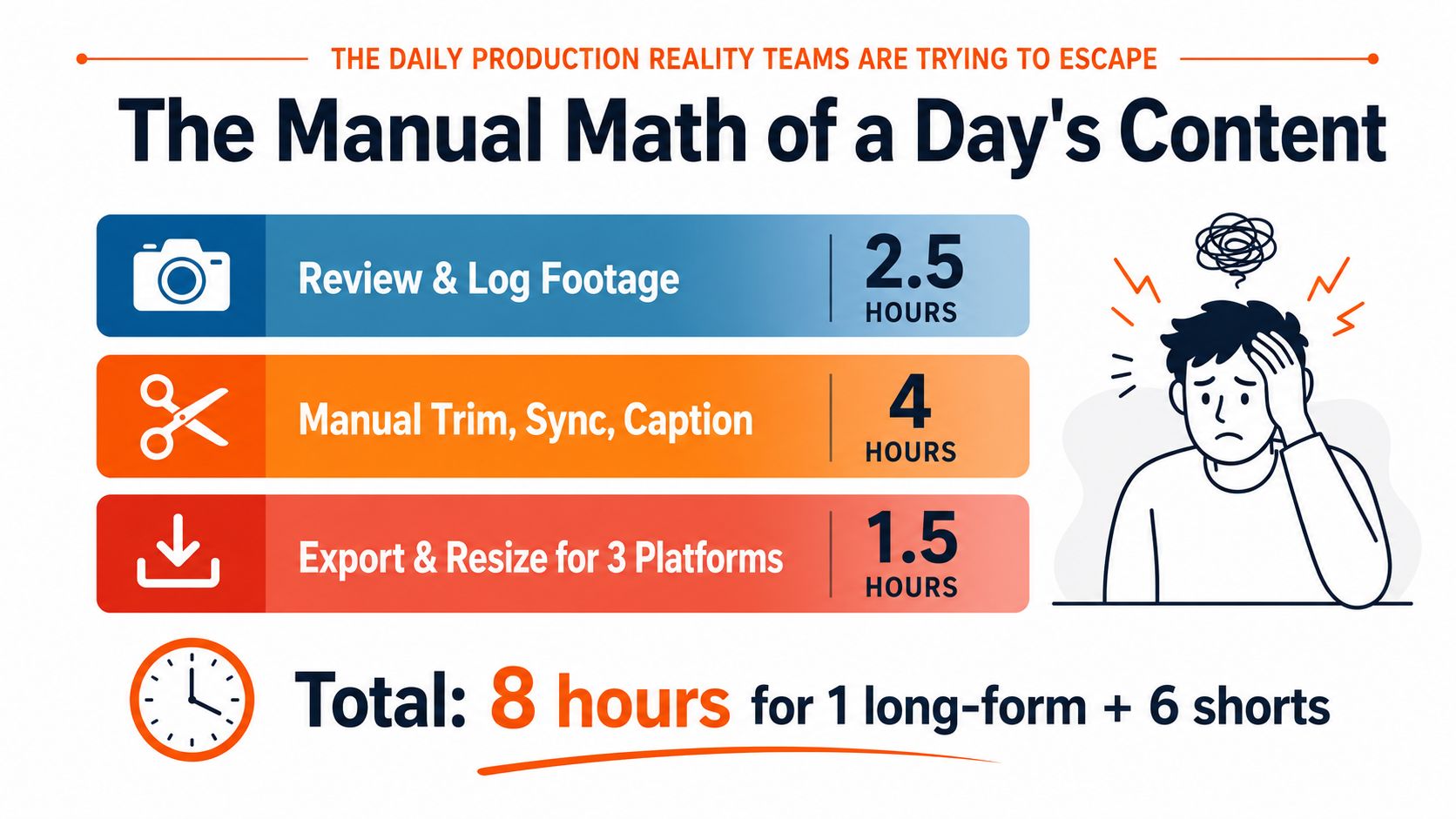
The supplied production model assigns 2.5 hours to reviewing and logging footage, 4 hours to manual trimming, syncing, and captioning, and 1.5 hours to exporting and resizing across three platforms. Together, that's 8 hours for one long-form video and six shorts, before revisions, approvals, publishing copy, or comment moderation enter the picture.
<a id="where-the-day-actually-breaks"></a>
Where the day actually breaks
The time cost isn't only editing. It's the repeated handoff between tools and decisions:
- Ingest and organization: Files need consistent names, locations, proxies, and project links.
- Selection: Editors must understand the speaker's argument, not merely identify loud or visually active moments.
- Versioning: One source clip may need different framing, captions, opening lines, and endings.
- Quality control: A successful render can still contain a bad crop, incorrect caption, clipped audio, or covered text.
Automation can remove much of the mechanical repetition. It can't decide whether a hesitant pause adds authenticity, whether a joke needs setup, or whether a controversial claim should be cut for brand reasons. That distinction leads to a layered approach: template what should remain consistent, batch what machines handle predictably, use multimodal AI for rough assembly, and reserve distribution-aware judgment for the final versions.
<a id="what-automated-video-editing-actually-means-in-2026"></a>
What Automated Video Editing Actually Means in 2026
Automated video editing is a workflow in which software performs repeatable production tasks with limited manual input. Those tasks can include transcription, silence removal, clip detection, caption generation, resizing, audio cleanup, project assembly, and export preparation. It's broader than a single “auto-edit” button and narrower than fully generative video.
Generation creates new footage from text, images, or other references. Editing automation works with an existing production goal and helps turn source material into a usable timeline. A team might use a generative model for an illustrative shot, then use a separate automated workflow to select interview moments, add captions, reframe the speaker, and prepare platform versions.
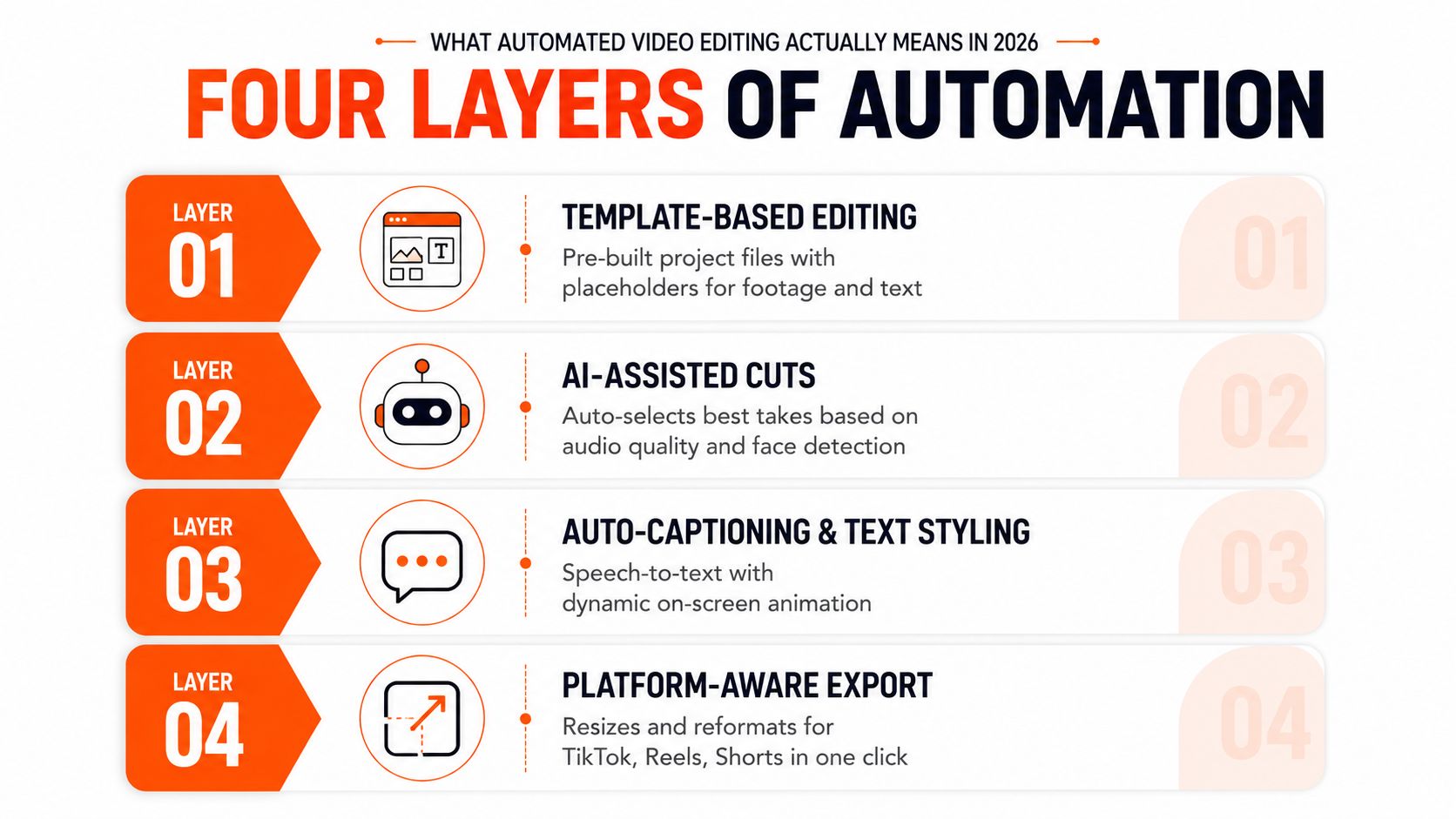
The practical model has four layers:
- Templates and presets establish the structure. A project file can contain title cards, lower thirds, caption styling, audio tracks, color settings, and export destinations.
- Batch operations handle predictable volume. Proxy generation, transcoding, audio normalization, file naming, and multi-format rendering belong here.
- AI-assisted assembly proposes decisions from context. A multimodal system can connect a transcript, shot descriptions, and a reference style to suggest selects and rough sequences.
- Distribution-aware repurposing adapts the edit to its destination. This includes hooks, pacing, framing, captions, safe zones, thumbnails, and localized versions.
This distinction matters because the industry's adoption is already broad. Wyzowl's 2026 survey reported that 63% of video marketers had used AI tools to help create or edit marketing videos, up from 51% a year earlier, while 91% of businesses used video as a marketing tool (Wyzowl's 2026 video marketing statistics summary). The commercial category is expanding as well, with industry estimates placing the broader AI video generation and editing software market at $3.67 billion in 2026, with a projection of $24.89 billion by 2036 and a projected 21.4% compound annual growth rate (AI video editing software market history and forecasts).
The mistake is treating generation as the whole opportunity. Teams already have footage. Their harder problem is converting one source into several edits that feel native wherever they appear. For a wider view of how different sectors apply these workflows, the overview of industries served by video automation is useful because it frames automation as an operational capability, not only a creator feature.
<iframe width="100%" style="aspect-ratio: 16 / 9;" src="https://www.youtube.com/embed/SD-VCNvTBg4" frameborder="0" allow="autoplay; encrypted-media" allowfullscreen></iframe><a id="the-four-core-automation-approaches-and-their-trade-offs"></a>
The Four Core Automation Approaches and Their Trade-Offs
No single automation layer solves the entire production problem. Each one removes a different kind of friction, and each introduces a different failure mode.
<a id="templates-and-presets"></a>
Templates and presets
Templates are the safest starting point because they automate consistency rather than taste. A Premiere Pro or DaVinci Resolve project can lock brand fonts, lower thirds, intro timing, caption placement, audio tracks, and platform render settings.
The trade-off is creative rigidity. If every clip opens with the same animation and follows the same rhythm, the template can flatten the content it was meant to support. Vendors often present templates as a complete editing solution, but they're better understood as guardrails.
<a id="batch-operations"></a>
Batch operations
Batching handles work that doesn't require interpretation. Queue proxies, transcodes, audio normalization, caption conversions, and exports while editors work on selects or scripts. HandBrake, ffmpeg, Adobe Media Encoder, watch folders, and Resolve render queues all fit this layer.
Batching only works when project hygiene is reliable. Inconsistent folder names, missing source files, or unclear version labels turn a queue into a larger cleanup job. The machine follows the instruction exactly, including a bad instruction.
<a id="ai-assisted-assembly"></a>
AI-assisted assembly
AI-assisted assembly is useful for transcripts, topic clustering, silence detection, rough selects, B-roll candidates, and initial caption timing. A model can inspect language and visual context together, which is more useful than selecting clips based only on volume, motion, or facial activity.
Research reflects that direction. The CMVE framework treats automated editing as a multimodal problem involving a text query, described videos, and a reference video, while VEBench evaluates textual faithfulness, frame consistency, and video fidelity across 152 clips, 962 prompts, 1,280 edited videos, and human labels (CVPR workshop paper on contextual multimodal automated editing). The system can propose a useful rough cut, but it still misreads irony, emotional restraint, implied context, and deliberate silence.
<a id="end-to-end-studio-pipelines"></a>
End-to-end studio pipelines
An integrated platform can connect scripting, voiceover, visual selection, captions, music, editing, and exports in one workspace. That reduces handoffs, but it can also hide where a bad decision entered the process. A polished final render may conceal weak source selection, an inaccurate paraphrase, or a caption style that conflicts with a platform's interface.
Teams comparing tool categories can use resources such as ViewsMax AI content tools to survey capabilities, but the decision should begin with the production bottleneck rather than the feature list.
| Layer | Best use | Main risk | Human checkpoint |
|---|---|---|---|
| Templates | Brand consistency and repeatable structure | Creative sameness | Approve structure and exceptions |
| Batch operations | High-volume technical processing | Bad inputs multiply | Check naming, folders, and presets |
| AI assembly | Rough cuts and candidate selection | Tone and context errors | Approve every meaningful cut |
| Studio pipeline | Connected production from idea to export | Hidden failure points | Review intermediate decisions and final files |
The most durable workflow combines all four without pretending they're interchangeable. A practical guide to automated video production workflows can help teams map those layers to their own handoffs, but the quality still depends on clear ownership at each checkpoint.
<a id="a-reusable-workflow-that-combines-all-four-layers"></a>
A Reusable Workflow That Combines All Four Layers
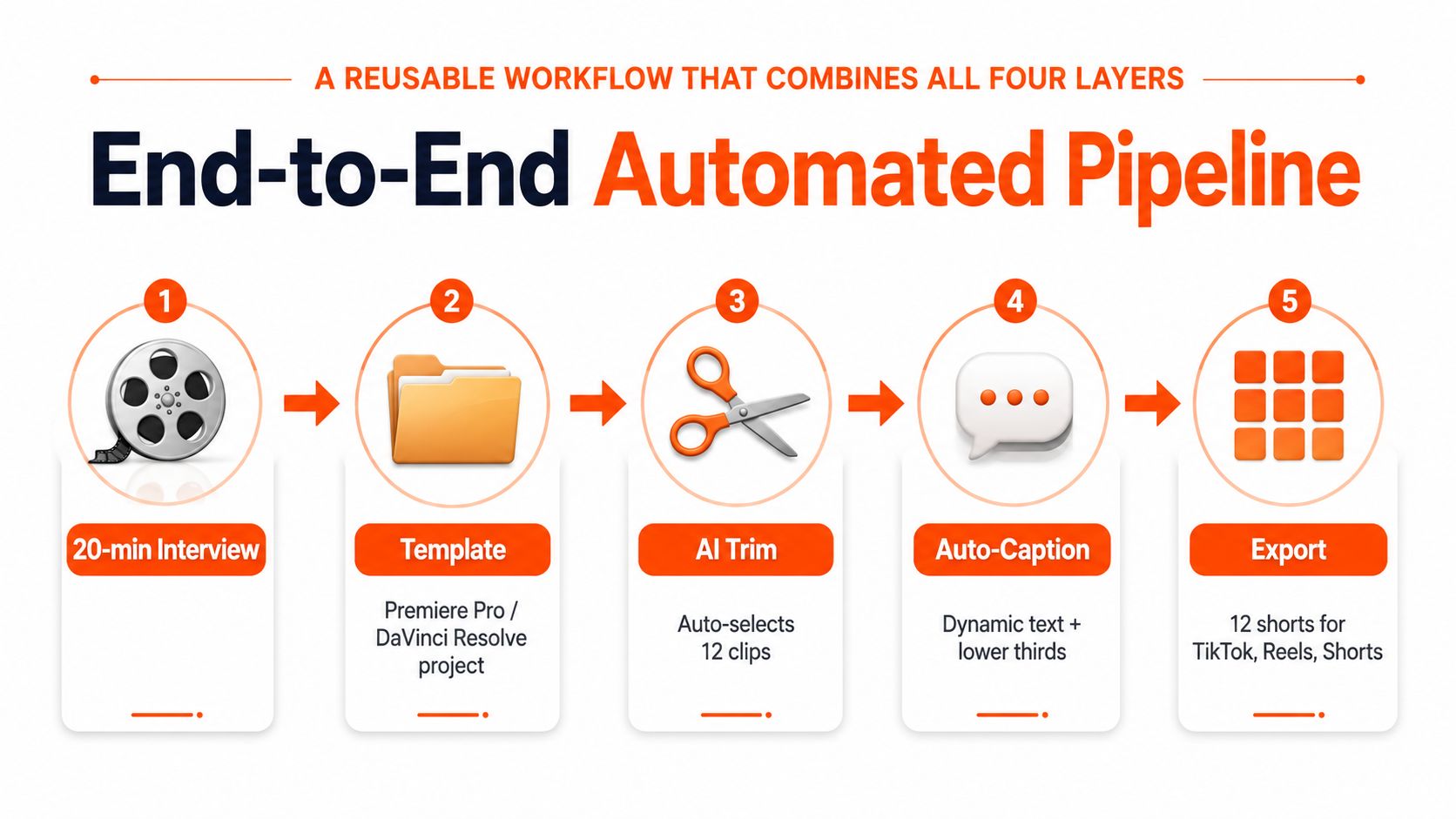
Start with a twenty-minute interview and define the output before opening an editor. In this example, the target is twelve short-form cuts, each prepared for TikTok, Reels, and Shorts. The number of outputs isn't the important part. The important part is that the workflow knows what “done” means before automation begins.
<a id="step-one-starts-with-a-controlled-project"></a>
Step one starts with a controlled project
Create a master project in Premiere Pro or DaVinci Resolve. Pre-build title cards, lower thirds, caption styles, music beds, audio tracks, and platform-specific sequences. Keep the source timeline separate from the short-form sequences so an automated trim can't damage the interview master.
A template should expose the fields an editor is allowed to change. Hook text, speaker name, background treatment, caption language, and end card can remain editable. Brand typography, color rules, and legal text should be controlled.
<a id="step-two-moves-technical-work-into-a-queue"></a>
Step two moves technical work into a queue
Place camera footage, audio, graphics, and reference files into predictable folders. Generate proxies overnight, normalize dialogue, and queue transcodes through HandBrake, ffmpeg, or Adobe Media Encoder. The editor should open the project to prepared media, not spend the first part of the day waiting for files or repairing links.
This is also where multi-aspect sequences belong. Build 9:16, 1:1, and 16:9 versions from a shared source, then allow each sequence to override framing rather than forcing one crop everywhere.
<a id="step-three-lets-ai-propose-the-rough-assembly"></a>
Step three lets AI propose the rough assembly
Feed the transcript, shot descriptions, and reference style into a multimodal model. Ask it to identify topic peaks, suggest opening lines, mark complete thoughts, and nominate B-roll candidates. The output should be a review queue, not an automatically approved timeline.
The Anatomy of Video Editing dataset supports the importance of shot-level organization. It contains more than 1.5 million tags across 196,176 shots, giving researchers a structured basis for understanding footage beyond simple cut detection (Anatomy of Video Editing dataset). In production, that means better metadata can help an editor find continuity-friendly shots, but metadata doesn't replace editorial intent.
<a id="step-four-adapts-each-approved-clip"></a>
Step four adapts each approved clip
Apply platform-specific rules after the human editor approves the source moments. Rework the hook where necessary, adjust caption timing, move text away from interface areas, and choose a crop that preserves the speaker's expression and relevant visual details.
A ClipNova-style studio can consolidate scripting, voiceover, visuals, captions, music, and multi-aspect export in one workspace. Point tools still win when a specialist needs granular audio mixing, complex motion design, local media control, or a precise color workflow.
<a id="why-distribution-aware-editing-is-the-real-gap"></a>
Why Distribution-Aware Editing Is the Real Gap
A vertical crop isn't automatically a TikTok edit, a Reels edit, or a Shorts edit. It's only a change in canvas shape. The finished version still needs an opening that works in the target feed, a pace that suits the viewing context, captions positioned around interface overlays, and a thumbnail that looks native rather than like a reduced long-form frame.
That's where the strongest unmet need sits. Adobe's creator survey identified auto-repurposing at 19%, instant platform-specific edits at 14%, and AI-assisted edits while filming at 14% among requested AI features. The same survey reported that editing was the top current AI use case at 58%, and 56% of creators said AI saved over 30 minutes per video (Adobe creator survey coverage).
<a id="one-source-needs-several-editorial-treatments"></a>
One source needs several editorial treatments
For TikTok, the edit may need a sharper first sentence and faster movement into the payoff. Reels may benefit from a cleaner visual rhythm and stronger cover treatment. Shorts may need more explicit context because a viewer can encounter the clip without knowing the creator or original video.
The exact rules will vary by audience and account, so the workflow should store them as editable presets rather than permanent assumptions. A useful platform profile can define:
- Hook treatment: Whether the opening is a direct claim, question, result, or visual interruption.
- Caption geometry: Where words can sit without colliding with native controls or usernames.
- Framing behavior: Whether the crop follows a face, product, screen, or group.
- Ending behavior: Whether the clip resolves with a conclusion, loop, comment prompt, or next-step invitation.
The system should also generate platform-native thumbnails and cover frames. Scaling one horizontal thumbnail into every destination creates a technical export, not a distribution strategy. For teams that publish supporting written content, the workflow described in video for blogs can help connect embedded video with the surrounding editorial context without forcing one asset to serve every purpose.
<a id="batch-and-template-patterns-for-short-form-at-scale"></a>
Batch and Template Patterns for Short-Form at Scale
Scale comes from reducing decisions per asset, not from making editors work faster. A clean folder system prevents the most expensive type of automation failure, a batch process that produces dozens of files nobody can identify or trust.
Use a structure such as:
- Raw: Original camera, screen, and audio files.
- Proxies: Lightweight files linked to the source media.
- Selects: Approved moments and editor-marked alternatives.
- Exports: Platform-ready masters, captions, thumbnails, and review files.
Name assets with a consistent pattern such as YYYY-MM-DD_project_platform_aspect. Add a version suffix when an approved edit changes. The name should tell a producer what the file is without opening it.
<a id="build-the-project-file-once"></a>
Build the project file once
A practical Premiere Pro or Resolve template includes a master timeline, short-form sequences, pre-timed caption tracks, language variants, intro and outro motion assets, music placeholders, and render presets. Keep captions as editable text until the final quality check. Burned-in captions should be a delivery output, not the only copy.
For each platform, create a separate caption treatment. TikTok may need more conservative lower placement, while another destination may allow a different rhythm or line length. The template can apply the style, but an editor should still correct names, acronyms, punctuation, and emphasis.
<a id="queue-the-repetitive-work"></a>
Queue the repetitive work
Watch folders or encoder queues can trigger proxy creation, transcodes, loudness normalization, and exports. A single transcript can produce an SRT, a review caption file, and burned-in versions positioned for each aspect ratio. That removes repeated caption styling without pretending that speech recognition is infallible.
Prompting also benefits from standardization. Store prompts for clip selection, hook variations, B-roll matching, caption cleanup, and platform adaptation in a shared library. The text-to-video prompt workflow is relevant when a team creates new visual material, but the same discipline applies to repurposing existing footage: specify audience, format, tone, exclusions, and review requirements.
The best batch systems create a review manifest alongside the media. Each row should identify the source timecode, proposed hook, destination platforms, caption status, audio status, reviewer, and approval state. That makes automation observable instead of mysterious.
<a id="keeping-human-oversight-where-it-matters-most"></a>
Keeping Human Oversight Where It Matters Most
Unattended editing sounds efficient until a small error reaches a paid campaign, a regulated audience, or a client approval queue. The more tasks a system performs, the more important it becomes to define where a person must intervene.
Three surfaces deserve mandatory review.
Claims and paraphrases need a human check before rendering. A model can shorten a sentence and accidentally strengthen it, remove a qualifier, or turn an opinion into a factual statement. Approve the script, hook, subtitles, and on-screen claims before the final export.
Brand safety requires contextual judgment. A system may select a technically relevant clip that contains a sensitive gesture, an ambiguous background detail, or a moment that conflicts with the client's standards. Editors should review the selected range, adjacent frames, B-roll, music, and generated visuals.
Rights clearance cannot be inferred from visual quality. Confirm licenses for music, stock footage, logos, user-generated clips, voices, and reference images. Keep the source and permission information attached to the project, not buried in a separate conversation.
Human checkpoint: Automate assembly, not accountability.
A final visual check should use a per-platform specification sheet. Inspect the opening frame, crop, caption placement, spelling, audio transitions, end card, thumbnail, and export destination. Also record what the automation changed. A lightweight audit sheet can log source timecodes, removed sections, generated text, inserted assets, caption corrections, reviewer names, and approval status.
That record costs little and answers important questions when a client asks why a line disappeared or when a team needs to reproduce a successful version. Trust grows when editors can see and correct the system's decisions.
<a id="a-four-week-roadmap-to-adopt-automation-safely"></a>
A Four-Week Roadmap to Adopt Automation Safely
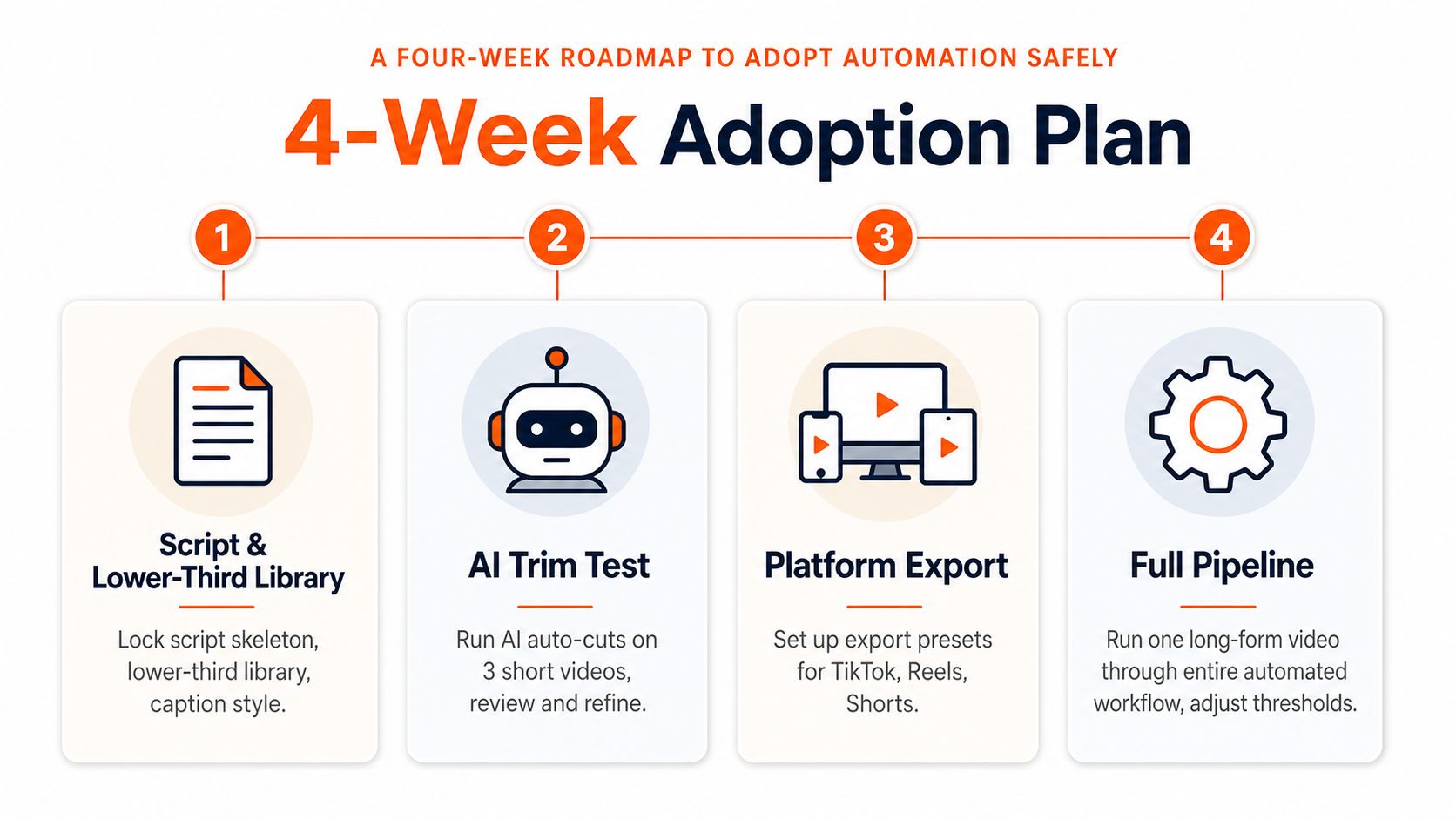
Adoption works best when each week introduces one layer and creates a stable foundation for the next. Don't begin with a fully autonomous pipeline. Begin with the work your team already understands and can verify quickly.
<a id="week-one-builds-the-controlled-base"></a>
Week one builds the controlled base
Lock a script skeleton, lower-third library, caption style, intro and outro assets, and project naming convention. Create one approved master project for long-form work and one for short-form repurposing. The objective is consistency, not speed.
<a id="week-two-cleans-the-media-pipeline"></a>
Week two cleans the media pipeline
Automate folder creation, file renaming, proxy generation, transcoding, and audio preparation on import. Test the process with representative footage, including separate microphones, screen recordings, and mixed frame rates. Fix naming and linking problems before adding AI.
<a id="week-three-pilots-ai-assembly"></a>
Week three pilots AI assembly
Run automated transcript analysis, silence detection, topic grouping, and rough-cut suggestions on a small batch of short videos. A human editor should approve every cut, reject weak hooks, correct captions, and record recurring failure patterns. Use those patterns to refine prompts and thresholds.
<a id="week-four-adds-distribution-aware-exports"></a>
Week four adds distribution-aware exports
Create presets for 9:16, 1:1, and 16:9 outputs, then tune framing, captions, hooks, and cover frames for TikTok, Reels, and Shorts. Run one long-form video through the complete workflow and compare every generated version against the platform checklist.
Keep these tasks manual at first:
- Claims and legal-sensitive footage: Human approval should remain mandatory.
- Final audio mix: Automation can normalize and clean, but an editor should approve balance and intent.
- Brand exceptions: Sensitive campaigns need a person who understands the client's standards.
Automate these first:
- Resizing and render queues: Machines handle repeatable technical outputs well.
- Caption generation and styling: Use editable text plus a human correction pass.
- Metadata and file naming: Consistent labels improve every downstream handoff.
- Candidate selection: Let AI propose clips while an editor controls the final sequence.
The market is moving toward integrated workflows, but speed alone isn't the finish line. Build a system that gives editors fewer repetitive tasks, clearer review points, and platform-specific outputs they can trust.
ClipNova brings scripting, voiceover, visuals, captions, music, refinement, and multi-aspect export into one AI-powered studio, which makes it useful for teams testing an integrated approach to short-form production. Visit ClipNova to turn a topic or prompt into reviewable video assets while keeping final creative and publishing decisions under your control.
Ready to ship your own?
Start creating viral videos with AI in under twenty minutes, no credit card required.